


歡迎來到 Visual Paradigm 技術團隊帶來的又一堂大師級教程!在設計複雜的企業架構時,保持圖表清晰、有組織且結構嚴謹可能是一項挑戰。傳統的拖放工具在佈局調整或需求變更時往往會拖慢您的進度。這就是為什麼許多軟體架構師和企業設計師依賴「圖表即程式碼」的工作流程。
在本指南中,我將帶您逐步了解我構建一個全面且多層的 ArchiMate 架構圖以用於圖書館管理系統的完整思考過程。我們將在免費的 PlantUML 編輯器中使用 Visual Paradigm VPasCode,我們將詳細解析如何構建企業層級、清晰地定義元素,並規劃精確的跨層關係。
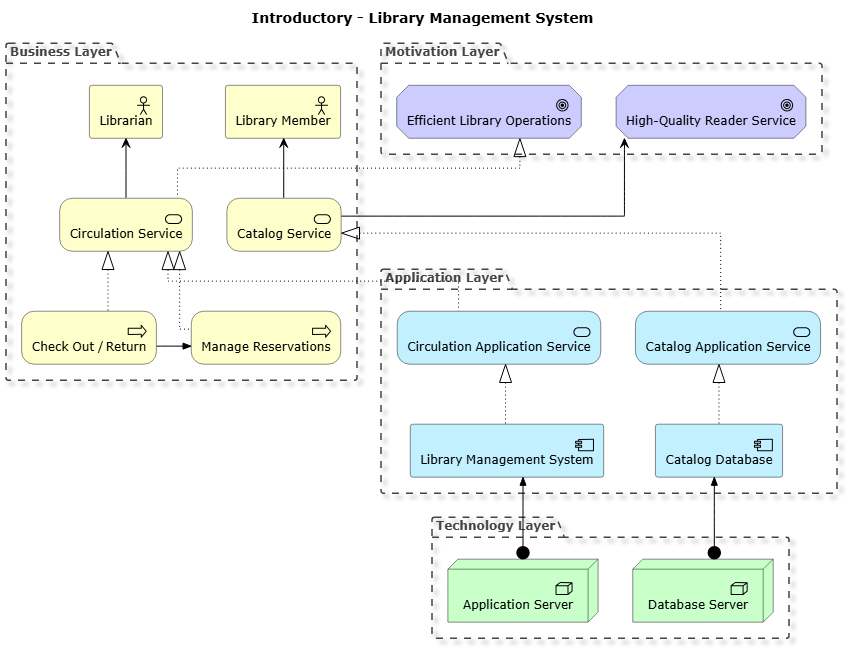
理解 ArchiMate 架構層級
當我開始為企業系統建模時,我總是從定義結構邊界開始。ArchiMate 將關注點劃分為不同的架構層級,讓利害關係人能一覽無遺地理解業務價值、功能邏輯、應用程式元件以及技術基礎設施。
針對我們的圖書館系統,我們將圖表組織為四個明確的垂直與水平分組:
- 動機層:捕捉引導組織的高階目標與驅動因素。
- 業務層:突出顯示參與者、服務以及核心業務流程,例如圖書借閱與預約。
- 應用程式層:定義處理核心邏輯的軟體服務與應用程式元件。
- 技術層:代表託載我們應用程式堆疊的實體或虛擬硬體節點。
步驟 1:設定基礎結構
要開始編寫程式碼,我先從設定全域渲染規則並匯入 PlantUML 的官方 ArchiMate 標準函式庫開始。設定正交線型可使連接線清晰且以直角對齊,這對建立整潔的企業藍圖至關重要。
skinparam linetype ortho
!include https://static.visual-paradigm.com/plantuml-stdlib/Archimate-PlantUML/master/Archimate.puml
remove @unlinked
top to bottom direction
title Introductory - Library Management System
透過強制由上至下的方向並移除未連結的元素,我確保佈局能自然地從高階業務動機流暢地延伸至技術基礎設施。
步驟 2:定義核心層級與元素
接下來,我將各分組容器填入相應的元素。我偏好使用 PlantUML 的分組區塊明確地將相關元件分組,使視覺邊界與企業領域相對應。
Grouping(motivation_layer, "Motivation Layer") {
  Motivation_Goal(g_ops, "Efficient Library Operations")
  Motivation_Goal(g_service, "High-Quality Reader Service")
}

Grouping(business_layer, "Business Layer") {
  Business_Actor(ba_librarian, "Librarian")
  Business_Actor(ba_member, "Library Member")
  Business_Service(bs_circulation, "Circulation Service")
  Business_Service(bs_catalog, "Catalog Service")
  Business_Process(bp_checkout, "Check Out / Return")
  Business_Process(bp_reserve, "Manage Reservations")
}

Grouping(application_layer, "Application Layer") {
  Application_Service(as_circulation, "Circulation Application Service")
  Application_Service(as_catalog, "Catalog Application Service")
  Application_Component(ac_lms, "Library Management System")
  Application_Component(ac_catalog, "Catalog Database")
}

Grouping(technology_layer, "Technology Layer") {
  Technology_Node(tn_server, "Application Server")
  Technology_Node(tn_db, "Database Server")
}為何要這樣結構化?明確地為元素加上前綴(例如”)ba_用於業務參與者,”)bp_用於流程,以及”)tn_用於技術節點)能讓後續撰寫複雜的關聯映射變得更加輕鬆。這可避免命名衝突,並使您的腳本具備自註解特性。
步驟 3:跨層級映射關係
在元素就位後,最後一步是將它們連接起來。ArchiMate 依賴精確的關係類型——例如實現、服務、觸發和指派——來準確建模依賴關係。
' 業務流程實現業務服務
Rel_Realization_Up(bp_checkout, bs_circulation, "")
Rel_Realization_Up(bp_reserve, bs_circulation, "")
Rel_Triggering_Right(bp_checkout, bp_reserve, "")

' 業務服務實現動機目標
Rel_Realization_Up(bs_circulation, g_ops, "")
Rel_Serving_Up(bs_catalog, g_service, "")

' 參與者由業務服務提供服務
Rel_Serving_Up(bs_circulation, ba_librarian, "")
Rel_Serving_Up(bs_catalog, ba_member, "")

' 應用服務實現業務服務
Rel_Realization_Up(as_circulation, bs_circulation, "")
Rel_Realization_Up(as_catalog, bs_catalog, "")

' 應用組件實現應用服務
Rel_Realization_Up(ac_lms, as_circulation, "")
Rel_Realization_Up(ac_catalog, as_catalog, "")

' 技術節點指派(部署)應用組件
Rel_Assignment_Up(tn_server, ac_lms, "")
Rel_Assignment_Up(tn_db, ac_catalog, "")
透過使用方向性關係標籤,例如”)Rel_Realization_Up以及”)Rel_Triggering_Right,我能精確控制連接器在畫布上的路由方式,避免雜亂的重疊線條。
完整原始碼
以下是我們圖書館管理系統架構圖的完整、可直接用於生產環境的 PlantUML 腳本:
@startuml
skinparam linetype ortho
!include https://static.visual-paradigm.com/plantuml-stdlib/Archimate-PlantUML/master/Archimate.puml
remove @unlinked
top to bottom direction
title Introductory - Library Management System

Grouping(motivation_layer, "Motivation Layer") {
  Motivation_Goal(g_ops, "Efficient Library Operations")
  Motivation_Goal(g_service, "High-Quality Reader Service")
}

Grouping(business_layer, "Business Layer") {
  Business_Actor(ba_librarian, "Librarian")
  Business_Actor(ba_member, "Library Member")
  Business_Service(bs_circulation, "Circulation Service")
  Business_Service(bs_catalog, "Catalog Service")
  Business_Process(bp_checkout, "Check Out / Return")
  Business_Process(bp_reserve, "Manage Reservations")
}

Grouping(application_layer, "Application Layer") {
  Application_Service(as_circulation, "Circulation Application Service")
  Application_Service(as_catalog, "Catalog Application Service")
  Application_Component(ac_lms, "Library Management System")
  Application_Component(ac_catalog, "Catalog Database")
}

Grouping(technology_layer, "Technology Layer") {
  Technology_Node(tn_server, "Application Server")
  Technology_Node(tn_db, "Database Server")
}

' Business processes realize business services
Rel_Realization_Up(bp_checkout, bs_circulation, "")
Rel_Realization_Up(bp_reserve, bs_circulation, "")
Rel_Triggering_Right(bp_checkout, bp_reserve, "")

' Business services realize motivation goals
Rel_Realization_Up(bs_circulation, g_ops, "")
Rel_Serving_Up(bs_catalog, g_service, "")

' Actors are served by business services
Rel_Serving_Up(bs_circulation, ba_librarian, "")
Rel_Serving_Up(bs_catalog, ba_member, "")

' Application services realize business services
Rel_Realization_Up(as_circulation, bs_circulation, "")
Rel_Realization_Up(as_catalog, bs_catalog, "")

' Application components realize application services
Rel_Realization_Up(ac_lms, as_circulation, "")
Rel_Realization_Up(ac_catalog, as_catalog, "")

' Technology nodes assign (deploy) application components
Rel_Assignment_Up(tn_server, ac_lms, "")
Rel_Assignment_Up(tn_db, ac_catalog, "")

@enduml
透過 VPasCode 讓您的架構栩栩如生
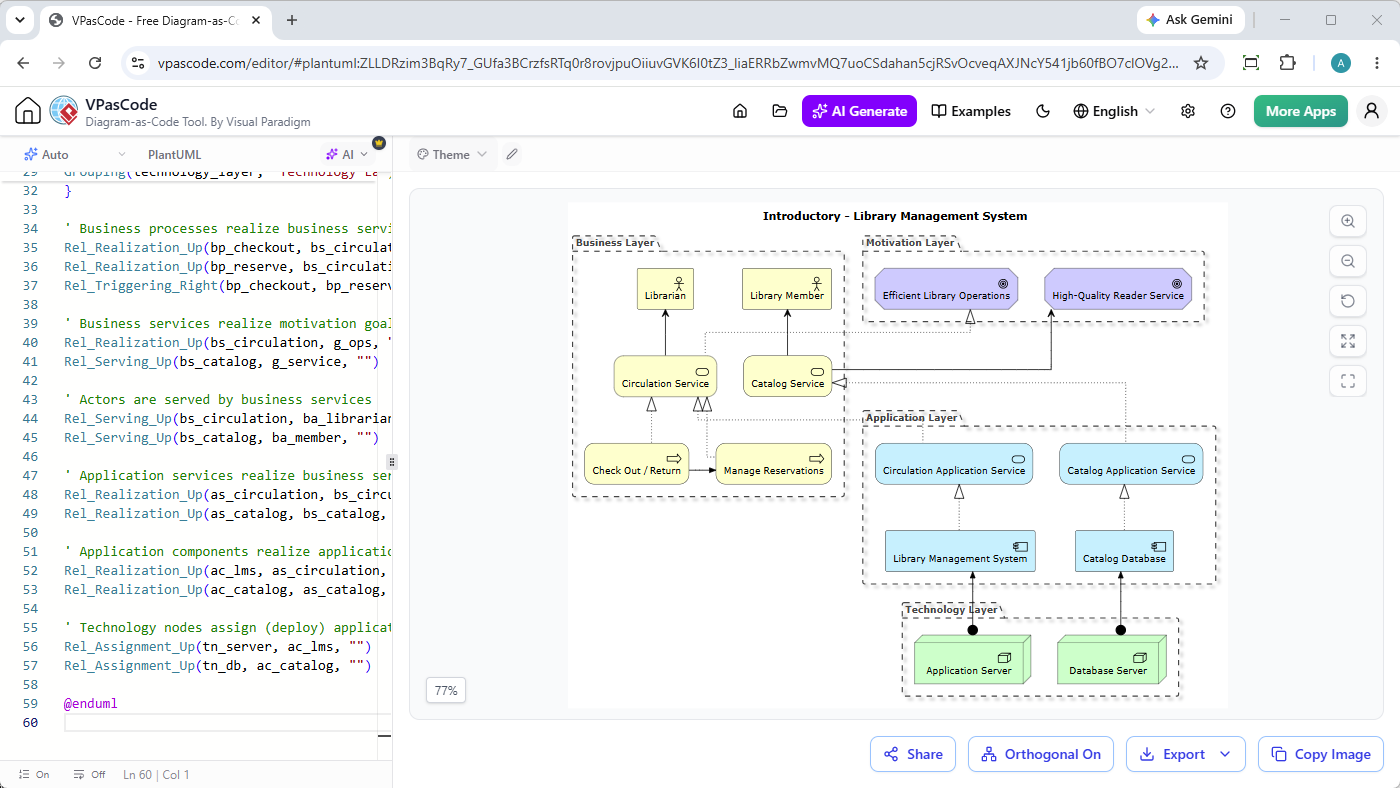
以程式碼繪圖讓您能對架構進行版本控制、無縫協作,並在數秒內生成完美的圖表。無論您是在建立 ArchiMate 企業模型、C4 軟體架構,或是標準 UML 序列圖,在穩健的環境中進行這些操作將帶來顯著差異。