



Die Einführung eines PlantUML-Editors und eines Diagram-as-Code-Workflow verändert die Art und Weise, wie Engineering- und Architekteteams Software-Systeme entwerfen, warten und teilen. Anstatt sich mit manuellen Layout-Tools herumzuschlagen, schreiben Entwickler saubere Plain-Text-Skripte, die automatisch in präzise visuelle Diagramme kompiliert werden.
Was ist PlantUML und wie funktioniert es?
PlantUML ist ein Open-Source-Text-zu-Diagramm-Tool, das domänenspezifische Sprachen (DSLs) verwendet, um einfache Textbeschreibungen in professionelle Architekturpläne zu verwandeln, Sequenzdiagramme, Klassendiagramme und C4-Diagramme.
Das Kernkonzept von Text-zu-Diagramm-DSLs
Die Generierung von Text-zu-Diagrammen entkoppelt das visuelle Design von der manuellen grafischen Positionierung. Durch das Schreiben von präzisem Code definieren Entwickler strukturelle Beziehungen, und die Rendering-Engine übernimmt alle Layout-Berechnungen automatisch.
Über das Drag-and-Drop-Müdigkeits-Paradigma hinausgehen
Traditionelle Drag-and-Drop-Diagrammierungswerkzeuge verursachen massive Reibungsverluste während der Software-Refaktorierung. Jedes Mal, wenn sich eine Klasse oder Abhängigkeit ändert, verschwenden Ingenieure Stunden damit, Boxen manuell zu skalieren, Linien neu zu verlegen und Elemente neu auszurichten. Diagram-as-Code eliminiert diese lästige Arbeit vollständig.
Wichtige technische Vorteile der Nutzung von PlantUML
Die Nutzung textbasierter Diagramme bringt enorme operative Vorteile für moderne Softwareentwicklungslebenszyklen.
Versionskontrolle-freundlich: Architekturverfolgung in Git
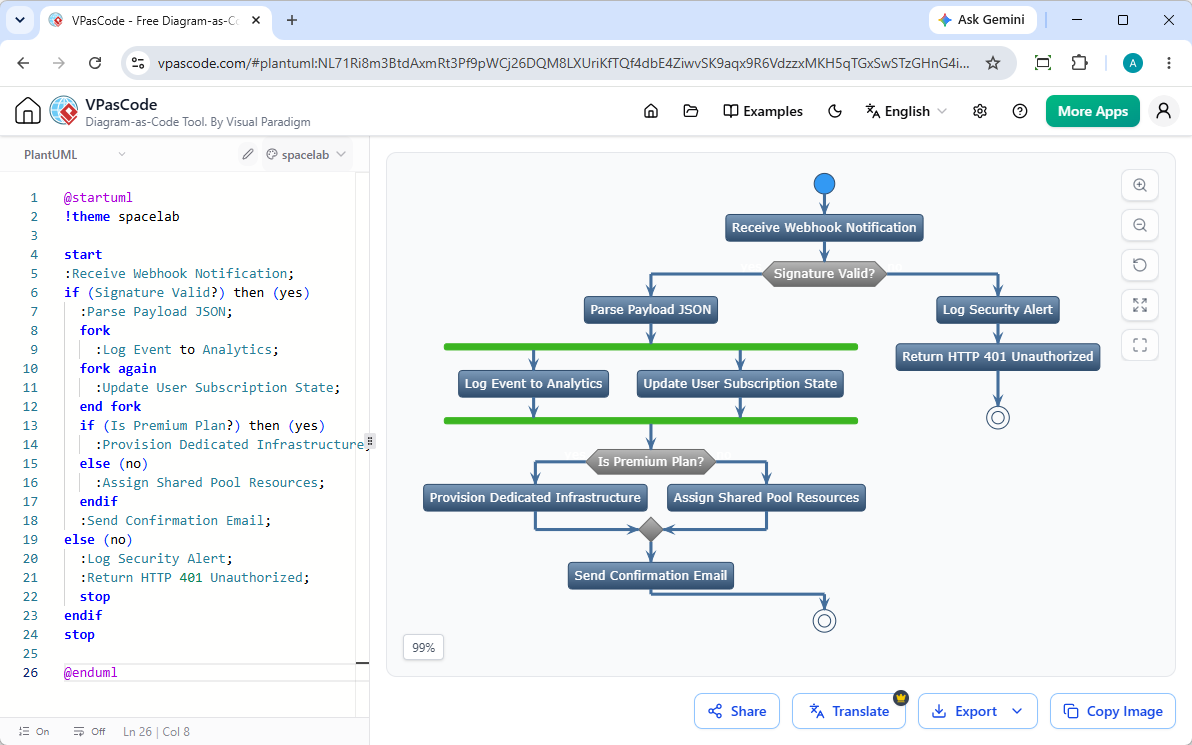
Da PlantUML-Diagramme als Plain-Text-Dateien gespeichert werden, integrieren sie sich nativ in Git-Repositories. Teams können Architekturänderungen zeilenweise über Standard-Pull-Requests und Code-Diffs verfolgen. Sie können diese Skripte sofort mit Visual Paradigm VPasCodetesten und rendern, das automatische Formaterkennung und sofortiges Cloud-Rendering bietet.
Wartbarkeit und sofortige Refaktorierung
Die Änderung einer Systemarchitektur wird so einfach wie das Bearbeiten einer einzigen Textzeile. Es gibt keine proprietären Binärdateien oder beschädigten Layout-Koordinaten – nur sauberen Code, der sich gemeinsam mit Ihrem Anwendungsquellcode weiterentwickelt.
Konsistenz durch automatisierte Layouts
Automatisierte Rendering-Engine erzwingen einheitliches Styling und standardisierte Abstände in der gesamten Systemdokumentation, beseitigen menschliche Inkonsistenzen und sorgen jedes Mal für saubere, lesbare Ergebnisse.
Produktivitätssteigerung über den gesamten Software-Lebenszyklus hinweg
PlantUML optimiert komplexe Engineering-Workflows weit über das initiale Systemdesign hinaus.
Sofortige KI-Diagrammerstellung und -Modifikation
Wie in unserem Großes VPasCode-Update: Diagramme sofort mit KI generieren und modifizierenkönnen Sie das Schreiben von Code von Grund auf vollständig umgehen. Geben Sie einfach natürliche Sprachanweisungen ein – wie zum Beispiel “Erstellen Sie ein Klassendiagramm in PlantUML für eine E-Commerce-Plattform”—und lassen Sie die native KI der Plattform Diagrammsyntax in Ihrem Browser sofort generieren, aufbauen und verfeinern.
Beschleunigung von Systemdesign und C4-Modellierung
Komplexe Frameworks wie C4-Architekturmodelle, Entity-Relationship-Diagramme (ERDs) und Sequenzflüsse lassen sich erstaunlich schnell erstellen und aktualisieren. Für Teams, die diese Dokumentation zentralisieren möchten, bieten Tools wie die Visual Paradigm VPasCode OpenDocs-Integrationdie Möglichkeit, Live-Diagramme direkt in umfassende technische Dokumentationen einzubetten.
Überbrückung von Kommunikationslücken zwischen Entwicklern und Stakeholdern
Technische Klarheit fördert eine bessere Ausrichtung auf die Geschäftsziele. Das sofortige Teilen über öffentliche URLs oder generierte QR-Codes ermöglicht es mühelos, aktuelle Systemspezifikationen an Produktmanager, Sicherheitsaudits und Führungskräfte weiterzugeben.
Überwindung häufiger Herausforderungen bei der Einführung von PlantUML
Während Text-zu-Diagramm-Workflows Zeit sparen, stoßen Teams bei der ersten Einführung gelegentlich auf Hindernisse.
Beherrschung komplexer Syntax und Fehlerbehebung
Syntaxfehler können gelegentlich die Diagramm-Kompilierung stoppen. Moderne Plattformen lösen dieses Problem: In Visual Paradigm VPasCodekönnen Sie bei einem Syntaxfehler einfach auf “Von KI reparieren lassen”klicken, um Ihr Skript automatisch zu reparieren, während Sie Code-Diffs nebeneinander prüfen, um Syntaxregeln schneller zu erlernen.
Mehrsprachige Dokumentation und Beschriftungsübersetzung
Globale Teams stoßen häufig auf Lokalisierungshürden, wenn sie Architekturen über internationale Niederlassungen hinweg teilen. Eingebaute KI-Übersetzungsfunktionen ermöglichen es Ingenieuren, Diagrammbeschriftungen direkt im Editor-Workflow sofort zu übersetzen.
(Hinweis: Erweiterte KI-Funktionen zur Diagrammerstellung, Codebearbeitung und Fehlerbehebung sind in der Visual Paradigm Online Deluxe Edition bzw. der Visual Paradigm Desktop Professional Edition+ verfügbar).
Wie Sie mit kostenlosen Tools mit PlantUML beginnen
Der Übergang zu Diagrammen als Code erfordert keine schweren Softwareinstallationen oder komplexen Umgebungskonfigurationen.
Auswahl des richtigen Online-Editors und Renderers
Sie können sofort mit dem Schreiben und Rendern von PlantUML-, Mermaid-, D2- und Graphenvisualisierungsskripts beginnen, indem Sie webbasierte Plattformen ohne Konfiguration verwenden. Visual Paradigm VPasCodebietet kostenlosen Kernzugang zu einem Online-Code-Editor, Live-Rendervorschauen und flexiblen SVG/PNG-Bildexporten, damit Ihr Team seine technische Dokumentation noch heute modernisieren kann.