



Wdrożenie edytora PlantUML oraz paradygmatu diagramów jako koduprzekształca sposób, w jaki zespoły inżynieryjne i architektoniczne projektują, utrzymują i udostępniają systemy oprogramowania. Zamiast walczyć z narzędziami do ręcznego układania, programiści piszą czyste skrypty w formacie tekstowym, które automatycznie kompilują się w precyzyjne diagramy wizualne.
Czym jest PlantUML i jak działa
PlantUML to narzędzie typu open-source do generowania diagramów z tekstu, które wykorzystuje języki specyficzne dla danej dziedziny (DSL), aby przekształcać proste opisy tekstowe w profesjonalne projekty architektoniczne, diagramy sekwencjimodele klas oraz wykresy C4.
Podstawowa koncepcja języków DSL do generowania diagramów z tekstu
Generowanie diagramów z tekstu oddziela projektowanie wizualne od ręcznego pozycjonowania graficznego. Poprzez pisanie zwięzłego kodu programiści definiują relacje strukturalne, a silnik renderowania automatycznie wykonuje wszystkie obliczenia dotyczące układu.
Przekroczenie granicy zmęczenia metodą przeciągnij i upuść
Tradycyjne narzędzia do tworzenia diagramów metodą przeciągnij i upuść wprowadzają ogromne trudności podczas refaktoryzacji oprogramowania. Za każdym razem, gdy zmienia się klasa lub zależność, inżynierowie marnują godziny na ręczne skalowanie ramek, przepinanie linii i ponowne wyrównywanie elementów. Podejście diagramów jako kodu całkowicie eliminuje tę bezsensowną pracę.
Kluczowe korzyści techniczne wynikające z używania PlantUML
Wykorzystanie diagramów tekstowych przynosi ogromne korzyści operacyjne we współczesnych cyklach życia oprogramowania.
Przyjazne dla kontroli wersji: śledzenie architektury w Git
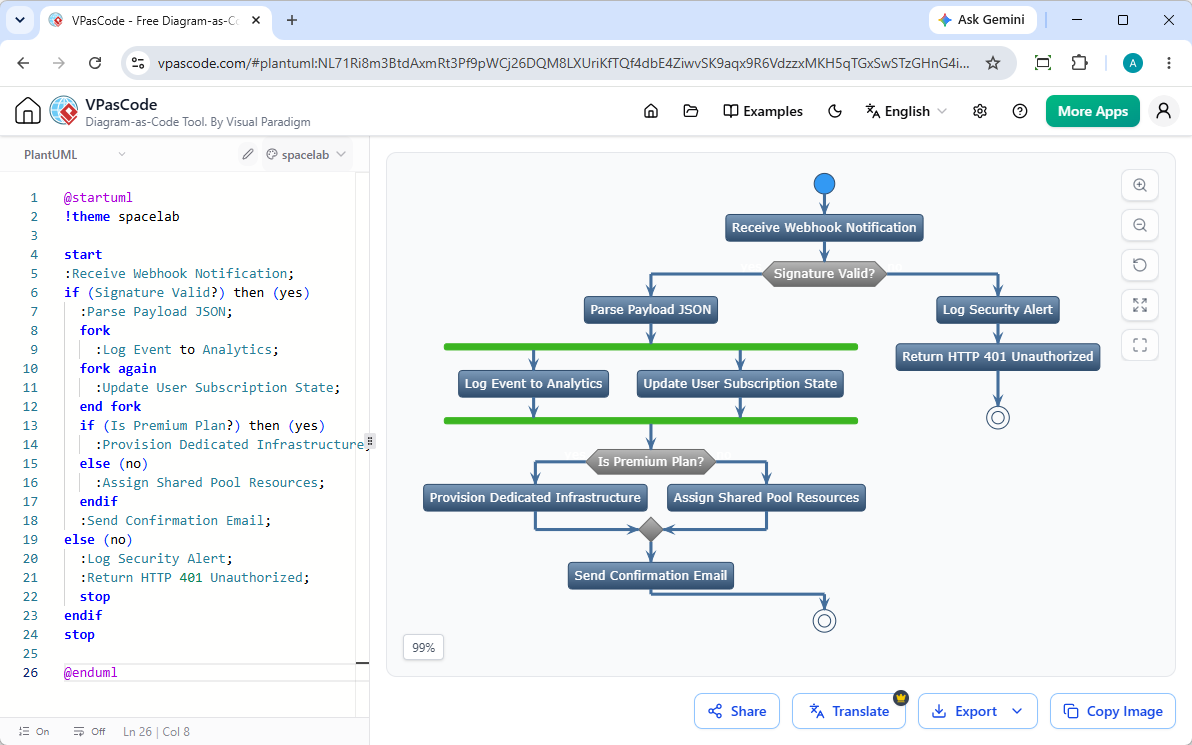
Ponieważ diagramy PlantUML są przechowywane jako pliki tekstowe, integrują się one natywnie z repozytoriami Git. Zespoły mogą śledzić zmiany architektoniczne linijka po linijce, wykorzystując standardowe pull requesty i różnice w kodzie. Możesz natychmiast testować i renderować te skrypty, używając Visual Paradigm VPasCodektóry oferuje automatyczne wykrywanie formatu oraz natychmiastowe renderowanie w chmurze.
Utrzymalność i natychmiastowa refaktoryzacja
Modyfikacja architektury systemu staje się tak prosta jak edycja pojedynczej linii tekstu. Nie ma tu własnościowych plików binarnych ani uszkodzonych współrzędnych układu – tylko czysty kod, który ewoluuje wraz z kodem źródłowym Twojej aplikacji.
Spójność dzięki zautomatyzowanym układom
Zautomatyzowane silniki renderowania narzucają jednolity styl i standaryzowane odstępy we wszystkich dokumentacjach systemowych, eliminując ludzkie niekonsekwencje i zapewniając czysty, czytelny wynik za każdym razem.
Maksymalizacja produktywności na całym cyklu życia oprogramowania
PlantUML usprawnia złożone przepływy pracy inżynieryjnej znacznie wykraczające poza początkowy projekt systemu.
Natychmiastowe generowanie i modyfikacja diagramów przy użyciu AI
Jak podkreślono w naszym Wielka aktualizacja VPasCode: Natychmiastowe generowanie i modyfikacja diagramów przy użyciu AImożesz całkowicie pominąć pisanie kodu od zera. Wystarczy wpisać polecenia w języku naturalnym – na przykład “Wygeneruj diagram klas w PlantUML dla platformy e-commerce”—a pozwól natywnej sztucznej inteligencji platformy natychmiast generować, tworzyć szkielety i udoskonalać składnię diagramów bezpośrednio w przeglądarce.
Przyspieszanie projektowania systemów i modelowania C4
Złożone ramy, takie jak modele architektury C4, diagramy relacji encji (ERD) oraz przepływy sekwencyjne, stają się niezwykle szybkie w tworzeniu i aktualizacji. Dla zespołów dążących do scentralizowania tej dokumentacji narzędzia takie jakintegracja Visual Paradigm VPasCode OpenDocsumożliwiają wbudowanie żywych diagramów bezpośrednio w kompleksową dokumentację techniczną.
Zamykanie luk komunikacyjnych między deweloperami a interesariuszami
Techniczna jasność napędza lepsze dopasowanie biznesowe. Natychmiastowe udostępnianie za pomocą publicznych adresów URL lub wygenerowanych kodów QR sprawia, że rozpowszechnianie aktualnych specyfikacji systemowych do menedżerów produktów, audytorów bezpieczeństwa i kierownictwa jest bezproblemowe.
Pokonywanie typowych wyzwań związanych z wdrażaniem PlantUML
Chociaż przepływy pracy z tekstu na diagram oszczędzają czas, zespoły czasami napotykają przeszkody podczas początkowego wdrażania.
Opanowanie złożonej składni i rozwiązywanie błędów
Literówki w składni mogą czasami zatrzymać kompilację diagramu. Współczesne platformy rozwiązują ten problem: wewnątrzVisual Paradigm VPasCode, jeśli wystąpi błąd składni, możesz po prostu kliknąć“Napraw przez AI”, aby automatycznie naprawić swój skrypt, jednocześnie przeglądając obok siebie różnice w kodzie, co pozwoli szybciej przyswoić reguły składni.
Dokumentacja wielojęzyczna i tłumaczenie etykiet
Zespoły globalne często napotykają bariery lokalizacyjne podczas udostępniania architektury między międzynarodowymi oddziałami. Wbudowane możliwości tłumaczenia przez sztuczną inteligencję pozwalają inżynierom natychmiast tłumaczyć etykiety diagramów bezpośrednio w toku pracy edytora.
(Uwaga: Zaawansowane funkcje generowania diagramów przez AI, modyfikacji kodu i naprawiania błędów są dostępne w wersji Visual Paradigm Online Deluxe Edition / Visual Paradigm Desktop Professional Edition+).
Jak rozpocząć pracę z PlantUML, korzystając z darmowych narzędzi
Przejście na podejście diagram jako kod nie wymaga ciężkich instalacji oprogramowania ani skomplikowanych konfiguracji środowiska.
Wybór odpowiedniego edytora online i renderera
Możesz natychmiast rozpocząć pisanie i renderowanie skryptów PlantUML, Mermaid, D2 oraz wizualizacji grafów, korzystając z platform webowych bez konieczności konfiguracji. Visual Paradigm VPasCodeoferuje darmowy dostęp do podstawowych funkcji online’owego edytora kodu, podglądu renderowania na żywo oraz elastycznego eksportu obrazów w formatach SVG/PNG, dzięki czemu Twój zespół może już dziś zmodernizować swoją dokumentację techniczną.