


Czy UML jest martwy? Ewolucja projektowania oprogramowania we współczesnych przepływach pracy Agile i AI
Krótka odpowiedź: Nie, UML nie jest martwy, ale tradycyjny sposób, w jaki programiści go wykorzystywali, jest przestarzały. Ciężkie narzędzia typu “przeciągnij i upuść”narzędzia UML które generują monolityczną dokumentację statyczną, zostały w dużej mierze zastąpione. Dziś nowoczesne zespoły programistyczne polegają na lekkich przepływach pracy przekształcających tekst w diagramy (Diagram-as-Code) w połączeniu z natywnymi możliwościami AI – wykorzystując wszechstronnedarmowy edytor UML lub darmowy edytor PlantUML do utrzymania elastyczności przy jednoczesnym zapewnieniu przejrzystości złożonych systemów.
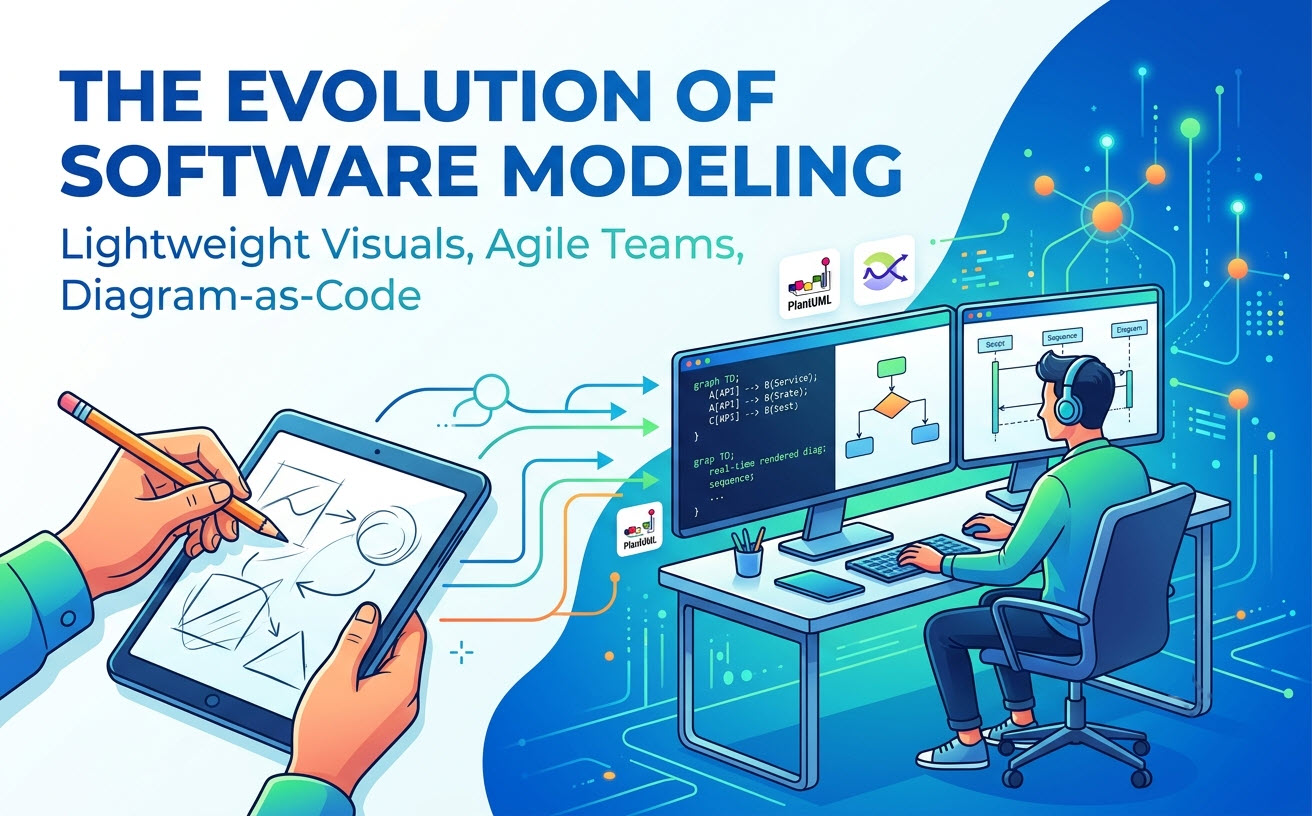
Przesunięcie: Dlaczego programiści uważają UML za przestarzały
Przekonanie, że Język Modelowania Zjednoczonego (UML) umarł, wynika z frustracji związanej z zarządzaniem tradycyjnymi artefaktami projektowania oprogramowania w dynamicznych środowiskach deweloperskich.
Śmierć ciężkich narzędzi modelowania korporacyjnego
Wczesne narzędzia UML wymagały ciężkich instalacji na komputerach stacjonarnych, żmudnych ręcznych dostosowywań układu oraz ciągłych ręcznych aktualizacji za każdym razem, gdy kod się zmieniał. Te dziedziczne platformy odłączyły projektowanie od implementacji, zamieniając tworzenie diagramów w obowiązek, a nie w zasób.
Błędne pojęcie Agile: „Działające oprogramowanie ponad kompleksową dokumentację”
Wiele zespołów błędnie zinterpretowało zasady Agile jako oznaczającebrak jakiejkolwiek dokumentacji. Wraz z przyspieszeniem cykli wydawniczych przez ciągłą integrację i wdrażanie (CI/CD), spędzanie dni na rzeźbieniu kompleksowych diagramów klas przed napisaniem kodu stało się nieakceptowalne. W rezultacie sztywne modelowanie wstępne straciło na popularności.
Rzeczywistość: UML nie jest martwy, ewoluował tylko w kod i AI
Chociaż pełne projektowanie wizualne wstępne jest dziś rzadkie, podstawowa potrzeba wizualizacji architektury oprogramowania pozostaje niezbędna. UML nie zniknął; przeniósł się do natywnych dla programistów formatów tekstowych i jest teraz przyspieszany przez inteligentne asystenty AI.
Wzrost diagramowania opartego na tekście (PlantUML i Mermaid)
Współczesne zespoły inżynieryjne traktują diagramy jak kod. Zamiast używać narzędzi z wizualnym płótnem, programiści piszą deklaratywne skrypty, wykorzystując standardowe języki specyficzne dla domeny (DSL), bezpośrednio obok kodu źródłowego.
| Cecha | Dziedziczne UML typu “przeciągnij i upuść” | Współczesne Diagram-as-Code (DaC) |
|---|---|---|
| Przechowywanie i wersjonowanie | Własnościowe pliki binarne | Zwykły tekst przechowywany w repozytoriach Git |
| Utrzymanie | Ręczna wizualna reorganizacja | Zautomatyzowane renderowanie skryptów |
| Integracja procesów roboczych | Osobne aplikacja desktopowa | Zintegrowane z IDE, CI/CD i platformami webowymi |
Milcząca kryzys: dług architektoniczny w niewidocznych systemach
Całkowite porzucenie modelowania wizualnego stworzyło nowy problem: wysoki dług architektoniczny. Bez diagramów wysokiego poziomu wdrażanie nowych inżynierów zajmuje tygodnie, logika między mikrousługami staje się niejasna, a zależności systemowe pozostają niewidoczne, dopóki coś nie zawiedzie w środowisku produkcyjnym.
Jak współczesne zespoły inżynieryjne modelują architekturę dzisiaj
Aby zrównoważyć szybkość z jasnością, współczesne zespoły deweloperskie wykorzystują elastyczne platformy, które natychmiast renderują skrypty tekstowe, eliminując jednocześnie tarcie związane z konfiguracją języka.
Ujednolicenie wieloformatowych procesów roboczych dzięki VPasCode
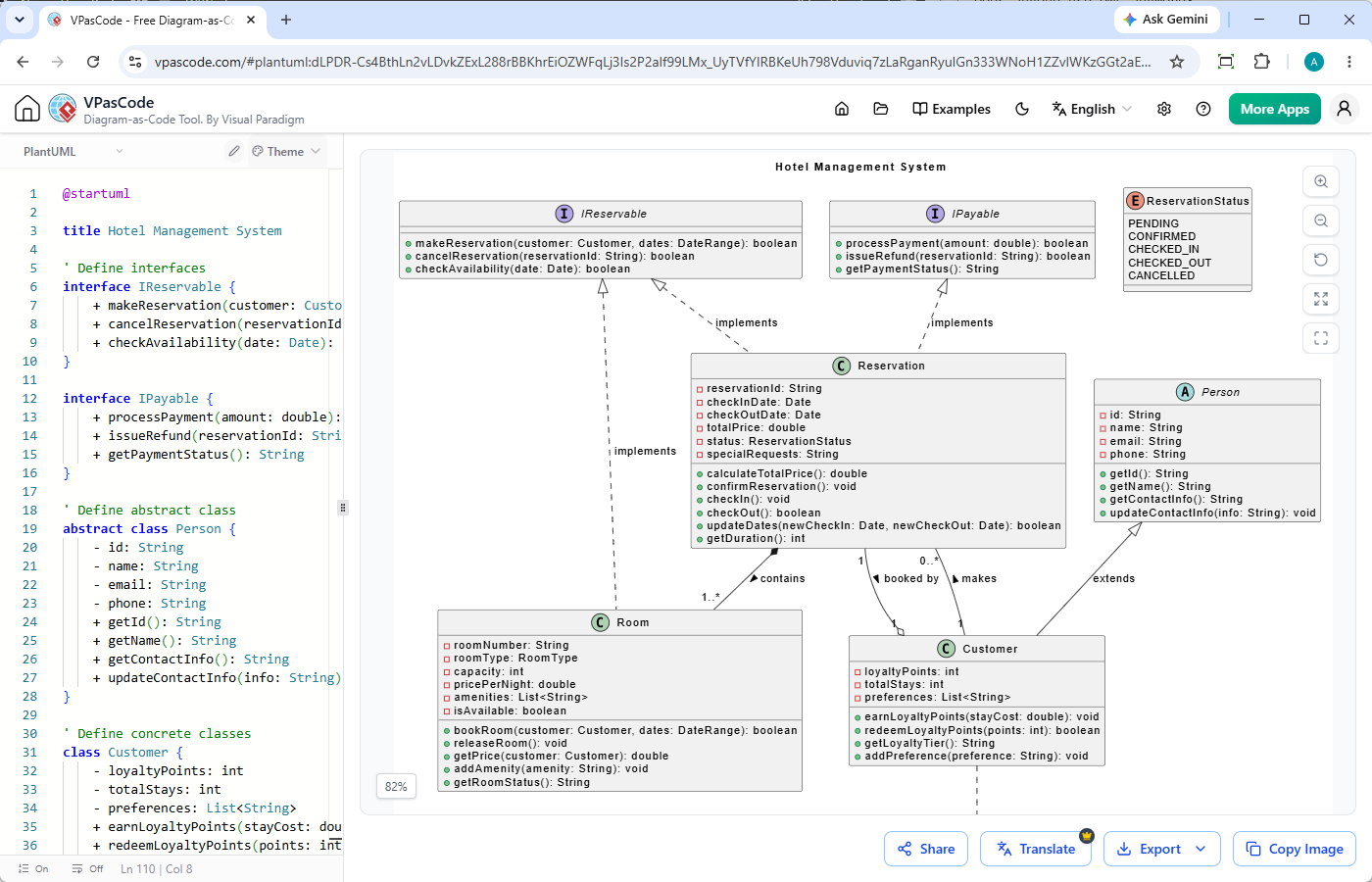
Wykorzystywanie rozproszonych narzędzi dla różnych typów składni spowalnia zespoły.Visual Paradigm VPasCodeupraszcza to, działając jako uniwersalny edytor webowy z funkcją automatycznego wykrywania formatu. Niezależnie od tego, czy wkleisz surowe dane PlantUML, Mermaid, Graphviz, czy strukturalne dane JSON/YAML, edytor natychmiast wykrywa format wejściowy i aktualizuje podgląd wektorowy w czasie rzeczywistym bez konieczności ręcznego wyboru.
- Natychmiastowa konfiguracja:W pełni oparte na sieci, darmowa edycja i renderowanie na żywo.
- Wsparcie wielu formatów:Działa jako zintegrowane darmowy edytor PlantUML, kompilator Mermaid oraz konwerter kodu na diagramy.
- Eksport wysokiej jakości:Eksportuj skalowalne wektory SVG lub zasoby PNG do pull requestów, specyfikacji i dokumentacji.
Eliminacja tarcia składniowego dzięki diagramowaniu wspieranemu przez AI i sterowanemu poleceniami
Nauka wariacji składniowych w różnych językach domenowych (DSL) lub budowanie modeli od zera może hamować adopcję. VPasCode przełamuje tę barierę dzięki potężnym generowaniu diagramów przy użyciu AIi narzędziom edycyjnym:
- Tworzenie diagramów na podstawie polecenia:Wpisz polecenie w języku naturalnym — na przykład „Wygeneruj diagram przypadków użycia w PlantUML dla systemu bankomatu”—aby natychmiast wygenerować kod i renderować architekturę.
- Naprawianie błędów w kodzie przy użyciu AI: Kliknij „Napraw przez AI” aby automatycznie naprawić błędny składnik lub brakujące znaczniki.
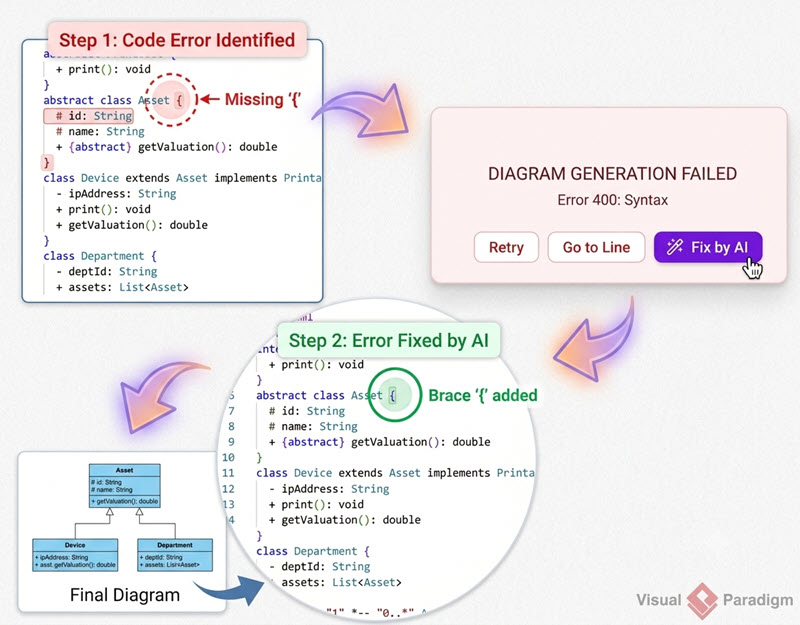
- Różnice w kodzie i wyjaśnienia:Przejrzyj obok siebie różnice w składzie, aby zrozumieć, jak rozwiązano błędy lub modyfikacje kodu.
- Tłumaczenie natywne przez AI:Przetłumacz etykiety diagramów i tekst wewnętrzny na wiele języków jednym kliknięciem.
(Uwaga: Zaawansowane funkcje generowania, modyfikowania i naprawiania błędów diagramów przy użyciu AI są dostępne w wersji Visual Paradigm Online Deluxe Edition / Visual Paradigm Desktop Professional Edition+).
Najlepsze praktyki dotyczące lekkiej, nowoczesnej dokumentacji architektonicznej
Aby skutecznie zintegrować koncepcje UML ze współczesnymi potokami, skup się na minimalnym, ukierunkowanym modelowaniu, które integruje się bezpośrednio z istniejącym narzędziem.
Traktowanie specyfikacji architektury jako zasobów kontrolowanych wersjami
Przechowuj skrypty diagramów w swoich repozytoriach kodu. Gdy system się zmienia, zaktualizuj skrypt diagramu w formacie tekstu prostego w tym samym Pull Request. Integracja wyrenderowanych zasobów z takimi narzędziami jak Visual Paradigm OpenDocszapewnia, że dokumentacja techniczna pozostaje dokładna, widoczna i zsynchronizowana z aktywnymi budami.
Wybieranie odpowiedniego poziomu szczegółowości: Kiedy modelować (a kiedy nie)
Unikaj modelowania każdej trywialnej klasy lub funkcji. Zamiast tego zarezerwuj UML dla wartościowych punktów kontrolnych architektury:
- Diagramy sekwencji:Niezbędne do mapowania złożonych interakcji API między wieloma usługami i warunków wyścigu.
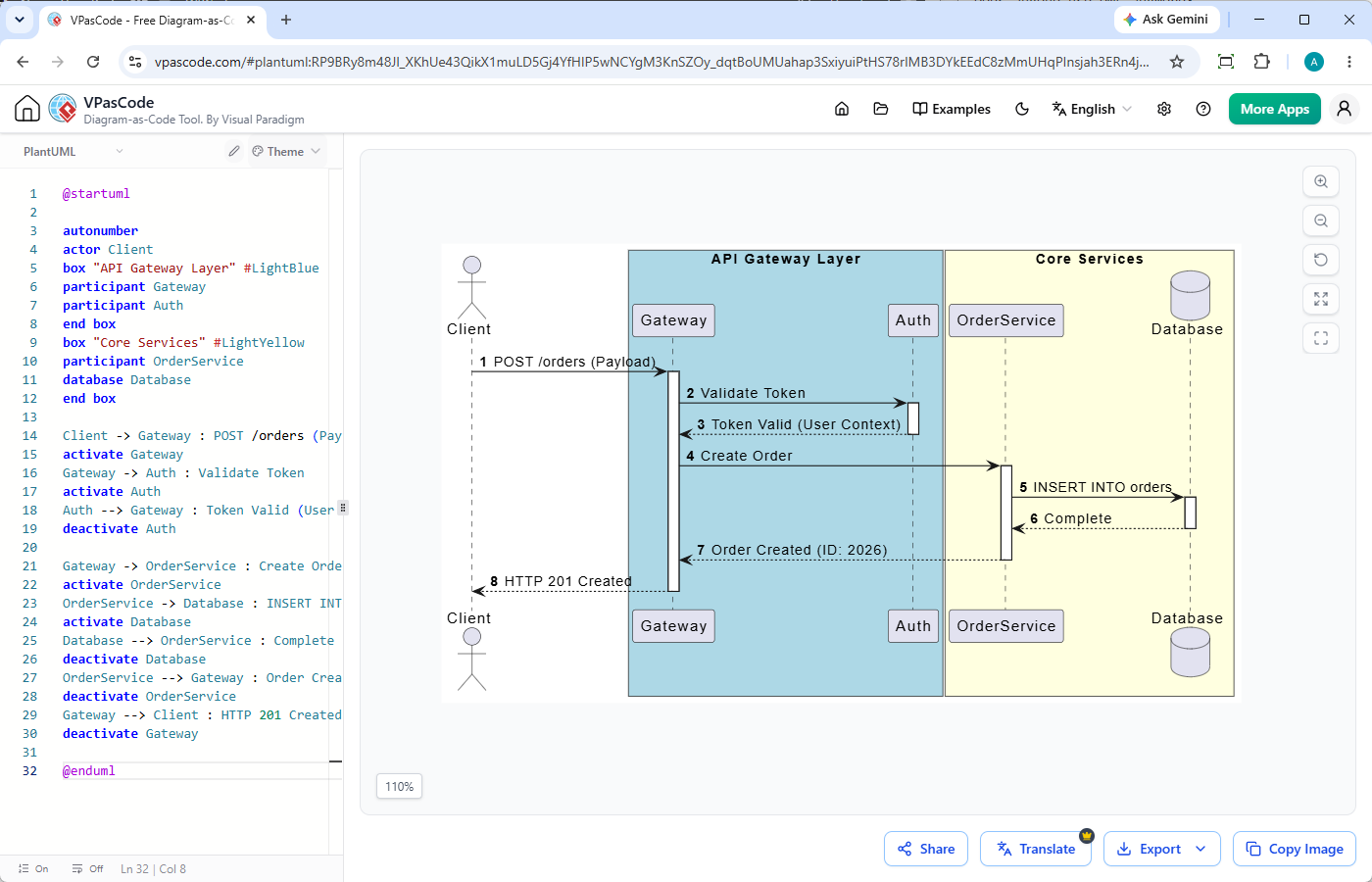
- Modele C4 i komponentów:Idealne do mapowania granic mikroserwisów wysokiego poziomu i infrastruktury.
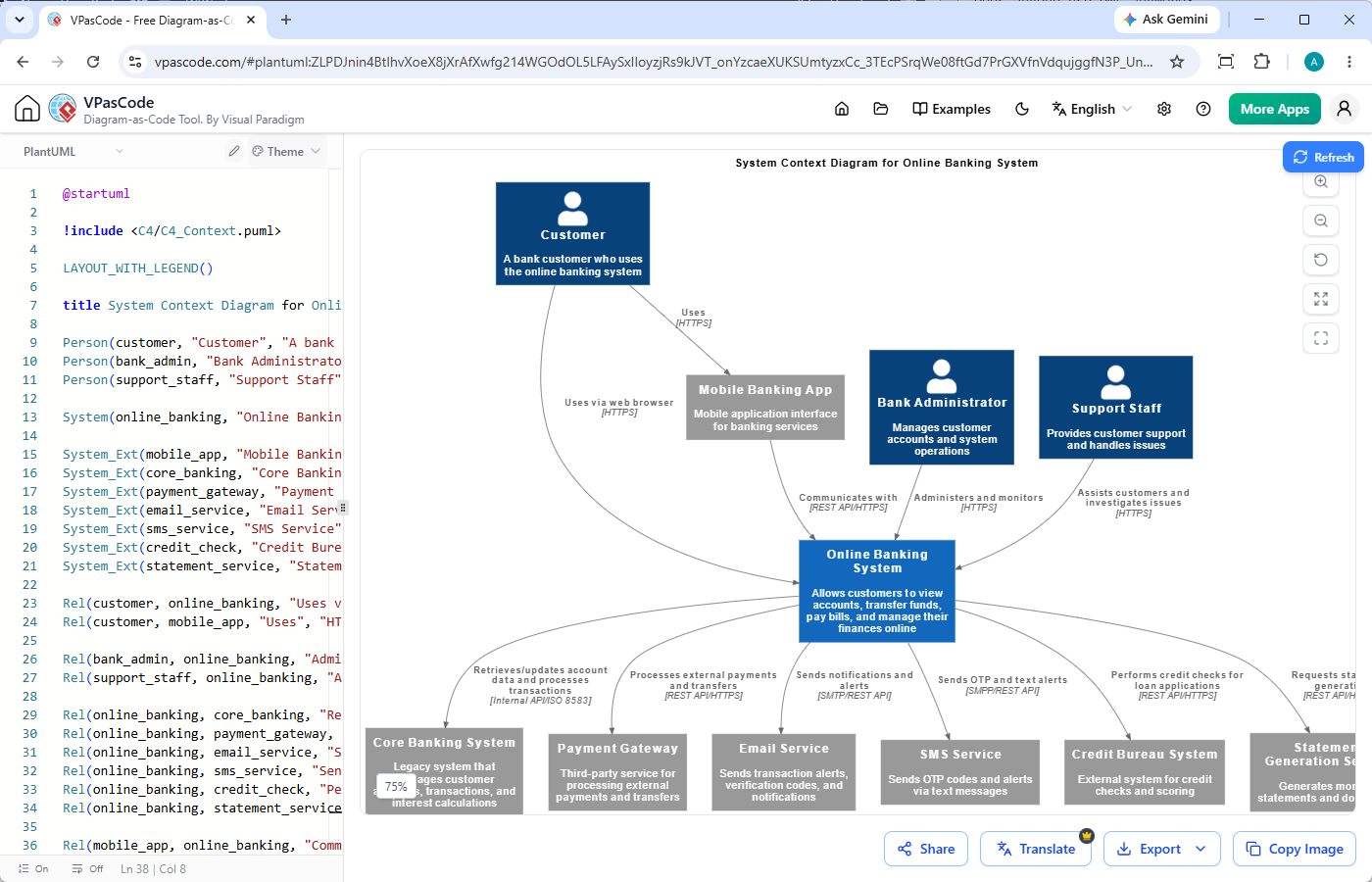
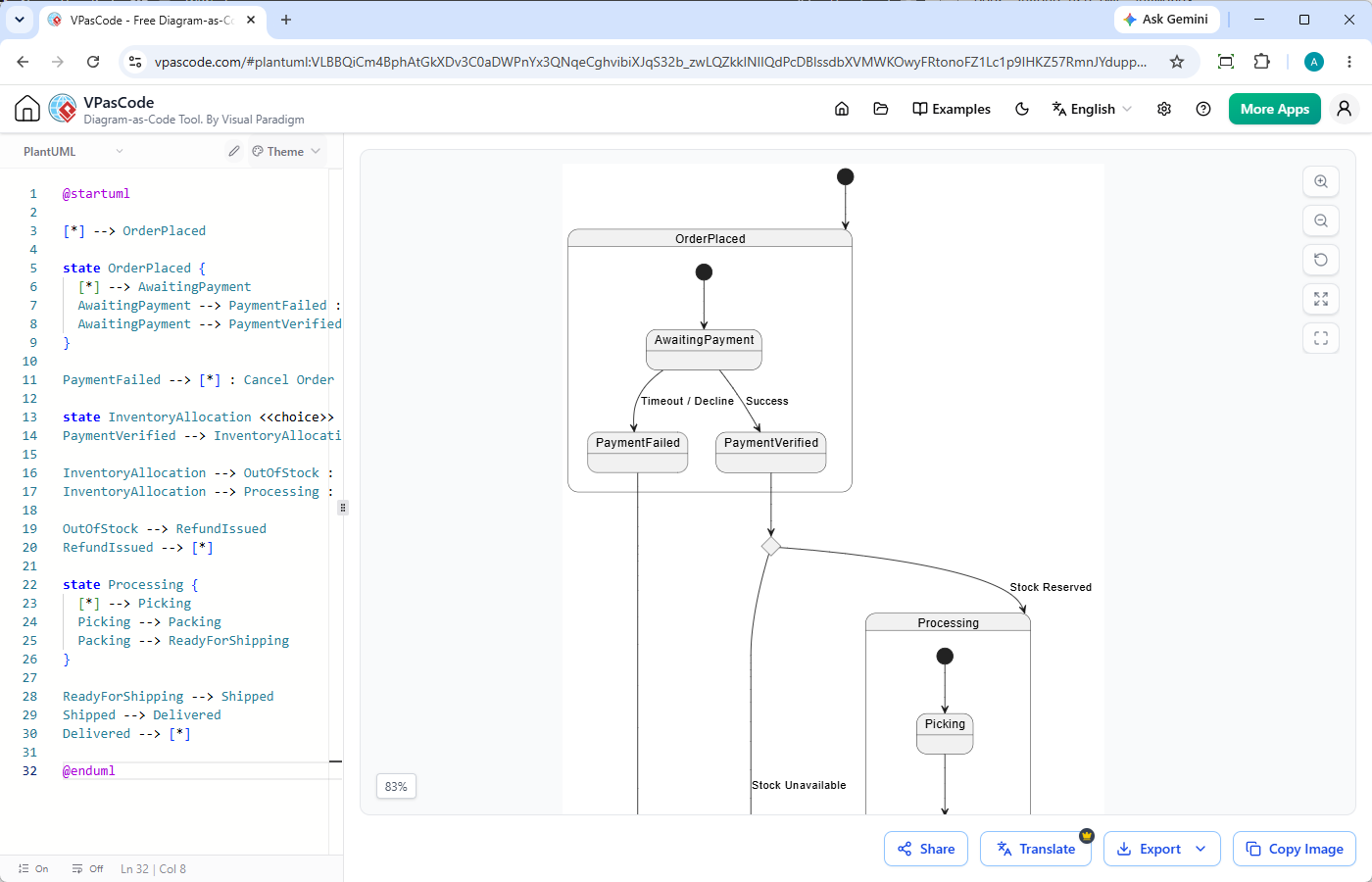
- Maszyny stanów:Kluczowe do walidacji przepływów płatności, kontroli autoryzacji i wieloetapowych potoków danych.
Powiązane zasoby
- Interaktywny plac zabaw Visual Paradigm VPasCode: Wypróbuj Visual Paradigm VPasCode w interaktywnym placu zabaw VPasCode
- Przegląd VPasCode: Dowiedz się więcej o VPasCode
- Wielka aktualizacja VPasCode: Generuj i modyfikuj diagramy natychmiastowo przy użyciu AI