


PlantUML — это мощный и популярный инструмент для создания визуализаций архитектуры программного обеспечения и систем с использованием обычного текста. Однако по мере роста проектов разработчики часто сталкиваются со строгими ограничениями синтаксиса, узкими местами в производительности рендеринга и отсутствием современных функций совместной работы. В этом руководстве рассматриваются основные ограничения PlantUML и объясняется, как внедрение современногоДиаграммы как код платформы, такой как Visual Paradigm VPasCode, может оптимизировать ваш рабочий процесс технической документации.
Основные структурные и синтаксические ограничения PlantUML
Хотя создание диаграмм на обычном тексте позволяет разработчикам контролировать версии проектов вместе с исходным кодом, внутренняя архитектура PlantUML создает уникальные проблемы для растущих команд.
Крутая кривая обучения и избыточные затраты на ручное написание скриптов
Определение: PlantUML опирается на предметно-ориентированный язык, требующий запоминания строгих правил синтаксиса для точной настройки макета и кастомного оформления, что часто замедляет скорость работы разработчиков.
- Сложные директивы макета могут стать трудными для поддержки по мере роста диаграмм.
- Отладка скрытых опечаток в синтаксисе отнимает ценное инженерное время.
- Традиционные среды требуют написания каждого скрипта с нуля, не имея преимуществ автоматизированной генерации на основе ИИ.
Хрупкость в крупномасштабных архитектурах систем
Определение:Монолитные файлы PlantUML, обрабатывающие инфраструктуру корпоративного масштаба, часто ломаются или становятся нечитаемыми при управлении сотнями взаимосвязанных компонентов.
- Управление множественными подключениями файлов и зависимостями увеличивает накладные расходы.
- Большие скрипты испытывают трудности с автоматическим распределением макета без ручных хитростей позиционирования.
Проблемы производительности и узкие места рендеринга
Проблемы производительности часто возникают из-за того, как диаграммы компилируются и рендерятся в различных средах.
Накладные расходы от зависимости от внешних серверов
Определение:Стандартные рабочие процессы PlantUML часто опираются на внешние серверы или локальные среды выполнения Java (JRE) и бинарные файлы Graphviz для компиляции скриптов в визуальную графику.
- Настройка локальной среды может быть обременительной для новых членов команды.
- Опора на внешние серверы рендеринга создает проблемы безопасности и задержек для проприетарных корпоративных архитектур.
- Использование инструмента с нулевым трениемонлайн-инструмента для диаграмм как кодполностью устраняет проблемы локальной настройки благодаря мгновенному рендерингу в браузере.
Проблемы качества экспорта и масштабируемости
Определение:Преобразование сложных текстовых скриптов в четкие визуальные элементы иногда приводит к несоответствиям масштабирования или форматирования в различных форматах вывода.
Чтобы документация выглядела профессионально, разработчики получают выгоду от гибких опций экспорта, поддерживающих как масштабируемую векторную графику SVG, так и изображения PNG высокого разрешения для презентаций и вики-сайтов.
Искусственный интеллект и пробелы в современной документации в стандартных инструментах
По мере того как инженерные команды переходят к рабочим процессам разработки с поддержкой искусственного интеллекта, традиционные инструменты для создания диаграмм часто не обладают встроенным интеллектом для устранения разрывов в синтаксисе или устранения ручных трудностей при написании кода.
Отсутствие встроенной генерации кода и каркасов с помощью искусственного интеллекта
Определение:Стандартные редакторы PlantUML требуют от разработчиков ручного ввода каждой строки, описывающей актора, участника и связь, не имея возможности генерировать начальные диаграммы на основе концепций естественного языка.
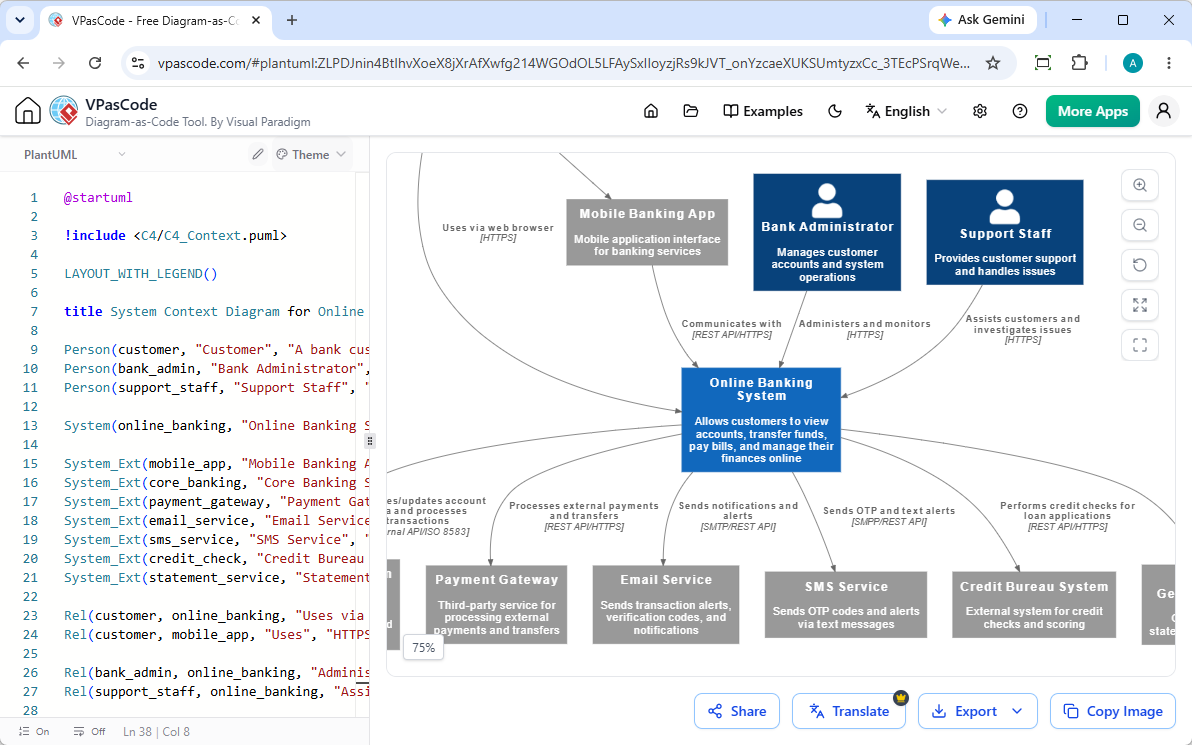
Современные платформы преодолевают это ограничение за счет внедрения встроенной генерации диаграмм с помощью искусственного интеллекта. Как подробно описано в нашей Крупное обновление VPasCode: мгновенная генерация и изменение диаграмм с помощью искусственного интеллекта, разработчики могут просто вводить запросы — например, «Создать диаграмму архитектуры C4 в PlantUML для платформы онлайн-банкинга»—чтобы мгновенно создавать и рефакторить сложные потоки.
Ручное устранение неполадок из-за скрытых ошибок синтаксиса
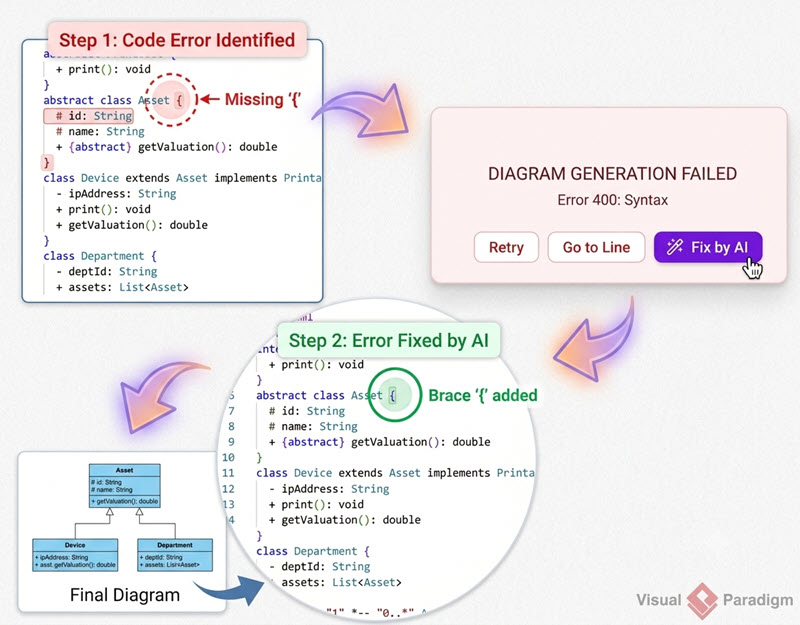
Определение:Исправление сломанного синтаксиса диаграмм обычно требует ручного перебора вариантов, что прерывает процесс разработки.
Платформы, оснащенные передовыми функциями исправления ошибок с помощью искусственного интеллекта, позволяют разработчикам мгновенно исправлять сломанные скрипты одним кликом. Просмотр сравнения кода (diff) в режиме «рядом» и прозрачные объяснения от искусственного интеллекта также помогают инженерам гораздо быстрее освоить синтаксис.
Языковые и локализационные барьеры в глобальных командах
Определение:Перевод меток диаграмм и текстовых блоков для трансграничных инженерных команд традиционно является ручной, трудоемкой задачей копирования и вставки.
Интегрированные встроенные функции перевода с помощью искусственного интеллекта решают эту проблему, позволяя командам мгновенно переводить текст диаграмм на разные языки непосредственно в интерфейсе редактирования.
(Примечание: расширенные функции генерации диаграмм с помощью искусственного интеллекта, изменения кода и исправления ошибок доступны в Visual Paradigm Online Deluxe Edition / Visual Paradigm Desktop Professional Edition+).
Преодоление разрыва: выход за рамки ограничений PlantUML
Модернизация вашего стека для создания диаграмм требует отказа от ограничений одного формата и тесной интеграции визуальных элементов в ваш общий конвейер документации.
Почему поддержка нескольких форматов — это будущее создания диаграмм
Определение:Платформы для создания диаграмм с поддержкой нескольких форматов позволяют командам беспрепятственно работать с PlantUML, Mermaid, D2, Graphviz и структурированными форматами данных, такими как JSON и YAML, в едином унифицированном рабочем пространстве.
Эта гибкость гарантирует, что разные команды могут использовать именно тот DSL (предметно-ориентированный язык), который подходит для их конкретного случая использования, без необходимости переключения между инструментами.
Прямая интеграция диаграмм в техническую документацию
Определение:Поддержка диаграмм терпит неудачу, когда визуальные ресурсы изолированы от документации, которую они описывают.
Подключив ваш редактор диаграмм напрямую к платформам технической документации, таким как Visual Paradigm OpenDocs, технические писатели и разработчики могут поддерживать единый источник истины, который синхронизируется с изменениями в коде.
Попробуйте VPasCode прямо сейчас по адресу: https://www.vpascode.com/editor/