


PlantUML ist ein leistungsstarkes und beliebtes Werkzeug zur Erstellung von Softwarearchitekturen und Systemvisualisierungen mit Hilfe von reinem Text. Wenn Projekte jedoch wachsen, stoßen Entwickler häufig auf strenge Syntaxbeschränkungen, Leistungseinbußen beim Rendern und einen Mangel an modernen Kollaborationsfunktionen. Dieser Leitfaden untersucht die Kernbeschränkungen von PlantUML und erläutert, wie die Einführung eines modernenDiagramm als Code Plattformen wie Visual Paradigm VPasCode können Ihren Workflow für technische Dokumentation optimieren.
Kernstrukturelle und syntaktische Grenzen von PlantUML
Während das Diagrammieren mit reinem Text Entwicklern ermöglicht, Designs gemeinsam mit dem Quellcode zu versionieren, führt die zugrunde liegende Architektur von PlantUML für wachsende Teams zu einzigartigen Reibungspunkten.
Steile Lernkurve und manueller Skript-Overhead
Definition: PlantUML stützt sich auf eine domänenspezifische Sprache, die das Auswendiglernen starrer Syntaxregeln für eine feine Layoutsteuerung und benutzerdefiniertes Styling erfordert, was die Entwicklungsgeschwindigkeit der Entwickler häufig verlangsamt.
- Komplexe Layout-Direktiven können schwer zu warten werden, wenn Diagramme wachsen.
- Das Debuggen von obskuren Syntax-Tippfehlern verbraucht wertvolle Ingenieurszeit.
- Traditionelle Umgebungen erfordern das vollständige Schreiben jedes Skripts von Grund auf und bieten nicht den Komfort von KI-gesteuerten Gerüsten.
Sprödigkeit bei großskaligen Systemarchitekturen
Definition: Monolithische PlantUML-Dateien, die Infrastruktur im Unternehmensmaßstab verwalten, brechen häufig oder werden unlesbar, wenn Hunderte von miteinander verbundenen Komponenten verwaltet werden.
- Das Verwalten von Multi-File-Einschlüssen und Abhängigkeiten erhöht den Overhead.
- Große Skripte haben Schwierigkeiten mit der automatischen Layoutverteilung, ohne manuelle Positionierungs-Hacks.
Leistungs- und Rendern-Engpässe
Leistungsprobleme entstehen häufig aus der Art und Weise, wie Diagramme in verschiedenen Umgebungen kompiliert und gerendert werden.
Der Overhead externer Server-Abhängigkeiten
Definition: Standard-PlantUML-Workflows stützen sich häufig auf externe Server oder lokale Java-Laufzeitumgebungen (JRE) und Graphviz-Binaries, um Skripte in visuelle Grafiken zu kompilieren.
- Die lokale Umgebungsconfiguration kann für neue Teammitglieder umständlich sein.
- Die Abhängigkeit von externen Rendering-Servern wirft Sicherheits- und Latenzbedenken für proprietäre Unternehmensarchitekturen auf.
- Die Verwendung eines reibungsfreienOnline-Diagramm-als-Code-Tools eliminiert lokale Einrichtungsprobleme vollständig durch sofortiges browserbasiertes Rendern.
Reibung bei Exportqualität und Skalierbarkeit
Definition: Die Umwandlung komplexer Textskripte in scharfe visuelle Assets führt manchmal zu Skalierungs- oder Formatinkonsistenzen über verschiedene Ausgabeformate hinweg.
Um sicherzustellen, dass Dokumentationen professionell aussehen, profitieren Entwickler von flexiblen Exportoptionen, die sowohl skalierbare SVG-Vektorgrafiken als auch hochauflösende PNG-Bilder für Präsentationen und Wikis unterstützen.
KI und moderne Lücken in Standard-Tools für die Dokumentation
Da sich Ingenieursteams zunehmend auf KI-gestützte Entwicklungsworkflows verlagern, fehlt es traditionellen Diagramm-Tools oft an nativer Intelligenz, um Syntaxlücken zu schließen oder manuelle Codierungsprobleme zu beseitigen.
Fehlende native KI-Codegenerierung und -Gerüstbildung
Definition:Standard-PlantUML-Editoren erfordern von Entwicklern, dass sie jeden Akteur, jeden Teilnehmer und jede Beziehungszeile manuell eingeben, und verfügen nicht über die Fähigkeit, erste Diagramme aus natürlichen Sprachkonzepten zu generieren.
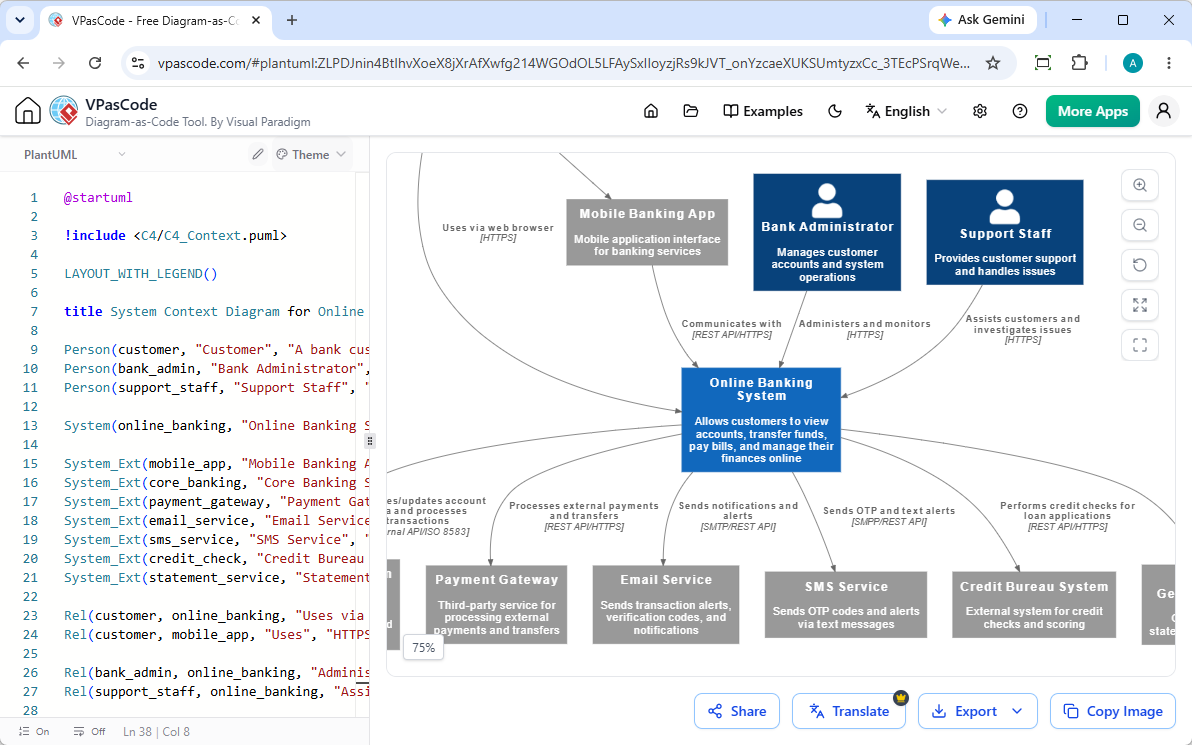
Moderne Plattformen überwinden diese Einschränkung durch die Integration nativer KI-Diagrammgenerierung. Wie in unserem Großes VPasCode-Update: Diagramme sofort mit KI generieren und bearbeiten, können Entwickler einfach Eingabeaufforderungen eingeben – wie zum Beispiel „Erstellen Sie ein C4-Architekturdiagramm in PlantUML für eine Online-Banking-Plattform“—um komplexe Abläufe in Sekunden zu instantiieren und zu refaktorisieren.
Manuelle Fehlersuche bei schwer erkennbaren Syntaxfehlern
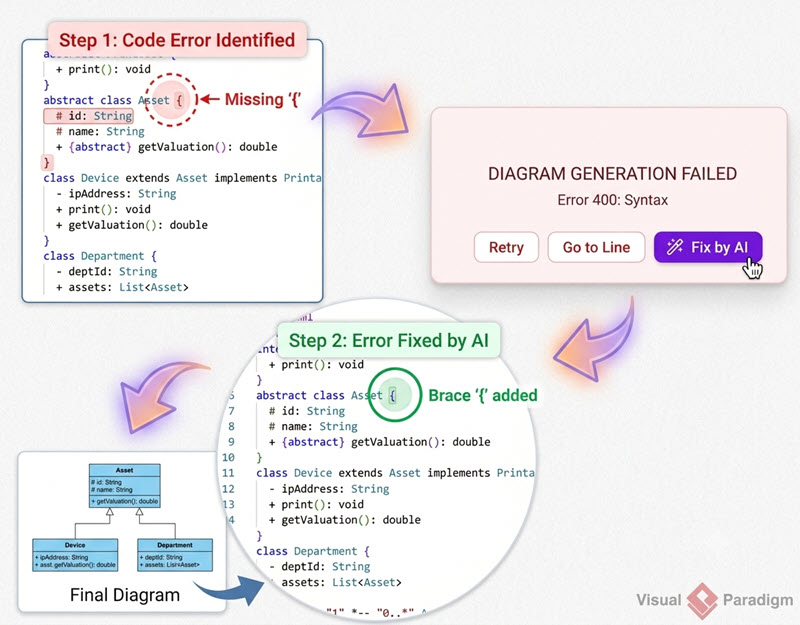
Definition:Das Beheben fehlerhafter Diagrammsyntax erfordert in der Regel manuelles Ausprobieren und Irrtum, was den Entwicklungsfluss unterbricht.
Plattformen mit fortschrittlicher KI-Fehlerkorrektur ermöglichen es Entwicklern, fehlerhafte Skripte mit einem einzigen Klick sofort zu reparieren. Das Überprüfen von Code-Diffs nebeneinander und transparente KI-Erklärungen helfen Ingenieuren zudem, die Syntax viel schneller zu beherrschen.
Sprach- und Lokalisierungsbarrieren in globalen Teams
Definition:Das Übersetzen von Diagrammetiketten und Textblöcken für grenzüberschreitende Ingenieursteams ist traditionell eine manuelle, zeitaufwändige Kopier- und Einfügeaufgabe.
Integrierte native KI-Übersetzungsfunktionen lösen dieses Engpassproblem, indem sie Teams ermöglichen, Diagrammtexte direkt innerhalb der Bearbeitungsoberfläche sofort in verschiedene Sprachen zu übersetzen.
(Hinweis: Fortgeschrittene Funktionen zur KI-Diagrammgenerierung, Codebearbeitung und Fehlerbehebung sind in der Visual Paradigm Online Deluxe Edition / Visual Paradigm Desktop Professional Edition+ verfügbar).
Die Lücke schließen: Über die Einschränkungen von PlantUML hinausgehen
Die Modernisierung Ihrer Diagramm-Stack erfordert, dass Sie über Single-Format-Einschränkungen hinausgehen und Visualisierungen eng in Ihre breitere Dokumentationspipeline integrieren.
Warum Multi-Format-Unterstützung die Zukunft des Diagrammierens ist
Definition:Multi-Format-Diagrammplattformen ermöglichen es Teams, nahtlos innerhalb eines einzigen, einheitlichen Arbeitsbereichs mit PlantUML, Mermaid, D2, Graphviz und strukturierten Datenformaten wie JSON und YAML zu arbeiten.
Diese Flexibilität stellt sicher, dass verschiedene Teams die exakte DSL verwenden können, die ihrem spezifischen Anwendungsfall entspricht, ohne die Tools wechseln zu müssen.
Diagramme direkt in technische Dokumentationen integrieren
Definition:Die Wartung von Diagrammen scheitert, wenn visuelle Assets von der Dokumentation, die sie beschreiben, isoliert werden.
Indem Sie Ihren Diagramm-Editor direkt mit technischen Dokumentationsplattformen wie Visual Paradigm OpenDocs, können technische Autoren und Entwickler eine einzige Quelle der Wahrheit pflegen, die mit Codeänderungen synchron bleibt.
Probieren Sie VPasCode jetzt aus unter: https://www.vpascode.com/editor/