Building a Robust ATM Cash Withdrawal Sequence Diagram in PlantUML
![A 16:10 hero banner styled graphic featuring a clean, modern illustration. The background is subtle and uses glowing accents, circuit board traces, and digital symbols with blues, greens, and white colors. Vertical columns define main participants like "Card Reader", "ATM Interface", "Bank Server", and "Cash Dispenser" across the top. Arrows with numbered steps (1, 2, 3...) indicate the sequential flow of communication, beginning with a "Customer" actor on the left. Key sections highlight the main decision structures using "alt [PIN Invalid] / [PIN Valid]" and "alt [Insufficient Funds] / [Account Approved]", clearly detailing both successful and alternative paths of interaction. No product logos are included. At the very top center, the main title in clean fonts reads "BUILDING A ROBUST ATM SEQUENCE DIAGRAM" with a subtitle "STEP-BY-STEP PLANTUML GUIDE".](https://www.vpascode.com/wp-content/uploads/2026/08/atm-sequence-diagram-plantuml-guide.jpg)
Designing systemic financial transactions requires absolute clarity. Whether you are architecting a banking engine, documenting a legacy workflow, or training engineering teams, a PlantUML sequence diagram is one of the most effective ways to visualize time-ordered interactions between system components.
In this tutorial, I will walk you through my exact thought process for building a comprehensive ATM Cash Withdrawal Sequence Diagram from scratch using PlantUML. We will cover participant setup, message flows, and nested conditional branching for error handling—all using VPasCode, our free diagram-as-code tool and online PlantUML editor.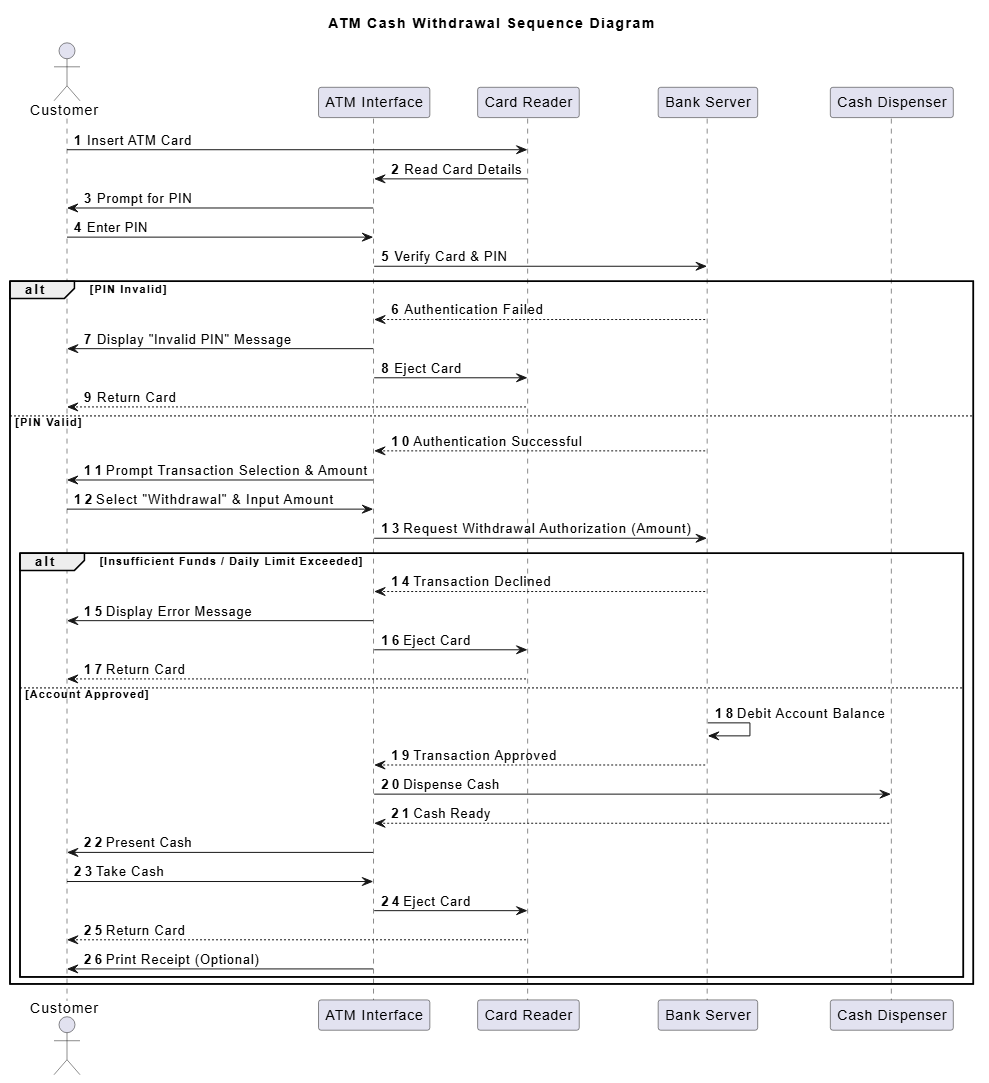
Step 1: AI-Powered Diagram Generation (The Faster Alternative)
While building diagrams manually offers granular control, modern workflows now leverage native AI to bootstrap complex flows. As highlighted in our Major VPasCode Update: Generate and Modify Diagrams Instantly with AI, you can simply input a natural language prompt—such as “Generate an ATM cash withdrawal sequence diagram in PlantUML with error handling for PINs and insufficient funds”—and let the AI scaffold the entire sequence instantly. You can then use the manual steps below to refine the structure to your specific requirements.Step 2: Setting Up the Title and Automatic Step Numbering
I always begin my PlantUML diagrams by laying down clear global configurations. When modeling financial operations like an ATM withdrawal, keeping track of order execution is critical for both developers and auditors. To achieve this, I start with the@startuml tag, define a descriptive title, and enable the autonumber feature.
@startuml
title ATM Cash Withdrawal Sequence Diagram

autonumberautonumber? Without automatic numbering, reviewers must manually trace sequence lines to understand order. Enforcing sequential numbering automatically indexes every request and response, making cross-referencing during architecture reviews completely effortless.
Step 3: Defining Actors and System Participants
Next, I identify the distinct entities participating in the transaction. I want to separate human actors from backend components and hardware subsystems. Instead of letting PlantUML declare participants implicitly as messages are drawn, I explicitly define them at the top. This guarantees they appear in a logical, left-to-right order that reflects their architectural boundary:actor Customer
participant "ATM Interface" as ATM
participant "Card Reader" as Reader
participant "Bank Server" as Bank
participant "Cash Dispenser" as Dispenseractor Customer: Represents the human user initiating the action.participant ... as Alias: Assigning short aliases likeATM,Reader, andBankmakes the rest of the script clean and readable without repeating long display strings.- By placing
ReaderbetweenCustomerandATM Interface, I accurately reflect the physical sequence of card insertion prior to software UI interactions.
Step 4: Modeling the Initial Authentication Flow
With participants declared, I begin mapping out the happy-path initialization: inserting the card, reading data, prompting for a PIN, and contacting the central bank server.Customer -> Reader: Insert ATM Card
Reader -> ATM: Read Card Details
ATM -> Customer: Prompt for PIN
Customer -> ATM: Enter PIN
ATM -> Bank: Verify Card & PIN->). The card hardware triggers the ATM software, which prompts the user, captures input, and passes authentication credentials securely to the Bank server.
Step 5: Structuring Authentication Branching with alt Blocks
Real-world systems fail, and sequence diagrams must communicate error conditions explicitly. Once the ATM requests verification from the bank, two outcomes can occur: authentication fails or succeeds.
To represent conditional logic in PlantUML, I use an alt / else / end block:
alt PIN Invalid
Bank --> ATM: Authentication Failed
ATM -> Customer: Display "Invalid PIN" Message
ATM -> Reader: Eject Card
Reader --> Customer: Return Card
else PIN Valid
Bank --> ATM: Authentication Successful
ATM -> Customer: Prompt Transaction Selection & Amount
Customer -> ATM: Select "Withdrawal" & Input Amount
ATM -> Bank: Request Withdrawal Authorization (Amount)
...
end- Dotted return arrows (
-->) signal asynchronous response messages back to caller components. - Clear block labels like
[PIN Invalid]and[PIN Valid]instantly inform software developers how exception flows terminate (e.g., displaying error, ejecting card, and returning hardware).
Step 6: Nesting Logic for Account Authorization and Cash Dispensing
Once authentication is verified, the user requests a withdrawal. However, the bank must verify account balances and daily limits. To represent this secondary validation, I nest a secondalt block inside the PIN Valid branch.
If funds are insufficient, the transaction terminates safely. If approved, the bank debits the account, triggers the cash dispenser, present cash, ejects the card, and offers an optional printed receipt.
alt Insufficient Funds / Daily Limit Exceeded
Bank --> ATM: Transaction Declined
ATM -> Customer: Display Error Message
ATM -> Reader: Eject Card
Reader --> Customer: Return Card
else Account Approved
Bank -> Bank: Debit Account Balance
Bank --> ATM: Transaction Approved
ATM -> Dispenser: Dispense Cash
Dispenser --> ATM: Cash Ready
ATM -> Customer: Present Cash
Customer -> ATM: Take Cash
ATM -> Reader: Eject Card
Reader --> Customer: Return Card
ATM -> Customer: Print Receipt (Optional)
endBank -> Bank: Debit Account Balance. Self-referencing arrows in PlantUML are ideal for highlighting internal backend state updates that don’t involve external network messaging.
The Complete PlantUML Script
Here is the full, assembled source code for our ATM Cash Withdrawal Sequence Diagram. You can copy and paste this code directly into your favorite free PlantUML editor to edit or render vector graphics:
PlantUML
Edit PlantUML in VPasCode
@startuml
title ATM Cash Withdrawal Sequence Diagram
autonumber
actor Customer
participant "ATM Interface" as ATM
participant "Card Reader" as Reader
participant "Bank Server" as Bank
participant "Cash Dispenser" as Dispenser
Customer -> Reader: Insert ATM Card
Reader -> ATM: Read Card Details
ATM -> Customer: Prompt for PIN
Customer -> ATM: Enter PIN
ATM -> Bank: Verify Card & PIN
alt PIN Invalid
Bank --> ATM: Authentication Failed
ATM -> Customer: Display "Invalid PIN" Message
ATM -> Reader: Eject Card
Reader --> Customer: Return Card
else PIN Valid
Bank --> ATM: Authentication Successful
ATM -> Customer: Prompt Transaction Selection & Amount
Customer -> ATM: Select "Withdrawal" & Input Amount
ATM -> Bank: Request Withdrawal Authorization (Amount)
    alt Insufficient Funds / Daily Limit Exceeded
        Bank --> ATM: Transaction Declined
        ATM -> Customer: Display Error Message
        ATM -> Reader: Eject Card
        Reader --> Customer: Return Card
    else Account Approved
        Bank -> Bank: Debit Account Balance
        Bank --> ATM: Transaction Approved

        ATM -> Dispenser: Dispense Cash
        Dispenser --> ATM: Cash Ready
        ATM -> Customer: Present Cash
        Customer -> ATM: Take Cash

        ATM -> Reader: Eject Card
        Reader --> Customer: Return Card
        ATM -> Customer: Print Receipt (Optional)
    end
end
@enduml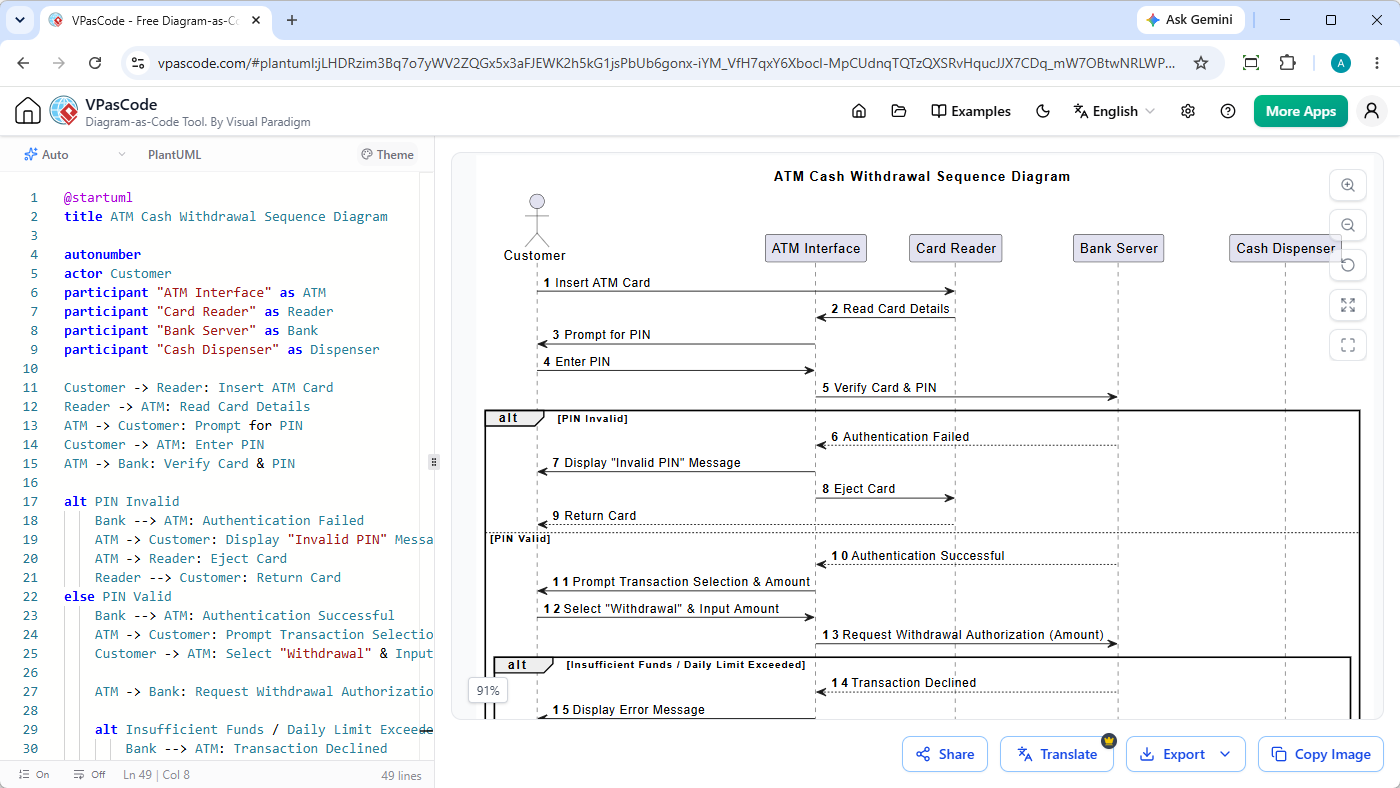
Why Render Your Sequence Diagrams with VPasCode?
Creating complex diagrams using code shouldn’t require tedious local environment setups or manual command-line compilation. VPasCode by Visual Paradigm brings instant rendering and powerful AI assistance directly to your browser:- Instant AI Diagram Generation: Bypass manual coding entirely by using native AI to generate sequence diagrams from natural language prompts.
- Automatic Format Detection: Paste PlantUML, Mermaid, Graphviz, or D2 scripts—VPasCode instantly recognizes the DSL format and renders in real time.
- AI Code Error Fixing: Stuck on a syntax bug? Click “Fix by AI” to view transparent side-by-side diffs and automatically repair syntax errors.
- Multi-Language AI Translation: Effortlessly translate diagram labels and messages for international technical teams in seconds.
- High-Resolution Exporting: Download clean, scalable SVG vector graphics or high-res PNG images for technical documentation and slide decks.