Yes, PlantUML fully supports class diagram generation using declarative, text-based code syntax. It allows developers and system architects to model Object-Oriented structures—including classes, interfaces, inheritance, associations, and visibility modifiers—without manually drawing shapes.
1. Quick Answer: Generating Class Diagrams in PlantUML
PlantUML parses plain-text scripts enclosed within @startuml and @enduml tags to generate vector and image outputs of class diagrams. It automatically handles layout calculations, auto-positioning nodes based on defined relationships.
1.1 The Basic Class Diagram Syntax
To define a basic class diagram, specify class entities along with their fields and methods using standard syntax:
@startuml
class User {
    - String username
    - String email
    + login(): Boolean
}

class Order {
    - String orderId
    + calculateTotal(): Double
}

User "1" -- "0..*" Order : places
@enduml
2. Deep Dive: Key Class Diagram Features Supported by PlantUML
Beyond basic structures, PlantUML supports complex Object-Oriented Analysis and Design (OOAD) notation required for enterprise software modeling.
2.1 Defining Relationships (Inheritance, Aggregation, & Composition)
PlantUML uses arrow notation variations to represent structural relationships cleanly:
- Extension / Inheritance (
<|--): Parent <|-- Child
- Implementation (
<|..): Interface <|.. Realization
- Composition (
*--): Building *-- Room (Strong ownership)
- Aggregation (
o--): Library o-- Book (Weak ownership)
- Association (
--): Student -- Course
2.2 Adding Visibility Modifiers, Attributes, and Methods
Visibility indicators precede member names to denote access control explicitly:
- Private+ Public# Protected~ Package Private
2.3 Working with Interfaces, Abstract Classes, and Generics
Specialized class types can be defined explicitly using keywords or stereotypes:
abstract class PaymentProcessor {
    {abstract} + processPayment(): void
}

interface Repository<T> {
    + findById(id: String): T
}
3. Common Pain Points of PlantUML Class Diagrams
While declarative diagramming saves time compared to drag-and-drop tools, traditional PlantUML workflows introduce operational friction.
3.1 Local Environment Setup vs. Instant Preview Friction
Standard PlantUML rendering often requires installing local Java runtimes, Graphviz dependencies, and complex IDE plugins before displaying a single rendering. Switching between local code editing and preview panels often disrupts developer focus.
3.2 Troubleshooting Cryptic Syntax Errors
A single missing brace or syntax typo in PlantUML script often yields vague error messages, forcing developers to manually inspect line by line to isolate syntax failures.
4. Modernizing Your PlantUML Workflow with VPasCode & AI
To eliminate local environment setup and syntax troubleshooting overhead, developers can use unified online diagramming platforms like Visual Paradigm VPasCode, which now features powerful native AI automation capabilities.
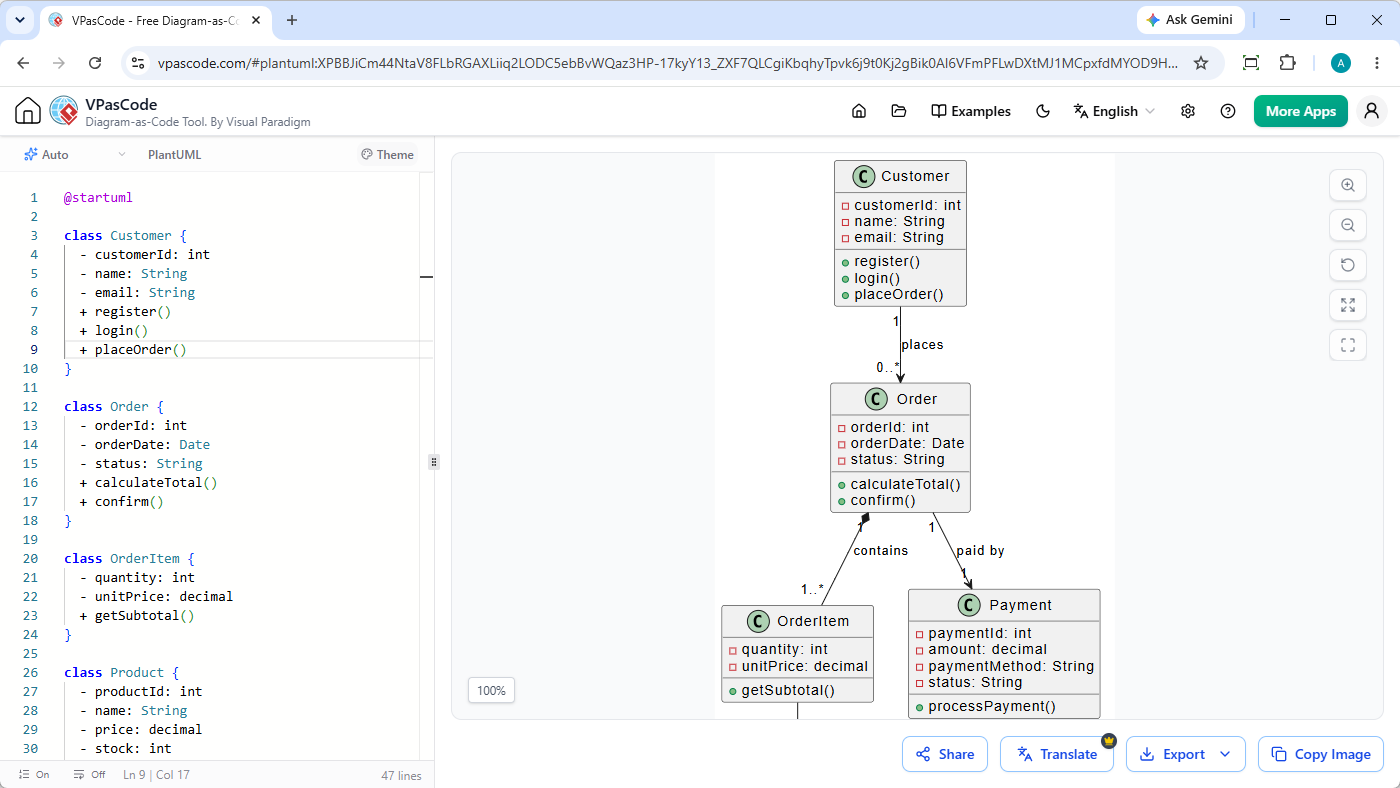
4.1 Instant AI Diagram Generation & Modification
As highlighted in our Major VPasCode Update: Generate and Modify Diagrams Instantly with AI, you can bypass manual coding from scratch by entering natural language prompts—such as “Generate a class diagram in PlantUML for an e-commerce order system”—allowing you to create, scaffold, and refactor class models natively inside the browser in seconds.
4.2 Zero-Setup PlantUML Editing & Automatic DSL Detection
VPasCode provides a free online code editor with real-time rendering. Simply paste your PlantUML script or prompt your request directly into the editor—the platform automatically detects the DSL format and renders your class diagram instantly without requiring manual configuration or Java installation.
4.3 One-Click AI Code Fixing & Explanatory Diffs
When syntax errors break your rendering, VPasCode’s integrated “Fix by AI” engine automatically diagnoses and repairs syntax errors. It displays a side-by-side code diff with clear explanations, letting you resolve syntax bugs instantly while learning correct syntax faster.
4.4 High-Resolution Exporting & OpenDocs Integration
Once generated, diagrams can be exported directly as high-resolution PNGs or scalable SVG vector graphics for technical design documents. You can also send models directly to Visual Paradigm OpenDocs to build comprehensive software architecture documentation.
(Note: Advanced AI diagram generation, code modification, and error-fixing features are available in Visual Paradigm Online Deluxe Edition / Visual Paradigm Desktop Professional Edition+).
5. PlantUML vs. Other Diagram-as-Code Options (Mermaid, D2)
Choosing the right diagram-as-code DSL depends on your project requirements and existing documentation ecosystem.
- Primary Strengths:
- PlantUML: Rich UML standard compliance & complex OOP features
- Mermaid: Native GitHub/GitLab markdown preview support
- D2: Modern layout engine & clean, modern aesthetics
- Syntax Complexity:
- PlantUML: Moderate
- Mermaid: Low / Beginner-friendly
- D2: Low
- Best For:
- PlantUML: Enterprise software architecture & detailed class modeling
- Mermaid: Quick README diagrams & simple workflows
- D2: Modern architectural layouts & software documentation
5.1 When to Stick with PlantUML vs. Switching DSLs
Stick with PlantUML if your team models detailed Object-Oriented systems requiring formal UML compliance. Consider lightweight alternatives like Mermaid for simple documentation directly embedded in Markdown files.
5.2 Rendering Multiple DSLs in a Single Editor
Rather than switching tools when working with different languages, VPasCode supports PlantUML, Mermaid, D2, Graphviz, and Markmap natively within a single, unified workspace.
6. Summary & Frequently Asked Questions
6.1 How do I export PlantUML class diagrams to high-resolution PNG or SVG?
In standard PlantUML environments, you must run command-line flags (e.g., -tsvg or -tpng). Using VPasCode, you can directly download scalable SVG or high-resolution PNG files with a single click from the preview interface.
6.2 Can I generate PlantUML class diagrams automatically from source code?
Yes. Many IDE plugins and reverse-engineering utilities parse existing codebases (Java, C++, C#) to output PlantUML script, which can then be pasted into VPasCode for instant editing and sharing.