
How VPasCode Works with
OpenDocs, VP Desktop,
and AI Chatbots

Connect your entire software design pipeline from initial ideation to living documentation. Generate scripts in AI Chatbots, fine-tune code visuals in Visual Paradigm VPasCode, execute advanced modeling in Visual Paradigm Desktop, and publish directly to OpenDocs.
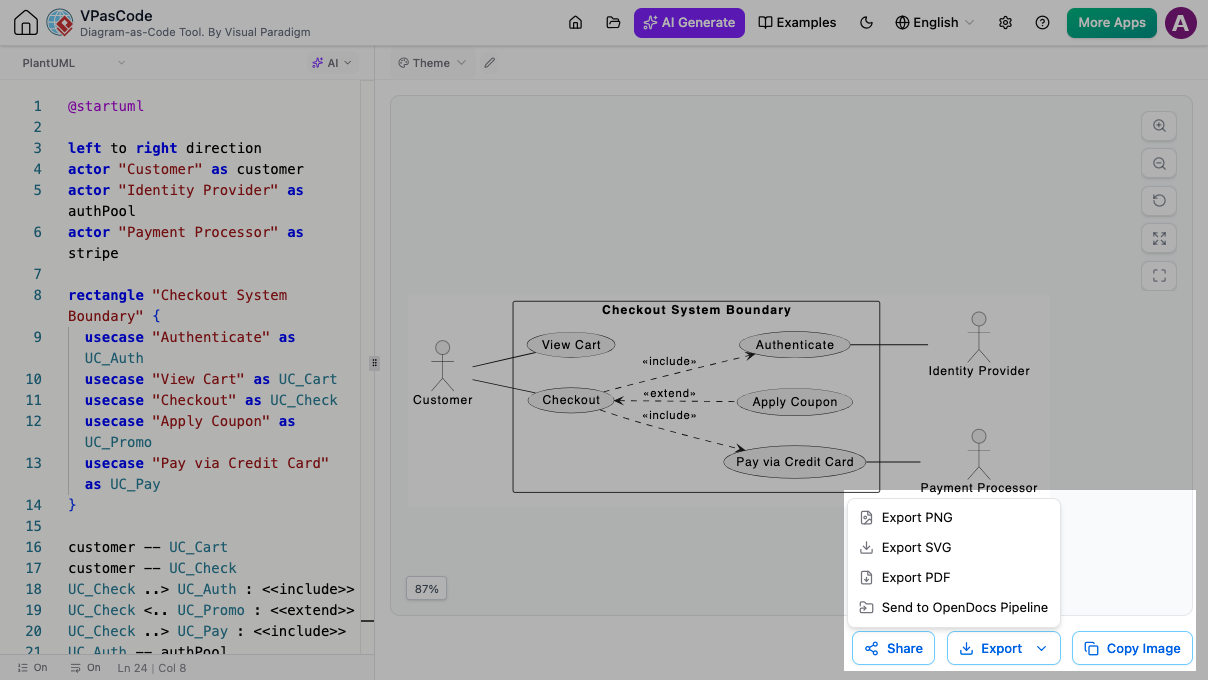
VPasCode editor interface showing PlantUML code generating a checkout use case diagram with export options for OpenDocs pipeline.

GENERATIVE IDEATION

AI Chatbot Integration

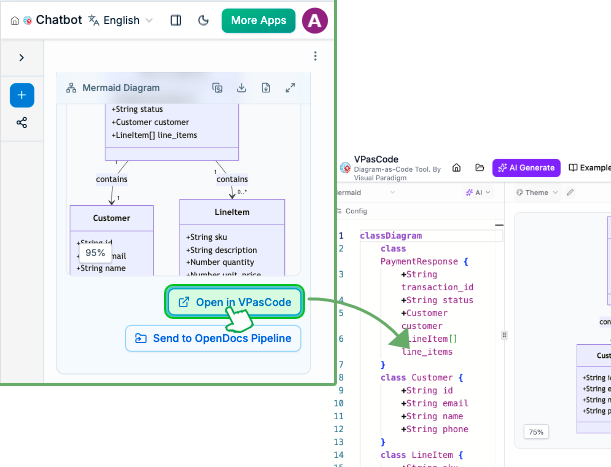
Brainstorm system architectures, sequence flows, or class structures directly within your AI chatbot interface. Generate initial diagram scripts on the fly, then send them straight into Visual Paradigm VPasCode to refine and preview the layout with real-time visual feedback.

ENTERPRISE MODELING

VPasCode Diagrams Straight to Visual Paradigm Desktop

Brainstorming in code is fast, but enterprise modeling needs depth. With our Visual Paradigm Pipeline integration, you can create text-to-diagram designs in VPasCode and export them straight to Visual Paradigm Desktop.

No file conversions or copy-pasting required—just a seamless transition from quick ideas to production-grade system designs.

How the VPasCode to Desktop Export Works

  1. Code & Refine: Draft your diagram in VPasCode using simple code prompts or built-in AI tools.

  2. Send to Pipeline: Click Export > Send to Pipeline to store your diagram safely online.

  3. Open in Desktop: In Visual Paradigm Desktop, go to Project > Import > Visual Paradigm Pipeline to bring your diagram right into your main workspace.

Documentation Integration

Direct OpenDocs Integration for Living Documentation

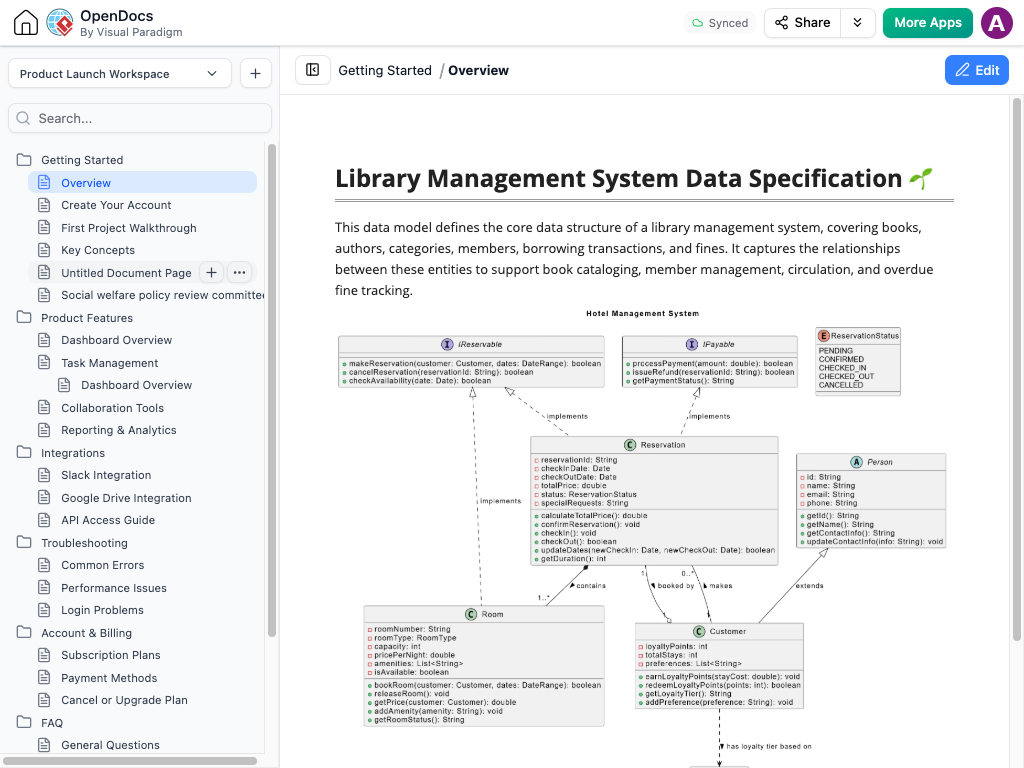
Bridge the gap between diagram creation and technical documentation. With direct OpenDocs integration, you can seamlessly embed live VPasCode diagrams into your project documents, developer guides, and system specs. Any updates made to your diagram code automatically synchronize with your OpenDocs documentation, keeping your team’s knowledge base fully aligned without manual re-exports.

Powerful Utilities to Connect Your Entire Pipeline

Smart capabilities that connect visual modeling, software documentation, and seamless team collaboration.

Smart Creation

Describe your system architecture or flow in plain language and let the integrated AI assistant instantly generate the underlying diagram script for you.

Flexible Deliverables

Export your finished visuals as crisp SVG vector graphics, high-resolution PNGs, or clean PDFs, or generate quick share links for seamless team collaboration.
Comfortable Workspace

Toggle seamlessly between light and dark display modes to keep your editing environment comfortable during long coding and modeling sessions.

How the Connected Ecosystem Works

  • Step 1: Draft in AI Chatbot

    Prompt your AI assistant with a natural language description to generate an initial diagram script (such as PlantUML, Mermaid, or D2).

  • Step 2: Refine in VPasCode

    Open the generated script in VPasCode. Use built-in syntax checks, instant code diffs, and AI error resolution to tweak and perfect the layout.

  • Step 3: Scale to VP Desktop

    Send complex architectures to Visual Paradigm Desktop to perform in-depth analysis, manage pipeline assets, or model larger systems.

  • Step 4: Publish to OpenDocs

    Embed the visual directly into your OpenDocs portal to give your team accessible, up-to-date technical documentation.

Ready to Connect Your Entire Design Pipeline?

Move fluidly from AI chatbot ideation to visual editing in Visual Paradigm VPasCode, deep system modeling in VP Desktop, and continuous publishing in OpenDocs—all from your browser.

Scroll to Top