


In the finance sector, precision and clarity are non-negotiable. When designing a Payroll Management System, stakeholders must align on who interacts with the system, what functions are available, and how external dependencies like banking or tax authorities integrate. A poorly defined scope can lead to compliance risks, payroll errors, and security vulnerabilities. Visual modeling serves as the bridge between business requirements and technical implementation.

This tutorial demonstrates how to construct a professional Use Case Diagram using PlantUML within VPasCode, a free, web-based diagram-as-code editor. Unlike traditional drag-and-drop tools that often struggle with versioning or require local installation, VPasCode allows you to write code and see instant rendering in your browser. This approach ensures your architecture diagrams remain living documentation that is easy to update, share, and embed directly into technical wikis.
Understanding the Model: Purpose, Scope & Problem Framing
Diagram Abstraction & Representation
A Use Case Diagram is the ideal tool for capturing functional requirements and system boundaries from a user perspective. It abstracts away implementation details (like database schemas or API endpoints) to focus on what the system does and who does it. In this model:
- Actors: Represent human roles (e.g., Employee, HR Manager) or external systems (e.g., Bank System) that interact with the Payroll Management System.
- Use Cases: Represent high-level functional goals, such as “Process Payroll” or “Generate Reports”.
- Relationships: Define how actors access functionality, including standard associations and inclusion dependencies (e.g., “Process Payroll” includes “Calculate Net Pay”).
Target Domain Scope & Scenario
This diagram specifically models the core workflow of a corporate payroll operation. The scope is bounded by the Payroll Management System rectangle, which encapsulates internal logic. The boundaries explicitly separate internal administrative tasks from external integrations. For instance, while the HR Manager processes payroll internally, the actual fund transfer is delegated to the external Bank System. This separation of concerns is critical for defining security zones and API contracts in the subsequent architectural design.
Key Takeaways & Educational Insights
By constructing this model, you will gain clarity on:
- Actor Privileges: Clearly defining that Employees cannot process payroll, only HR Managers can.
- System Dependencies: Identifying mandatory integrations (Tax Authority, Bank) that must be available for core functions to succeed.
- Modularity: Using
includerelationships to break down complex processes into smaller, testable sub-functions like “Calculate Deductions”.
Complete Diagram & Full Source Code
Before diving into the step-by-step construction, review the finished blueprint. This diagram utilizes the cerulean theme for a clean, professional financial aesthetic. You can view the live preview and edit the code directly in the VPasCode editor.
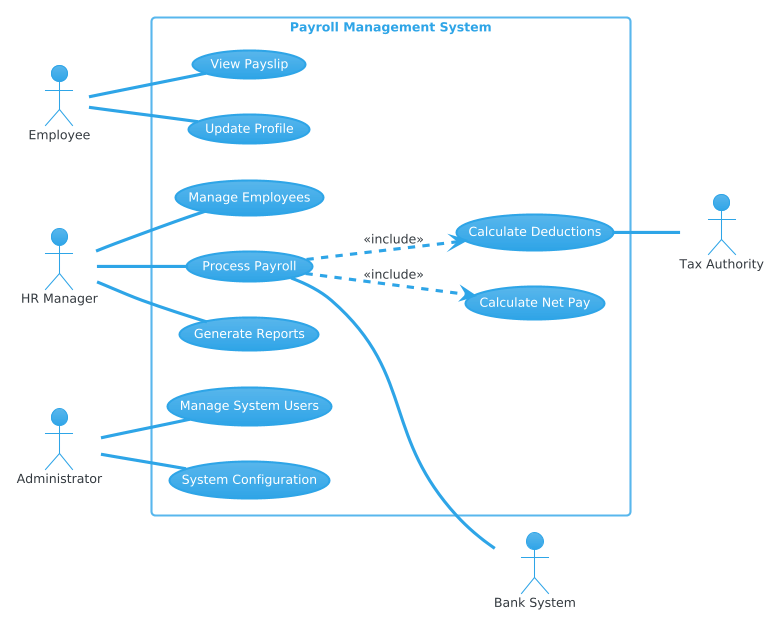
Copy the following complete source code to replicate this diagram instantly:
@startuml
!theme cerulean
left to right direction
skinparam defaultTextAlignment center

' Primary Actors (Left)
actor Employee as emp
actor "HR Manager" as hr
actor Administrator as admin

rectangle "Payroll Management System" {
    emp -- (View Payslip)
    emp -- (Update Profile)

    hr -- (Manage Employees)
    hr -- (Process Payroll)
    hr -- (Generate Reports)

    admin -- (Manage System Users)
    admin -- (System Configuration)

    (Process Payroll) ..> (Calculate Net Pay) : <<include>>
    (Process Payroll) ..> (Calculate Deductions) : <<include>>
}

' Secondary Actors (Right)
actor "Bank System" as bank
actor "Tax Authority" as tax

(Process Payroll) -- bank
(Calculate Deductions) -- tax
@endumlStep-by-Step Architectural Walkthrough
Phase 1: Canvas Configuration & Layout Directives
The foundation of a maintainable PlantUML diagram lies in its global settings. We start by declaring the theme and layout direction to ensure consistency across the visual model.
First, we apply the cerulean theme. This provides a cohesive color palette suitable for professional documentation.
!theme ceruleanNext, we set the flow direction. Financial systems often require left-to-right reading flows to align with standard documentation patterns. We also center-align text for better readability within shapes.
left to right direction
skinparam defaultTextAlignment center
Phase 2: Declaring Core Entities, Actors, and Boundaries
With the canvas ready, we define the participants. In PlantUML, actors are defined using the actor keyword. We assign aliases (like emp, hr) to reference them later in relationship lines, keeping the syntax clean.
actor Employee as emp
actor "HR Manager" as hr
actor Administrator as admin
Next, we establish the system boundary using a rectangle. This visually encapsulates the internal logic of the Payroll Management System. Anything inside this box is part of the system’s responsibility.
rectangle "Payroll Management System" {
    // Use cases go here
}
Phase 3: Mapping Data Flows & Key Interactions
Now we connect actors to their respective functions. Solid lines with double dashes (--) indicate a standard association, meaning the actor can initiate that use case.
emp -- (View Payslip)
hr -- (Process Payroll)
Crucially, we model complex processes using inclusion relationships. The Process Payroll function is too large to be a single atomic step. It logically includes calculating net pay and deductions. We use the dotted line with ..> and the <<include>> stereotype to represent this dependency.
(Process Payroll) ..> (Calculate Net Pay) : <> Phase 4: Grouping, Annotations & Visual Polish
Finally, we introduce external systems. These actors sit outside the system rectangle but interact with it. The Bank System and Tax Authority are critical for compliance and execution.
actor "Bank System" as bank
actor "Tax Authority" as tax

(Process Payroll) -- bank
(Calculate Deductions) -- tax
This phase ensures the diagram reflects the real-world ecosystem, showing that the system does not operate in a vacuum but relies on external validation and fund transfer services.
Syntax & Keyword Deep Dive
Understanding the specific PlantUML syntax empowers you to extend this diagram for more complex scenarios. Here is a breakdown of the key keywords used:
actor: Defines a participant (human or system) that interacts with the use cases. Can include an alias for shorter references.rectangle: Creates a boundary box to group related use cases, representing the system under design.--: Represents a standard association line connecting an actor to a use case...>: Creates a directed dotted line, typically used for dependency relationships like includes or extends.<<include>>: A stereotype indicating that the base use case (Process Payroll) always invokes the included use case (Calculate Net Pay).!theme: A directive to load a specific visual style theme for the entire diagram.
Best Practices & Pitfalls to Avoid
To ensure your diagrams remain effective over time, adhere to these modeling best practices:
- Maintain Clear Boundaries: Only include use cases that the system directly controls. External systems (like the Bank) should be actors, not internal use cases.
- Keep Actors Atomic: Avoid combining roles. An “Employee” should be distinct from an “Admin” to prevent confusion over permissions.
- Use Include Wisely: Do not overuse
<<include>>for simple steps. Reserve it for mandatory sub-processes that are reused across multiple use cases. - Consistent Naming: Use verb-noun phrases for use cases (e.g., “Process Payroll” instead of “Payroll”) to clarify the action being performed.
Start Building PlantUML Diagrams Faster with VPasCode
Test, preview, and customize this Payroll Use Case diagram instantly in your browser without installing any tools.