


Architecting Financial Systems: The Online Banking Class Diagram
In the complex world of financial technology, clarity is currency. When designing an Online Banking System, architects must balance security, transaction integrity, and user accessibility. A static class diagram serves as the blueprint for this digital infrastructure, defining the data structures, behaviors, and relationships that power the backend logic. Without a clear model, codebases become brittle and difficult to maintain.

This tutorial leverages VPasCode, a free web-based diagram-as-code editor, to demonstrate how to construct a professional-grade class diagram for a banking system. By using PlantUML, you can define complex inheritance hierarchies, associations, and dependencies in text, then render them instantly in your browser. This approach eliminates the friction of manual drawing tools and ensures your documentation remains synchronized with your codebase.
Understanding the Model: Purpose, Scope & Problem Framing
Diagram Abstraction & Representation
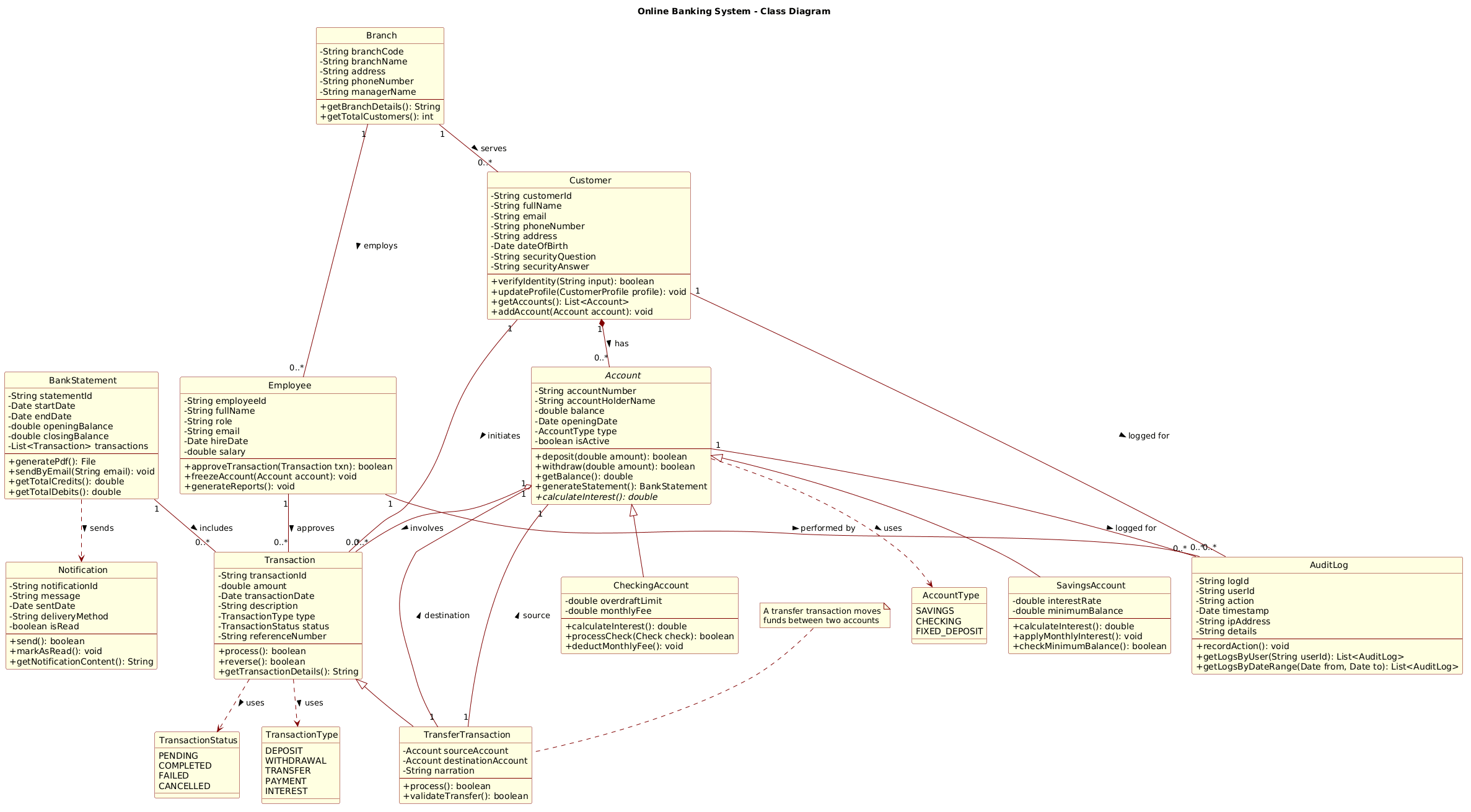
A class diagram in PlantUML models the static structure of a system. It visualizes classes, their attributes, methods, and the relationships between them. In the context of an Online Banking System, this diagram answers critical architectural questions: How does a Customer relate to an Account? How are Transaction types differentiated? How does the system handle inheritance between SavingsAccount and CheckingAccount?
Target Domain Scope & Scenario
This model focuses on the core banking domain. It intentionally excludes external integrations (like payment gateways or mobile apps) to keep the diagram readable. The scope covers:
- Core Entities:
Customer,Account,Transaction,Branch. - Business Logic: Interest calculation, overdraft limits, and transaction processing.
- Support Systems:
AuditLogfor compliance,Notificationfor user updates, andEmployeemanagement.
Key Takeaways & Educational Insights
By following this guide, you will learn how to use VPasCode to model object-oriented relationships accurately. You will gain insights into how to structure abstract base classes for shared behavior, how to define enums for constrained data states, and how to document complex flows using notes and annotations directly within the diagram code.
Complete Diagram & Full Source Code
Below is the finalized architecture for the Online Banking System. You can view the rendered result immediately after the code block.
@startuml

!include https://static.visual-paradigm.com/web/resources/plantuml-stdlib/themes/rose.puml

title Online Banking System - Class Diagram

' ========== ENUMS ==========
enum AccountType {
    SAVINGS
    CHECKING
    FIXED_DEPOSIT
}

enum TransactionStatus {
    PENDING
    COMPLETED
    FAILED
    CANCELLED
}

enum TransactionType {
    DEPOSIT
    WITHDRAWAL
    TRANSFER
    PAYMENT
    INTEREST
}

' ========== ABSTRACT CLASS ==========
abstract class Account {
    - String accountNumber
    - String accountHolderName
    - double balance
    - Date openingDate
    - AccountType type
    - boolean isActive
    --
    + deposit(double amount): boolean
    + withdraw(double amount): boolean
    + getBalance(): double
    + generateStatement(): BankStatement
    + {abstract} calculateInterest(): double
}

' ========== CONCRETE CLASSES ==========
class SavingsAccount {
    - double interestRate
    - double minimumBalance
    --
    + calculateInterest(): double
    + applyMonthlyInterest(): void
    + checkMinimumBalance(): boolean
}

class CheckingAccount {
    - double overdraftLimit
    - double monthlyFee
    --
    + calculateInterest(): double
    + processCheck(Check check): boolean
    + deductMonthlyFee(): void
}

class Customer {
    - String customerId
    - String fullName
    - String email
    - String phoneNumber
    - String address
    - Date dateOfBirth
    - String securityQuestion
    - String securityAnswer
    --
    + verifyIdentity(String input): boolean
    + updateProfile(CustomerProfile profile): void
    + getAccounts(): List<Account>
    + addAccount(Account account): void
}

class Transaction {
    - String transactionId
    - double amount
    - Date transactionDate
    - String description
    - TransactionType type
    - TransactionStatus status
    - String referenceNumber
    --
    + process(): boolean
    + reverse(): boolean
    + getTransactionDetails(): String
}

class TransferTransaction {
    - Account sourceAccount
    - Account destinationAccount
    - String narration
    --
    + process(): boolean
    + validateTransfer(): boolean
}

class BankStatement {
    - String statementId
    - Date startDate
    - Date endDate
    - double openingBalance
    - double closingBalance
    - List<Transaction> transactions
    --
    + generatePdf(): File
    + sendByEmail(String email): void
    + getTotalCredits(): double
    + getTotalDebits(): double
}

class Branch {
    - String branchCode
    - String branchName
    - String address
    - String phoneNumber
    - String managerName
    --
    + getBranchDetails(): String
    + getTotalCustomers(): int
}

class Employee {
    - String employeeId
    - String fullName
    - String role
    - String email
    - Date hireDate
    - double salary
    --
    + approveTransaction(Transaction txn): boolean
    + freezeAccount(Account account): void
    + generateReports(): void
}

class Notification {
    - String notificationId
    - String message
    - Date sentDate
    - String deliveryMethod
    - boolean isRead
    --
    + send(): boolean
    + markAsRead(): void
    + getNotificationContent(): String
}

class AuditLog {
    - String logId
    - String userId
    - String action
    - Date timestamp
    - String ipAddress
    - String details
    --
    + recordAction(): void
    + getLogsByUser(String userId): List<AuditLog>
    + getLogsByDateRange(Date from, Date to): List<AuditLog>
}

' ========== RELATIONSHIPS ==========

' Inheritance / Generalization
Account <|-- SavingsAccount
Account <|-- CheckingAccount

' Composition - strong ownership (Customer owns Account)
Customer "1" *-- "0..*" Account : has >

' Association - Customer belongs to Branch
Branch "1" -- "0..*" Customer : serves >

' Association - Employee works at Branch
Branch "1" -- "0..*" Employee : employs >

' Aggregation - Transaction references Account
Account "1" o-- "0..*" Transaction : involves >

' Inheritance - specialized Transaction
Transaction <|-- TransferTransaction

' Association - TransferTransaction has references to two Accounts
TransferTransaction "1" -- "1" Account : source >
TransferTransaction "1" -- "1" Account : destination >

' Association - BankStatement contains Transactions
BankStatement "1" -- "0..*" Transaction : includes >

' Association - Customer makes Transactions
Customer "1" -- "0..*" Transaction : initiates >

' Association - Employee approves Transactions
Employee "1" -- "0..*" Transaction : approves >

' Dependency - BankStatement uses Notification
BankStatement ..> Notification : sends >

' Dependency - Account uses AccountType enum
Account ..> AccountType : uses >

' Dependency - Transaction uses TransactionStatus and TransactionType
Transaction ..> TransactionStatus : uses >
Transaction ..> TransactionType : uses >

' Association - AuditLog tracks actions on various entities
Customer "1" -- "0..*" AuditLog : logged for >
Account "1" -- "0..*" AuditLog : logged for >
Employee "1" -- "0..*" AuditLog : performed by >

' Note for TransferTransaction
note top of TransferTransaction : A transfer transaction moves\nfunds between two accounts

@endumlStep-by-Step Architectural Walkthrough
Building this diagram in VPasCode follows a logical progression from setup to detailed relationship mapping. Each phase ensures the diagram remains maintainable and semantically accurate.
Phase 1: Canvas Configuration & Layout Directives
Before defining classes, we set the visual theme and metadata. This ensures consistency and professional styling. The !include directive pulls the “rose” theme from the PlantUML standard library, giving the diagram a clean, modern look without manual CSS configuration.
!include https://static.visual-paradigm.com/web/resources/plantuml-stdlib/themes/rose.puml
title Online Banking System - Class Diagram
Phase 2: Declaring Core Entities, Actors, and Boundaries
We begin by defining the foundational enums and the abstract base class. Enums constrain data values (like TransactionStatus), preventing invalid states. The Account class is marked abstract because a generic account cannot exist without specific behavior (like interest calculation).
enum AccountType {
    SAVINGS
    CHECKING
}

abstract class Account {
    - String accountNumber
    - double balance
    --
    + {abstract} calculateInterest(): double
}
Phase 3: Mapping Data Flows & Key Interactions
Here we define concrete classes that inherit from the abstract base. SavingsAccount and CheckingAccount implement the calculateInterest method but add their own specific attributes like overdraftLimit. We also model the TransferTransaction to handle complex flows involving multiple accounts.
class SavingsAccount {
    - double interestRate
    --
    + calculateInterest(): double
}

class TransferTransaction {
    - Account sourceAccount
    - Account destinationAccount
}
Phase 4: Grouping, Annotations & Visual Polish
Finally, we establish the relationships that bind the system together. We use composition (*--) to show that a Customer owns Accounts. We use aggregation (o--) to show that Transactions involve Accounts. Notes are added to clarify complex logic, such as the specific behavior of a transfer.
Customer "1" *-- "0..*" Account : has >
note top of TransferTransaction : A transfer transaction moves\nfunds between two accounts
Syntax & Keyword Deep Dive
Understanding the specific PlantUML syntax used in this diagram is crucial for accurate modeling. Below are the key keywords and conventions utilized:
abstract class: Declares a class that cannot be instantiated directly. It defines a common interface for subclasses (e.g.,Account).enum: Defines a fixed set of constants. Used here forAccountTypeandTransactionStatusto ensure data integrity.<|--: Represents Inheritance (Generalization). The arrow points to the parent class. Example:Account <|-- SavingsAccount.*--: Represents Composition. A strong ownership relationship where the child cannot exist without the parent. Example:Customer *-- Account.o--: Represents Aggregation. A weak relationship where the child can exist independently. Example:Account o-- Transaction...>: Represents Dependency. A usage relationship where one class relies on another. Example:Account ..> AccountType.note top of: Adds a textual annotation attached to a specific class for documentation.
Best Practices & Pitfalls to Avoid
When modeling complex systems like banking with VPasCode, adhere to these guidelines to maintain clarity:
- Keep Diagrams Modular: If the diagram becomes too crowded, consider splitting it into sub-systems (e.g., Core Banking vs. Reporting). This specific diagram balances both for educational purposes.
- Use Consistent Naming: Stick to PascalCase for classes and camelCase for methods. Avoid abbreviations unless they are industry standards (e.g.,
txnfor transaction). - Define Cardinality Explicitly: Always specify relationship multiplicities (e.g.,
"1","0..*") to clarify business rules like “One Customer has Many Accounts”. - Leverage Comments: Use single quotes (
') for comments in the code to explain why a relationship exists, not just what it is.
Start Building PlantUML Class Diagrams Faster with VPasCode
Instantly prototype, preview, and customize your banking system architecture online in VPasCode without installing any tools.