


In the fast-paced world of retail technology, the Point-of-Sale (POS) Terminal System serves as the critical nexus between customer interaction, inventory management, and financial processing. For software architects and developers, capturing the static structure of such a complex system is essential before writing a single line of executable code. A well-structured class diagram provides the blueprint for object-oriented design, ensuring that data flows logically between entities like customers, transactions, and payment gateways.
However, traditional drag-and-drop modeling tools often lack the flexibility and versioning capabilities required for agile development workflows. This is where diagram-as-code methodologies shine. By using PlantUML within the VPasCode web editor, architects can define system structures textually, validate them instantly in the browser, and maintain a living documentation source that evolves alongside the codebase. This tutorial demonstrates how to construct a professional-grade Class Diagram for a POS Terminal System, focusing on inheritance, aggregation, and association patterns that reflect real-world retail requirements.
Understanding the Model: Purpose, Scope & Problem Framing
Before diving into the syntax, it is crucial to understand the abstraction level and the problem space this diagram addresses. A Class Diagram is a static structure diagram that describes the structure of a system by showing the system’s classes, their attributes, operations (methods), and the relationships among objects. It is the backbone of Object-Oriented Programming (OOP) documentation.
Diagram Abstraction & Representation
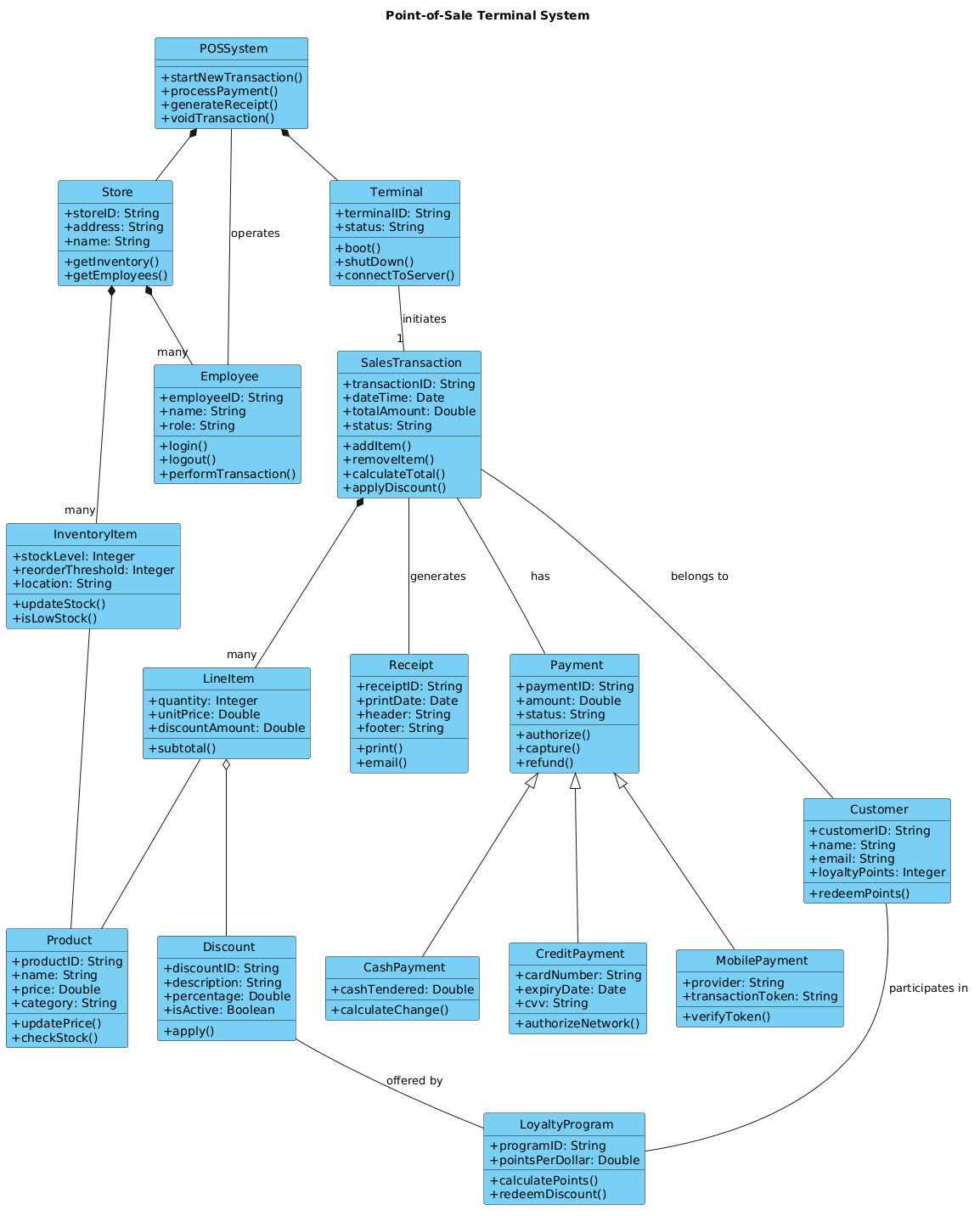
In this specific model, we are not modeling the runtime behavior (like a Sequence Diagram) or the physical deployment (like a Deployment Diagram). Instead, we are modeling the domain model. This means we focus on the core business entities: what exists in the system, what properties they hold, and how they relate to one another. For instance, a SalesTransaction is not just a record; it is an aggregate object that holds a collection of LineItems, which in turn reference Products.
Target Domain Scope & Scenario
The scope of this diagram covers the core checkout workflow of a retail environment. It explicitly models the hierarchy of payment methods (Cash, Credit, Mobile), the relationship between a Store and its Employees, and the composition of a transaction. It intentionally excludes peripheral systems like external accounting software or hardware driver interfaces to maintain clarity on the core application logic.
Key Takeaways & Educational Insights
By completing this diagram, you will gain insights into:
- Composition vs. Aggregation: Understanding when a
LineItemmust die with theSalesTransaction(composition) versus when aProductcan exist independently (aggregation/association). - Inheritance Patterns: How to model polymorphism using the
<|--stereotype for different payment types. - Cardinality: Defining one-to-many relationships, such as one
Storehaving manyEmployees.
Complete Diagram & Full Source Code
Below is the complete blueprint for the Point-of-Sale Terminal System. You can copy this code directly into the VPasCode editor to render the diagram instantly.
@startuml
!include https://static.visual-paradigm.com/web/resources/plantuml-stdlib/themes/vp.puml

title Point-of-Sale Terminal System

/'
  This class diagram models the core domain of a Point-of-Sale (POS) Terminal System.
  The system supports retail checkout operations, including product scanning, payment processing,
  receipt generation, and inventory management. It captures the relationships between sales transactions,
  customers, employees, store locations, payment methods, and loyalty programs.
  The diagram illustrates how a sales transaction is composed of multiple line items,
  each referencing a product and applicable discounts. Payment is handled through various
  channels (cash, credit, mobile), and system administration includes employee roles and permissions.
  Inventory is tracked at the store level, with alerts for low stock.
  The design emphasises separation of concerns, maintainability, and real-world retail workflow fidelity.
'/

class POSSystem {
  + startNewTransaction()
  + processPayment()
  + generateReceipt()
  + voidTransaction()
}

class Terminal {
  + terminalID: String
  + status: String
  + boot()
  + shutDown()
  + connectToServer()
}

class Store {
  + storeID: String
  + address: String
  + name: String
  + getInventory()
  + getEmployees()
}

class Employee {
  + employeeID: String
  + name: String
  + role: String
  + login()
  + logout()
  + performTransaction()
}

class Customer {
  + customerID: String
  + name: String
  + email: String
  + loyaltyPoints: Integer
  + redeemPoints()
}

class SalesTransaction {
  + transactionID: String
  + dateTime: Date
  + totalAmount: Double
  + status: String
  + addItem()
  + removeItem()
  + calculateTotal()
  + applyDiscount()
}

class LineItem {
  + quantity: Integer
  + unitPrice: Double
  + discountAmount: Double
  + subtotal()
}

class Product {
  + productID: String
  + name: String
  + price: Double
  + category: String
  + updatePrice()
  + checkStock()
}

class InventoryItem {
  + stockLevel: Integer
  + reorderThreshold: Integer
  + location: String
  + updateStock()
  + isLowStock()
}

class Payment {
  + paymentID: String
  + amount: Double
  + status: String
  + authorize()
  + capture()
  + refund()
}

class CashPayment {
  + cashTendered: Double
  + calculateChange()
}

class CreditPayment {
  + cardNumber: String
  + expiryDate: Date
  + cvv: String
  + authorizeNetwork()
}

class MobilePayment {
  + provider: String
  + transactionToken: String
  + verifyToken()
}

class Discount {
  + discountID: String
  + description: String
  + percentage: Double
  + isActive: Boolean
  + apply()
}

class LoyaltyProgram {
  + programID: String
  + pointsPerDollar: Double
  + calculatePoints()
  + redeemDiscount()
}

class Receipt {
  + receiptID: String
  + printDate: Date
  + header: String
  + footer: String
  + print()
  + email()
}

POSSystem *-- Terminal
POSSystem *-- Store
Store *-- "many" Employee
Store *-- "many" InventoryItem
Terminal -- "1" SalesTransaction : initiates
SalesTransaction *-- "many" LineItem
LineItem -- Product
LineItem o-- Discount
InventoryItem -- Product
SalesTransaction -- Customer : belongs to
SalesTransaction -- Payment : has
Payment <|-- CashPayment
Payment <|-- CreditPayment
Payment <|-- MobilePayment
SalesTransaction -- Receipt : generates
Customer -- LoyaltyProgram : participates in
Employee -- POSSystem : operates
Discount -- LoyaltyProgram : offered by
@endumlStep-by-Step Architectural Walkthrough
Constructing this diagram requires a logical progression from system boundaries to granular relationships. We will break this down into four distinct phases.
Phase 1: Canvas Configuration & Layout Directives
Every professional PlantUML diagram begins with configuration. We first import the Visual Paradigm theme to ensure consistent styling across all elements. This ensures the diagram looks polished without needing manual skin parameter overrides.
!include https://static.visual-paradigm.com/web/resources/plantuml-stdlib/themes/vp.pumlNext, we define the title and the context. The comment block is crucial for documentation; it explains the “why” of the diagram without cluttering the rendering logic. In VPasCode, you can see this comment rendered as a description block above the diagram.
title Point-of-Sale Terminal System

/'
  This class diagram models the core domain of a Point-of-Sale (POS) Terminal System.
  ... (rest of comment)
'/
Phase 2: Declaring Core Entities, Actors, and Boundaries
We begin by defining the high-level system containers. POSSystem acts as the central orchestrator. Terminal and Store represent the physical and organizational boundaries.
class POSSystem {
  + startNewTransaction()
  + processPayment()
  + generateReceipt()
  + voidTransaction()
}

class Terminal {
  + terminalID: String
  + status: String
  + boot()
  + shutDown()
  + connectToServer()
}
Notice the use of the + symbol. In PlantUML, this indicates public visibility, meaning these methods are accessible from outside the class. Attributes like terminalID are typed (e.g., String) to enforce data integrity.
Phase 3: Mapping Data Flows & Key Interactions
The core of the POS logic lies in the transaction flow. A SalesTransaction is composed of LineItems. This is a strong relationship because if the transaction is voided, the line items no longer exist.
class SalesTransaction {
  + transactionID: String
  + dateTime: Date
  + totalAmount: Double
  + status: String
  + addItem()
  + removeItem()
  + calculateTotal()
  + applyDiscount()
}

class LineItem {
  + quantity: Integer
  + unitPrice: Double
  + discountAmount: Double
  + subtotal()
}
We also link the Customer to the transaction. A customer may have many transactions, but a specific transaction belongs to one specific customer at the point of sale.
Phase 4: Grouping, Annotations & Visual Polish
The final phase involves defining the relationships between these classes. We use specific arrow types to denote the nature of the relationship. For example, the payment hierarchy demonstrates inheritance.
Payment <|-- CashPayment
Payment <|-- CreditPayment
Payment <|-- MobilePayment
This syntax tells the renderer that CashPayment, CreditPayment, and MobilePayment are specialized forms of Payment, inheriting common properties like paymentID and amount.
Syntax & Keyword Deep Dive
To fully leverage PlantUML in VPasCode, you must understand the cardinality and relationship keywords. Here is a breakdown of the symbols used in this diagram:
class: Defines a new class entity. The name follows immediately after the keyword.+ method(): Declares a public method. The parentheses indicate it is a function, not an attribute.: Type: Used to define the data type of an attribute (e.g.,String,Integer,Date).*--(Composition): Represents a strong ownership relationship. If the parent object is destroyed, the child object is also destroyed (e.g.,POSSystemownsTerminal).--(Association): A general link between two classes without strong ownership (e.g.,TerminalinitiatesSalesTransaction).o--(Aggregation): A weak ownership relationship. The child can exist independently of the parent (e.g.,LineItemaggregatesDiscount). Note the hollow diamond.<|--(Generalization): Represents inheritance. The arrowhead points to the superclass (e.g.,Payment)."many"or"1": Defines cardinality on the relationship line to specify multiplicity constraints.
Best Practices & Pitfalls to Avoid
When modeling complex systems like a POS terminal in PlantUML, adhering to best practices ensures your diagram remains maintainable.
- Maintain Abstraction Levels: Do not mix database schema details with business logic in the same diagram. Keep your Class Diagram focused on the application domain objects, not the database tables directly.
- Use Consistent Naming: Always use PascalCase for class names (e.g.,
SalesTransaction) and camelCase for methods (e.g.,startNewTransaction). Consistency aids readability significantly. - Limit Relationship Density: If a diagram becomes too crowded, consider splitting it into subsystem diagrams (e.g., one for Inventory, one for Payments). VPasCode allows you to manage multiple files easily.
- Document Relationships: Always label your relationships (e.g.,
: initiates,: belongs to). A line without a label is ambiguous and reduces the diagram's value as documentation.
Try It Yourself with VPasCode
Start Building PlantUML Class Diagrams Faster with VPasCode
Design, preview, and export your Point-of-Sale Terminal System architecture instantly in your browser with zero local installation required.