


In the realm of financial technology and enterprise expense management, clarity in workflow is paramount. When employees submit receipts for reimbursement, the process must be robust, auditable, and efficient. A well-designed Activity Diagram serves as the architectural blueprint for these critical business processes, ensuring that every stakeholder—from the submitting employee to the finance department—understands their role and the system’s logic.

Traditional diagramming tools often suffer from version fragmentation and static documentation that quickly becomes outdated. By adopting a diagram-as-code approach using PlantUML within VPasCode, architects can maintain living documentation that is versioned alongside the source code. This tutorial demonstrates how to construct a professional Expense Management Receipt Approval process, utilizing swimlanes to delineate responsibilities and conditional logic to handle complex approval hierarchies.
VPasCode enables instant browser-based rendering, allowing you to prototype these financial workflows without the overhead of local environment setup. Whether you are documenting a new policy or refactoring an existing reimbursement engine, this guide provides the architectural patterns needed for scalable financial modeling.
Understanding the Model: Purpose, Scope & Problem Framing
Diagram Abstraction & Representation
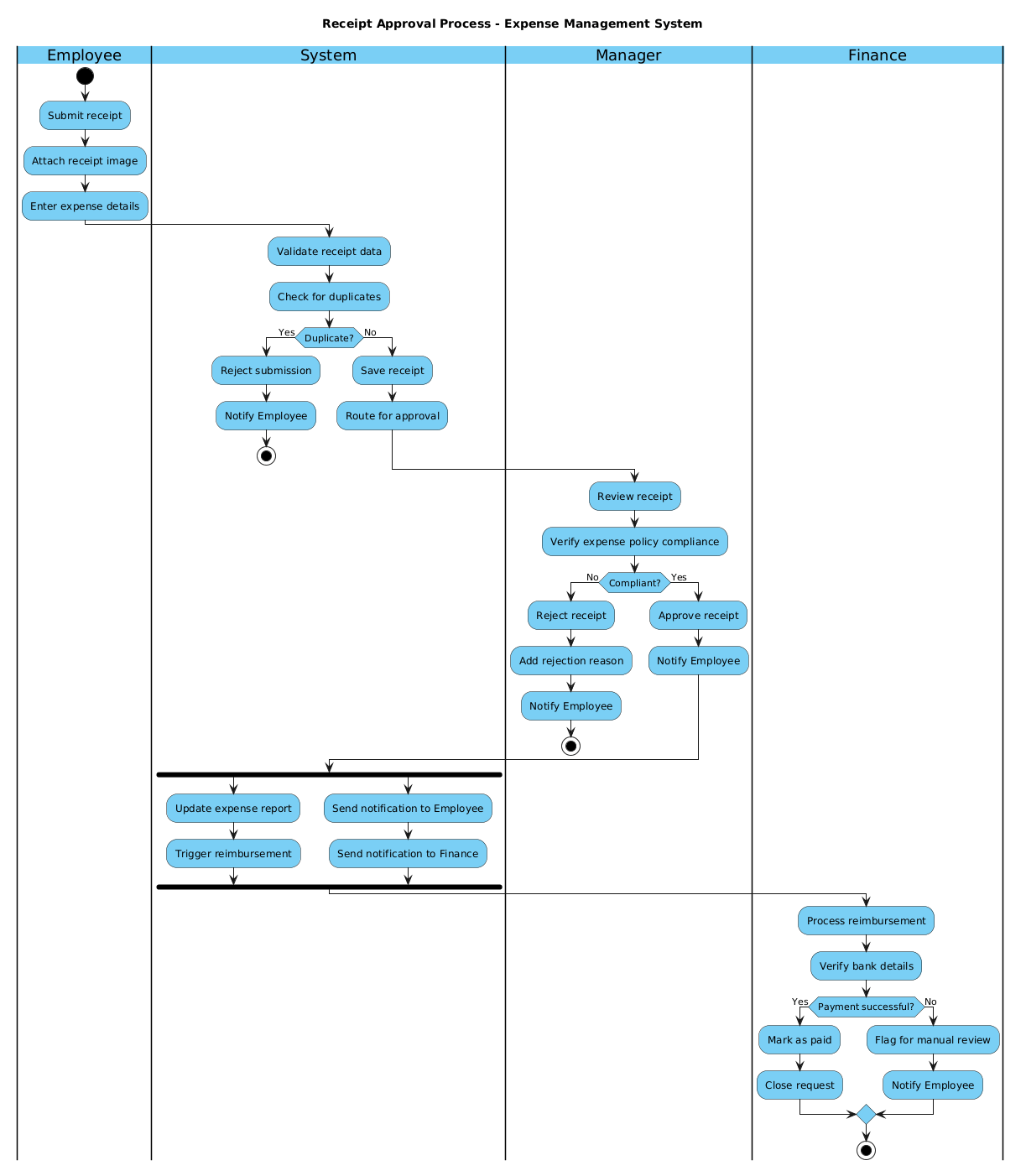
An Activity Diagram in PlantUML is the ideal abstraction for modeling the dynamic behavior of a system. Unlike static class diagrams, activity diagrams capture the flow of control and data over time. In this specific scenario, we model the lifecycle of a receipt submission. The diagram uses swimlanes (also known as partitions) to visually separate the actions performed by different actors: the Employee, the System, the Manager, and the Finance Department. This separation is crucial for identifying handoff points and potential bottlenecks in the financial workflow.
Target Domain Scope & Scenario
This diagram focuses strictly on the Receipt Approval Process within an Expense Management System. It intentionally excludes unrelated processes such as employee onboarding or tax calculation. The scope covers the journey from the initial upload of a receipt image to the final status update in the database. Key dependencies include the validation engine (checking for duplicates) and the approval hierarchy (manager verification). The diagram also accounts for error states, such as duplicate submissions or policy non-compliance, ensuring the system handles exceptions gracefully.
Key Takeaways & Educational Insights
By following this tutorial, you will gain insights into:
- Boundary Management: How to clearly define where one actor’s responsibility ends and another’s begins using swimlanes.
- Decision Logic: Implementing
if/elseblocks to handle compliance checks and duplicate detection. - Parallel Processing: Using
forkstructures to model concurrent system actions, such as updating reports while sending notifications. - State Termination: Properly defining
startandstopnodes to ensure the workflow has a clear beginning and end state.
Complete Diagram & Full Source Code
Before diving into the construction phases, review the complete blueprint below. This model encapsulates the entire financial approval lifecycle, including validation, rejection paths, and successful reimbursement triggers.
@startuml
!include https://static.visual-paradigm.com/web/resources/plantuml-stdlib/themes/vp.puml

title Receipt Approval Process - Expense Management System

|Employee|
start
:Submit receipt;
:Attach receipt image;
:Enter expense details;

|System|
:Validate receipt data;
:Check for duplicates;

if (Duplicate?) then (Yes)
  :Reject submission;
  :Notify Employee;
  stop
else (No)
  :Save receipt;
  :Route for approval;
endif

|Manager|
:Review receipt;
:Verify expense policy compliance;

if (Compliant?) then (No)
  :Reject receipt;
  :Add rejection reason;
  :Notify Employee;
  stop
else (Yes)
  :Approve receipt;
  :Notify Employee;
endif

|System|
fork
  :Update expense report;
  :Trigger reimbursement;
fork again
  :Send notification to Employee;
  :Send notification to Finance;
end fork

|Finance|
:Process reimbursement;
:Verify bank details;

if (Payment successful?) then (Yes)
  :Mark as paid;
  :Close request;
else (No)
  :Flag for manual review;
  :Notify Employee;
endif

stop
@endumlStep-by-Step Architectural Walkthrough
Building a complex financial workflow requires a structured approach. We will break down the construction of this diagram into four distinct phases: Canvas Configuration, Entity Declaration, Flow Mapping, and Visual Polish.
Phase 1: Canvas Configuration & Layout Directives
The foundation of any PlantUML diagram is its preamble. This section sets the visual theme and the diagram title. In this financial context, clarity is key, so we utilize the VPasCode standard library theme to ensure professional styling.
First, we include the theme library. This directive loads the necessary styles for shapes and colors, ensuring the diagram renders consistently across different browsers.
!include https://static.visual-paradigm.com/web/resources/plantuml-stdlib/themes/vp.pumlNext, we define the title. This metadata helps in identifying the diagram when exported or shared. It provides immediate context for stakeholders reviewing the financial process.
title Receipt Approval Process - Expense Management SystemPhase 2: Declaring Core Entities, Actors, and Boundaries
Activity diagrams rely on swimlanes to organize logic by role. We declare these boundaries using the pipe syntax |Role|. This ensures that every action is attributed to the correct actor, which is vital for audit trails in finance.
We start with the Employee lane, representing the initiator of the workflow. The diagram begins with a filled black circle indicating the start node.
|Employee|
start
:Submit receipt;
:Attach receipt image;
:Enter expense details;
Subsequent lanes like System, Manager, and Finance are declared similarly. This structure visually separates the user interface actions from backend processing and human approval steps.
Phase 3: Mapping Data Flows & Key Interactions
This phase involves connecting the nodes with control flow arrows. We implement decision logic using the if/else syntax. In the System lane, we check for duplicate receipts. If a duplicate exists, the workflow terminates immediately to prevent fraud.
if (Duplicate?) then (Yes)
  :Reject submission;
  :Notify Employee;
  stop
else (No)
  :Save receipt;
  :Route for approval;
endif
We also implement a fork structure to model parallel processing. Once a manager approves the receipt, the system must simultaneously update the expense report and trigger notifications. This concurrency is critical for real-time system responsiveness.
fork
  :Update expense report;
  :Trigger reimbursement;
fork again
  :Send notification to Employee;
  :Send notification to Finance;
end fork
Phase 4: Grouping, Annotations & Visual Polish
The final phase ensures the diagram is readable and complete. We ensure every decision point has a clear outcome, either leading to the next step or terminating with a stop node. The Finance lane includes a final validation check for payment success. If the payment fails, the workflow flags the request for manual review rather than failing silently.
if (Payment successful?) then (Yes)
  :Mark as paid;
  :Close request;
else (No)
  :Flag for manual review;
  :Notify Employee;
endif

stop
Using VPasCode, you can instantly preview these changes. The live editor allows you to tweak the swimlane widths or node shapes without recompiling the entire diagram.
Syntax & Keyword Deep Dive
Understanding the specific PlantUML syntax is essential for extending this diagram. Here are the core keywords utilized in this financial workflow model:
start: Defines the entry point of the activity. It is represented by a solid black circle.stop: Marks the termination of the activity. It is used when a process is successfully completed or rejected.|Swimlane|: Creates a partition for a specific actor or system component. This is critical for separating responsibilities.if/else: Implements conditional logic. The text inside parentheses defines the condition, and the branches define the outcome.fork: Initiates parallel threads of execution.fork againmarks additional parallel branches, andend forkmerges them back into a single flow.title: Adds a header to the diagram, useful for documentation and export purposes.
Best Practices & Pitfalls to Avoid
To maintain high-quality architectural documentation, adhere to these modeling best practices:
- Keep Swimlanes Balanced: Avoid creating swimlanes that are too wide or too narrow. Ensure each lane represents a distinct responsibility area to maintain clarity.
- Consistent Naming Conventions: Use clear, action-oriented labels for nodes (e.g.,
:Verify expense policy compliance;). Avoid vague terms like:Do something;. - Manage Complexity: If a workflow becomes too complex for a single diagram, consider breaking it down into sub-activities or using sequence diagrams for detailed interaction flows.
- Handle Error Paths: Never leave a decision point without a defined exit. Ensure every
ifstatement accounts for both success and failure scenarios to prevent dead ends.
Start Building PlantUML Activity Diagrams Faster with VPasCode
Design complex financial workflows instantly in your browser with zero local installation. Test, preview, and customize your Expense Management diagrams online with VPasCode.