


In the complex world of logistics and supply chain management, clarity is currency. A freight brokerage platform acts as the critical intermediary between shippers who need to move cargo and carriers who have the capacity to transport it. When building the software backbone for such a system, the architectural blueprint must be as robust as the trucks on the road. This is where diagramming-as-code shines, transforming abstract business rules into concrete, executable visual models that developers and stakeholders can instantly understand.

Using PlantUML within VPasCode allows you to define these complex relationships with precision. Instead of manually dragging boxes and lines, you write declarative code that describes the domain entities—such as Loads, Carriers, and Invoices—and their interactions. This approach ensures that your documentation remains synchronized with your codebase, reducing the friction between design and implementation. In this masterclass, we will construct a professional class diagram for a Freight Brokerage System, demonstrating how to model generalization, aggregation, and association relationships to capture the full lifecycle of a shipment.
Understanding the Model: Purpose, Scope & Problem Framing
Diagram Abstraction & Representation
A class diagram in the context of a logistics platform serves as the structural backbone of the application. It maps the domain model, defining the static structure of the system by specifying classes, their attributes, and operations. In this specific Freight Brokerage scenario, the diagram represents the core business entities that drive revenue and operational flow. It visualizes how a Broker facilitates transactions between a Shipper and a Carrier, while managing the Load object that represents the physical cargo.
Target Domain Scope & Scenario
This model covers the central domain of a brokerage platform. It intentionally excludes peripheral systems like payment gateways or external GPS tracking APIs, focusing instead on the internal data structures required to manage a shipment from request to delivery. The scope includes load specification, rate agreements, contract management, and the tracking of shipment status events. By isolating these core components, we create a clear boundary for the system’s primary responsibility: matching supply with demand efficiently.
Key Takeaways & Educational Insights
By following this tutorial, you will learn how to model real-world logistics constraints using PlantUML syntax. You will gain insights into representing one-to-many relationships (e.g., a broker managing many loads), handling inheritance hierarchies (e.g., Users extending to specific roles), and using enumerations to restrict state values like LoadStatus or TransitStatus. This clarity is essential for maintaining a scalable architecture in high-volume transportation environments.
Complete Diagram & Full Source Code
Below is the finished blueprint of the Freight Brokerage System. This diagram encapsulates the core domain logic, visualizing the interactions between brokers, carriers, shippers, and the loads they manage.
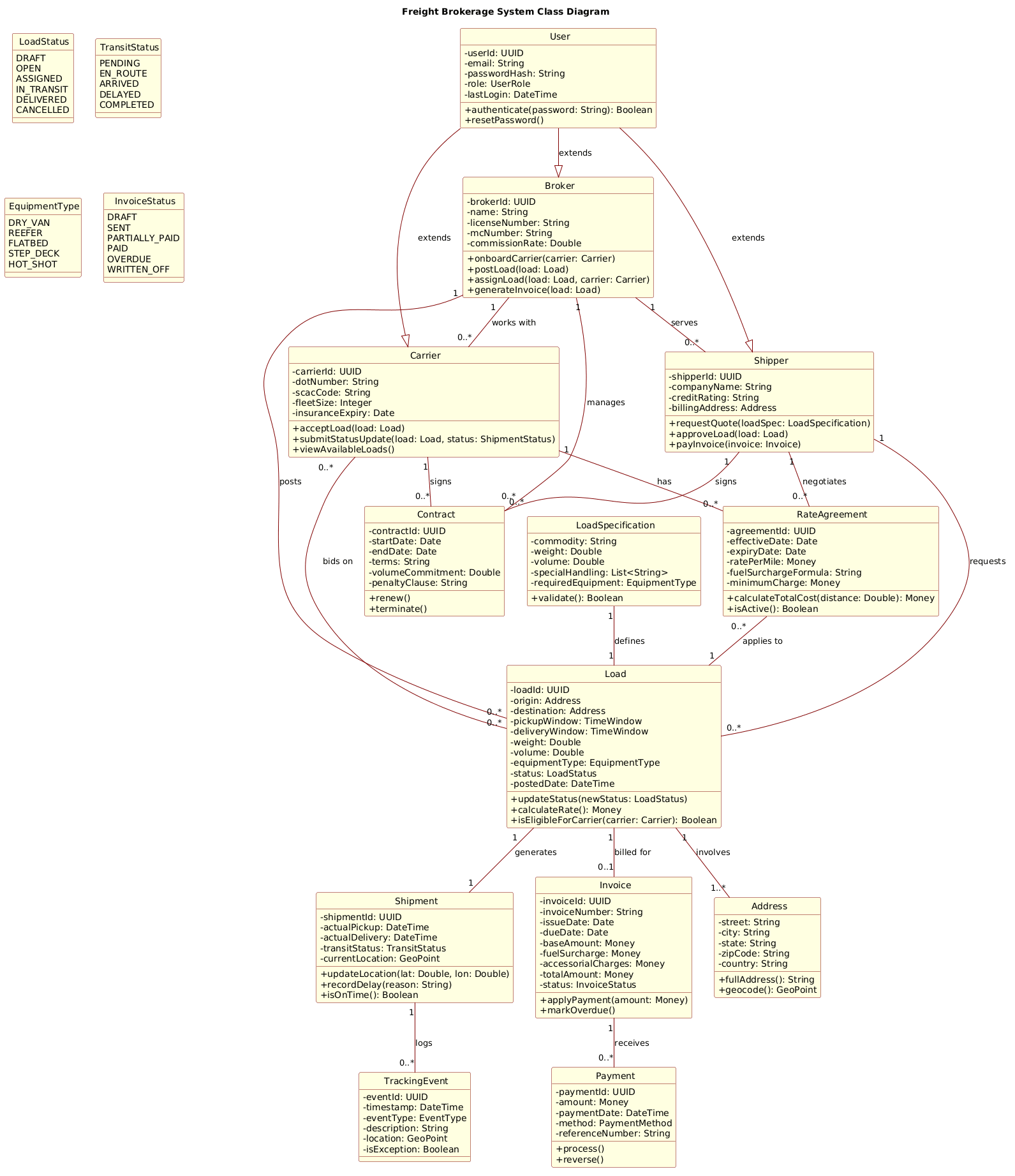
@startuml
!include https://static.visual-paradigm.com/web/resources/plantuml-stdlib/themes/rose.puml

title Freight Brokerage System Class Diagram

/'
This class diagram models the core domain of a freight brokerage platform.
The system connects shippers who need to move cargo with carriers who have available trucks.
Key functional areas include load management, carrier procurement, contract pricing,
shipment tracking, document handling, and customer relationship management.

The diagram captures the following main responsibilities:
- Load lifecycle (creation, posting, assignment, delivery)
- Carrier qualification and performance tracking
- Rate negotiation and contract management
- Shipment visibility and event logging
- Invoicing and payment settlement
- User roles (broker, shipper, carrier, dispatcher)
'/

class Broker {
  - brokerId: UUID
  - name: String
  - licenseNumber: String
  - mcNumber: String
  - commissionRate: Double
  + onboardCarrier(carrier: Carrier)
  + postLoad(load: Load)
  + assignLoad(load: Load, carrier: Carrier)
  + generateInvoice(load: Load)
}

class Shipper {
  - shipperId: UUID
  - companyName: String
  - creditRating: String
  - billingAddress: Address
  + requestQuote(loadSpec: LoadSpecification)
  + approveLoad(load: Load)
  + payInvoice(invoice: Invoice)
}

class Carrier {
  - carrierId: UUID
  - dotNumber: String
  - scacCode: String
  - fleetSize: Integer
  - insuranceExpiry: Date
  + acceptLoad(load: Load)
  + submitStatusUpdate(load: Load, status: ShipmentStatus)
  + viewAvailableLoads()
}

class Load {
  - loadId: UUID
  - origin: Address
  - destination: Address
  - pickupWindow: TimeWindow
  - deliveryWindow: TimeWindow
  - weight: Double
  - volume: Double
  - equipmentType: EquipmentType
  - status: LoadStatus
  - postedDate: DateTime
  + updateStatus(newStatus: LoadStatus)
  + calculateRate(): Money
  + isEligibleForCarrier(carrier: Carrier): Boolean
}

class LoadSpecification {
  - commodity: String
  - weight: Double
  - volume: Double
  - specialHandling: List<String>
  - requiredEquipment: EquipmentType
  + validate(): Boolean
}

class RateAgreement {
  - agreementId: UUID
  - effectiveDate: Date
  - expiryDate: Date
  - ratePerMile: Money
  - fuelSurchargeFormula: String
  - minimumCharge: Money
  + calculateTotalCost(distance: Double): Money
  + isActive(): Boolean
}

class Contract {
  - contractId: UUID
  - startDate: Date
  - endDate: Date
  - terms: String
  - volumeCommitment: Double
  - penaltyClause: String
  + renew()
  + terminate()
}

class Shipment {
  - shipmentId: UUID
  - actualPickup: DateTime
  - actualDelivery: DateTime
  - transitStatus: TransitStatus
  - currentLocation: GeoPoint
  + updateLocation(lat: Double, lon: Double)
  + recordDelay(reason: String)
  + isOnTime(): Boolean
}

class TrackingEvent {
  - eventId: UUID
  - timestamp: DateTime
  - eventType: EventType
  - description: String
  - location: GeoPoint
  - isException: Boolean
}

class Invoice {
  - invoiceId: UUID
  - invoiceNumber: String
  - issueDate: Date
  - dueDate: Date
  - baseAmount: Money
  - fuelSurcharge: Money
  - accessorialCharges: Money
  - totalAmount: Money
  - status: InvoiceStatus
  + applyPayment(amount: Money)
  + markOverdue()
}

class Payment {
  - paymentId: UUID
  - amount: Money
  - paymentDate: DateTime
  - method: PaymentMethod
  - referenceNumber: String
  + process()
  + reverse()
}

class User {
  - userId: UUID
  - email: String
  - passwordHash: String
  - role: UserRole
  - lastLogin: DateTime
  + authenticate(password: String): Boolean
  + resetPassword()
}

class Address {
  - street: String
  - city: String
  - state: String
  - zipCode: String
  - country: String
  + fullAddress(): String
  + geocode(): GeoPoint
}

enum LoadStatus {
  DRAFT
  OPEN
  ASSIGNED
  IN_TRANSIT
  DELIVERED
  CANCELLED
}

enum TransitStatus {
  PENDING
  EN_ROUTE
  ARRIVED
  DELAYED
  COMPLETED
}

enum EquipmentType {
  DRY_VAN
  REEFER
  FLATBED
  STEP_DECK
  HOT_SHOT
}

enum InvoiceStatus {
  DRAFT
  SENT
  PARTIALLY_PAID
  PAID
  OVERDUE
  WRITTEN_OFF
}

Broker "1" -- "0..*" Load : posts
Shipper "1" -- "0..*" Load : requests
Carrier "0..*" -- "0..*" Load : bids on
Carrier "1" -- "0..*" RateAgreement : has
Shipper "1" -- "0..*" RateAgreement : negotiates
Broker "1" -- "0..*" Contract : manages
Shipper "1" -- "0..*" Contract : signs
Carrier "1" -- "0..*" Contract : signs
Load "1" -- "1" Shipment : generates
Shipment "1" -- "0..*" TrackingEvent : logs
Load "1" -- "0..1" Invoice : billed for
Invoice "1" -- "0..*" Payment : receives
Broker "1" -- "0..*" Carrier : works with
Broker "1" -- "0..*" Shipper : serves
Load "1" -- "1..*" Address : involves
User --|> Broker : extends
User --|> Shipper : extends
User --|> Carrier : extends
LoadSpecification "1" -- "1" Load : defines
RateAgreement "0..*" -- "1" Load : applies to
@endumlStep-by-Step Architectural Walkthrough
Constructing a complex domain model requires a phased approach. We will break down the construction of this Freight Brokerage diagram into logical stages, starting from the canvas setup to the final relationship mapping.
Phase 1: Canvas Configuration & Layout Directives
Every PlantUML diagram begins with directives that define its scope and visual style. We start with @startuml to open the diagram and import a theme to ensure professional styling without manual CSS work. The title directive provides a clear header for documentation, while the comment block (/' ... '/) serves as living documentation for future maintainers.
@startuml
!include https://static.visual-paradigm.com/web/resources/plantuml-stdlib/themes/rose.puml

title Freight Brokerage System Class Diagram
/'
This class diagram models the core domain of a freight brokerage platform.
... (comment block continues)
'/
Phase 2: Declaring Core Entities, Actors, and Boundaries
The foundation of the system lies in the core classes. We define Broker, Shipper, and Carrier as the primary actors. Each class is defined with attributes (prefixed with - for private) and methods (prefixed with + for public). For example, the Broker class manages the commission rates and handles the onboarding of carriers.
class Broker {
  - brokerId: UUID
  - name: String
  + onboardCarrier(carrier: Carrier)
  + postLoad(load: Load)
}

class Carrier {
  - carrierId: UUID
  - dotNumber: String
  + acceptLoad(load: Load)
}
Phase 3: Mapping Data Flows & Key Interactions
Relationships define how these entities interact. In logistics, a broker posts a load, but a carrier bids on it. We use association lines (--) with cardinality labels to express these constraints. For instance, one Broker can post many Loads, but a Load is posted by exactly one Broker.
Broker "1" -- "0..*" Load : posts
Carrier "0..*" -- "0..*" Load : bids on
Phase 4: Grouping, Annotations & Visual Polish
Finally, we incorporate inheritance and enumerations to refine the model. The User class acts as a parent for Broker, Shipper, and Carrier, using the generalization arrow (--|>). Enumerations like LoadStatus ensure data integrity by restricting values to valid states like DRAFT or IN_TRANSIT.
User --|> Broker : extends
User --|> Shipper : extends

enum LoadStatus {
  DRAFT
  OPEN
  ASSIGNED
  IN_TRANSIT
  DELIVERED
  CANCELLED
}
Syntax & Keyword Deep Dive
To master PlantUML class diagrams, you must understand the specific syntax keywords that drive the rendering engine. Here is a breakdown of the critical elements used in this Freight Brokerage model:
class: Declares a class definition. It can include attributes and methods separated by newlines. Attributes use-for private and+for public visibility.--: Represents an association relationship between two classes. You can add cardinality labels (e.g.,"1" -- "0..*") to specify multiplicity constraints.--|>: Represents generalization (inheritance). This indicates that a child class (likeBroker) extends a parent class (likeUser).enum: Defines an enumeration type, listing specific allowed values for a property, such asLoadStatusorEquipmentType.title: Sets the main heading of the diagram, useful for documentation and embedding./' ... '/: Creates a multi-line comment block that appears in the rendered diagram as a note, providing context without affecting the logic.
Best Practices & Pitfalls to Avoid
When modeling complex logistics systems, maintaining readability is paramount. Follow these guidelines to ensure your PlantUML diagrams remain effective over time.
- Use Clear Cardinalities: Always specify the multiplicity (e.g.,
"1","0..*") on associations. Ambiguity in relationships leads to database design errors later. - Separate Value Objects: Entities like
AddressorMoneyshould be distinct classes to promote reuse and consistency across the model. - Limit Class Depth: Avoid nesting too many attributes or methods in a single class. If a class becomes too large, consider splitting it into smaller, cohesive components.
- Document Intent: Use the comment block (
/' ... '/) to explain the business rules behind the model, not just the code syntax.
Try It Yourself with VPasCode
Start Building Logistics Architecture Diagrams Faster with VPasCode
Instantly prototype and refine your Freight Brokerage System class diagrams online with VPasCode’s free, browser-based PlantUML editor.