


In the rapidly evolving landscape of healthcare technology, data integrity and relational clarity are paramount for clinical documentation systems. For Speech-Language Pathologists (SLPs), the complexity of tracking patient progress is immense; it involves not just recording a single visit, but maintaining a longitudinal history of treatment plans, specific therapeutic goals, session-specific observations, and standardized assessments. A robust database schema is the backbone of any software designed to support these clinical workflows, ensuring that every data point—from a patient’s diagnosis to the accuracy percentage of a specific speech exercise—is accurately linked and retrievable.

Traditionally, translating these complex clinical requirements into a database schema has required deep SQL knowledge or expensive, proprietary modeling tools. However, the shift towards “diagram-as-code” has democratized this process. By using PlantUML, a text-based modeling language, architects can define intricate relationships, cardinalities, and entity attributes in a version-friendly, readable format. This approach allows for immediate visualization of the data structure, making it easier to validate clinical logic before a single line of backend code is written. In this tutorial, we will leverage VPasCode to construct a professional ERD specifically tailored for a Speech-Language Pathology therapy session documentation tool.
Understanding the Model: Purpose, Scope & Problem Framing
Before diving into the syntax, it is essential to understand the architectural abstraction we are building. This diagram is not merely a list of tables; it is a representation of the clinical lifecycle. In the domain of speech-language pathology, the core problem is managing the many-to-many relationships between patients and their evolving treatment needs. A single patient may have multiple active treatment plans, each containing numerous specific goals. Furthermore, every therapy session is a discrete event that captures data against these goals, while also contributing to the patient’s overall assessment history.
This ERD focuses on the clinical data domain. It intentionally excludes administrative billing or insurance claim entities to keep the focus on the therapeutic workflow. The scope covers the interaction between the Patient (the recipient of care), the Clinician (the provider), the TreatmentPlan (the roadmap), and the Session (the execution). Crucially, it models the granular tracking of GoalProgress, which links a specific goal to a specific session, allowing for longitudinal analysis of a patient’s improvement over time.
By the end of this guide, you will gain insights into how to model one-to-many relationships (e.g., one clinician conducts many sessions), how to handle associative entities (e.g., linking a session to a goal via progress notes), and how to structure timestamp fields for audit trails. You will learn how to use PlantUML to create a schema that is both technically sound for database engineers and semantically clear for clinical stakeholders.
Complete Diagram & Full Source Code
Below is the finished blueprint of the Speech-Language Pathology ERD. This diagram visualizes the entire data architecture required for the therapy documentation tool, utilizing the “rose” theme for a clean, professional aesthetic.
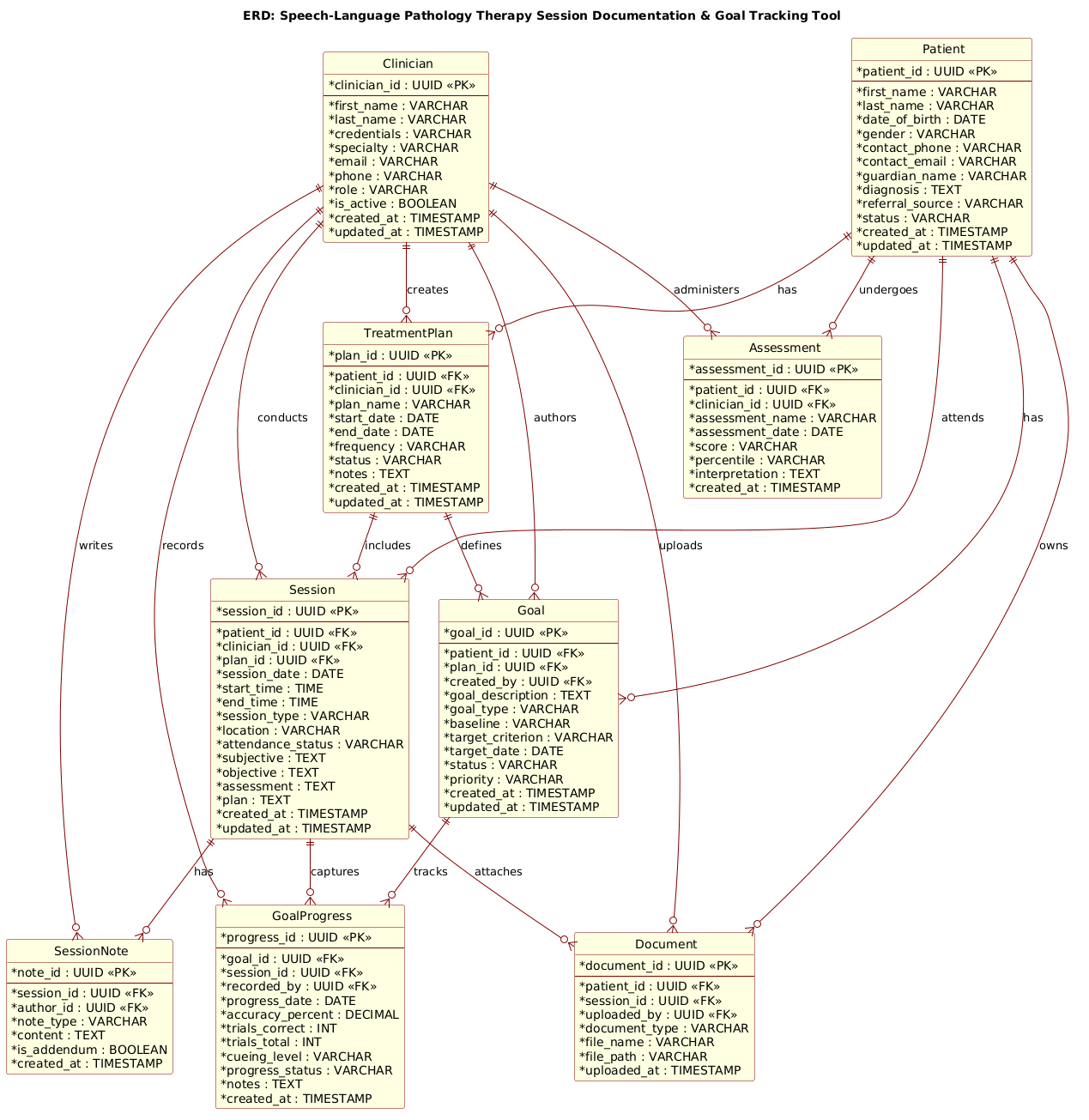
@startuml
!include https://static.visual-paradigm.com/web/resources/plantuml-stdlib/themes/rose.puml

title ERD: Speech-Language Pathology Therapy Session Documentation & Goal Tracking Tool

/'
Diagram Context:
This ERD models a clinical documentation system for speech-language pathology (SLP) therapy.
It supports recording therapy sessions, tracking patient goals, documenting progress,
and maintaining treatment plans over time. The core entities capture patients, clinicians,
sessions, goals, goal progress notes, and session notes. The design allows multiple goals
per patient, multiple sessions per patient, and goal-specific progress tracking within
each session. It also supports treatment plans and diagnostic information relevant to
speech-language pathology practice.
'/

entity "Patient" as patient {
  * patient_id : UUID <<PK>>
  --
  * first_name : VARCHAR
  * last_name : VARCHAR
  * date_of_birth : DATE
  * gender : VARCHAR
  * contact_phone : VARCHAR
  * contact_email : VARCHAR
  * guardian_name : VARCHAR
  * diagnosis : TEXT
  * referral_source : VARCHAR
  * status : VARCHAR
  * created_at : TIMESTAMP
  * updated_at : TIMESTAMP
}

entity "Clinician" as clinician {
  * clinician_id : UUID <<PK>>
  --
  * first_name : VARCHAR
  * last_name : VARCHAR
  * credentials : VARCHAR
  * specialty : VARCHAR
  * email : VARCHAR
  * phone : VARCHAR
  * role : VARCHAR
  * is_active : BOOLEAN
  * created_at : TIMESTAMP
  * updated_at : TIMESTAMP
}

entity "TreatmentPlan" as treatment_plan {
  * plan_id : UUID <<PK>>
  --
  * patient_id : UUID <<FK>>
  * clinician_id : UUID <<FK>>
  * plan_name : VARCHAR
  * start_date : DATE
  * end_date : DATE
  * frequency : VARCHAR
  * status : VARCHAR
  * notes : TEXT
  * created_at : TIMESTAMP
  * updated_at : TIMESTAMP
}

entity "Session" as session {
  * session_id : UUID <<PK>>
  --
  * patient_id : UUID <<FK>>
  * clinician_id : UUID <<FK>>
  * plan_id : UUID <<FK>>
  * session_date : DATE
  * start_time : TIME
  * end_time : TIME
  * session_type : VARCHAR
  * location : VARCHAR
  * attendance_status : VARCHAR
  * subjective : TEXT
  * objective : TEXT
  * assessment : TEXT
  * plan : TEXT
  * created_at : TIMESTAMP
  * updated_at : TIMESTAMP
}

entity "Goal" as goal {
  * goal_id : UUID <<PK>>
  --
  * patient_id : UUID <<FK>>
  * plan_id : UUID <<FK>>
  * created_by : UUID <<FK>>
  * goal_description : TEXT
  * goal_type : VARCHAR
  * baseline : VARCHAR
  * target_criterion : VARCHAR
  * target_date : DATE
  * status : VARCHAR
  * priority : VARCHAR
  * created_at : TIMESTAMP
  * updated_at : TIMESTAMP
}

entity "GoalProgress" as goal_progress {
  * progress_id : UUID <<PK>>
  --
  * goal_id : UUID <<FK>>
  * session_id : UUID <<FK>>
  * recorded_by : UUID <<FK>>
  * progress_date : DATE
  * accuracy_percent : DECIMAL
  * trials_correct : INT
  * trials_total : INT
  * cueing_level : VARCHAR
  * progress_status : VARCHAR
  * notes : TEXT
  * created_at : TIMESTAMP
}

entity "SessionNote" as session_note {
  * note_id : UUID <<PK>>
  --
  * session_id : UUID <<FK>>
  * author_id : UUID <<FK>>
  * note_type : VARCHAR
  * content : TEXT
  * is_addendum : BOOLEAN
  * created_at : TIMESTAMP
}

entity "Assessment" as assessment {
  * assessment_id : UUID <<PK>>
  --
  * patient_id : UUID <<FK>>
  * clinician_id : UUID <<FK>>
  * assessment_name : VARCHAR
  * assessment_date : DATE
  * score : VARCHAR
  * percentile : VARCHAR
  * interpretation : TEXT
  * created_at : TIMESTAMP
}

entity "Document" as document {
  * document_id : UUID <<PK>>
  --
  * patient_id : UUID <<FK>>
  * session_id : UUID <<FK>>
  * uploaded_by : UUID <<FK>>
  * document_type : VARCHAR
  * file_name : VARCHAR
  * file_path : VARCHAR
  * uploaded_at : TIMESTAMP
}

patient ||--o{ treatment_plan : "has"
patient ||--o{ session : "attends"
patient ||--o{ goal : "has"
patient ||--o{ assessment : "undergoes"
patient ||--o{ document : "owns"

clinician ||--o{ treatment_plan : "creates"
clinician ||--o{ session : "conducts"
clinician ||--o{ goal : "authors"
clinician ||--o{ goal_progress : "records"
clinician ||--o{ session_note : "writes"
clinician ||--o{ assessment : "administers"
clinician ||--o{ document : "uploads"

treatment_plan ||--o{ session : "includes"
treatment_plan ||--o{ goal : "defines"

session ||--o{ goal_progress : "captures"
session ||--o{ session_note : "has"
session ||--o{ document : "attaches"

goal ||--o{ goal_progress : "tracks"

@endumlStep-by-Step Architectural Walkthrough
Building this ERD in VPasCode involves a logical progression from setting the visual theme to defining the core entities, and finally mapping the complex relationships that drive the clinical workflow. We will break this down into four distinct phases.
Phase 1: Canvas Configuration & Layout Directives
Every PlantUML diagram begins with configuration directives that set the stage for rendering. In this healthcare context, clarity and professionalism are key. We start by including a standard library theme to ensure the diagram looks polished immediately.
The directive !include loads the “rose” theme, which provides a consistent color palette and styling for the entity boxes. We also define a title directive to clearly label the diagram’s purpose at the top.
!include https://static.visual-paradigm.com/web/resources/plantuml-stdlib/themes/rose.puml

title ERD: Speech-Language Pathology Therapy Session Documentation & Goal Tracking Tool
Additionally, we include a comment block using the /' ... '/ syntax. This is a standard PlantUML feature that allows us to embed a rich text description of the diagram’s context without it appearing in the final rendered image. This is crucial for documentation purposes, ensuring that anyone viewing the diagram understands the clinical scope immediately.
Phase 2: Declaring Core Entities, Actors, and Boundaries
The foundation of an ERD is the entity definition. In PlantUML, we define an entity using the entity keyword, followed by the table name, the alias (used for relationships), and the attribute list enclosed in curly braces.
Consider the Patient entity. We define the primary key using the * prefix, which PlantUML automatically converts to a Primary Key marker. We also define the data type (e.g., UUID, VARCHAR, DATE) to ensure database engineers know the expected schema.
entity "Patient" as patient {
  * patient_id : UUID <>
  --
  * first_name : VARCHAR
  * last_name : VARCHAR
  * date_of_birth : DATE
  * contact_phone : VARCHAR
  * diagnosis : TEXT
  * created_at : TIMESTAMP
}
Notice the -- separator line. This is a visual aid in PlantUML that splits the primary key from the remaining attributes, improving readability. We apply this pattern to all entities, including Clinician, TreatmentPlan, and Session, ensuring a consistent structure across the entire model.
Phase 3: Mapping Data Flows & Key Interactions
Once the entities are defined, we must establish the relationships that connect them. In this healthcare scenario, the relationships are critical for data integrity. We use the ||--o{ notation to represent a One-to-Many relationship where the “One” side is mandatory (the double bar) and the “Many” side is optional (the circle and crow’s foot).
For example, a Clinician conducts many Session records, but a single session is conducted by exactly one clinician. We also label the relationship to provide semantic meaning.
clinician ||--o{ session : "conducts"
patient ||--o{ session : "attends"
We also model the complex tracking of progress. The GoalProgress entity acts as a junction table, linking a specific Goal to a specific Session. This allows us to track how a patient performed on a specific goal during a specific visit.
goal ||--o{ goal_progress : "tracks"
session ||--o{ goal_progress : "captures"
Phase 4: Grouping, Annotations & Visual Polish
The final phase involves ensuring the diagram is self-documenting. We have already used the comment block for high-level context. In the entity definitions, we use stereotypes like < (Primary Key) and < (Foreign Key) to make the database constraints explicit in the visual diagram.
Furthermore, we ensure that all entities have audit fields like created_at and updated_at. This is a best practice in healthcare software to maintain an audit trail for compliance (such as HIPAA). The visual result in VPasCode will clearly show these fields, reminding developers to implement them in the backend code.
Syntax & Keyword Deep Dive
To master ERD creation in PlantUML, understanding the specific syntax used in this diagram is essential. Here is a breakdown of the key keywords and conventions:
entity: The core keyword used to define a database table or class. It takes three arguments: the display name, the alias (for relationships), and the attribute block.*(Asterisk): Placed before an attribute name (e.g.,* patient_id) to denote a Primary Key. PlantUML renders this with a special icon.--(Double Dash): A visual separator line inside an entity block. It is used to visually group the Primary Key separately from the other attributes, improving diagram readability.||--o{: This is the notation for a mandatory One-to-Many relationship. The||indicates the “One” side is mandatory (must exist), and theo{indicates the “Many” side is optional (can be zero or more).<<PK>>and <<FK>>: These are stereotypes.<<PK>>explicitly marks a Primary Key, while<<FK>>marks a Foreign Key, helping to visualize the referential integrity constraints./' ... '/: This syntax creates a multi-line comment block. Text inside this block is visible in the source code but is hidden from the rendered diagram, making it perfect for context descriptions.
Best Practices & Pitfalls to Avoid
When modeling complex healthcare data like the SLP ERD, adherence to best practices ensures the diagram remains maintainable and accurate.
- Consistent Naming Conventions: Always use the alias (e.g.,
as patient) consistently when referencing the entity in relationships. MixingpatientandPatientcan cause rendering errors or confusion. - Use Aliases for Readability: Instead of writing
entity "Patient" as patient { ... }, use the aliaspatientin the relationship lines. This keeps the relationship syntax clean:patient ||--o{ sessionis much clearer thanentity "Patient" ||--o{ entity "Session". - Separate Keys from Attributes: Always use the
--separator in your entity definitions. This visual distinction helps database architects quickly identify primary keys and foreign keys without reading every line of text. - Audit Trail Fields: In healthcare, never forget
created_atandupdated_atfields. They are critical for tracking changes and ensuring data integrity over time.
Start Building SLP ERDs Faster with VPasCode
Design and visualize your healthcare data models instantly in your browser with VPasCode, the free PlantUML editor for software architects.