


In the high-stakes environment of electronics retail, the ability to track product lifecycle from the moment of sale through potential future repairs is a critical operational differentiator. Retailers dealing in high-value items like smartphones, laptops, and home appliances must maintain rigorous records of warranty eligibility, service history, and repair costs to ensure customer satisfaction and regulatory compliance. Without a unified data model, information regarding a specific product unit—its original purchase, its warranty status, and its repair history—often becomes fragmented across disparate spreadsheets or legacy systems, leading to service delays and lost revenue.

This complexity demands a robust database architecture capable of linking a single customer to multiple products, each with its own unique serial number and warranty timeline, while simultaneously managing the intricate workflows of service tickets. A well-designed Entity Relationship Diagram (ERD) serves as the blueprint for this ecosystem, visually mapping how customers own product units, how those units are registered for warranty, and how they transition into the repair lifecycle involving technicians, parts, and service charges. By modeling these relationships explicitly, architects can ensure data integrity, prevent duplicate records, and streamline the query logic required for customer service agents to instantly retrieve a product’s full history.
Using PlantUML within the VPasCode editor allows software architects and database designers to prototype this complex schema instantly in the browser, without the overhead of installing local database engines or configuration tools. This tutorial guides you through building a professional-grade ERD that captures the nuances of an electronics retail warranty and repair service ticket system, demonstrating how to structure entities for customers, products, service tickets, and inventory parts, and how to define the cardinality of relationships that drive the business logic.
Understanding the Model: Purpose, Scope & Problem Framing
The primary objective of this diagram is to establish a normalized data structure that supports two distinct but interconnected business processes: Warranty Registration and Service Ticket Management. Unlike a simple sales database that tracks a one-to-many relationship between a customer and a product, this model introduces a critical intermediate entity: ProductUnit. In electronics retail, a “Product” (e.g., “iPhone 15 Pro”) is a template, but the actual item sold is a specific “Unit” identified by a unique serial number. This distinction is vital for warranty tracking, as two units of the same model may have different purchase dates and warranty expiration dates.
The scope of this model extends beyond simple sales to include the post-sales service lifecycle. It must account for the ServiceTicket entity, which acts as the central hub for repair operations. A single ticket can involve multiple technicians (though typically one primary), multiple replacement parts, and various service charges (labor, diagnostics, shipping). The diagram also explicitly models the Technician and Part entities to support inventory management and workforce allocation. By defining these boundaries, the model ensures that every repair action is traceable to a specific customer, a specific product unit, and a specific set of resources.
Key Takeaways: By studying this diagram, you will learn how to handle the one-to-many and many-to-many relationships inherent in service operations. You will see how to link a customer to a ticket, how a ticket consumes parts from inventory, and how a product unit is the pivot point that connects sales data to service history. This architectural clarity is essential for building applications that can answer complex questions like, “Which customers have a product unit that is currently under warranty and has been repaired more than twice?”
Complete Diagram & Full Source Code
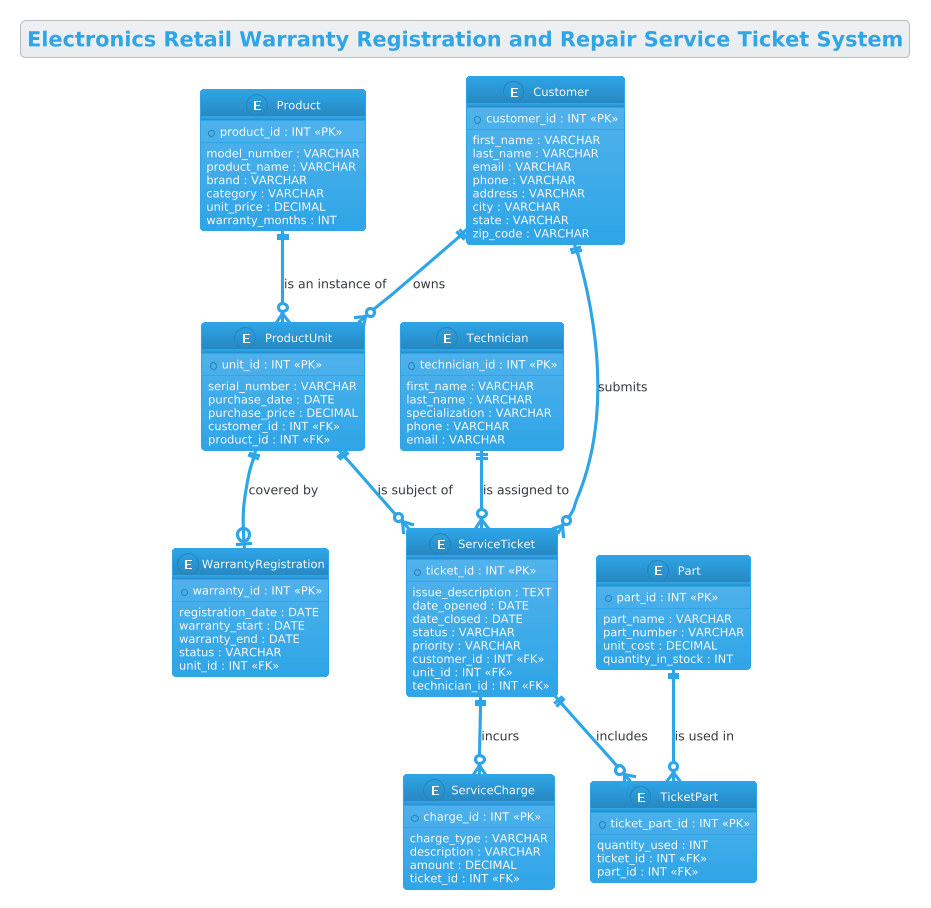
Below is the complete visual representation of the Electronics Retail Warranty and Repair Service Ticket System. This diagram encapsulates all core entities, their attributes, and the logical relationships that govern data flow between sales, warranty, and service departments.
@startuml
!theme cerulean
title Electronics Retail Warranty Registration and Repair Service Ticket System

/'
This ERD models the core data structure for an electronics retail business that sells products
with manufacturer warranties and also operates a repair service center. The system tracks
customers who purchase products, the specific product units sold (each with its own serial
number), and the warranty registrations tied to those units. It also manages repair service
tickets submitted by customers for products needing service, along with the technicians
assigned to diagnose and repair them, the parts used during repairs, and the associated
service charges. The goal is to give the retailer a unified view of product ownership,
warranty coverage, repair history, and service costs.
'/

entity "Customer" as customer {
  * customer_id : INT <<PK>>
  --
  first_name : VARCHAR
  last_name : VARCHAR
  email : VARCHAR
  phone : VARCHAR
  address : VARCHAR
  city : VARCHAR
  state : VARCHAR
  zip_code : VARCHAR
}

entity "Product" as product {
  * product_id : INT <<PK>>
  --
  model_number : VARCHAR
  product_name : VARCHAR
  brand : VARCHAR
  category : VARCHAR
  unit_price : DECIMAL
  warranty_months : INT
}

entity "ProductUnit" as product_unit {
  * unit_id : INT <<PK>>
  --
  serial_number : VARCHAR
  purchase_date : DATE
  purchase_price : DECIMAL
  customer_id : INT <<FK>>
  product_id : INT <<FK>>
}

entity "WarrantyRegistration" as warranty {
  * warranty_id : INT <<PK>>
  --
  registration_date : DATE
  warranty_start : DATE
  warranty_end : DATE
  status : VARCHAR
  unit_id : INT <<FK>>
}

entity "ServiceTicket" as ticket {
  * ticket_id : INT <<PK>>
  --
  issue_description : TEXT
  date_opened : DATE
  date_closed : DATE
  status : VARCHAR
  priority : VARCHAR
  customer_id : INT <<FK>>
  unit_id : INT <<FK>>
  technician_id : INT <<FK>>
}

entity "Technician" as technician {
  * technician_id : INT <<PK>>
  --
  first_name : VARCHAR
  last_name : VARCHAR
  specialization : VARCHAR
  phone : VARCHAR
  email : VARCHAR
}

entity "Part" as part {
  * part_id : INT <<PK>>
  --
  part_name : VARCHAR
  part_number : VARCHAR
  unit_cost : DECIMAL
  quantity_in_stock : INT
}

entity "TicketPart" as ticket_part {
  * ticket_part_id : INT <<PK>>
  --
  quantity_used : INT
  ticket_id : INT <<FK>>
  part_id : INT <<FK>>
}

entity "ServiceCharge" as service_charge {
  * charge_id : INT <<PK>>
  --
  charge_type : VARCHAR
  description : VARCHAR
  amount : DECIMAL
  ticket_id : INT <<FK>>
}

customer ||--o{ product_unit : owns
product ||--o{ product_unit : "is an instance of"
product_unit ||--o| warranty : "covered by"
customer ||--o{ ticket : submits
product_unit ||--o{ ticket : "is subject of"
technician ||--o{ ticket : "is assigned to"
ticket ||--o{ ticket_part : includes
part ||--o{ ticket_part : "is used in"
ticket ||--o{ service_charge : incurs

@endumlStep-by-Step Architectural Walkthrough
Phase 1: Canvas Configuration & Layout Directives
The foundation of any PlantUML diagram lies in its configuration. Before defining entities, we set the visual theme and the diagram title to establish context immediately. In this guide, we utilize the !theme cerulean directive. This applies a professional, clean blue-and-white color scheme that is highly readable for technical documentation and fits well within corporate dashboards.
We also define a descriptive title using the title directive. Crucially, we include a comment block using the /' ... '/ syntax. This block serves as a high-level architectural summary, explaining the business domain (electronics retail) and the specific scope (warranty and repair tracking) without cluttering the visual diagram with syntax details. This practice ensures that anyone viewing the diagram understands the “why” behind the model.
Phase 2: Declaring Core Entities, Actors, and Boundaries
The core of the ERD is built using the entity keyword. We start with the Customer and Product entities, which represent the primary actors and catalog items. Notice the distinction between Product (the template) and ProductUnit (the specific item). The ProductUnit entity is the linchpin of this model; it captures the serial_number and purchase_date, which are essential for warranty validation.
Each entity is defined with a list of attributes. We use the * symbol to denote the Primary Key (PK), such as * customer_id : INT. Foreign Keys (FK) are marked with <<FK>> to explicitly show relationships, such as customer_id : INT <<FK>> inside the ProductUnit entity. This explicit labeling is a best practice in ERD design, making the schema self-documenting and easier to translate into SQL DDL.
Phase 3: Mapping Data Flows & Key Interactions
Once the entities are defined, we establish the relationships using PlantUML’s line notation. The syntax ||--o{ is used to represent a one-to-many relationship where the entity on the left is mandatory (the double bar) and the entity on the right is optional (the circle) but can have many instances (the crow’s foot).
For example, customer ||--o{ product_unit : owns indicates that one customer can own zero or many product units, but a product unit must belong to exactly one customer. We also handle the ServiceTicket relationships here. A ticket is linked to a customer (who submitted it), a product_unit (what is being fixed), and a technician (who is doing the work). This triad of relationships ensures that every repair action is fully attributed.
Phase 4: Grouping, Annotations & Visual Polish
Complex repair processes often involve multiple parts and charges. To model this, we introduce the junction entity TicketPart. This is a classic solution to the many-to-many relationship between Ticket and Part. A ticket can use many parts, and a part can be used in many tickets, but the specific quantity used in a specific ticket is the data point we need to capture. The TicketPart entity holds the quantity_used, effectively breaking the many-to-many relationship into two one-to-many relationships.
Finally, we add the ServiceCharge entity to track costs. This allows the system to record labor, diagnostics, and shipping separately, aggregating them under a single ticket ID. The visual lines connecting these entities create a clear narrative flow: from ownership to warranty, and from warranty to service, and finally to the financial settlement of the repair.
Syntax & Keyword Deep Dive
To build this diagram effectively in VPasCode, it is essential to understand the specific PlantUML syntax features used to represent the data model accurately.
entity: The keyword used to define a database table or class. It is followed by the entity name and an alias (e.g.,entity "Customer" as customer) which is used for drawing relationships.<<PK>>and<<FK>>: These are stereotypes used to visually mark Primary Keys and Foreign Keys within the entity attributes. The*prefix in the attribute list also denotes the primary key visually.||--o{: This relationship connector represents a mandatory one-to-many relationship. The||indicates mandatory participation on the left, ando{indicates optional participation and multiplicity (many) on the right./' ... '/: This is the multi-line comment syntax in PlantUML. It allows you to embed descriptive text that is rendered in the diagram but does not affect the logic or rendering of the entities.!theme: A directive that applies a predefined visual style to the entire diagram, ensuring consistency in fonts, colors, and shapes.
Best Practices & Pitfalls to Avoid
When designing ERDs for complex systems like warranty and repair services, adhering to best practices ensures the model remains maintainable and scalable.
- Separate Product from ProductUnit: A common pitfall is conflating the product template (e.g., “iPhone 15”) with the specific unit sold. Always maintain a distinct entity for
ProductUnitto track serial numbers and individual purchase dates, which is critical for warranty logic. - Use Junction Entities for Many-to-Many: Do not try to force a many-to-many relationship directly between two entities. Always create an intermediate entity (like
TicketPart) to store the attributes of the relationship, such as quantity or cost. - Explicit Foreign Keys: While PlantUML infers relationships from the lines drawn, explicitly marking attributes with
<<FK>>in the entity definition makes the diagram self-explanatory and easier to convert into SQL code. - Keep Attributes Simple: Stick to standard data types (INT, VARCHAR, DATE, DECIMAL) in your attribute definitions. Avoid embedding complex logic or functions within the entity attributes themselves.
Start Building Your Retail ERD Faster with VPasCode
Design complex database schemas instantly in your browser with VPasCode, the free PlantUML editor that offers live rendering and zero installation.