


In the fast-paced world of retail bookkeeping, managing the lifecycle of a physical book—from its initial metadata entry to its eventual resale or buyback—requires a data model that is both granular and flexible. A bookstore doesn’t just sell new books; it thrives on the circular economy of used books, where condition, provenance, and market demand dictate value. Without a structured data foundation, tracking the specific copy of a book, calculating fair buyback offers based on dynamic pricing rules, and linking these transactions to customer profiles becomes a logistical nightmare prone to errors.
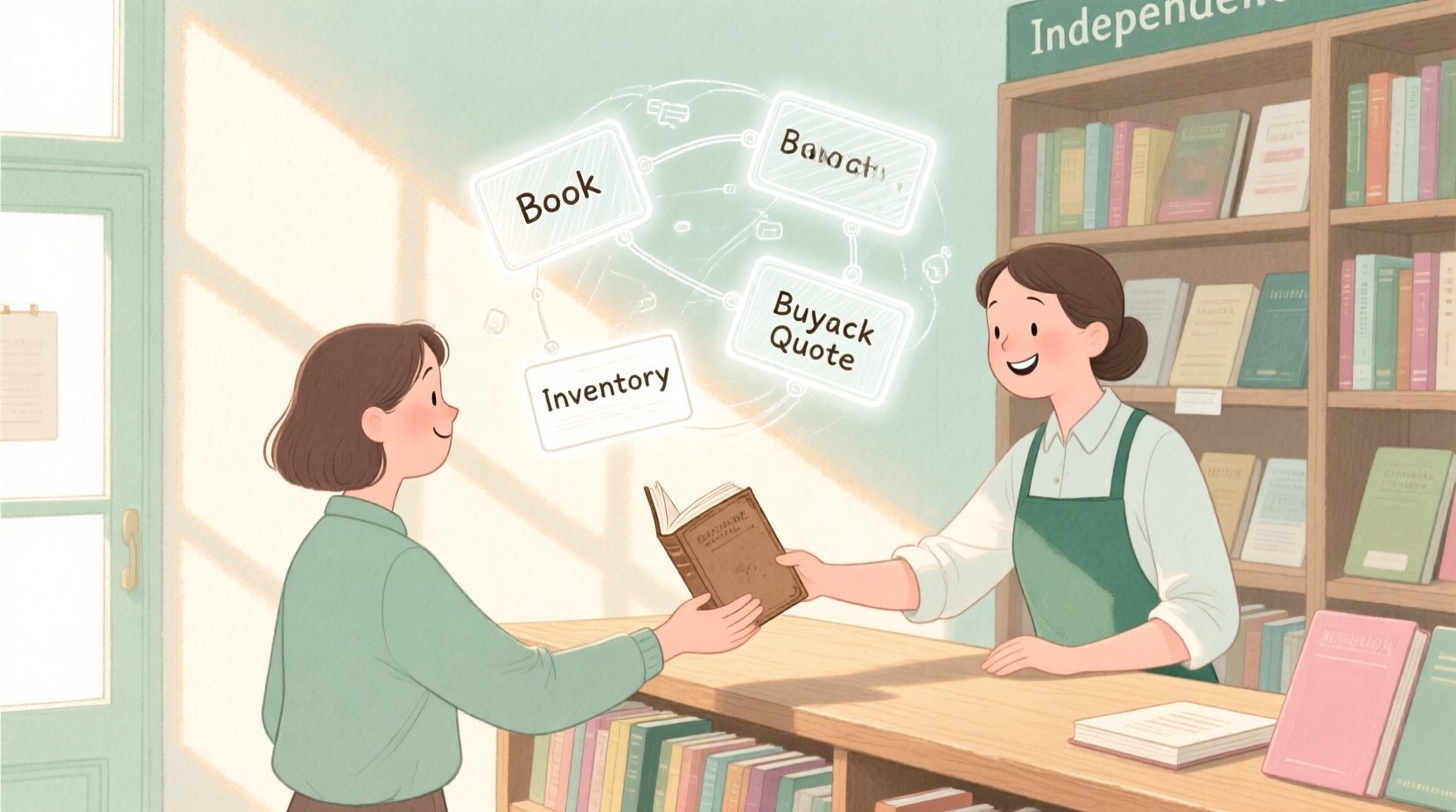
This is where the power of diagram-as-code comes into play. By using PlantUML to define an Entity-Relationship Diagram (ERD), architects can visualize the complex relationships between ISBNs, inventory items, pricing logic, and customer transactions before a single line of database code is written. This approach ensures that the data structure supports critical business operations like buyback pricing engines and multi-location inventory tracking. In this masterclass, we will build a complete ERD for a bookstore buyback tool, leveraging the VPasCode web editor to render, refine, and understand the data architecture instantly.
Understanding the Model: Purpose, Scope & Problem Framing
Before diving into the syntax, it is crucial to understand the architectural abstraction we are building. An Entity-Relationship Diagram (ERD) serves as the blueprint for a relational database, defining how data entities (like Books or Customers) relate to one another. In this specific retail scenario, the primary challenge is handling the “Many-to-Many” relationship between books and categories, while simultaneously tracking individual physical copies (Inventory) that may have different conditions and prices.
Diagram Abstraction & Representation
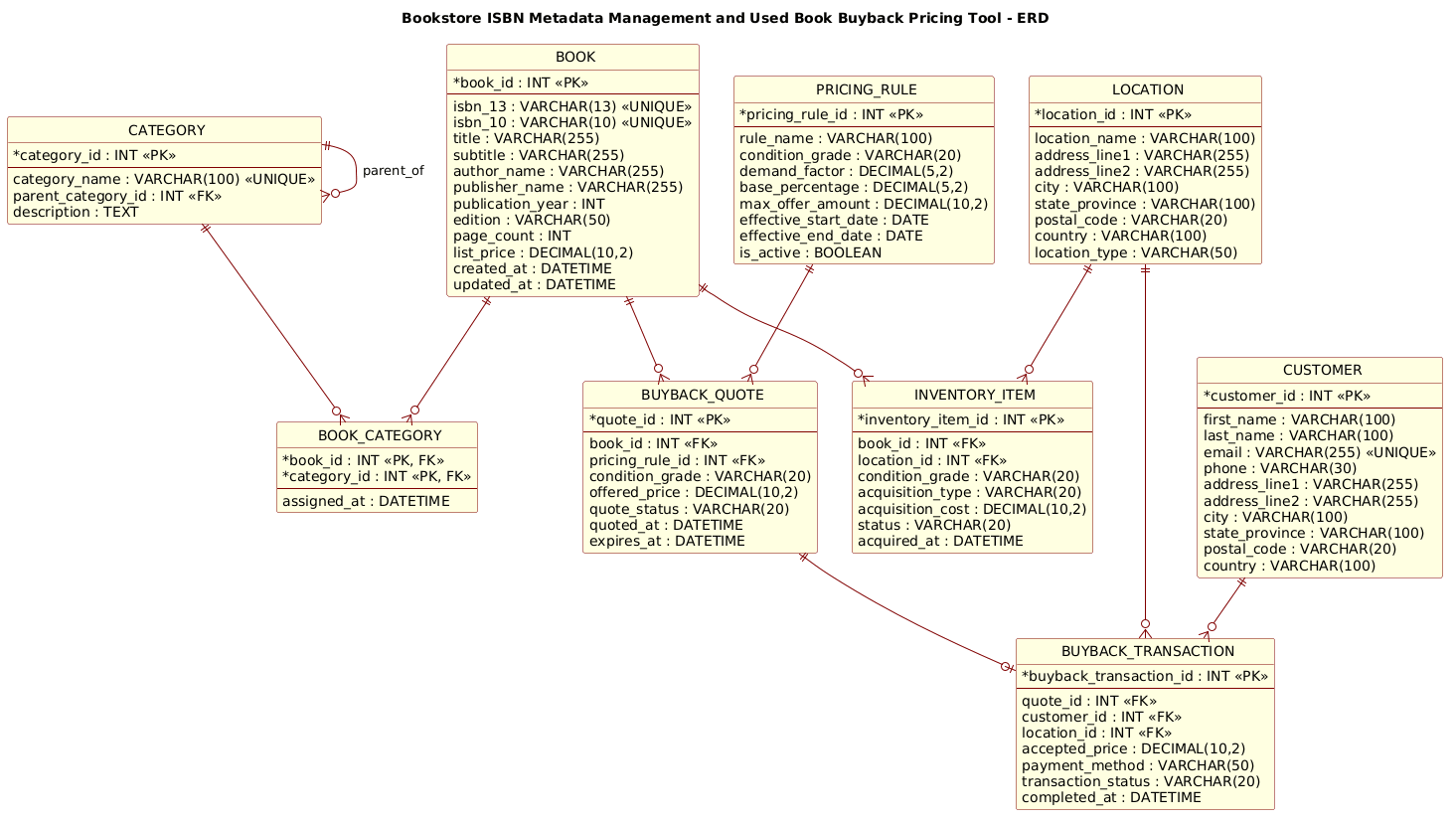
This ERD models the core data entities required for a hybrid bookstore system. The BOOK entity acts as the canonical record for metadata (ISBN, Title, Author), ensuring that we don’t duplicate data for every physical copy. The INVENTORY_ITEM entity bridges the gap between the abstract book and the physical reality, storing condition grades and location data. The BUYBACK_QUOTE and BUYBACK_TRANSACTION entities form a critical chain for the buyback workflow, linking a customer’s offer to a specific pricing rule and the final accepted price.
Target Domain Scope & Scenario
The scope of this model is strictly limited to the data structures needed for ISBN management and the buyback lifecycle. It covers the entire journey of a used book: from a customer bringing a book in, to the system generating a quote based on a PRICING_RULE, to the final transaction recording the payment. It explicitly excludes external systems like point-of-sale (POS) integration or e-commerce frontend logic, focusing purely on the backend data integrity.
Key Takeaways & Educational Insights
By constructing this diagram, you will learn how to:
- Design a normalized schema that separates metadata from physical inventory.
- Implement polymorphic relationships using junction tables (e.g.,
BOOK_CATEGORY). - Model complex business logic entities like
PRICING_RULEthat drive dynamic calculations. - Visualize one-to-many and one-to-one relationships using standard PlantUML ERD notation.
Complete Diagram & Full Source Code
Below is the final, rendered blueprint of the Bookstore Buyback ERD. This diagram showcases the relationships between Books, Categories, Inventory, Locations, Pricing Rules, and the Buyback transaction flow.
@startuml
!include https://static.visual-paradigm.com/web/resources/plantuml-stdlib/themes/rose.puml

title Bookstore ISBN Metadata Management and Used Book Buyback Pricing Tool - ERD

/'
This ERD models the data foundation for a bookstore system that manages book metadata by ISBN
and supports used book buyback pricing. The central BOOK entity stores ISBN-level metadata,
including title, author, publisher, edition, and list price. Each book may be associated with
one or more CATEGORY records for shelving and discovery, and with multiple INVENTORY_ITEM
records representing physical copies in the store. Used copies that customers bring in for
buyback are captured in BUYBACK_QUOTE, which records condition, offered price, and quote
status. PRICING_RULE defines the business logic used to calculate buyback offers based on
condition, demand, and current market value. CUSTOMER identifies the person selling used
books, while BUYBACK_TRANSACTION records the final accepted buyback and links the customer,
the quoted item, and the store location. LOCATION identifies where inventory is held or
where a buyback occurs. Together, these entities support ISBN metadata management, copy-level
tracking, and transparent used book buyback pricing.
'/

' Entities
entity "BOOK" as BOOK {
  * book_id : INT <<PK>>
  --
  isbn_13 : VARCHAR(13) <<UNIQUE>>
  isbn_10 : VARCHAR(10) <<UNIQUE>>
  title : VARCHAR(255)
  subtitle : VARCHAR(255)
  author_name : VARCHAR(255)
  publisher_name : VARCHAR(255)
  publication_year : INT
  edition : VARCHAR(50)
  page_count : INT
  list_price : DECIMAL(10,2)
  created_at : DATETIME
  updated_at : DATETIME
}

entity "CATEGORY" as CATEGORY {
  * category_id : INT <<PK>>
  --
  category_name : VARCHAR(100) <<UNIQUE>>
  parent_category_id : INT <<FK>>
  description : TEXT
}

entity "BOOK_CATEGORY" as BOOK_CATEGORY {
  * book_id : INT <<PK, FK>>
  * category_id : INT <<PK, FK>>
  --
  assigned_at : DATETIME
}

entity "INVENTORY_ITEM" as INVENTORY_ITEM {
  * inventory_item_id : INT <<PK>>
  --
  book_id : INT <<FK>>
  location_id : INT <<FK>>
  condition_grade : VARCHAR(20)
  acquisition_type : VARCHAR(20)
  acquisition_cost : DECIMAL(10,2)
  status : VARCHAR(20)
  acquired_at : DATETIME
}

entity "LOCATION" as LOCATION {
  * location_id : INT <<PK>>
  --
  location_name : VARCHAR(100)
  address_line1 : VARCHAR(255)
  address_line2 : VARCHAR(255)
  city : VARCHAR(100)
  state_province : VARCHAR(100)
  postal_code : VARCHAR(20)
  country : VARCHAR(100)
  location_type : VARCHAR(50)
}

entity "PRICING_RULE" as PRICING_RULE {
  * pricing_rule_id : INT <<PK>>
  --
  rule_name : VARCHAR(100)
  condition_grade : VARCHAR(20)
  demand_factor : DECIMAL(5,2)
  base_percentage : DECIMAL(5,2)
  max_offer_amount : DECIMAL(10,2)
  effective_start_date : DATE
  effective_end_date : DATE
  is_active : BOOLEAN
}

entity "BUYBACK_QUOTE" as BUYBACK_QUOTE {
  * quote_id : INT <<PK>>
  --
  book_id : INT <<FK>>
  pricing_rule_id : INT <<FK>>
  condition_grade : VARCHAR(20)
  offered_price : DECIMAL(10,2)
  quote_status : VARCHAR(20)
  quoted_at : DATETIME
  expires_at : DATETIME
}

entity "CUSTOMER" as CUSTOMER {
  * customer_id : INT <<PK>>
  --
  first_name : VARCHAR(100)
  last_name : VARCHAR(100)
  email : VARCHAR(255) <<UNIQUE>>
  phone : VARCHAR(30)
  address_line1 : VARCHAR(255)
  address_line2 : VARCHAR(255)
  city : VARCHAR(100)
  state_province : VARCHAR(100)
  postal_code : VARCHAR(20)
  country : VARCHAR(100)
}

entity "BUYBACK_TRANSACTION" as BUYBACK_TRANSACTION {
  * buyback_transaction_id : INT <<PK>>
  --
  quote_id : INT <<FK>>
  customer_id : INT <<FK>>
  location_id : INT <<FK>>
  accepted_price : DECIMAL(10,2)
  payment_method : VARCHAR(50)
  transaction_status : VARCHAR(20)
  completed_at : DATETIME
}

' Relationships
BOOK ||--o{ BOOK_CATEGORY
CATEGORY ||--o{ BOOK_CATEGORY
CATEGORY ||--o{ CATEGORY : parent_of
BOOK ||--o{ INVENTORY_ITEM
LOCATION ||--o{ INVENTORY_ITEM
BOOK ||--o{ BUYBACK_QUOTE
PRICING_RULE ||--o{ BUYBACK_QUOTE
CUSTOMER ||--o{ BUYBACK_TRANSACTION
BUYBACK_QUOTE ||--o| BUYBACK_TRANSACTION
LOCATION ||--o{ BUYBACK_TRANSACTION

@endumlStep-by-Step Architectural Walkthrough
Phase 1: Canvas Configuration & Layout Directives
Every professional PlantUML diagram starts with configuration to ensure consistency and visual appeal. In this phase, we set the global theme and the diagram title. We include the rose.puml theme, which provides a polished, modern look with soft colors and rounded borders, ideal for presentation to stakeholders.
!include https://static.visual-paradigm.com/web/resources/plantuml-stdlib/themes/rose.puml

title Bookstore ISBN Metadata Management and Used Book Buyback Pricing Tool - ERD
Additionally, we define the context using a comment block. This is a best practice for living documentation, as it allows the diagram to explain itself without cluttering the code with syntax comments.
/'
This ERD models the data foundation for a bookstore system...
'/
Phase 2: Declaring Core Entities, Actors, and Boundaries
The foundation of the ERD lies in the entity blocks. We define the BOOK entity first as it is the central hub of our data. We use the entity keyword followed by a label and an alias. Inside the block, we define attributes with their data types. We use the * prefix to denote Primary Keys (PK) and FK for Foreign Keys.
entity "BOOK" as BOOK {
  * book_id : INT <>
  --
  isbn_13 : VARCHAR(13) <>
  ...
}
We also define the INVENTORY_ITEM and LOCATION entities to handle the physical tracking of books. The separation of BOOK (metadata) from INVENTORY_ITEM (physical instance) is a critical architectural decision that allows us to track the same book title across multiple copies with different conditions.
Phase 3: Mapping Data Flows & Key Interactions
Once the entities are defined, we establish the relationships using the ||--o{ and ||--o| syntax. This notation represents cardinality. For example, BOOK ||--o{ INVENTORY_ITEM means one Book can have zero or many Inventory Items.
BOOK ||--o{ INVENTORY_ITEM
LOCATION ||--o{ INVENTORY_ITEM
We also model the complex buyback flow. The BUYBACK_QUOTE is linked to both the BOOK and the PRICING_RULE, showing that a quote is generated based on a specific book and a specific set of pricing rules. The final transaction links the quote, the customer, and the location.
BUYBACK_QUOTE ||--o| BUYBACK_TRANSACTION
CUSTOMER ||--o{ BUYBACK_TRANSACTION
Phase 4: Grouping, Annotations & Visual Polish
To enhance readability, we use the parent_of label for the recursive relationship in the CATEGORY entity, allowing books to be nested within categories (e.g., “Fiction” > “Mystery”). We also ensure all data types are explicitly defined (e.g., DECIMAL(10,2) for currency) to prevent ambiguity during database implementation.
Syntax & Keyword Deep Dive
PlantUML ERD diagrams use specific keywords to define structure and relationships. Here is a breakdown of the syntax used in this tutorial:
entity: Defines a database table or entity. The syntax isentity "Label" as Alias { ... }.PKandFK: Stereotypes used inside the entity block to mark Primary Keys (PK) and Foreign Keys (FK). They appear as <> and < > in the diagram. ||--o{: Represents a one-to-many relationship. The||indicates “one and only one” on the left, ando{indicates “zero or many” on the right.||--o|: Represents a one-to-zero-or-one relationship. This is used for the link between a Quote and a Transaction, implying a quote might not result in a transaction, but if it does, it’s a single transaction./** /and/' /: Comment blocks./' ... '/is used for text that appears inside the diagram canvas, while/** ... */is for code comments that do not render visually.data-type: Standard SQL data types likeINT,VARCHAR,DECIMAL, andDATETIMEare used to define attribute constraints.
Best Practices & Pitfalls to Avoid
When building ERDs with PlantUML, adhering to best practices ensures your diagrams remain maintainable and clear.
- Separate Metadata from Physical Instances: As seen in this bookstore model, always separate the abstract
BOOK(metadata) from theINVENTORY_ITEM(physical copy). Mixing them leads to data redundancy and difficult updates. - Use Explicit Data Types: Always specify precision for numbers (e.g.,
DECIMAL(10,2)) and lengths for strings (e.g.,VARCHAR(255)). This prevents ambiguity when developers translate the diagram into SQL. - Avoid Over-Nesting: While categories can be hierarchical, try to keep the relationship lines clean. Use labels like
parent_ofto clarify recursive relationships. - Consistent Naming Conventions: Use uppercase for entity names and snake_case for attributes (e.g.,
book_id) to maintain readability across the codebase.
Start Building Professional ERDs Faster with VPasCode
Design complex retail data models instantly in your browser with VPasCode’s free PlantUML editor—no installation required.