


In the rapidly evolving landscape of e-commerce, particularly within the pet care sector, businesses are moving beyond simple transactional sales to build holistic ecosystems that manage both product replenishment and animal well-being. A modern pet supply platform must seamlessly integrate two distinct but interconnected workflows: the logistical rhythm of autoship subscriptions for recurring product delivery and the proactive, time-sensitive nature of pet health reminders. Designing the data architecture to support these parallel streams requires a clear understanding of how customers, their pets, and their orders relate to one another without creating data redundancy or logical conflicts.
Developers and architects often struggle to visualize how a single customer can simultaneously manage multiple pets, each with unique health schedules, while also maintaining separate subscription profiles for different product categories. This complexity is best solved through Entity Relationship Diagrams (ERDs) that clearly define cardinality, foreign keys, and entity boundaries. By leveraging diagram-as-code tools like VPasCode, teams can iterate on these complex schemas instantly, ensuring that the underlying database structure accurately reflects the business logic of a dual-purpose platform before writing a single line of SQL.
Understanding the Model: Purpose, Scope & Problem Framing
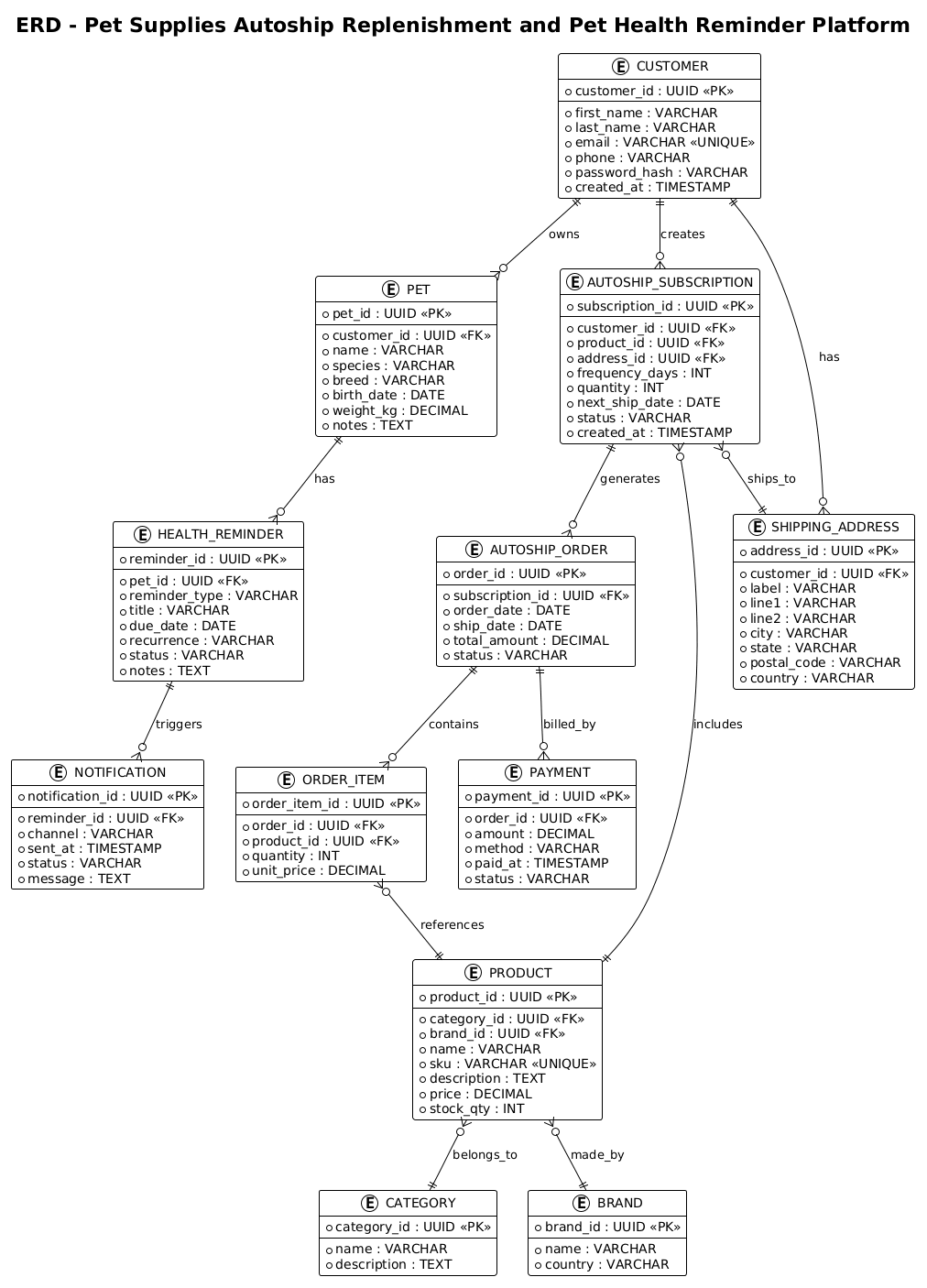
This Entity Relationship Diagram (ERD) serves as the foundational blueprint for a specialized retail platform designed to manage pet profiles, recurring supply orders, and scheduled health interventions. The core abstraction here is the PET entity, which acts as the central pivot point for all pet-specific data. Unlike standard retail models where the customer is the sole anchor, this model introduces a layer of indirection: the customer owns the pet, and the pet owns the health history and specific product needs. This separation ensures that health reminders are tied to the biological entity (the pet) rather than the financial entity (the customer), allowing for more accurate tracking of veterinary visits and medication schedules.
The scope of this model explicitly covers the intersection of two major business domains. The first domain is Recurring Replenishment, modeled through AUTOSHIP_SUBSCRIPTION, AUTOSHIP_ORDER, and ORDER_ITEM entities. This chain manages the logistics of how often a product is shipped, where it goes, and what was included in the transaction. The second domain is Proactive Health Management, modeled through HEALTH_REMINDER and NOTIFICATION entities. These entities track the lifecycle of a health event from its creation to the delivery of an alert to the owner. By modeling these as distinct but linked workflows, the diagram ensures that a missed medication reminder does not confuse the inventory logic of an autoship order.
By studying this model, readers will gain critical insights into handling one-to-many relationships in complex retail systems. You will learn how to structure a database where a single CUSTOMER can have multiple SHIPPING_ADDRESS entries, how to link a subscription to a specific product without creating data duplication, and how to track the financial state of an order independently from the physical delivery status. The diagram demonstrates best practices for normalization, ensuring that product details and address information are stored once and referenced by multiple transactions, thereby maintaining data integrity across the platform.
Complete Diagram & Full Source Code
Before diving into the construction details, examine the complete schema below. This ERD visualizes the entire data ecosystem, from the customer profile down to the individual order line items and health notifications.
@startuml
!theme plain
title ERD - Pet Supplies Autoship Replenishment and Pet Health Reminder Platform

/'
This entity relationship diagram models a platform that manages pet profiles, recurring
autoship orders for pet supplies, and scheduled health reminders for each pet. The core
of the diagram centers on the PET entity, which belongs to a CUSTOMER (the pet owner)
and serves as the anchor for all pet-specific activity in the system. Each pet can have
multiple HEALTH_REMINDER records for things like vaccinations, medications, and vet
visits, and each reminder can optionally generate a NOTIFICATION to alert the owner.
Independently, a CUSTOMER can create AUTOSHIP_SUBSCRIPTION records that define how
often a particular PRODUCT should be reordered and shipped. Each subscription references
exactly one PRODUCT from the product catalog and one SHIPPING_ADDRESS, and over time
it produces many AUTOSHIP_ORDER records representing individual fulfilled or pending
deliveries. Each order contains one or more ORDER_ITEM line entries that capture the
specific products, quantities, and prices at the time of fulfillment, while PAYMENT
records track the financial transactions tied to those orders. The PRODUCT entity
supports the supply side of the platform, optionally belonging to a CATEGORY and
optionally being linked to a BRAND, and can appear in many subscriptions and order
items. SHIPPING_ADDRESS is reusable across multiple subscriptions so a customer can
direct deliveries to different locations. Overall the diagram captures the intersection
of two related but distinct workflows, recurring product replenishment and proactive
pet health management, both organized around the customer and their pets.
'/

entity CUSTOMER {
  * customer_id : UUID <<PK>>
  --
  * first_name : VARCHAR
  * last_name : VARCHAR
  * email : VARCHAR <<UNIQUE>>
  * phone : VARCHAR
  * password_hash : VARCHAR
  * created_at : TIMESTAMP
}

entity PET {
  * pet_id : UUID <<PK>>
  --
  * customer_id : UUID <<FK>>
  * name : VARCHAR
  * species : VARCHAR
  * breed : VARCHAR
  * birth_date : DATE
  * weight_kg : DECIMAL
  * notes : TEXT
}

entity HEALTH_REMINDER {
  * reminder_id : UUID <<PK>>
  --
  * pet_id : UUID <<FK>>
  * reminder_type : VARCHAR
  * title : VARCHAR
  * due_date : DATE
  * recurrence : VARCHAR
  * status : VARCHAR
  * notes : TEXT
}

entity NOTIFICATION {
  * notification_id : UUID <<PK>>
  --
  * reminder_id : UUID <<FK>>
  * channel : VARCHAR
  * sent_at : TIMESTAMP
  * status : VARCHAR
  * message : TEXT
}

entity AUTOSHIP_SUBSCRIPTION {
  * subscription_id : UUID <<PK>>
  --
  * customer_id : UUID <<FK>>
  * product_id : UUID <<FK>>
  * address_id : UUID <<FK>>
  * frequency_days : INT
  * quantity : INT
  * next_ship_date : DATE
  * status : VARCHAR
  * created_at : TIMESTAMP
}

entity AUTOSHIP_ORDER {
  * order_id : UUID <<PK>>
  --
  * subscription_id : UUID <<FK>>
  * order_date : DATE
  * ship_date : DATE
  * total_amount : DECIMAL
  * status : VARCHAR
}

entity ORDER_ITEM {
  * order_item_id : UUID <<PK>>
  --
  * order_id : UUID <<FK>>
  * product_id : UUID <<FK>>
  * quantity : INT
  * unit_price : DECIMAL
}

entity PAYMENT {
  * payment_id : UUID <<PK>>
  --
  * order_id : UUID <<FK>>
  * amount : DECIMAL
  * method : VARCHAR
  * paid_at : TIMESTAMP
  * status : VARCHAR
}

entity PRODUCT {
  * product_id : UUID <<PK>>
  --
  * category_id : UUID <<FK>>
  * brand_id : UUID <<FK>>
  * name : VARCHAR
  * sku : VARCHAR <<UNIQUE>>
  * description : TEXT
  * price : DECIMAL
  * stock_qty : INT
}

entity CATEGORY {
  * category_id : UUID <<PK>>
  --
  * name : VARCHAR
  * description : TEXT
}

entity BRAND {
  * brand_id : UUID <<PK>>
  --
  * name : VARCHAR
  * country : VARCHAR
}

entity SHIPPING_ADDRESS {
  * address_id : UUID <<PK>>
  --
  * customer_id : UUID <<FK>>
  * label : VARCHAR
  * line1 : VARCHAR
  * line2 : VARCHAR
  * city : VARCHAR
  * state : VARCHAR
  * postal_code : VARCHAR
  * country : VARCHAR
}

CUSTOMER ||--o{ PET : owns
CUSTOMER ||--o{ AUTOSHIP_SUBSCRIPTION : creates
CUSTOMER ||--o{ SHIPPING_ADDRESS : has

PET ||--o{ HEALTH_REMINDER : has
HEALTH_REMINDER ||--o{ NOTIFICATION : triggers

AUTOSHIP_SUBSCRIPTION ||--o{ AUTOSHIP_ORDER : generates
AUTOSHIP_SUBSCRIPTION }o--|| PRODUCT : includes
AUTOSHIP_SUBSCRIPTION }o--|| SHIPPING_ADDRESS : ships_to

AUTOSHIP_ORDER ||--o{ ORDER_ITEM : contains
AUTOSHIP_ORDER ||--o{ PAYMENT : billed_by

ORDER_ITEM }o--|| PRODUCT : references

PRODUCT }o--|| CATEGORY : belongs_to
PRODUCT }o--|| BRAND : made_by

@endumlStep-by-Step Architectural Walkthrough
Constructing a complex ERD like this requires a systematic approach. We will break down the diagram into four logical phases: setting the stage, defining the core entities, establishing the relationships, and refining the visual presentation.
Phase 1: Canvas Configuration & Layout Directives
The first step in any PlantUML ERD is to establish the visual theme and title. This ensures consistency and provides immediate context. In this diagram, we use the !theme plain directive to keep the design clean and focused on the data structure rather than decorative elements. The title directive provides a clear label for the diagram, which is essential for documentation.
@startuml
!theme plain
title ERD - Pet Supplies Autoship Replenishment and Pet Health Reminder Platform
Immediately following the title, we insert a comment block using the /' and '/ syntax. This block serves as a narrative description of the diagram’s purpose, explaining the business logic without cluttering the code with syntax instructions. This is a best practice for living documentation, ensuring that the “why” of the diagram is preserved alongside the “how”.
Phase 2: Declaring Core Entities, Actors, and Boundaries
The foundation of the ERD lies in the entity blocks. We begin with the CUSTOMER entity, which acts as the root of the user hierarchy. Notice the use of UUID for the primary key (customer_id) and the < stereotype. This indicates that this field uniquely identifies the customer. We also define standard attributes like first_name, email, and password_hash. The email field is marked with <, a crucial constraint for ensuring data integrity in authentication systems.
entity CUSTOMER {
  * customer_id : UUID <>
  --
  * first_name : VARCHAR
  * last_name : VARCHAR
  * email : VARCHAR <>
  * phone : VARCHAR
  * password_hash : VARCHAR
  * created_at : TIMESTAMP
}
Next, we define the PET entity. This entity is critical because it introduces the concept of a child record tied to a parent. The customer_id field here is marked as < (Foreign Key), establishing the link back to the CUSTOMER table. We then proceed to define the transactional entities like AUTOSHIP_SUBSCRIPTION and PRODUCT, ensuring that every necessary attribute for business logic (e.g., frequency_days, stock_qty) is included.
Phase 3: Mapping Data Flows & Key Interactions
Once the entities are defined, we establish the relationships using the ||--o{ and }o--|| syntax. This syntax explicitly defines the cardinality of the relationship. For instance, the line CUSTOMER ||--o{ PET : owns indicates that one customer owns zero or many pets. The || symbol represents the “one” side, while the o{ represents the “zero or many” side.
CUSTOMER ||--o{ PET : owns
PET ||--o{ HEALTH_REMINDER : has
HEALTH_REMINDER ||--o{ NOTIFICATION : triggers
This section is where the business logic becomes visual. The relationship between AUTOSHIP_SUBSCRIPTION and AUTOSHIP_ORDER (one subscription generates many orders) captures the recurring nature of the business. Similarly, the link between ORDER_ITEM and PRODUCT ensures that every line item in an order points to a valid product definition, maintaining referential integrity.
Phase 4: Grouping, Annotations & Visual Polish
The final phase involves refining the diagram to ensure readability. While the !theme plain directive handles the basic styling, the logical grouping of entities is achieved through their spatial arrangement and the clarity of the relationship labels. The diagram separates the health workflow (Customer -> Pet -> Reminder -> Notification) from the supply workflow (Customer -> Subscription -> Order -> Item) visually, while keeping the shared entities like CUSTOMER and PRODUCT accessible to both. This separation of concerns is vital for developers who need to query specific parts of the database without being overwhelmed by irrelevant data paths.
Syntax & Keyword Deep Dive
To fully master PlantUML ERD diagrams, it is essential to understand the specific keywords and syntax conventions used in this model. These elements dictate how the database schema is interpreted and rendered.
- entity: The keyword used to define a new table or entity. It is followed by the entity name and a block containing the attributes.
- attribute syntax: Attributes are defined as
* attribute_name : TYPE. The asterisk*denotes that the attribute is mandatory. The--separator is used to visually divide primary keys from other attributes within the entity block. - stereotypes: PlantUML uses double-angle brackets to denote special properties.
<marks a Primary Key,> <marks a Foreign Key, and> <enforces a unique constraint on a column.> - Relationship Syntax: The cardinality is expressed using symbols like
||(exactly one),o{(zero or one), and{(zero or many). The arrow direction indicates the direction of the relationship (e.g., Customer owns Pet). - comment block: The
/'and'/syntax is used to create a multi-line comment that is displayed as a caption or description in the rendered diagram, providing context without affecting the code logic.
Best Practices & Pitfalls to Avoid
When designing ERDs for complex retail systems, adherence to best practices ensures that the diagram remains maintainable and accurate over time. First, always use UUID for primary keys in distributed systems or when integrating with external APIs, as seen in the CUSTOMER and PET entities. This avoids collision issues that can arise with auto-incrementing integers in microservices architectures.
Second, avoid circular dependencies in your relationship definitions. For example, ensure that a PRODUCT does not directly reference an AUTOSHIP_ORDER; instead, the relationship should be mediated through ORDER_ITEM. This maintains a normalized structure where each relationship has a clear purpose. Finally, always include a descriptive comment block at the top of your PlantUML code. This narrative context is invaluable for new team members joining the project and for understanding the business logic behind the data model without needing to reverse-engineer the code.
Try It Yourself with VPasCode
Start Building Pet Supply ERDs Faster with VPasCode
Instantly prototype and visualize complex database schemas for retail platforms in your browser with VPasCode, the free PlantUML editor.