


In the dynamic world of sporting goods retail, managing equipment rentals involves a complex web of interactions between customers, inventory, reservations, and financial accountability. Unlike simple sales transactions, rental businesses must track the lifecycle of an item from availability to checkout, return, and potential damage assessment. A single piece of equipment might be rented multiple times, and each rental event requires precise tracking of dates, deposits, and condition reports to ensure financial integrity and asset safety. Without a clear data model, businesses risk lost revenue from unreturned items, difficulty in tracking equipment maintenance, and customer service issues regarding deposits.
Visualizing this data architecture is critical for developers and business analysts alike. A well-structured Entity Relationship Diagram (ERD) serves as the blueprint for the database schema, ensuring that relationships between customers, equipment categories, and rental transactions are logically sound. By using diagram-as-code tools like PlantUML within the VPasCode editor, teams can define these relationships with precision, version the schema logic alongside their codebase, and instantly visualize the impact of design changes. This approach transforms abstract business rules—such as “a customer can have multiple reservations” or “a rental may generate a damage deposit”—into a concrete, navigable model that drives database design and application logic.
Understanding the Model: Purpose, Scope & Problem Framing
The diagram presented here is a specialized Entity Relationship Diagram (ERD) tailored for a sporting goods rental business. Its primary purpose is to model the data structures required to manage the full rental lifecycle, including the critical handling of damage deposits. This model moves beyond simple inventory tracking to address the financial and operational complexities specific to rentals.
Diagram Abstraction & Representation
This ERD uses standard notation to represent entities as tables and relationships as lines with cardinality indicators (e.g., one-to-many, optional). It abstracts the physical storage details to focus on the logical relationships. For instance, the Customer entity is not just a list of names; it represents the core actor who initiates the transaction. The Equipment entity models the physical assets, distinguishing between the item itself and its category. Crucially, the model separates Reservations (planned future events) from Rentals (actual completed or ongoing transactions), a distinction vital for inventory management systems.
Target Domain Scope & Scenario
The scope of this model covers the entire operational flow of a rental business. It includes:
- Customer Management: Storing contact info and membership status.
- Inventory Management: Categorizing equipment and tracking individual item condition.
- Booking Logic: Linking customers to specific equipment for future dates via Reservations.
- Transaction Execution: Converting reservations into active Rentals with start/end times.
- Financial & Risk Management: Tracking damage deposits, assessing deductions, and processing refunds.
Key Takeaways & Educational Insights
By studying this diagram, you will gain insights into how to handle many-to-many relationships (like a reservation containing multiple equipment items) using junction tables (Reservation_Item). You will also learn how to model stateful processes (like the progression from a deposit to a refund) and how to link financial records (Payment) to operational events (Rental and Damage_Deposit). This structure ensures data integrity and supports complex queries for business intelligence.
Complete Diagram & Full Source Code
Below is the final rendered ERD. It clearly displays the entities, their attributes, and the relationships connecting them, utilizing the VP theme for a clean, professional aesthetic.
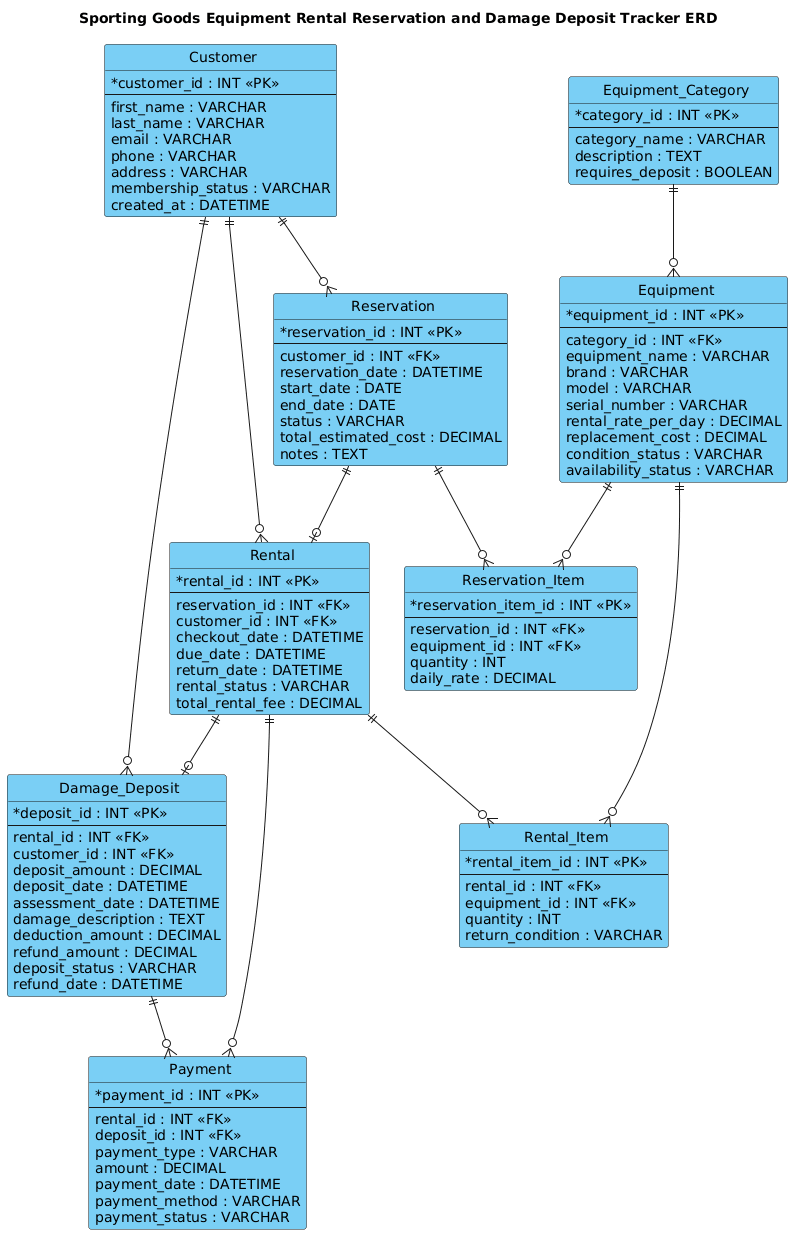
Here is the complete source code used to generate this diagram. You can copy this code directly into the VPasCode editor to see it in action.
@startuml
!include https://static.visual-paradigm.com/web/resources/plantuml-stdlib/themes/vp.puml

title Sporting Goods Equipment Rental Reservation and Damage Deposit Tracker ERD

/'
This ERD models a sporting goods rental business that tracks customers, equipment inventory,
reservations, rental transactions, and damage deposits. A customer can make multiple
reservations and rentals. Each reservation is for one or more equipment items, and each
equipment item belongs to a category and has a condition status. A rental is linked to a
reservation and may generate a damage deposit record if equipment is returned damaged or
late. The damage deposit tracker records the deposit amount, assessment result, deductions,
and refund status. This design helps manage equipment availability, rental history, and
financial accountability for damaged or unreturned items.
'/

entity "Customer" as customer {
  *customer_id : INT <<PK>>
  --
  first_name : VARCHAR
  last_name : VARCHAR
  email : VARCHAR
  phone : VARCHAR
  address : VARCHAR
  membership_status : VARCHAR
  created_at : DATETIME
}

entity "Equipment_Category" as category {
  *category_id : INT <<PK>>
  --
  category_name : VARCHAR
  description : TEXT
  requires_deposit : BOOLEAN
}

entity "Equipment" as equipment {
  *equipment_id : INT <<PK>>
  --
  category_id : INT <<FK>>
  equipment_name : VARCHAR
  brand : VARCHAR
  model : VARCHAR
  serial_number : VARCHAR
  rental_rate_per_day : DECIMAL
  replacement_cost : DECIMAL
  condition_status : VARCHAR
  availability_status : VARCHAR
}

entity "Reservation" as reservation {
  *reservation_id : INT <<PK>>
  --
  customer_id : INT <<FK>>
  reservation_date : DATETIME
  start_date : DATE
  end_date : DATE
  status : VARCHAR
  total_estimated_cost : DECIMAL
  notes : TEXT
}

entity "Reservation_Item" as res_item {
  *reservation_item_id : INT <<PK>>
  --
  reservation_id : INT <<FK>>
  equipment_id : INT <<FK>>
  quantity : INT
  daily_rate : DECIMAL
}

entity "Rental" as rental {
  *rental_id : INT <<PK>>
  --
  reservation_id : INT <<FK>>
  customer_id : INT <<FK>>
  checkout_date : DATETIME
  due_date : DATETIME
  return_date : DATETIME
  rental_status : VARCHAR
  total_rental_fee : DECIMAL
}

entity "Rental_Item" as rental_item {
  *rental_item_id : INT <<PK>>
  --
  rental_id : INT <<FK>>
  equipment_id : INT <<FK>>
  quantity : INT
  return_condition : VARCHAR
}

entity "Damage_Deposit" as deposit {
  *deposit_id : INT <<PK>>
  --
  rental_id : INT <<FK>>
  customer_id : INT <<FK>>
  deposit_amount : DECIMAL
  deposit_date : DATETIME
  assessment_date : DATETIME
  damage_description : TEXT
  deduction_amount : DECIMAL
  refund_amount : DECIMAL
  deposit_status : VARCHAR
  refund_date : DATETIME
}

entity "Payment" as payment {
  *payment_id : INT <<PK>>
  --
  rental_id : INT <<FK>>
  deposit_id : INT <<FK>>
  payment_type : VARCHAR
  amount : DECIMAL
  payment_date : DATETIME
  payment_method : VARCHAR
  payment_status : VARCHAR
}

customer ||--o{ reservation
customer ||--o{ rental
customer ||--o{ deposit

category ||--o{ equipment

equipment ||--o{ res_item
equipment ||--o{ rental_item

reservation ||--o{ res_item
reservation ||--o| rental

rental ||--o{ rental_item
rental ||--o| deposit
rental ||--o{ payment

deposit ||--o{ payment

@endumlStep-by-Step Architectural Walkthrough
Phase 1: Canvas Configuration & Layout Directives
Every professional PlantUML diagram begins with setup directives that define the rendering engine and visual style. In this model, we start by including the VP (Visual Paradigm) standard library theme. This ensures the diagram adopts a consistent, modern aesthetic with clean borders and legible fonts.
We also define the diagram title and a descriptive comment block. The comment block, enclosed by /' and '/, serves as documentation for anyone reading the code, explaining the business context without cluttering the visual rendering.
!include https://static.visual-paradigm.com/web/resources/plantuml-stdlib/themes/vp.puml

title Sporting Goods Equipment Rental Reservation and Damage Deposit Tracker ERD

/'
This ERD models a sporting goods rental business...
'/
Phase 2: Declaring Core Entities, Actors, and Boundaries
The foundation of an ERD is the definition of entities (tables). We use the entity keyword to define each table. Inside the entity block, we define attributes (columns). Primary Keys are marked with * and Foreign Keys with FK notation, while the data type (e.g., INT, VARCHAR) is specified after the colon.
For example, the Customer entity captures the user’s identity:
entity "Customer" as customer {
  *customer_id : INT <>
  --
  first_name : VARCHAR
  last_name : VARCHAR
  email : VARCHAR
  ...
Similarly, the Equipment entity tracks individual items, distinguishing between the item’s general properties (like brand) and its operational status (like condition_status).
Phase 3: Mapping Data Flows & Key Interactions
Once entities are defined, we establish relationships using PlantUML’s ERD arrow syntax. The syntax A ||--o{ B means “One A relates to Many Bs (optional).” The || indicates “One” (mandatory), and o{ indicates “Zero or Many” (optional).
Key relationships in this model include:
- Customer to Reservation:
customer ||--o{ reservation(A customer can have many reservations). - Reservation to Equipment: This is handled via the junction table
Reservation_Item. The relationshipreservation ||--o{ res_itemandequipment ||--o{ res_itemcreates a many-to-many link, allowing one reservation to contain multiple types of equipment. - Rental to Damage Deposit:
rental ||--o| deposit(A rental generates exactly one or zero damage deposits, depending on the outcome).
Phase 4: Grouping, Annotations & Visual Polish
The diagram concludes by ensuring all financial and operational paths are connected. The Payment entity acts as a bridge, linking both the Rental (for the rental fee) and the Damage_Deposit (for the refund or deduction). This ensures that every financial transaction is traceable back to a specific rental event or deposit assessment. The use of the -- separator within entities visually groups the primary key separately from the descriptive attributes, improving readability.
Syntax & Keyword Deep Dive
PlantUML’s ERD syntax is powerful yet concise. Here are the specific keywords and conventions used in this diagram:
entity: Defines a new table or entity in the diagram. It is followed by the entity name and an alias (e.g.,as customer).*(Asterisk): Precedes an attribute name to indicate it is the Primary Key (PK).<and> <: These are stereotypes used to explicitly label Primary Keys and Foreign Keys in the rendered diagram for clarity.> ||--o{: This arrow notation represents a one-to-many relationship where the “one” side is mandatory and the “many” side is optional (zero or more).||--o|: This represents a one-to-one or one-to-many relationship where the “many” side is mandatory (one or more). In this diagram, it is used forrental ||--o| depositto imply that a deposit record is expected if damage occurs, though the model allows for flexibility.--: A horizontal separator line used within an entity block to visually distinguish the Primary Key from other attributes.
Best Practices & Pitfalls to Avoid
When building complex ERDs like this one, adhering to best practices ensures the diagram remains maintainable and readable.
- Use Junction Tables for Many-to-Many: Never try to connect two entities directly with a many-to-many relationship without an intermediate table. In this model,
Reservation_ItemandRental_Itemare essential to handle the fact that one reservation contains multiple equipment items. - Keep Attribute Lists Manageable: If an entity has too many attributes, consider grouping them logically or using the
--separator to break them up visually, as done with theCustomerandEquipmententities. - Consistent Naming Conventions: Use singular names for entities (e.g.,
Customerinstead ofCustomers) and snake_case or PascalCase for attribute names. Consistency helps in translating the diagram directly into SQL. - Document Complex Logic: If a relationship has specific business rules (e.g., “a deposit is only created if damage occurs”), use the comment block or a note to explain this context, as the arrow alone cannot convey conditional logic.
Start Building Sporting Goods ERDs Faster with VPasCode
Design complex rental schemas instantly in your browser with VPasCode, the free PlantUML editor that offers live rendering and zero setup.