


In the high-stakes world of commercial logistics, operational efficiency hinges on precise data management. Fleet managers face the constant challenge of tracking thousands of data points: vehicle health status, driver assignments, maintenance schedules, and fuel consumption patterns. Without a unified data model, these disparate data streams become silos, making it nearly impossible to generate accurate reports on vehicle lifecycle costs, fuel efficiency per driver, or predictive maintenance needs. A robust Entity-Relationship Diagram (ERD) serves as the architectural blueprint, ensuring that the underlying database schema can support complex queries and real-time reporting.

Transitioning from manual spreadsheets to a structured database requires a clear visual representation of how entities like Vehicles, Drivers, Maintenance Records, and Fuel Logs interact. By adopting a diagram-as-code approach using PlantUML, architects can version their data models alongside their application code, ensuring documentation stays synchronized with the actual system. This tutorial walks you through constructing a professional ERD for a commercial fleet management system, leveraging the rose theme in VPasCode to create a visually stunning and technically accurate data model.
Understanding the Model: Purpose, Scope & Problem Framing
Before writing a single line of code, it is crucial to understand the domain abstraction we are modeling. An Entity-Relationship Diagram (ERD) is not merely a drawing; it is a contract between business requirements and technical implementation. In the context of commercial fleet management, this specific ERD addresses the need to track the lifecycle of assets (vehicles) and the resources consumed by them (fuel and maintenance).
Diagram Abstraction & Representation
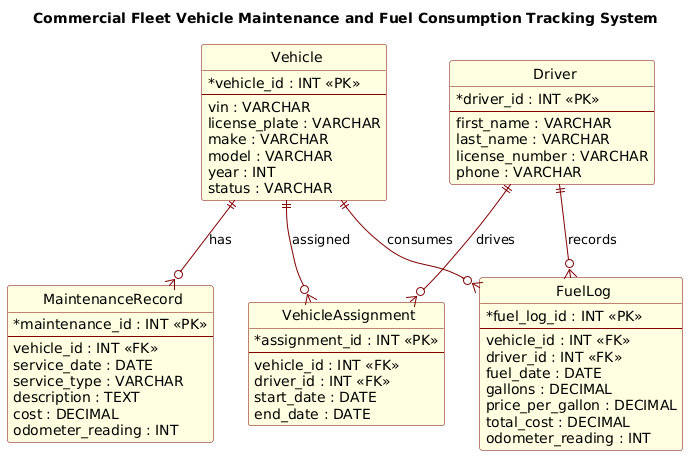
This model focuses on the core entities that drive fleet operations. Vehicles are the primary assets, identified by unique VINs and license plates. Drivers represent the human operators, linked to vehicles through assignment records. The diagram captures two critical operational streams: Maintenance (historical records of repairs and servicing) and Fuel Consumption (transactional logs of refueling events). The relationships defined here—such as a vehicle having many maintenance records or a driver recording multiple fuel transactions—enforce the integrity of the data, ensuring that every fuel purchase is tied to a specific vehicle and driver, and every repair is linked to the correct asset.
Target Domain Scope & Scenario
The scope of this diagram covers the essential data structures required for a mid-to-large scale fleet management system. It intentionally excludes peripheral systems like inventory management for spare parts or payroll integration, focusing strictly on the operational loop of vehicle health and fuel usage. The scenario assumes a many-to-many relationship between drivers and vehicles, mediated by a junction table (VehicleAssignment), which allows for historical tracking of assignments over specific date ranges.
Key Takeaways & Educational Insights
By following this guide, you will gain insights into:
- Normalization Principles: How to separate driver and vehicle data to avoid redundancy while linking them via foreign keys.
- Transaction Modeling: How to structure logs (FuelLog, MaintenanceRecord) to store historical data with timestamps and metrics like odometer readings.
- Visual Clarity: How to use PlantUML themes to make complex data models readable for stakeholders.
Complete Diagram & Full Source Code
Below is the finished blueprint for the Commercial Fleet Vehicle Maintenance and Fuel Consumption Tracking System. This diagram utilizes the rose theme to provide a professional, colored aesthetic suitable for technical documentation.
@startuml
!include https://static.visual-paradigm.com/web/resources/plantuml-stdlib/themes/rose.puml

title Commercial Fleet Vehicle Maintenance and Fuel Consumption Tracking System

/'
This ERD models a commercial fleet management system that tracks vehicles, drivers,
maintenance events, and fuel consumption. Each vehicle can have multiple maintenance
records and fuel logs, while drivers may be assigned to vehicles and fuel transactions.
The diagram supports operational reporting on vehicle health, fuel efficiency, and
maintenance costs across the fleet.
'/

entity "Vehicle" as vehicle {
  *vehicle_id : INT <<PK>>
  --
  vin : VARCHAR
  license_plate : VARCHAR
  make : VARCHAR
  model : VARCHAR
  year : INT
  status : VARCHAR
}

entity "Driver" as driver {
  *driver_id : INT <<PK>>
  --
  first_name : VARCHAR
  last_name : VARCHAR
  license_number : VARCHAR
  phone : VARCHAR
}

entity "MaintenanceRecord" as maintenance {
  *maintenance_id : INT <<PK>>
  --
  vehicle_id : INT <<FK>>
  service_date : DATE
  service_type : VARCHAR
  description : TEXT
  cost : DECIMAL
  odometer_reading : INT
}

entity "FuelLog" as fuel {
  *fuel_log_id : INT <<PK>>
  --
  vehicle_id : INT <<FK>>
  driver_id : INT <<FK>>
  fuel_date : DATE
  gallons : DECIMAL
  price_per_gallon : DECIMAL
  total_cost : DECIMAL
  odometer_reading : INT
}

entity "VehicleAssignment" as assignment {
  *assignment_id : INT <<PK>>
  --
  vehicle_id : INT <<FK>>
  driver_id : INT <<FK>>
  start_date : DATE
  end_date : DATE
}

vehicle ||--o{ maintenance : "has"
vehicle ||--o{ fuel : "consumes"
driver ||--o{ fuel : "records"
vehicle ||--o{ assignment : "assigned"
driver ||--o{ assignment : "drives"

@endumlStep-by-Step Architectural Walkthrough
Phase 1: Canvas Configuration & Layout Directives
Every PlantUML diagram begins with configuration directives that set the stage for rendering. In this section, we initialize the diagram with the @startuml command and immediately include the rose theme. This theme is crucial for logistics diagrams as it provides a clean, professional color palette that distinguishes entities clearly.
We also define a title directive to label the diagram for the viewer. Crucially, we add a comment block using the /' ... '/ syntax. This allows us to document the business context of the diagram directly within the code, serving as a living specification that travels with the file.
!include https://static.visual-paradigm.com/web/resources/plantuml-stdlib/themes/rose.puml

title Commercial Fleet Vehicle Maintenance and Fuel Consumption Tracking System

/'
This ERD models a commercial fleet management system that tracks vehicles, drivers,
maintenance events, and fuel consumption...
'/
Phase 2: Declaring Core Entities, Actors, and Boundaries
The backbone of an ERD is the entity definition. In PlantUML, we use the entity keyword followed by a label and an alias (e.g., entity "Vehicle" as vehicle). The alias is vital for referencing this entity later when defining relationships.
Inside the curly braces {}, we define the attributes. We use the asterisk * prefix to denote a Primary Key (PK). The double dash -- acts as a separator between keys and other attributes, improving visual hierarchy. Data types like INT, VARCHAR, DATE, and DECIMAL are explicitly defined to ensure database schema accuracy.
entity "Vehicle" as vehicle {
  *vehicle_id : INT <>
  --
  vin : VARCHAR
  license_plate : VARCHAR
  make : VARCHAR
  model : VARCHAR
  year : INT
  status : VARCHAR
}
Phase 3: Mapping Data Flows & Key Interactions
With entities defined, we establish the relationships that represent the business logic. In this fleet scenario, relationships are mostly one-to-many (e.g., one vehicle has many maintenance records). We use the ||--o{ syntax to denote a mandatory one-to-mandatory-many or optional one-to-many relationship depending on the specific cardinality notation used.
For example, the relationship vehicle ||--o{ maintenance : "has" indicates that a vehicle must exist to have maintenance records, and a vehicle can have zero or more records. We also define the junction entity VehicleAssignment to handle the many-to-many relationship between drivers and vehicles, capturing the temporal aspect of assignments with start_date and end_date.
vehicle ||--o{ maintenance : "has"
vehicle ||--o{ fuel : "consumes"
driver ||--o{ fuel : "records"
vehicle ||--o{ assignment : "assigned"
driver ||--o{ assignment : "drives"
Phase 4: Grouping, Annotations & Visual Polish
The final phase involves ensuring the diagram is self-documenting. The title provides the high-level context, while the comment block provides the detailed business rules. The rose theme automatically handles grouping and styling, but the explicit naming of relationships (e.g., : "has") ensures that the diagram is readable even without a legend. The use of FK (Foreign Key) annotations in the code helps developers quickly identify join keys during implementation.
Syntax & Keyword Deep Dive
PlantUML offers a rich set of keywords that allow for precise data modeling. Understanding these is key to building robust ERDs.
entity: Defines a database table or object. The syntaxentity "Label" as aliascreates a visual box with a specific label and an internal reference name.PK(Primary Key): Marked with<, this indicates the unique identifier for a row. In the code, it is often prefixed with> *to denote it as the primary key attribute.FK(Foreign Key): Marked with<, this indicates a column that references the primary key of another table. This is critical for maintaining referential integrity in the fleet system.> ||--o{(Cardinality): This arrow notation represents a relationship. The||means “one and only one” (mandatory), ando{means “zero or many” (optional). For example, a vehicle||--o{fuel means a vehicle must exist, but can have zero or many fuel logs.theme(via include): Using!include ... themes/rose.pumlapplies a predefined style set, changing colors, fonts, and shapes to a professional standard without manual CSS configuration.
Best Practices & Pitfalls to Avoid
When building ERDs for complex logistics systems, adherence to best practices ensures the model remains maintainable and scalable.
- Use Singular Names for Entities: Always name entities in the singular form (e.g.,
Vehicle, notVehicles). This aligns with standard database naming conventions and prevents confusion when writing SQL queries. - Consistent Naming for Foreign Keys: Ensure that foreign key columns (e.g.,
vehicle_id) match the naming convention of the primary key they reference. Consistency is key for readability and auto-generation of joins. - Separate Junction Tables for Many-to-Many: Never directly link two entities with a many-to-many relationship without an intermediate table. As seen in our
VehicleAssignmententity, this intermediate table allows you to store additional attributes (likestart_dateandend_date) that belong to the relationship itself. - Document with Comments: Use the
/' ... '/syntax to add context. Code changes over time, but the business logic description remains vital for new team members joining the project.
Start Building Fleet ERDs Faster with VPasCode
Design complex logistics data models instantly in your browser with VPasCode’s free PlantUML editor—no installation required, just write and visualize.