


In the complex ecosystem of international trade, the efficiency of freight forwarding operations hinges on the precision of data management. Logistics providers must orchestrate a symphony of moving parts—shippers, carriers, customs brokers, and regulatory bodies—while ensuring that every document, from the Bill of Lading to the Customs Declaration, is accurately linked to the physical cargo. A breakdown in this data chain can lead to costly delays, compliance penalties, and lost revenue. To navigate this complexity, architects and database designers rely on robust Entity-Relationship Diagrams (ERDs) to visualize the intricate web of relationships that govern the flow of goods across borders.
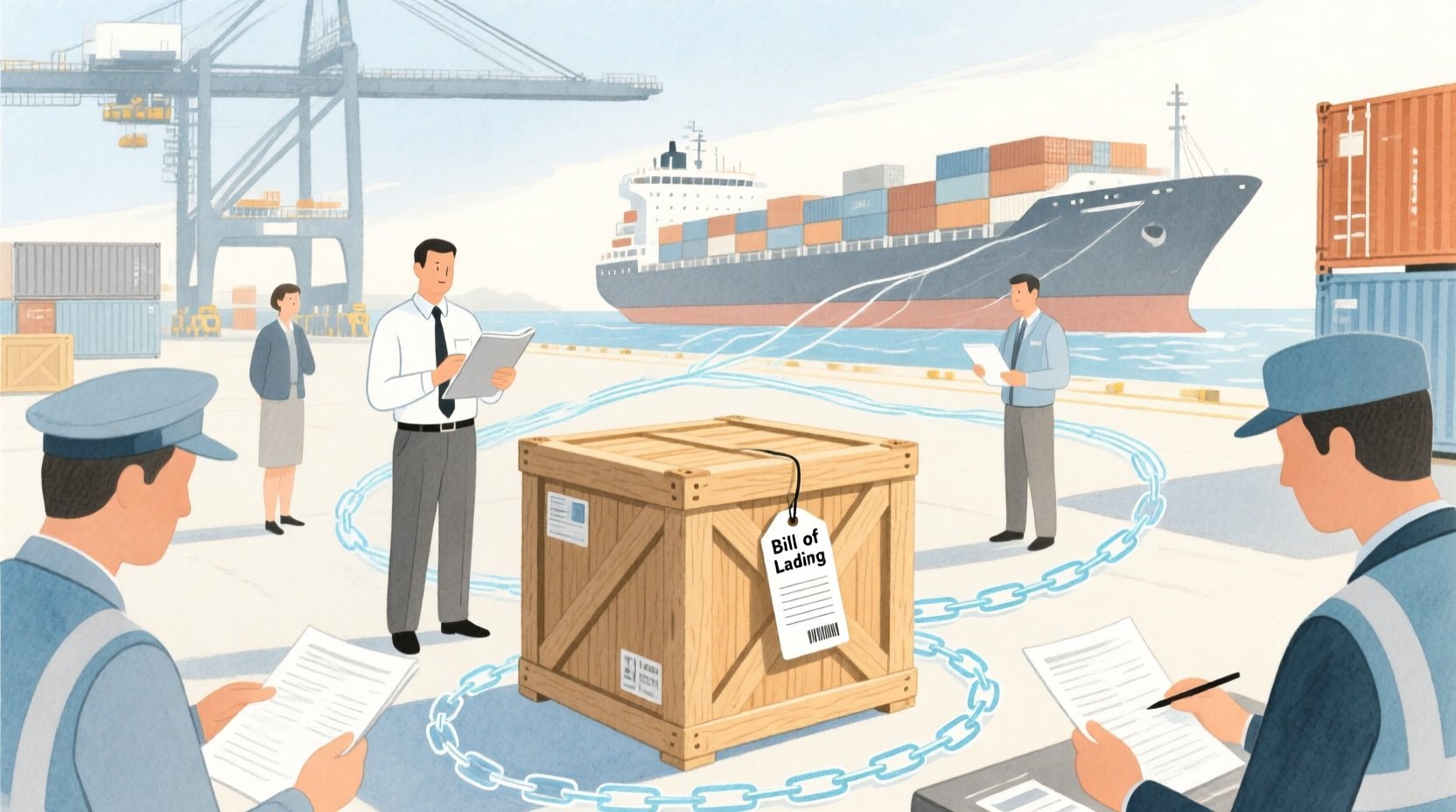
Visualizing these data structures is no longer a luxury; it is a necessity for building scalable logistics platforms. When managing customs declarations and bills of lading, the relationships between entities like Shipment, Carrier, Port, and CustomsBroker define the operational reality of the system. By adopting a diagram-as-code approach using PlantUML within VPasCode, teams can treat their database architecture as living documentation. This method allows for instant iteration, version-free collaboration via code sharing, and immediate visualization of how a change in one entity, such as adding a new Invoice field, ripples through the entire data model. This tutorial walks you through constructing a production-grade ERD that captures the full lifecycle of an international shipment, from booking to final delivery.
Understanding the Model: Purpose, Scope & Problem Framing
Diagram Abstraction & Representation
An Entity-Relationship Diagram (ERD) serves as the blueprint for relational databases, defining how data is stored, linked, and retrieved. In the context of this tutorial, the diagram abstracts the physical and administrative layers of freight forwarding. It models Entities as the core objects of the business (e.g., a Shipment or a CustomsDeclaration) and Relationships as the constraints and associations between them (e.g., a Carrier transports a Shipment). The notation used here—PlantUML’s Entity-Relationship syntax—allows us to define cardinalities (one-to-many, optional, mandatory) and attributes (primary keys, foreign keys) in a text-based format that is easily readable and maintainable.
Target Domain Scope & Scenario
This specific ERD focuses on the International Freight Forwarding domain, specifically addressing the critical junction of logistics and regulatory compliance. The scope is bounded by the following key scenarios:
- Shipment Management: Tracking a cargo unit from origin to destination, including booking details, weight, volume, and status updates.
- Document Lifecycle: Managing the generation and association of critical trade documents like the Bill of Lading (BoL) and Customs Declarations.
- Regulatory Compliance: Linking shipments to Customs Brokers and tracking declaration statuses to ensure adherence to international trade laws.
- Asset Tracking: Managing containers and individual cargo items within those containers, linking them to specific shipments.
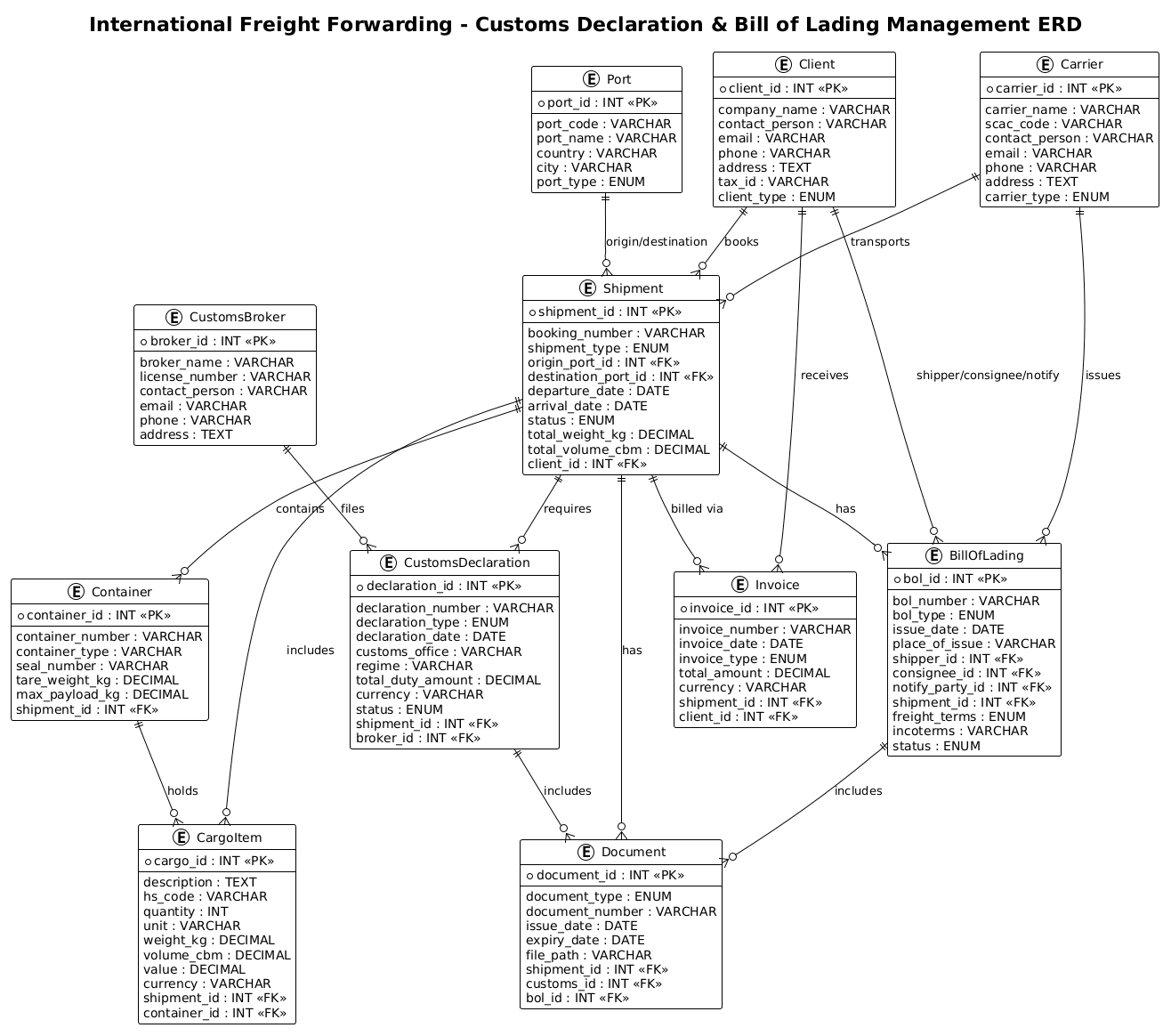
By modeling these elements, the diagram provides a clear view of how a single Shipment acts as the central hub, connecting clients, carriers, ports, and the necessary paperwork.
Key Takeaways & Educational Insights
By following this guide, you will gain the ability to:
- Structure a complex, multi-entity database schema for logistics using clean, text-based syntax.
- Understand how to model one-to-many relationships (e.g., one Client to many Shipments) and optional relationships (e.g., a Shipment may or may not have a specific Container).
- Apply best practices for naming conventions, primary/foreign key definition, and attribute typing in PlantUML.
Complete Diagram & Full Source Code
Before diving into the construction steps, here is the complete, rendered view of the International Freight Forwarding ERD. This diagram encapsulates the core data structures required to manage customs declarations and bills of lading.
@startuml
!theme plain
title International Freight Forwarding - Customs Declaration & Bill of Lading Management ERD

/'
Diagram Context:
This ERD models the core data structures for an international freight forwarding system
that manages customs declarations and bills of lading. It captures the relationships
between shipments, clients, carriers, customs brokers, ports, containers, and the
required trade documents. The diagram supports tracking of cargo movement,
regulatory compliance, and document lifecycle from origin to destination.
'/

' ==================== ENTITIES ====================

entity "Client" as client {
  * client_id : INT <<PK>>
  --
  company_name : VARCHAR
  contact_person : VARCHAR
  email : VARCHAR
  phone : VARCHAR
  address : TEXT
  tax_id : VARCHAR
  client_type : ENUM
}

entity "Shipment" as shipment {
  * shipment_id : INT <<PK>>
  --
  booking_number : VARCHAR
  shipment_type : ENUM
  origin_port_id : INT <<FK>>
  destination_port_id : INT <<FK>>
  departure_date : DATE
  arrival_date : DATE
  status : ENUM
  total_weight_kg : DECIMAL
  total_volume_cbm : DECIMAL
  client_id : INT <<FK>>
}

entity "BillOfLading" as bol {
  * bol_id : INT <<PK>>
  --
  bol_number : VARCHAR
  bol_type : ENUM
  issue_date : DATE
  place_of_issue : VARCHAR
  shipper_id : INT <<FK>>
  consignee_id : INT <<FK>>
  notify_party_id : INT <<FK>>
  shipment_id : INT <<FK>>
  freight_terms : ENUM
  incoterms : VARCHAR
  status : ENUM
}

entity "CustomsDeclaration" as customs {
  * declaration_id : INT <<PK>>
  --
  declaration_number : VARCHAR
  declaration_type : ENUM
  declaration_date : DATE
  customs_office : VARCHAR
  regime : VARCHAR
  total_duty_amount : DECIMAL
  currency : VARCHAR
  status : ENUM
  shipment_id : INT <<FK>>
  broker_id : INT <<FK>>
}

entity "CustomsBroker" as broker {
  * broker_id : INT <<PK>>
  --
  broker_name : VARCHAR
  license_number : VARCHAR
  contact_person : VARCHAR
  email : VARCHAR
  phone : VARCHAR
  address : TEXT
}

entity "Carrier" as carrier {
  * carrier_id : INT <<PK>>
  --
  carrier_name : VARCHAR
  scac_code : VARCHAR
  contact_person : VARCHAR
  email : VARCHAR
  phone : VARCHAR
  address : TEXT
  carrier_type : ENUM
}

entity "Port" as port {
  * port_id : INT <<PK>>
  --
  port_code : VARCHAR
  port_name : VARCHAR
  country : VARCHAR
  city : VARCHAR
  port_type : ENUM
}

entity "Container" as container {
  * container_id : INT <<PK>>
  --
  container_number : VARCHAR
  container_type : VARCHAR
  seal_number : VARCHAR
  tare_weight_kg : DECIMAL
  max_payload_kg : DECIMAL
  shipment_id : INT <<FK>>
}

entity "CargoItem" as cargo {
  * cargo_id : INT <<PK>>
  --
  description : TEXT
  hs_code : VARCHAR
  quantity : INT
  unit : VARCHAR
  weight_kg : DECIMAL
  volume_cbm : DECIMAL
  value : DECIMAL
  currency : VARCHAR
  shipment_id : INT <<FK>>
  container_id : INT <<FK>>
}

entity "Invoice" as invoice {
  * invoice_id : INT <<PK>>
  --
  invoice_number : VARCHAR
  invoice_date : DATE
  invoice_type : ENUM
  total_amount : DECIMAL
  currency : VARCHAR
  shipment_id : INT <<FK>>
  client_id : INT <<FK>>
}

entity "Document" as document {
  * document_id : INT <<PK>>
  --
  document_type : ENUM
  document_number : VARCHAR
  issue_date : DATE
  expiry_date : DATE
  file_path : VARCHAR
  shipment_id : INT <<FK>>
  customs_id : INT <<FK>>
  bol_id : INT <<FK>>
}

' ==================== RELATIONSHIPS ====================

client ||--o{ shipment : "books"
client ||--o{ invoice : "receives"
client ||--o{ bol : "shipper/consignee/notify"
shipment ||--o{ bol : "has"
shipment ||--o{ customs : "requires"
shipment ||--o{ container : "contains"
shipment ||--o{ cargo : "includes"
shipment ||--o{ invoice : "billed via"
shipment ||--o{ document : "has"
broker ||--o{ customs : "files"
carrier ||--o{ bol : "issues"
carrier ||--o{ shipment : "transports"
port ||--o{ shipment : "origin/destination"
container ||--o{ cargo : "holds"
customs ||--o{ document : "includes"
bol ||--o{ document : "includes"

@endumlStep-by-Step Architectural Walkthrough
Building this ERD requires a structured approach, moving from high-level configuration to detailed entity definition, and finally to relationship mapping. We will break this down into four distinct phases.
Phase 1: Canvas Configuration & Layout Directives
Before defining any data structures, we must set the stage for the diagram. This involves initializing the PlantUML environment and selecting a visual theme that ensures readability. In our case, we use the !theme plain directive to create a clean, minimalistic look that focuses on the data structure rather than decorative elements.
We also define a global title to provide immediate context. This is crucial for documentation purposes, ensuring anyone viewing the diagram instantly understands its scope.
@startuml
!theme plain
title International Freight Forwarding - Customs Declaration & Bill of Lading Management ERD

/'
Diagram Context: [Comment block describing the domain]
'/
Notice the comment block starting with /' and ending with '/. This allows us to embed rich, multi-line context directly into the code without affecting the rendering, serving as a permanent architectural note within the file.
Phase 2: Declaring Core Entities, Actors, and Boundaries
The heart of an ERD lies in its entities. In PlantUML, we define an entity using the entity keyword, followed by the display name and an alias for internal referencing. Each entity is enclosed in curly braces {} to hold its attributes.
Let’s examine the Client entity:
entity "Client" as client {
  * client_id : INT <>
  --
  company_name : VARCHAR
  contact_person : VARCHAR
  email : VARCHAR
  phone : VARCHAR
  address : TEXT
  tax_id : VARCHAR
  client_type : ENUM
}
Here, * client_id : INT < defines the primary key. The * indicates the attribute is part of the key, and < is a stereotype explicitly marking it as the Primary Key. The -- separator visually divides keys from regular attributes in the diagram. We apply this pattern to all core entities like Shipment, BillOfLading, and CustomsDeclaration, ensuring consistent data typing (e.g., INT, VARCHAR, DECIMAL, DATE).
Phase 3: Mapping Data Flows & Key Interactions
Once entities are defined, we must establish how they interact. This is where the logic of the logistics system is encoded. We use the | (one) and o{ (zero or many) symbols to define cardinality.
Consider the relationship between a Client and a Shipment:
client ||--o{ shipment : "books"
This line translates to: “One Client (mandatory) books Zero or Many Shipments.” The || on the left means the client is mandatory (a shipment cannot exist without a client), while o{ on the right means a client can have multiple shipments. We apply similar logic to other critical flows, such as shipment ||--o{ bol : "has" (One Shipment has Many Bills of Lading) and carrier ||--o{ shipment : "transports".
Phase 4: Grouping, Annotations & Visual Polish
While PlantUML ERD syntax is powerful, the final touch is ensuring the diagram is self-explanatory. We use relationship labels (the text in quotes, e.g., "books", "transports") to describe the nature of the link. This adds semantic meaning beyond just the structural link. For instance, port ||--o{ shipment : "origin/destination" clearly indicates that a port can be either the starting point or the endpoint of a shipment, a critical distinction in logistics routing.
Syntax & Keyword Deep Dive
To master this diagram, it is essential to understand the specific PlantUML ERD syntax elements used:
entity "Name" as alias { ... }: The fundamental building block.Nameis what appears in the box, andaliasis the short identifier used to define relationships.* attribute : TYPE <: Defines an attribute. The> *prefix marks it as part of the Primary Key. The<or> <stereotype visually renders the key type in the diagram.> --: A horizontal separator line used within the entity block to visually group keys separately from other attributes.|and|{/o{: Cardinality markers.|represents “One and Only One” (mandatory).o{represents “Zero or More” (optional).|on the right side of||--o{means “One or More” (mandatory many).: "Label": Defines the relationship label, describing the action or connection type (e.g., “files”, “transports”, “includes”)./' ... '/: Multi-line comment syntax used to embed documentation directly within the code file.
Best Practices & Pitfalls to Avoid
When constructing complex ERDs for logistics or enterprise systems, adhering to best practices ensures your diagrams remain maintainable and clear.
- Consistent Naming Conventions: Always use singular nouns for entities (e.g.,
ShipmentnotShipments) and snake_case for attributes (e.g.,total_weight_kg). This improves readability and aligns with standard database design patterns. - Explicit Foreign Keys: While PlantUML can infer relationships, explicitly marking foreign keys with
<in the entity definition helps database developers quickly identify the data integrity constraints.> - Modular Structure: If a diagram becomes too crowded, consider splitting it into multiple files (e.g., one for Shipment Management and one for Document Management) and using
!includedirectives to link them. This prevents visual clutter. - Avoid Redundant Relationships: Ensure relationships are necessary. For example, if
Shipmentalready links toCarrierandPort, ensure you don’t create circular dependencies that confuse the data flow.
Start Building Logistics ERDs Faster with VPasCode
Design complex freight forwarding data models instantly in your browser with VPasCode, the free PlantUML editor that brings your database architecture to life without any installation.