


In the complex ecosystem of global maritime logistics, the efficiency of a port terminal hinges on the precise synchronization of vessel arrivals, berth allocations, and cargo handling operations. Port managers and system architects face a formidable challenge: coordinating massive vessels with specific dimensional constraints, scheduling tight berthing windows, and assigning the correct cranes, trucks, and personnel to handle diverse cargo types, including hazardous materials. Without a clear, unified data model, these operations can quickly descend into chaos, leading to costly delays, resource bottlenecks, and safety violations.
Visualizing these intricate dependencies is not merely an academic exercise; it is a critical operational necessity. A well-structured Entity-Relationship Diagram (ERD) serves as the architectural blueprint for the software systems that drive modern ports. By modeling the relationships between vessels, voyages, berths, and the myriad resources required for cargo movement, architects can ensure data integrity and operational clarity. This tutorial leverages VPasCode, a free, browser-based PlantUML editor, to guide you through building a professional-grade ERD that captures the full lifecycle of a vessel’s visit, from arrival to departure, and the detailed assignment of every cargo item to a specific handling resource.
Understanding the Model: Purpose, Scope & Problem Framing
This diagram represents the core data architecture for a Maritime Port Terminal Vessel Berthing Schedule and Cargo Handling Assignment System. Unlike generic logistics models, this ERD is specifically tailored to the unique constraints of maritime operations, where physical dimensions (draft, beam, length) and temporal precision (ETA, ETD, berthing windows) are paramount.
Diagram Abstraction & Representation
As an Entity-Relationship Diagram, this model focuses on the static structure of data rather than dynamic behavior. It defines Entities (such as Vessel, Berth, and Cargo) as the fundamental nouns of the system and Relationships (such as “operates,” “allocated_to,” and “handled_by”) as the verbs that connect them. The notation uses Crow’s Foot (or Chen-style) cardinality to explicitly define how many instances of one entity relate to another, ensuring that the resulting database schema enforces business rules like “One Vessel can have many Voyages” or “One Berth can be assigned to multiple Schedules over time.”
Target Domain Scope & Scenario
The scope of this model covers the entire operational window of a vessel’s port call. It begins with the Vessel entity, capturing the ship’s physical attributes and ownership, and extends through the Voyage and BerthingSchedule entities, which manage the timing and location of the port call. The model then branches into the Cargo entity and its associated CargoHandlingAssignment, which acts as the central hub connecting the cargo to the specific TerminalResources (cranes, forklifts) and Personnel required to execute the work. It intentionally excludes external systems like customs declarations or billing to focus purely on the physical logistics flow.
Key Takeaways & Educational Insights
By constructing this diagram, you will gain a deep understanding of how to model hierarchical data in logistics. You will learn how to handle associative entities (like CargoHandlingAssignment) that link multiple strong entities, how to manage temporal data for scheduling, and how to model resource allocation constraints. This blueprint is essential for developers building the backend databases for Port Community Systems (PCS) or Terminal Operating Systems (TOS).
Complete Diagram & Full Source Code
Below is the final, fully rendered Entity-Relationship Diagram. This visual representation clearly delineates the ten core entities and their interconnections, providing a holistic view of the port terminal’s operational data structure.
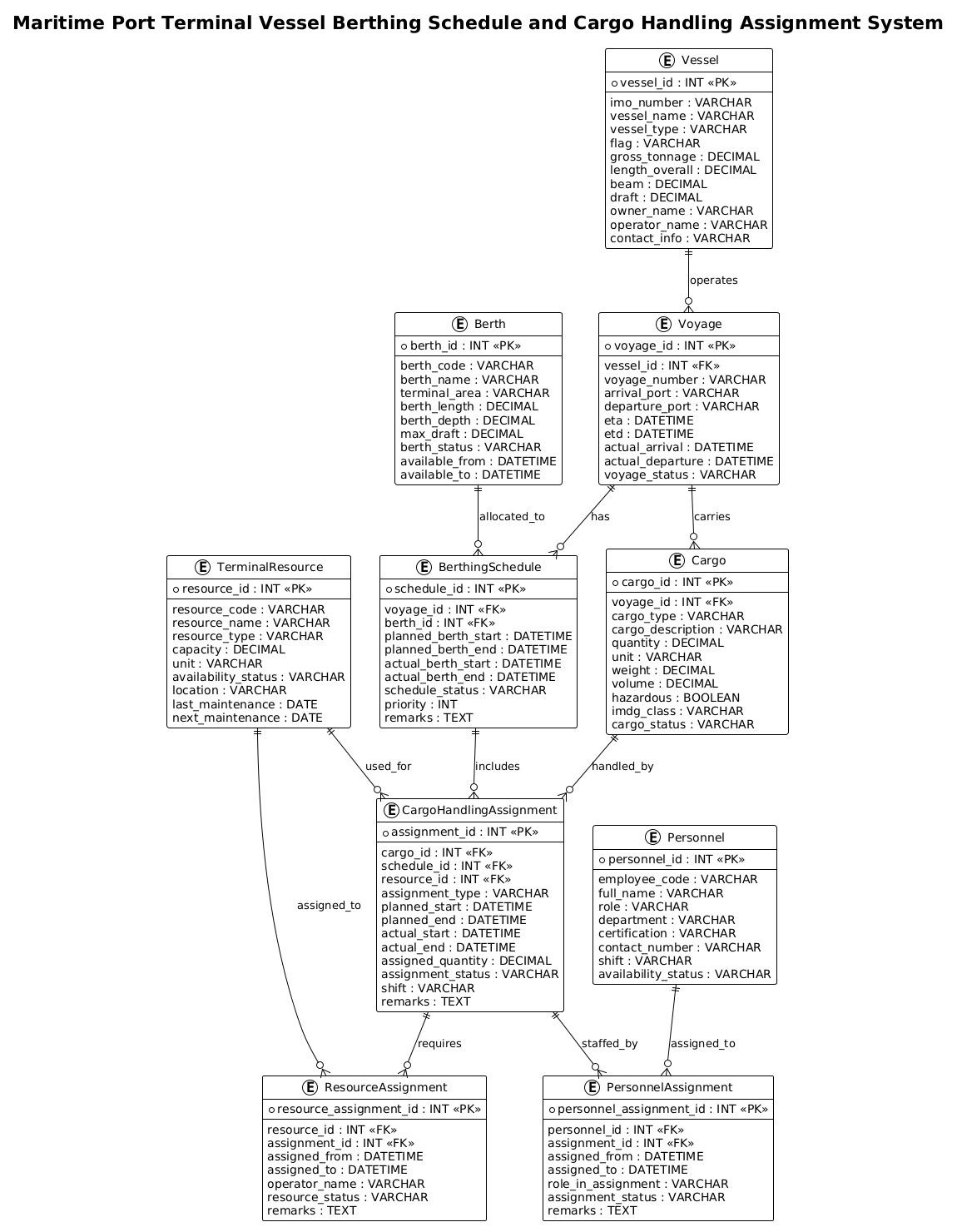
Here is the complete PlantUML source code used to generate this diagram. You can copy this code directly into the VPasCode editor to see it render instantly.
@startuml
!theme plain
title Maritime Port Terminal Vessel Berthing Schedule and Cargo Handling Assignment System

/'
This ERD models the core operations of a maritime port terminal.
It covers vessel arrivals and berthing schedules, berth allocation, cargo handling assignments,
cargo details, terminal resources, and the personnel/equipment involved in cargo operations.
The diagram supports planning, scheduling, and assignment of vessels to berths and cargo handling tasks.
'/

entity "Vessel" as vessel {
  * vessel_id : INT <<PK>>
  --
  imo_number : VARCHAR
  vessel_name : VARCHAR
  vessel_type : VARCHAR
  flag : VARCHAR
  gross_tonnage : DECIMAL
  length_overall : DECIMAL
  beam : DECIMAL
  draft : DECIMAL
  owner_name : VARCHAR
  operator_name : VARCHAR
  contact_info : VARCHAR
}

entity "Voyage" as voyage {
  * voyage_id : INT <<PK>>
  --
  vessel_id : INT <<FK>>
  voyage_number : VARCHAR
  arrival_port : VARCHAR
  departure_port : VARCHAR
  eta : DATETIME
  etd : DATETIME
  actual_arrival : DATETIME
  actual_departure : DATETIME
  voyage_status : VARCHAR
}

entity "Berth" as berth {
  * berth_id : INT <<PK>>
  --
  berth_code : VARCHAR
  berth_name : VARCHAR
  terminal_area : VARCHAR
  berth_length : DECIMAL
  berth_depth : DECIMAL
  max_draft : DECIMAL
  berth_status : VARCHAR
  available_from : DATETIME
  available_to : DATETIME
}

entity "BerthingSchedule" as berthing_schedule {
  * schedule_id : INT <<PK>>
  --
  voyage_id : INT <<FK>>
  berth_id : INT <<FK>>
  planned_berth_start : DATETIME
  planned_berth_end : DATETIME
  actual_berth_start : DATETIME
  actual_berth_end : DATETIME
  schedule_status : VARCHAR
  priority : INT
  remarks : TEXT
}

entity "Cargo" as cargo {
  * cargo_id : INT <<PK>>
  --
  voyage_id : INT <<FK>>
  cargo_type : VARCHAR
  cargo_description : VARCHAR
  quantity : DECIMAL
  unit : VARCHAR
  weight : DECIMAL
  volume : DECIMAL
  hazardous : BOOLEAN
  imdg_class : VARCHAR
  cargo_status : VARCHAR
}

entity "CargoHandlingAssignment" as cargo_handling_assignment {
  * assignment_id : INT <<PK>>
  --
  cargo_id : INT <<FK>>
  schedule_id : INT <<FK>>
  resource_id : INT <<FK>>
  assignment_type : VARCHAR
  planned_start : DATETIME
  planned_end : DATETIME
  actual_start : DATETIME
  actual_end : DATETIME
  assigned_quantity : DECIMAL
  assignment_status : VARCHAR
  shift : VARCHAR
  remarks : TEXT
}

entity "TerminalResource" as terminal_resource {
  * resource_id : INT <<PK>>
  --
  resource_code : VARCHAR
  resource_name : VARCHAR
  resource_type : VARCHAR
  capacity : DECIMAL
  unit : VARCHAR
  availability_status : VARCHAR
  location : VARCHAR
  last_maintenance : DATE
  next_maintenance : DATE
}

entity "ResourceAssignment" as resource_assignment {
  * resource_assignment_id : INT <<PK>>
  --
  resource_id : INT <<FK>>
  assignment_id : INT <<FK>>
  assigned_from : DATETIME
  assigned_to : DATETIME
  operator_name : VARCHAR
  resource_status : VARCHAR
  remarks : TEXT
}

entity "Personnel" as personnel {
  * personnel_id : INT <<PK>>
  --
  employee_code : VARCHAR
  full_name : VARCHAR
  role : VARCHAR
  department : VARCHAR
  certification : VARCHAR
  contact_number : VARCHAR
  shift : VARCHAR
  availability_status : VARCHAR
}

entity "PersonnelAssignment" as personnel_assignment {
  * personnel_assignment_id : INT <<PK>>
  --
  personnel_id : INT <<FK>>
  assignment_id : INT <<FK>>
  assigned_from : DATETIME
  assigned_to : DATETIME
  role_in_assignment : VARCHAR
  assignment_status : VARCHAR
  remarks : TEXT
}

vessel ||--o{ voyage : operates
voyage ||--o{ berthing_schedule : has
berth ||--o{ berthing_schedule : allocated_to
voyage ||--o{ cargo : carries
cargo ||--o{ cargo_handling_assignment : handled_by
berthing_schedule ||--o{ cargo_handling_assignment : includes
terminal_resource ||--o{ cargo_handling_assignment : used_for
cargo_handling_assignment ||--o{ resource_assignment : requires
terminal_resource ||--o{ resource_assignment : assigned_to
cargo_handling_assignment ||--o{ personnel_assignment : staffed_by
personnel ||--o{ personnel_assignment : assigned_to

@endumlStep-by-Step Architectural Walkthrough
Building a complex ERD like this requires a structured approach. We will break down the construction of this maritime logistics model into four logical phases, moving from the vessel’s identity to the granular details of resource assignment.
Phase 1: Canvas Configuration & Layout Directives
Before defining any data entities, we must set the stage for the diagram. In PlantUML, this is done using directives at the very beginning of the code. We start by declaring the start of the diagram and applying a specific visual theme to ensure the output is clean and professional.
First, we initialize the diagram block:
@startumlNext, we apply the !theme plain directive. This removes heavy graphical decorations, ensuring the focus remains on the data structure and relationships, which is ideal for technical documentation and database schema design.
!theme plainFinally, we add a title and a comment block. The title provides immediate context, while the comment block (wrapped in /' and '/) allows us to embed a narrative description of the system’s purpose without cluttering the visual diagram with text boxes.
title Maritime Port Terminal Vessel Berthing Schedule and Cargo Handling Assignment System

/'
This ERD models the core operations of a maritime port terminal.
It covers vessel arrivals and berthing schedules, berth allocation, cargo handling assignments,
cargo details, terminal resources, and the personnel/equipment involved in cargo operations.
The diagram supports planning, scheduling, and assignment of vessels to berths and cargo handling tasks.
'/
Phase 2: Declaring Core Entities, Actors, and Boundaries
With the canvas ready, we define the core entities. In PlantUML, the entity keyword is used to create database tables. We start with the Vessel and Berth entities, which are the foundational assets of the port.
For the Vessel entity, we define the primary key (* vessel_id) and a list of attributes separated by double dashes (--). We use standard SQL data types like INT, VARCHAR, and DECIMAL to represent the physical and administrative data of a ship.
entity "Vessel" as vessel {
  * vessel_id : INT <>
  --
  imo_number : VARCHAR
  vessel_name : VARCHAR
  vessel_type : VARCHAR
  flag : VARCHAR
  gross_tonnage : DECIMAL
  length_overall : DECIMAL
  beam : DECIMAL
  draft : DECIMAL
  owner_name : VARCHAR
  operator_name : VARCHAR
  contact_info : VARCHAR
}
We repeat this pattern for Voyage, Berth, and Cargo. Notice how Voyage includes a foreign key vessel_id : INT <, linking it back to the Vessel. Similarly, Berth captures critical physical constraints like berth_depth and max_draft, which are essential for port safety.
Phase 3: Mapping Data Flows & Key Interactions
The heart of this logistics system lies in the CargoHandlingAssignment entity. This is an associative entity that resolves the many-to-many relationship between Cargo and TerminalResource. It also links to the BerthingSchedule to ensure cargo is handled within the correct time window.
We define the attributes for CargoHandlingAssignment to track the lifecycle of the work, including planned vs. actual start/end times and the specific quantity assigned.
entity "CargoHandlingAssignment" as cargo_handling_assignment {
* assignment_id : INT <>
--
cargo_id : INT <>
schedule_id : INT < >
resource_id : INT < >
assignment_type : VARCHAR
planned_start : DATETIME
planned_end : DATETIME
actual_start : DATETIME
actual_end : DATETIME
assigned_quantity : DECIMAL
assignment_status : VARCHAR
shift : VARCHAR
remarks : TEXT
} We also define TerminalResource (cranes, trucks) and Personnel (workers, supervisors). The ResourceAssignment and PersonnelAssignment entities further break down the specific tasks, linking the general assignment to the specific human or machine resource and their availability.
Phase 4: Grouping, Annotations & Visual Polish
The final phase involves drawing the relationships. In PlantUML, we use the ||--o{ syntax to denote cardinality. The double bar || indicates “mandatory one” (the entity on the left must exist for the relationship to hold), and the crow’s foot { indicates “many” (the entity on the right can have multiple instances).
For example, a Vessel operates many Voyages:
vessel ||--o{ voyage : operatesA Berth is allocated to many BerthingSchedules over time:
berth ||--o{ berthing_schedule : allocated_toWe continue this pattern for all entities, ensuring that every entity (except the root Vessel and Berth) is linked to at least one other entity, creating a cohesive, interconnected graph that accurately reflects the port’s operational logic.
Syntax & Keyword Deep Dive
To master this diagram, it is essential to understand the specific PlantUML syntax features used to construct the ERD.
entity "Name" as alias: This defines a new entity (table). The"Name"is the display label, andas aliasprovides a short variable name used later in relationship definitions.* attribute : Type: The asterisk*denotes the Primary Key (PK). This is a critical constraint ensuring every record is unique.attribute : Type <: The double brackets> <mark an attribute as a Foreign Key, indicating a relationship to another entity’s primary key.> --: This separator line visually divides the Primary Key from the rest of the attributes within the entity box.||--o{: This is the cardinality notation.||means “one and only one” (mandatory), and{means “zero or many” (optional many). The arrow direction indicates the dependency./' ... '/: This creates a multi-line comment block. It is rendered as a text description below the title but does not appear as a box in the diagram itself.!theme plain: A directive to apply a minimalist, high-contrast theme suitable for technical documentation.
Best Practices & Pitfalls to Avoid
When designing ERDs for complex logistics systems, adhering to best practices ensures the model remains scalable and maintainable.
- Use Associative Entities for Many-to-Many Relationships: Never link Cargo directly to TerminalResource with a simple line. Instead, create an intermediate entity like CargoHandlingAssignment to store attributes specific to that relationship (e.g., start time, assigned quantity, status).
- Distinguish Between Planned and Actual Data: Logistics is dynamic. Always include both
planned_*andactual_*fields (e.g.,planned_berth_startvs.actual_berth_start) to allow for performance analysis and delay tracking. - Keep Entity Names Singular: Use singular names like
VesselandBerthrather than pluralVessels. This aligns with standard database normalization practices and makes relationship definitions clearer. - Validate Cardinality: Ensure your relationship arrows accurately reflect business rules. For instance, a Voyage must be associated with exactly one Vessel (1:1 or 1:M), but a Voyage can have many Cargo items (1:M).
Start Building Maritime ERDs Faster with VPasCode
Design complex port terminal schemas instantly with our free PlantUML editor, featuring live browser rendering and zero installation required.