


In the high-stakes world of air cargo logistics, precision in data modeling is not just a technical requirement; it is the backbone of operational safety and efficiency. Every kilogram of cargo, every Unit Load Device (ULD), and every flight schedule must be accounted for with absolute certainty before a plane takes off. The complexity arises from the intricate interplay between flight schedules, cargo shipments, and the physical constraints of ULDs. Without a clear, visual representation of these data relationships, logistics teams risk errors in weight distribution, manifest inaccuracies, and potential compliance issues with aviation authorities.

This tutorial guides you through constructing a comprehensive Entity Relationship Diagram (ERD) specifically designed for an Air Cargo Flight Manifest and ULD Build-Up Planning tool. By leveraging the power of diagram-as-code with PlantUML in VPasCode, you can create a living documentation model that evolves with your system. This approach allows architects to instantly visualize how a single flight connects to multiple shipments, how cargo is packed into ULDs, and how the final manifest is generated, ensuring that every data point in the logistics chain is logically sound and ready for implementation.
Understanding the Model: Purpose, Scope & Problem Framing
Diagram Abstraction & Representation
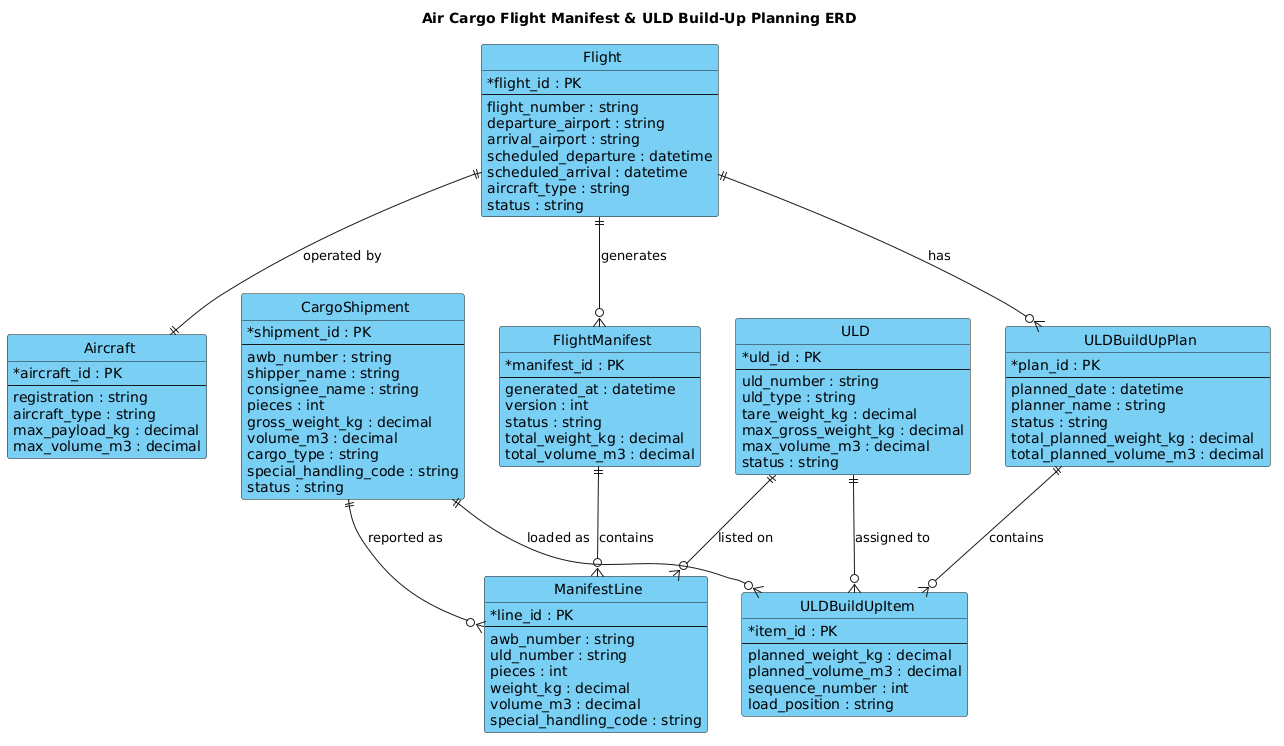
An Entity Relationship Diagram (ERD) serves as the blueprint for the database structure underlying the logistics system. In this specific context, the diagram abstracts the physical reality of air freight into logical data entities. It defines the “nouns” of the system—Flights, Aircraft, Shipments, and ULDs—and the “verbs” of the system, represented by relationships like “operated by,” “loaded as,” and “assigned to.” The ERD clarifies cardinality, ensuring that the system knows, for instance, that one Flight generates many Manifests, but a specific Manifest Line belongs to exactly one Shipment.
Target Domain Scope & Scenario
The scope of this model is strictly focused on the pre-departure planning and manifest generation phases of air cargo operations. It covers the lifecycle from the initial creation of a flight schedule, the booking of cargo shipments (AWB), the planning of how cargo fits into ULDs (Unit Load Devices), and the final compilation of the flight manifest. It intentionally excludes post-arrival customs clearance or ground handling tracking to maintain a focused architectural view on the loading and manifesting process.
Key Takeaways & Educational Insights
By the end of this guide, you will understand how to model complex many-to-many relationships (such as multiple shipments being loaded into a single ULD) through intermediate junction entities like ULDBuildUpItem. You will learn to separate planning data (what should happen) from execution data (what actually happened on the manifest), a critical distinction in logistics software. Finally, you will master the use of PlantUML’s entity syntax to define attributes, primary keys, and data types in a clean, maintainable format.
Complete Diagram & Full Source Code
Below is the complete visual representation of the Air Cargo Flight Manifest & ULD Build-Up Planning ERD. This diagram encapsulates the core data structures required to manage cargo loads, ensuring that weight and volume constraints are respected and that every piece of cargo is traceable on the final manifest.
@startuml
!include https://static.visual-paradigm.com/web/resources/plantuml-stdlib/themes/vp.puml

title Air Cargo Flight Manifest & ULD Build-Up Planning ERD

/'
Diagram Context:
This ERD models the core data structures needed for air cargo flight manifest generation and Unit Load Device (ULD) build-up planning.
It captures flights, cargo shipments, ULDs, build-up plans, and manifest outputs so that operations teams can plan, assign, and verify cargo loading before departure.
'/

entity "Flight" as flight {
  * flight_id : PK
  --
  flight_number : string
  departure_airport : string
  arrival_airport : string
  scheduled_departure : datetime
  scheduled_arrival : datetime
  aircraft_type : string
  status : string
}

entity "Aircraft" as aircraft {
  * aircraft_id : PK
  --
  registration : string
  aircraft_type : string
  max_payload_kg : decimal
  max_volume_m3 : decimal
}

entity "CargoShipment" as shipment {
  * shipment_id : PK
  --
  awb_number : string
  shipper_name : string
  consignee_name : string
  pieces : int
  gross_weight_kg : decimal
  volume_m3 : decimal
  cargo_type : string
  special_handling_code : string
  status : string
}

entity "ULD" as uld {
  * uld_id : PK
  --
  uld_number : string
  uld_type : string
  tare_weight_kg : decimal
  max_gross_weight_kg : decimal
  max_volume_m3 : decimal
  status : string
}

entity "ULDBuildUpPlan" as buildup {
  * plan_id : PK
  --
  planned_date : datetime
  planner_name : string
  status : string
  total_planned_weight_kg : decimal
  total_planned_volume_m3 : decimal
}

entity "ULDBuildUpItem" as buildup_item {
  * item_id : PK
  --
  planned_weight_kg : decimal
  planned_volume_m3 : decimal
  sequence_number : int
  load_position : string
}

entity "FlightManifest" as manifest {
  * manifest_id : PK
  --
  generated_at : datetime
  version : int
  status : string
  total_weight_kg : decimal
  total_volume_m3 : decimal
}

entity "ManifestLine" as manifest_line {
  * line_id : PK
  --
  awb_number : string
  uld_number : string
  pieces : int
  weight_kg : decimal
  volume_m3 : decimal
  special_handling_code : string
}

flight ||--|| aircraft : "operated by"
flight ||--o{ manifest : "generates"
flight ||--o{ buildup : "has"
buildup ||--o{ buildup_item : "contains"
uld ||--o{ buildup_item : "assigned to"
shipment ||--o{ buildup_item : "loaded as"
manifest ||--o{ manifest_line : "contains"
uld ||--o{ manifest_line : "listed on"
shipment ||--o{ manifest_line : "reported as"

@endumlStep-by-Step Architectural Walkthrough
Building a complex logistics ERD requires a structured approach. We will construct this diagram in four distinct phases, moving from the core flight entity to the intricate details of manifest line items.
Phase 1: Canvas Configuration & Layout Directives
Before defining any entities, we must set the stage for the diagram. In PlantUML, this involves including the necessary theme libraries to ensure the diagram looks professional and consistent with modern design standards. We also define the title to provide immediate context.
Start by including the Visual Paradigm standard library theme, which provides the clean, modern styling for the entities and relationships:
!include https://static.visual-paradigm.com/web/resources/plantuml-stdlib/themes/vp.puml

title Air Cargo Flight Manifest & ULD Build-Up Planning ERD
Next, we add a comment block to describe the diagram’s purpose. This is crucial for documentation, as it explains the “why” behind the model without cluttering the syntax:
/'
Diagram Context:
This ERD models the core data structures needed for air cargo flight manifest generation and Unit Load Device (ULD) build-up planning.
It captures flights, cargo shipments, ULDs, build-up plans, and manifest outputs so that operations teams can plan, assign, and verify cargo loading before departure.
'/
Phase 2: Declaring Core Entities, Actors, and Boundaries
The foundation of any ERD is the definition of entities. In PlantUML, we use the entity keyword followed by the entity name, an alias for the relationship, and a block defining its attributes.
We begin with the central entities: Flight and Aircraft. A flight is the primary event, and it must be linked to the specific aircraft operating it. We define the primary key (PK) using the asterisk * symbol, which is a standard PlantUML convention for identifying the unique identifier.
entity "Flight" as flight {
  * flight_id : PK
  --
  flight_number : string
  departure_airport : string
  arrival_airport : string
  scheduled_departure : datetime
  scheduled_arrival : datetime
  aircraft_type : string
  status : string
}

entity "Aircraft" as aircraft {
  * aircraft_id : PK
  --
  registration : string
  aircraft_type : string
  max_payload_kg : decimal
  max_volume_m3 : decimal
}
We then define the CargoShipment and ULD entities. Note the use of decimal for weight and volume, which is critical for logistics calculations where precision is required. The special_handling_code attribute is essential for dangerous goods or perishable items.
entity "CargoShipment" as shipment {
  * shipment_id : PK
  --
  awb_number : string
  shipper_name : string
  consignee_name : string
  pieces : int
  gross_weight_kg : decimal
  volume_m3 : decimal
  cargo_type : string
  special_handling_code : string
  status : string
}

entity "ULD" as uld {
  * uld_id : PK
  --
  uld_number : string
  uld_type : string
  tare_weight_kg : decimal
  max_gross_weight_kg : decimal
  max_volume_m3 : decimal
  status : string
}
Phase 3: Mapping Data Flows & Key Interactions
The most complex part of this logistics model is the relationship between planning and execution. We introduce ULDBuildUpPlan and ULDBuildUpItem to handle the logic of how cargo is packed. A single plan contains multiple items, and each item represents a specific cargo shipment assigned to a specific ULD.
Similarly, we define the FlightManifest and ManifestLine. The manifest is the final output document, and the manifest line breaks down exactly what is on board. Notice how we reuse attributes like awb_number and uld_number in the manifest line to link back to the original shipment and ULD without duplicating the entire entity definition.
entity "ULDBuildUpPlan" as buildup {
  * plan_id : PK
  --
  planned_date : datetime
  planner_name : string
  status : string
  total_planned_weight_kg : decimal
  total_planned_volume_m3 : decimal
}

entity "ULDBuildUpItem" as buildup_item {
  * item_id : PK
  --
  planned_weight_kg : decimal
  planned_volume_m3 : decimal
  sequence_number : int
  load_position : string
}

entity "FlightManifest" as manifest {
  * manifest_id : PK
  --
  generated_at : datetime
  version : int
  status : string
  total_weight_kg : decimal
  total_volume_m3 : decimal
}

entity "ManifestLine" as manifest_line {
  * line_id : PK
  --
  awb_number : string
  uld_number : string
  pieces : int
  weight_kg : decimal
  volume_m3 : decimal
  special_handling_code : string
}
Phase 4: Grouping, Annotations & Visual Polish
Finally, we connect the entities using relationship lines. PlantUML allows us to specify the cardinality (one-to-one, one-to-many, etc.) and the nature of the relationship.
For example, a flight is operated by exactly one aircraft (||--||), but a flight generates zero or many manifests (||--o{). The junction entities like buildup_item act as the bridge between shipment and uld, allowing many shipments to be loaded into many ULDs across different plans.
flight ||--|| aircraft : "operated by"
flight ||--o{ manifest : "generates"
flight ||--o{ buildup : "has"
buildup ||--o{ buildup_item : "contains"
uld ||--o{ buildup_item : "assigned to"
shipment ||--o{ buildup_item : "loaded as"
manifest ||--o{ manifest_line : "contains"
uld ||--o{ manifest_line : "listed on"
shipment ||--o{ manifest_line : "reported as"
Syntax & Keyword Deep Dive
Understanding the specific PlantUML syntax used in this ERD is key to extending this diagram in the future. Here are the critical keywords and conventions:
entity: Defines a new entity (table) in the diagram. The syntax isentity "Name" as alias { ... }. The alias is used for drawing relationships.*: Indicates the Primary Key (PK) attribute within an entity block. This visually distinguishes the unique identifier from other attributes.--: A separator line inside an entity block. It visually separates the primary key from the regular attributes, improving readability.||--||: Represents a mandatory one-to-one relationship (e.g., a flight must have exactly one aircraft).||--o{: Represents a mandatory one-to-many relationship (e.g., a flight has many manifests, or zero if the manifest hasn’t been generated yet). Theorepresents the “zero” side and the{represents the “many” side.: "Label": Allows you to add a text label to the relationship line, describing the nature of the connection (e.g., “operated by”, “loaded as”)./' ... '/: Defines a multi-line comment block. This is excellent for adding context, design notes, or problem statements that do not affect the rendering but are visible to humans.
Best Practices & Pitfalls to Avoid
When modeling complex logistics systems, adhering to best practices ensures your ERD remains maintainable and scalable.
- Separate Planning from Execution: As seen in this diagram, we have distinct entities for
ULDBuildUpPlan(what we intend to do) andManifestLine(what actually happened). Do not try to merge these into a single table, as this leads to data integrity issues when plans change. - Use Junction Entities for Many-to-Many: The relationship between Shipments and ULDs is many-to-many (one ULD holds many shipments, one shipment can be part of multiple ULDs over time). Always create an intermediate entity like
ULDBuildUpItemto resolve this, rather than trying to link them directly. - Standardize Data Types: Always use
decimalfor weight and volume, notint. Logistics calculations often require fractions of a kilogram or cubic meter. Using integers can lead to rounding errors that affect flight safety. - Keep Attribute Names Consistent: Notice how
awb_numberis used in bothCargoShipmentandManifestLine. Consistency in naming conventions across entities makes the diagram easier to read and the resulting code easier to write.
Start Building Air Cargo ERDs Faster with VPasCode
Instantly render, edit, and customize your PlantUML logistics diagrams in your browser with zero installation required.