


In the high-stakes world of logistics and postal services, the accuracy of a delivery rate calculation engine hinges on the robustness of its underlying data model. A single misconfigured relationship between a zip code and a delivery zone can lead to significant revenue leakage or customer dissatisfaction. As logistics networks expand to cover international borders and dynamic weight-based pricing, the complexity of these data structures grows exponentially. Architects must not only define how data is stored but also ensure that the logical relationships between zones, service types, and weight brackets are modeled with absolute precision to support scalable, real-time rate determination.

Diagram-as-code has emerged as the superior method for documenting these intricate systems. By using PlantUML to define Entity Relationship Diagrams (ERDs), architects can maintain a single source of truth that is version-friendly, easily readable, and instantly renderable. This tutorial leverages VPasCode to demonstrate how to build a professional-grade ERD for a postal service engine. We will dissect a schema that maps zip codes to delivery zones, calculates postage based on weight and service type, and handles complex surcharge logic, all within a clean, browser-based environment.
Understanding the Model: Purpose, Scope & Problem Framing
This specific ERD addresses the core data architecture required for a postal service’s rate calculation engine. Unlike simple inventory models, this schema must handle temporal validity (effective dates), hierarchical mappings (zip codes to zones), and multi-dimensional pricing (service type × weight × zone).
Diagram Abstraction & Representation
The Entity Relationship Diagram (ERD) is the standard blueprint for relational databases. In this context, it visually represents the entities (tables) such as ZipCode and RateTable, their attributes (columns) like zip_code and rate_amount, and the relationships (foreign keys) that link them. The cardinality notation (e.g., one-to-many) is critical here; for instance, a single Zone can have many RateTable entries, but a specific rate entry belongs to exactly one zone. This abstraction allows developers to see the entire data flow from the origin zip code to the final calculated postage charge without getting lost in SQL syntax.
Target Domain Scope & Scenario
The scope of this model is strictly the rate determination logic for a postal service. It covers:
- Geographic Mapping: Linking zip codes to specific delivery zones with effective date ranges to handle zone re-definitions over time.
- Pricing Logic: Defining base rates, weight brackets, and service types (e.g., First Class, Express, International).
- Calculation Engine: A transactional entity that records the outcome of a rate calculation for auditing and billing purposes.
It intentionally excludes operational entities like “Packages” or “Customers” to focus purely on the rules and constraints that govern pricing.
Key Takeaways & Educational Insights
By studying this diagram, you will learn how to model many-to-many relationships using junction tables (e.g., ZipZoneMapping), how to handle temporal data with effective/expiry dates, and how to structure hierarchical pricing where a final rate is a composite of zone, service, and weight. You will also see how to use PlantUML’s entity-relationship syntax to create a clear, professional schema that serves as both documentation and a development guide.
Complete Diagram & Full Source Code
Before diving into the step-by-step construction, here is the final rendered diagram. This visual representation shows the clean separation of concerns: geographic data, service definitions, pricing rules, and calculation history.
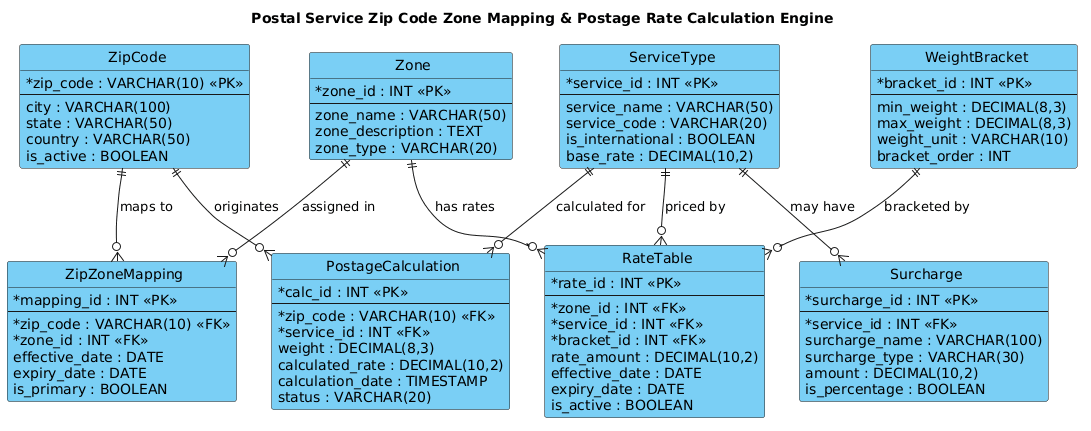
Copy the complete source code below. This code includes the necessary theme inclusion and the full entity definitions with attributes and relationships.
@startuml
!include https://static.visual-paradigm.com/web/resources/plantuml-stdlib/themes/vp.puml

title Postal Service Zip Code Zone Mapping & Postage Rate Calculation Engine

/'
Context:
This ERD models the core data structures for a postal service system that maps zip codes
to delivery zones and calculates postage rates based on weight, zone, and service type.
It captures the relationships between zip codes, zones, rate tables, weight brackets,
service levels, and calculated postage charges, enabling accurate and scalable rate
determination for domestic and international mail.
'/

entity "ZipCode" as zip {
  * zip_code : VARCHAR(10) <<PK>>
  --
  city : VARCHAR(100)
  state : VARCHAR(50)
  country : VARCHAR(50)
  is_active : BOOLEAN
}

entity "Zone" as zone {
  * zone_id : INT <<PK>>
  --
  zone_name : VARCHAR(50)
  zone_description : TEXT
  zone_type : VARCHAR(20)
}

entity "ZipZoneMapping" as mapping {
  * mapping_id : INT <<PK>>
  --
  * zip_code : VARCHAR(10) <<FK>>
  * zone_id : INT <<FK>>
  effective_date : DATE
  expiry_date : DATE
  is_primary : BOOLEAN
}

entity "ServiceType" as service {
  * service_id : INT <<PK>>
  --
  service_name : VARCHAR(50)
  service_code : VARCHAR(20)
  is_international : BOOLEAN
  base_rate : DECIMAL(10,2)
}

entity "WeightBracket" as weight {
  * bracket_id : INT <<PK>>
  --
  min_weight : DECIMAL(8,3)
  max_weight : DECIMAL(8,3)
  weight_unit : VARCHAR(10)
  bracket_order : INT
}

entity "RateTable" as rate {
  * rate_id : INT <<PK>>
  --
  * zone_id : INT <<FK>>
  * service_id : INT <<FK>>
  * bracket_id : INT <<FK>>
  rate_amount : DECIMAL(10,2)
  effective_date : DATE
  expiry_date : DATE
  is_active : BOOLEAN
}

entity "PostageCalculation" as calc {
  * calc_id : INT <<PK>>
  --
  * zip_code : VARCHAR(10) <<FK>>
  * service_id : INT <<FK>>
  weight : DECIMAL(8,3)
  calculated_rate : DECIMAL(10,2)
  calculation_date : TIMESTAMP
  status : VARCHAR(20)
}

entity "Surcharge" as surcharge {
  * surcharge_id : INT <<PK>>
  --
  * service_id : INT <<FK>>
  surcharge_name : VARCHAR(100)
  surcharge_type : VARCHAR(30)
  amount : DECIMAL(10,2)
  is_percentage : BOOLEAN
}

zip ||--o{ mapping : "maps to"
zone ||--o{ mapping : "assigned in"
zone ||--o{ rate : "has rates"
service ||--o{ rate : "priced by"
weight ||--o{ rate : "bracketed by"
zip ||--o{ calc : "originates"
service ||--o{ calc : "calculated for"
service ||--o{ surcharge : "may have"

@endumlStep-by-Step Architectural Walkthrough
Building this ERD in VPasCode is a structured process. We move from setting the visual stage to defining core entities, establishing relationships, and finally polishing the diagram with context.
Phase 1: Canvas Configuration & Layout Directives
Every professional PlantUML diagram starts with configuration. We begin by including the vp.puml theme, which ensures the diagram inherits the clean, modern aesthetic consistent with Visual Paradigm’s standards. This single line of code automatically applies consistent fonts, colors, and border styles to all entities.
!include https://static.visual-paradigm.com/web/resources/plantuml-stdlib/themes/vp.pumlNext, we define the diagram’s title. This acts as the header for the entire model, providing immediate context for anyone viewing the diagram.
title Postal Service Zip Code Zone Mapping & Postage Rate Calculation EnginePhase 2: Declaring Core Entities, Actors, and Boundaries
The heart of an ERD is the entity block. In PlantUML, we define an entity using the entity "Name" as alias { ... } syntax. The alias (e.g., zip) is used later to draw relationships, while the block inside defines the columns.
Consider the ZipCode entity. We define the primary key with the * symbol and the <<PK>> stereotype. The -- separator is crucial; it visually separates the primary key from the other attributes, making the schema easier to scan.
entity "ZipCode" as zip {
  * zip_code : VARCHAR(10) <>
  --
  city : VARCHAR(100)
  state : VARCHAR(50)
  is_active : BOOLEAN
}
We repeat this pattern for Zone, ServiceType, and WeightBracket, ensuring data types like DECIMAL and DATE are specified correctly for the logistics domain.
Phase 3: Mapping Data Flows & Key Interactions
Once entities are defined, we must link them. This is where the logic of the postal system comes to life. We use the ||--o{ syntax to denote a one-to-many relationship where the || represents the “one” side (mandatory) and o{ represents the “many” side (optional).
For example, the relationship between ZipCode and Zone is not direct; it is mediated by the ZipZoneMapping junction table. This is a classic many-to-many resolution pattern in relational databases.
zip ||--o{ mapping : "maps to"
zone ||--o{ mapping : "assigned in"
Similarly, the RateTable entity acts as a composite key, linking a specific Zone, a ServiceType, and a WeightBracket to determine a specific rate_amount. This tripartite relationship is critical for the engine’s accuracy.
Phase 4: Grouping, Annotations & Visual Polish
The final phase involves adding context and ensuring the diagram is self-documenting. We use the comment block syntax /' ... '/ to provide a high-level description of the diagram’s purpose. This text does not render as part of the diagram but serves as a crucial piece of metadata for readers and search engines.
/'
Context:
This ERD models the core data structures for a postal service system...
'/
We also ensure that foreign keys are explicitly marked with <<FK>> in the junction tables (like ZipZoneMapping) to clarify data integrity constraints.
Syntax & Keyword Deep Dive
Understanding the specific PlantUML syntax used in this ERD is essential for adapting this model to other domains. Here is a breakdown of the key keywords and conventions:
entity: The primary keyword used to define a database table. It accepts a display name and an alias.as: Used to assign a short alias (e.g.,as zip) to an entity for use in relationship lines.||--o{: A relationship connector.||indicates a mandatory one, ando{indicates zero or many. This creates a crow’s foot notation.<<PK>>&<<FK>>: Stereotypes used to visually mark Primary Keys and Foreign Keys respectively.--: A separator line within an entity block that visually divides the primary key from other attributes./' ... '/: The syntax for a multi-line comment block that provides context without rendering in the diagram itself.
Best Practices & Pitfalls to Avoid
When modeling complex logistics schemas like this, adherence to best practices ensures your diagram remains maintainable and accurate.
- Use Descriptive Aliases: While PlantUML allows short aliases, ensure they are intuitive (e.g.,
as rateinstead ofas r). This makes the relationship lines self-explanatory. - Separate Keys from Attributes: Always use the
--separator to visually distinguish the primary key. This is a standard convention that database developers expect to see. - Model Junction Tables Explicitly: For many-to-many relationships (like Zip to Zone), do not try to force a direct line. Create a dedicated entity (like
ZipZoneMapping) with its own primary key and foreign keys. - Include Temporal Validity: In rate calculation systems, data changes over time. Always include
effective_dateandexpiry_datecolumns in your entities to handle historical pricing.
Try It Yourself with VPasCode
Start Building Postal ERDs Faster with VPasCode
Instantly render, edit, and customize your logistics database schemas online with zero local installation required.