


In the rapidly evolving landscape of Industry 4.0, the ability to translate physical factory floor operations into digital data models is critical for predictive maintenance and operational efficiency. Manufacturing facilities are increasingly deploying thousands of sensors on machinery to monitor vibration, temperature, and pressure in real-time. However, without a coherent data architecture, this flood of telemetry data becomes unmanageable noise rather than actionable intelligence. The challenge lies in structuring a database schema that not only captures the hierarchical relationship between factories, machines, and sensors but also supports complex workflows for alerts, maintenance events, and machine learning predictions.
Entity Relationship Diagrams (ERDs) serve as the blueprint for this digital transformation. By visualizing entities like Factory, Machine, Sensor, and Telemetry, architects can ensure data integrity, optimize query performance, and clearly communicate the system’s logic to stakeholders. PlantUML, a diagram-as-code tool, offers a unique advantage here: it allows developers to define these complex relationships in plain text, version them alongside application code, and render them instantly. This tutorial guides you through building a comprehensive ERD for an IoT predictive maintenance platform, demonstrating how to leverage the VPasCode web editor to prototype and refine your data models with zero setup.
Understanding the Model: Purpose, Scope & Problem Framing
This tutorial focuses on constructing a specialized ERD for an Internet-of-Things (IoT) platform designed to connect factory floor machinery and enable predictive maintenance. Unlike generic database schemas, this model must handle high-frequency time-series data (telemetry) while maintaining strict referential integrity between physical assets and their digital twins.
Diagram Abstraction & Representation
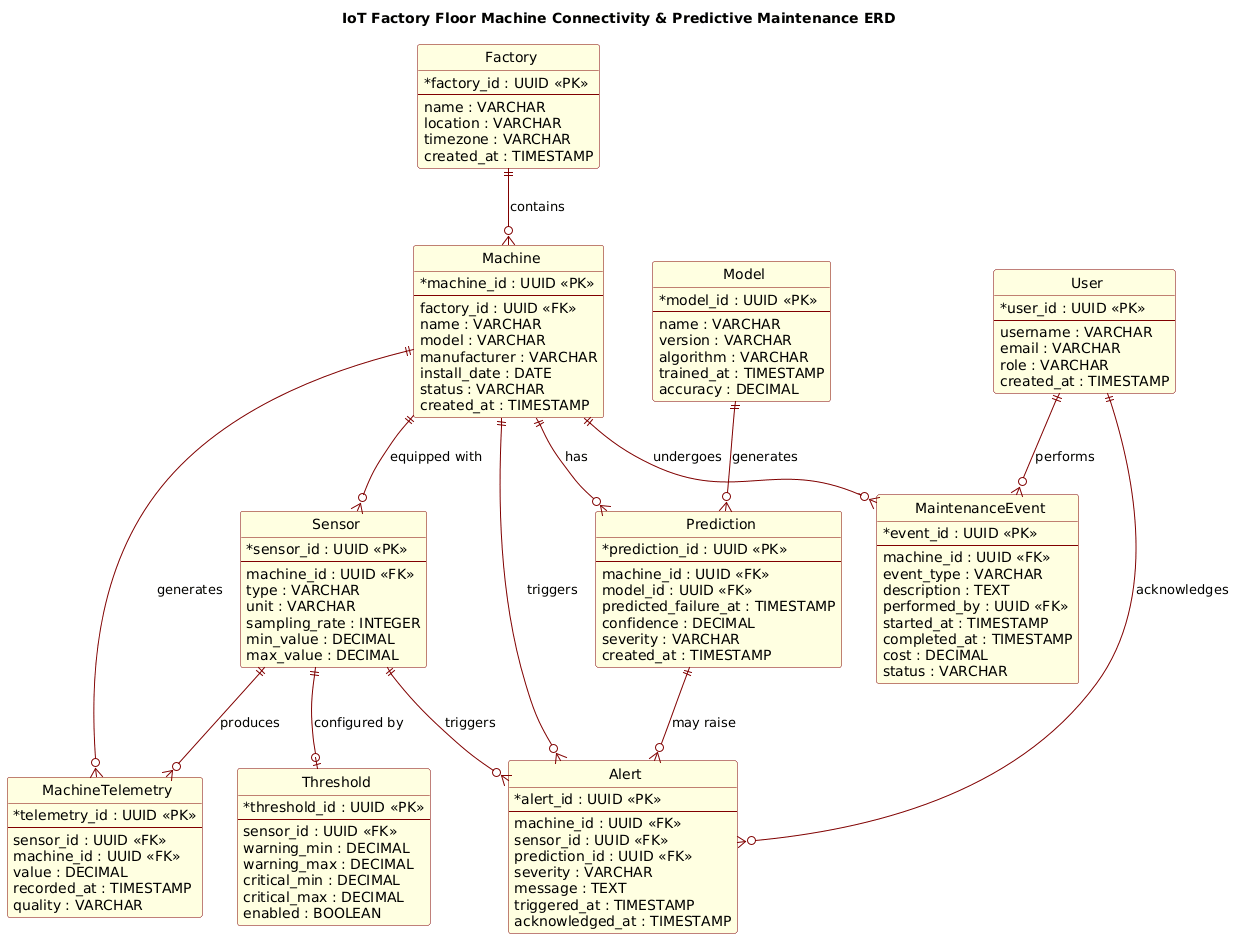
An ERD is the standard visual notation for defining the logical structure of a database. In this specific context, the diagram abstracts the physical world into discrete entities. Entities represent tangible objects (like a Machine or a Sensor) or abstract concepts (like a Prediction or a User). Attributes define the properties of these entities, such as a sensor’s sampling_rate or a machine’s status. Relationships (the connecting lines) define how these entities interact, specifying cardinality (one-to-many, one-to-one) and the nature of the dependency (e.g., a Machine produces Telemetry).
Target Domain Scope & Scenario
The scope of this diagram is the core data backbone of a predictive maintenance system. It intentionally excludes lower-level network protocols (like MQTT topics) or high-level UI components, focusing strictly on the persistence layer. The scenario covers:
- Asset Hierarchy: Organizing machines within factories.
- Instrumentation: Mapping sensors to specific machines and their data points.
- Operational Events: Recording maintenance actions and system alerts.
- Intelligence: Storing machine learning models and their generated predictions.
Key Takeaways & Educational Insights
By completing this tutorial, you will gain a deep understanding of how to model complex, multi-entity relationships in PlantUML. You will learn how to structure foreign keys to enforce data integrity, how to use stereotypes (like <
Complete Diagram & Full Source Code
Before diving into the step-by-step construction, here is the complete, rendered ERD that we will be building. This diagram illustrates the full connectivity of the IoT platform, showing how data flows from the physical sensor to the predictive model and the human operator.
@startuml
!include https://static.visual-paradigm.com/web/resources/plantuml-stdlib/themes/rose.puml

title IoT Factory Floor Machine Connectivity & Predictive Maintenance ERD

/'
This ERD models the core data architecture for an Internet-of-Things (IoT) platform
that connects factory floor machines, collects telemetry, and enables predictive maintenance.
The diagram centers on Factory, Machine, Sensor, and MachineTelemetry entities,
which together capture the physical and digital representation of connected assets.
MaintenanceEvent and Prediction records support condition-based and predictive maintenance
workflows, while Alert and User provide operational visibility and human ownership.
Threshold and Model entities enable configurable rules and machine-learning-driven
anomaly detection for proactive maintenance decisions.
'/

' Entities
entity "Factory" as factory {
  * factory_id : UUID <<PK>>
  --
  name : VARCHAR
  location : VARCHAR
  timezone : VARCHAR
  created_at : TIMESTAMP
}

entity "Machine" as machine {
  * machine_id : UUID <<PK>>
  --
  factory_id : UUID <<FK>>
  name : VARCHAR
  model : VARCHAR
  manufacturer : VARCHAR
  install_date : DATE
  status : VARCHAR
  created_at : TIMESTAMP
}

entity "Sensor" as sensor {
  * sensor_id : UUID <<PK>>
  --
  machine_id : UUID <<FK>>
  type : VARCHAR
  unit : VARCHAR
  sampling_rate : INTEGER
  min_value : DECIMAL
  max_value : DECIMAL
}

entity "MachineTelemetry" as telemetry {
  * telemetry_id : UUID <<PK>>
  --
  sensor_id : UUID <<FK>>
  machine_id : UUID <<FK>>
  value : DECIMAL
  recorded_at : TIMESTAMP
  quality : VARCHAR
}

entity "Threshold" as threshold {
  * threshold_id : UUID <<PK>>
  --
  sensor_id : UUID <<FK>>
  warning_min : DECIMAL
  warning_max : DECIMAL
  critical_min : DECIMAL
  critical_max : DECIMAL
  enabled : BOOLEAN
}

entity "MaintenanceEvent" as maint_event {
  * event_id : UUID <<PK>>
  --
  machine_id : UUID <<FK>>
  event_type : VARCHAR
  description : TEXT
  performed_by : UUID <<FK>>
  started_at : TIMESTAMP
  completed_at : TIMESTAMP
  cost : DECIMAL
  status : VARCHAR
}

entity "Prediction" as prediction {
  * prediction_id : UUID <<PK>>
  --
  machine_id : UUID <<FK>>
  model_id : UUID <<FK>>
  predicted_failure_at : TIMESTAMP
  confidence : DECIMAL
  severity : VARCHAR
  created_at : TIMESTAMP
}

entity "Model" as model {
  * model_id : UUID <<PK>>
  --
  name : VARCHAR
  version : VARCHAR
  algorithm : VARCHAR
  trained_at : TIMESTAMP
  accuracy : DECIMAL
}

entity "Alert" as alert {
  * alert_id : UUID <<PK>>
  --
  machine_id : UUID <<FK>>
  sensor_id : UUID <<FK>>
  prediction_id : UUID <<FK>>
  severity : VARCHAR
  message : TEXT
  triggered_at : TIMESTAMP
  acknowledged_at : TIMESTAMP
}

entity "User" as user {
  * user_id : UUID <<PK>>
  --
  username : VARCHAR
  email : VARCHAR
  role : VARCHAR
  created_at : TIMESTAMP
}

' Relationships
factory ||--o{ machine : "contains"
machine ||--o{ sensor : "equipped with"
sensor ||--o{ telemetry : "produces"
machine ||--o{ telemetry : "generates"
sensor ||--o| threshold : "configured by"
machine ||--o{ maint_event : "undergoes"
machine ||--o{ prediction : "has"
model ||--o{ prediction : "generates"
machine ||--o{ alert : "triggers"
sensor ||--o{ alert : "triggers"
prediction ||--o{ alert : "may raise"
user ||--o{ maint_event : "performs"
user ||--o{ alert : "acknowledges"

@endumlStep-by-Step Architectural Walkthrough
Phase 1: Canvas Configuration & Layout Directives
The first step in any PlantUML diagram is setting the stage. We begin by including a specific theme to ensure the diagram looks professional and consistent with modern design standards. In this case, we use the rose theme from the Visual Paradigm standard library.
@startuml
!include https://static.visual-paradigm.com/web/resources/plantuml-stdlib/themes/rose.puml

title IoT Factory Floor Machine Connectivity & Predictive Maintenance ERD
The @startuml directive initializes the diagram, while the !include directive fetches the external styling rules. The title directive adds a descriptive header. Immediately following the title, we add a comment block using /' and '/ to provide a high-level architectural summary for anyone reading the source code.
Phase 2: Declaring Core Entities, Actors, and Boundaries
With the canvas ready, we define the core entities. In PlantUML ERD syntax, we use the entity keyword followed by the entity name and an alias for shorthand referencing later. Each entity is wrapped in curly braces { } to contain its attributes.
entity "Factory" as factory {
  * factory_id : UUID <>
  --
  name : VARCHAR
  location : VARCHAR
  timezone : VARCHAR
  created_at : TIMESTAMP
}
Here, we define the Factory entity. The * symbol before factory_id indicates it is a primary key. The < stereotype explicitly labels it as a Primary Key, and < is used for Foreign Keys. The -- separator divides keys from regular attributes, improving readability. We repeat this pattern for Machine, Sensor, and Telemetry, ensuring that every entity has a unique identifier (UUID) and relevant metadata.
Phase 3: Mapping Data Flows & Key Interactions
Once entities are declared, we define the relationships that bind them together. PlantUML uses specific arrow notation to represent cardinality and direction. The syntax ||--o{ represents a mandatory one-to-many relationship (one factory contains many machines), while ||--o| represents a mandatory one-to-zero-or-one relationship.
factory ||--o{ machine : "contains"
machine ||--o{ sensor : "equipped with"
sensor ||--o{ telemetry : "produces"
We map the physical hierarchy first: a Factory contains Machines, and a Machine is equipped with Sensors. Then, we define the data flow: a Sensor produces Telemetry data. We also introduce the Threshold entity, which is configured by a Sensor (one-to-zero-or-one), defining the rules for when an alert should be triggered.
Phase 4: Grouping, Annotations & Visual Polish
The final phase involves connecting the operational and intelligence layers. We link the MaintenanceEvent to the Machine and the User who performed the action. We also connect the Prediction entity, which links a Machine to a Model (the AI algorithm) and generates an Alert if a failure is imminent.
machine ||--o{ maint_event : "undergoes"
user ||--o{ maint_event : "performs"
model ||--o{ prediction : "generates"
prediction ||--o{ alert : "may raise"
By explicitly naming the relationships (e.g., “contains“, “equipped with“, “performs“), the diagram becomes self-documenting. The User entity is linked to both maintenance events (as the actor) and alerts (as the resolver), completing the loop of human oversight in the automated system.
Syntax & Keyword Deep Dive
To master this ERD, it is essential to understand the specific PlantUML keywords and conventions used:
entity: Defines a database table or entity. The syntax isentity "Name" as alias { ... }.*(Asterisk): Placed before an attribute name to denote a Primary Key (PK) in the visual representation.<&> <: Stereotypes used to explicitly label Primary Keys and Foreign Keys, making the schema easier to read for database engineers.> --(Double Dash): A separator line used within an entity block to visually separate keys from regular attributes.||--o{(Cardinality): Represents a mandatory one-to-many relationship. The||means mandatory one, ando{means zero or many.||--o|(Cardinality): Represents a mandatory one-to-zero-or-one relationship./' ... '/: The syntax for multi-line comments in PlantUML, allowing for rich documentation within the code.
Best Practices & Pitfalls to Avoid
When modeling complex IoT data architectures, adhering to best practices ensures your diagrams remain maintainable and clear.
- Consistent Naming Conventions: Use singular names for entities (e.g.,
MachinenotMachines) and snake_case for attributes (e.g.,factory_id). This aligns with standard database naming conventions. - Explicit Cardinality: Always define the cardinality of relationships. Ambiguity in whether a relationship is optional or mandatory can lead to significant database design flaws later.
- Modular Entity Definition: If your diagram becomes too large, consider breaking it into multiple files or using
packagedirectives to group related entities (e.g., grouping all Alert and Threshold logic together). - Use Aliases: Always assign an alias (e.g.,
as factory) to entities. This makes the relationship lines much cleaner and easier to read than repeating the full entity name.
Start Building IoT ERDs Faster with VPasCode
Design complex database schemas instantly in your browser with VPasCode, the free PlantUML editor that offers live rendering, zero setup, and interactive syntax testing.