


In the high-stakes environment of modern manufacturing, the integrity of the production line depends not just on the machinery, but on the precision of the data that monitors it. Quality Assurance (QA) teams face a dual challenge: they must continuously monitor process stability through Statistical Process Control (SPC) to prevent defects before they occur, and simultaneously manage the complex lifecycle of Non-Conformance Reports (NCRs) when deviations inevitably happen. Without a unified data model, these two critical workflows often become siloed, leading to lost traceability, delayed root cause analysis, and an inability to correlate process drift with specific supplier defects.

Designing a robust database schema for this domain requires a deep understanding of how measurement data flows into control charts, how out-of-spec conditions trigger non-conformance events, and how those events cascade into corrective actions. This tutorial leverages VPasCode, the free web-based diagram-as-code editor, to build a comprehensive Entity Relationship Diagram (ERD) that bridges these operational gaps. By defining clear entities for Processes, Characteristics, Measurements, and the subsequent Non-Conformance lifecycle, we create a living blueprint that ensures every measurement, defect, and corrective action is traceable from the shop floor to the supplier.
Understanding the Model: Purpose, Scope & Problem Framing
Diagram Abstraction & Representation
This ERD serves as the architectural backbone for a Quality Management System (QMS) focused on proactive and reactive quality control. Unlike a simple list of tables, this diagram abstracts the complex relationships between statistical monitoring and defect management. It visualizes how a single Process is broken down into measurable Characteristics, how those characteristics are sampled over time into Measurements, and how statistical limits (Control Limits) are dynamically calculated and applied.
Crucially, the diagram extends beyond simple monitoring to handle the failure state. It maps the precise path from a failed Measurement or a bad Lot into a NonConformance record. This record then branches into a detailed investigation workflow involving Defects, Root Causes, and Corrective Actions. This abstraction allows architects to see the entire quality lifecycle in one view, ensuring that data integrity is maintained from the moment a part is measured to the moment a supplier is re-evaluated.
Target Domain Scope & Scenario
The scope of this model is strictly defined within the manufacturing quality domain. It covers:
- Statistical Process Control (SPC): Defining processes, their measurable attributes (characteristics), and the statistical charts (X-bar, R, etc.) used to track them.
- Lot & Traceability: Linking measurements and defects back to specific production lots and suppliers.
- Non-Conformance Management: The full workflow of detecting a defect, classifying it, investigating the root cause, and assigning corrective actions.
It intentionally excludes broader ERP functions like financial billing or inventory valuation, focusing solely on the data structures required for quality engineering and compliance.
Key Takeaways & Educational Insights
By studying this diagram, readers will gain insights into:
- How to model one-to-many relationships between a Process and its Characteristics.
- The structural necessity of separating Control Charts from Measurements to support historical analysis.
- Best practices for linking Non-Conformance records to both the source Lot and the specific Characteristic that failed.
- How to structure the investigation phase with separate entities for Root Causes and Corrective Actions to allow multiple actions per cause.
Complete Diagram & Full Source Code
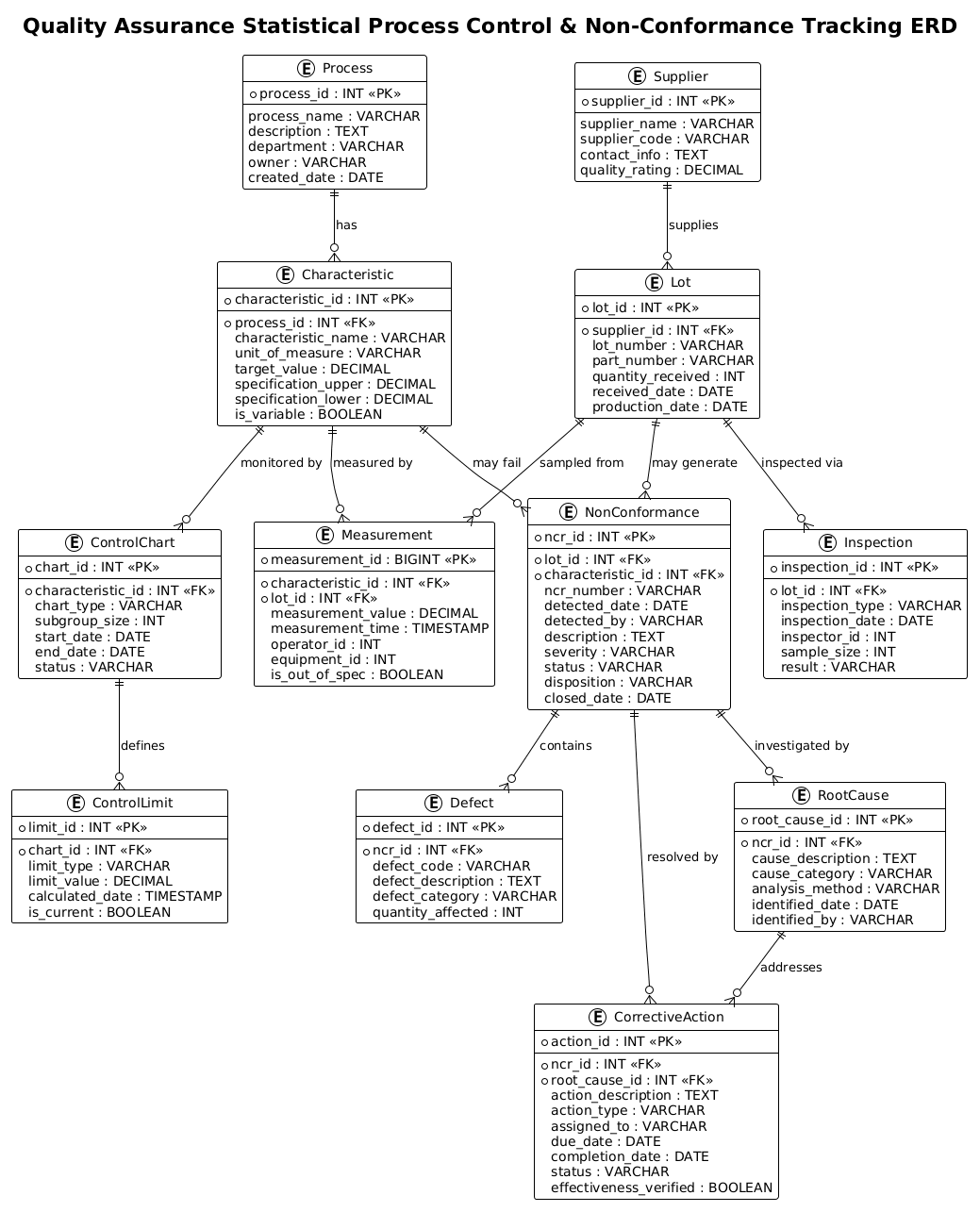
Below is the complete PlantUML source code for the diagram. You can copy this entire block and paste it into the VPasCode editor to see the rendered result instantly.
@startuml
!theme plain
title Quality Assurance Statistical Process Control & Non-Conformance Tracking ERD

/'
Diagram Context:
This ERD models a Quality Assurance system that combines Statistical Process Control (SPC)
with Non-Conformance Tracking. The database supports manufacturing quality operations by
capturing process measurements over time, calculating control chart statistics, and linking
out-of-control conditions to non-conformance reports (NCRs). It enables quality engineers
to monitor process stability, investigate root causes, assign corrective actions, and track
supplier-related defects. Key entities include Process, Characteristic, Measurement,
ControlChart, ControlLimit, NonConformance, Defect, RootCause, CorrectiveAction, Supplier,
Lot, and Inspection. The relationships allow traceability from a failed measurement through
to the NCR, investigation, and closure.
'/

' ---------- Core Process Definition ----------
entity "Process" as process {
  * process_id : INT <<PK>>
  --
  process_name : VARCHAR
  description : TEXT
  department : VARCHAR
  owner : VARCHAR
  created_date : DATE
}

entity "Characteristic" as characteristic {
  * characteristic_id : INT <<PK>>
  --
  * process_id : INT <<FK>>
  characteristic_name : VARCHAR
  unit_of_measure : VARCHAR
  target_value : DECIMAL
  specification_upper : DECIMAL
  specification_lower : DECIMAL
  is_variable : BOOLEAN
}

' ---------- SPC Data ----------
entity "Measurement" as measurement {
  * measurement_id : BIGINT <<PK>>
  --
  * characteristic_id : INT <<FK>>
  * lot_id : INT <<FK>>
  measurement_value : DECIMAL
  measurement_time : TIMESTAMP
  operator_id : INT
  equipment_id : INT
  is_out_of_spec : BOOLEAN
}

entity "ControlChart" as controlchart {
  * chart_id : INT <<PK>>
  --
  * characteristic_id : INT <<FK>>
  chart_type : VARCHAR
  subgroup_size : INT
  start_date : DATE
  end_date : DATE
  status : VARCHAR
}

entity "ControlLimit" as controllimit {
  * limit_id : INT <<PK>>
  --
  * chart_id : INT <<FK>>
  limit_type : VARCHAR
  limit_value : DECIMAL
  calculated_date : TIMESTAMP
  is_current : BOOLEAN
}

' ---------- Non-Conformance Tracking ----------
entity "NonConformance" as nonconformance {
  * ncr_id : INT <<PK>>
  --
  * lot_id : INT <<FK>>
  * characteristic_id : INT <<FK>>
  ncr_number : VARCHAR
  detected_date : DATE
  detected_by : VARCHAR
  description : TEXT
  severity : VARCHAR
  status : VARCHAR
  disposition : VARCHAR
  closed_date : DATE
}

entity "Defect" as defect {
  * defect_id : INT <<PK>>
  --
  * ncr_id : INT <<FK>>
  defect_code : VARCHAR
  defect_description : TEXT
  defect_category : VARCHAR
  quantity_affected : INT
}

entity "RootCause" as rootcause {
  * root_cause_id : INT <<PK>>
  --
  * ncr_id : INT <<FK>>
  cause_description : TEXT
  cause_category : VARCHAR
  analysis_method : VARCHAR
  identified_date : DATE
  identified_by : VARCHAR
}

entity "CorrectiveAction" as correctiveaction {
  * action_id : INT <<PK>>
  --
  * ncr_id : INT <<FK>>
  * root_cause_id : INT <<FK>>
  action_description : TEXT
  action_type : VARCHAR
  assigned_to : VARCHAR
  due_date : DATE
  completion_date : DATE
  status : VARCHAR
  effectiveness_verified : BOOLEAN
}

' ---------- Supporting Entities ----------
entity "Lot" as lot {
  * lot_id : INT <<PK>>
  --
  * supplier_id : INT <<FK>>
  lot_number : VARCHAR
  part_number : VARCHAR
  quantity_received : INT
  received_date : DATE
  production_date : DATE
}

entity "Supplier" as supplier {
  * supplier_id : INT <<PK>>
  --
  supplier_name : VARCHAR
  supplier_code : VARCHAR
  contact_info : TEXT
  quality_rating : DECIMAL
}

entity "Inspection" as inspection {
  * inspection_id : INT <<PK>>
  --
  * lot_id : INT <<FK>>
  inspection_type : VARCHAR
  inspection_date : DATE
  inspector_id : INT
  sample_size : INT
  result : VARCHAR
}

' ---------- Relationships ----------
process ||--o{ characteristic : "has"
characteristic ||--o{ measurement : "measured by"
characteristic ||--o{ controlchart : "monitored by"
controlchart ||--o{ controllimit : "defines"
lot ||--o{ measurement : "sampled from"
lot ||--o{ nonconformance : "may generate"
lot ||--o{ inspection : "inspected via"
supplier ||--o{ lot : "supplies"
characteristic ||--o{ nonconformance : "may fail"
nonconformance ||--o{ defect : "contains"
nonconformance ||--o{ rootcause : "investigated by"
nonconformance ||--o{ correctiveaction : "resolved by"
rootcause ||--o{ correctiveaction : "addresses"

@endumlStep-by-Step Architectural Walkthrough
Building a complex ERD requires a phased approach to ensure logical consistency and data integrity. We will deconstruct this diagram into four distinct phases: configuration, core entity definition, data flow mapping, and relationship linking.
Phase 1: Canvas Configuration & Layout Directives
The first step in any PlantUML ERD is setting the visual theme and context. We begin by declaring the @startuml directive and applying a clean, professional theme. The !theme plain directive ensures a minimalistic look that focuses on the data structure rather than decorative elements, which is ideal for technical documentation.
We also include a title directive to give the diagram a clear identifier. Immediately following the title, we use a comment block to document the diagram’s scope. In PlantUML, comments start with an apostrophe ('). This block wraps the context description, ensuring that anyone reading the code understands the business problem before looking at the schema.
@startuml
!theme plain
title Quality Assurance Statistical Process Control & Non-Conformance Tracking ERD

'/
Diagram Context:
This ERD models a Quality Assurance system...
'/
Phase 2: Declaring Core Entities, Actors, and Boundaries
Next, we define the fundamental building blocks of our system. In this phase, we focus on the Process and Characteristic entities. The Process entity represents a specific manufacturing line or operation, while the Characteristic entity represents the specific attribute being measured (e.g., “Diameter”, “Temperature”, “Tensile Strength”).
Notice the use of the entity keyword followed by the display name and the alias (e.g., as characteristic). The alias is crucial for writing concise relationships later. Inside the curly braces, we define attributes using the standard name : type syntax. Primary Keys are marked with * and Foreign Keys with * (in this specific notation style, both are often marked, but the context defines the relationship). We also use «PK» and «FK» stereotypes for clarity.
entity "Process" as process {
* process_id : INT <>
--
process_name : VARCHAR
}
entity "Characteristic" as characteristic {
* characteristic_id : INT < >
* process_id : INT <>
--
characteristic_name : VARCHAR
} Phase 3: Mapping Data Flows & Key Interactions
The core of the SPC model lies in the Measurement and ControlChart entities. The Measurement entity is a transactional table that records every data point. It links back to the Characteristic (what was measured) and the Lot (where the sample came from). The ControlChart entity acts as a container for statistical analysis over a specific time period, linking to the Characteristic it monitors.
We also introduce the Non-Conformance domain here. The NonConformance entity is the central hub for defects. It links to the Lot and the Characteristic to provide full context on why a batch was rejected. This phase establishes the “what” and “when” of the quality data.
entity "Measurement" as measurement {
* measurement_id : BIGINT <>
* characteristic_id : INT <>
* lot_id : INT < >
measurement_value : DECIMAL
}
entity "NonConformance" as nonconformance {
* ncr_id : INT <>
* lot_id : INT <>
* characteristic_id : INT < >
ncr_number : VARCHAR
} Phase 4: Grouping, Annotations & Visual Polish
The final phase involves linking the entities with relationships and adding supporting entities like Supplier and CorrectiveAction. The CorrectiveAction entity is linked to both NonConformance and RootCause, reflecting the workflow where one root cause might trigger multiple actions to resolve a single non-conformance.
We define relationships using the ||--o{ syntax. The || represents the “one” side (mandatory), and the o{ represents the “zero or many” side (optional). This notation clearly communicates that a Process must have Characteristics, but a Characteristic might not have any Measurements yet (if the process is new).
process ||--o{ characteristic : "has"
nonconformance ||--o{ correctiveaction : "resolved by"
supplier ||--o{ lot : "supplies"
Syntax & Keyword Deep Dive
PlantUML’s ERD syntax is powerful and flexible. Here is a breakdown of the specific keywords and conventions used in this manufacturing ERD:
entity: The primary directive used to define a table or entity. It is followed by the display name (in quotes) and an alias (usingas) for referencing in relationships.«PK»and«FK»: These are stereotypes used to visually denote Primary Keys and Foreign Keys within the entity definition. While PlantUML can infer keys from relationships, explicitly marking them improves readability.«--»: This separator line within an entity block visually divides the key attributes from the standard attributes, improving the visual hierarchy of the box.||--o{: This is the Crow’s Foot notation for relationships.||means “one and only one” (mandatory), ando{means “zero or many” (optional). For example,process ||--o{ characteristicmeans a Process must have at least one Characteristic? No, actually in this specific notation||is mandatory one,o{is optional many. Wait, the standard PlantUML ERD notation is:|o{(zero or one),|(one),o{(zero or many),||(one or many),||--o{(one mandatory to zero or many). In the code above,process ||--o{ characteristicimplies a mandatory one-to-many relationship, which is semantically correct for a process definition.!theme: A directive to apply a specific visual style (e.g.,plain,modern) to the entire diagram, ensuring consistency with organizational branding.': The comment character. Anything following this on a line is ignored by the renderer, allowing for documentation strings like theDiagram Contextblock.
Best Practices & Pitfalls to Avoid
When modeling complex manufacturing systems, following best practices ensures your diagram remains maintainable and useful over time.
- Use Aliases for Readability: Always define an alias for your entities (e.g.,
as process). This allows you to write shorter, cleaner relationship lines likeprocess ||--o{ characteristicinstead of repeating the full entity name every time. - Separate Transactional Data from Metadata: Notice how
Measurement(transactional) is separated fromCharacteristic(metadata). Do not mix static definitions with high-frequency data points in the same entity to maintain database normalization. - Define Cardinality Clearly: Be precise with your relationship arrows. Using
||--o{(mandatory one to optional many) vs|o--o{(optional one to optional many) can have significant implications for data integrity rules in your database. - Document Context Early: As shown in this guide, always start with a comment block explaining the diagram’s scope. This helps stakeholders quickly understand if the model covers the specific problem they are facing.
Start Building SPC & NCR Diagrams Faster with VPasCode
Instantly visualize your Quality Assurance database schema, test relationship logic, and export professional ERDs directly in your browser with zero installation.