


In the high-stakes environment of automotive manufacturing, the integrity of production data is paramount. Every vehicle rolling off the assembly line is identified by a unique 17-character Vehicle Identification Number (VIN), which serves as the digital thread connecting order intake, component selection, physical assembly, and final quality validation. For system architects designing manufacturing execution systems (MES), visualizing the complex relationships between vehicle build records, assembly station events, and option configurations is not just a documentation exercise—it is a critical prerequisite for ensuring data consistency and traceability.
Traditional drag-and-drop diagramming tools often struggle with the granularity required for such complex schemas, where thousands of entities must maintain strict referential integrity. Diagram-as-code approaches, specifically using PlantUML, offer a superior alternative for manufacturing data modeling. By defining the schema in text, engineers can version their data models alongside their application code, automate schema generation, and leverage the power of VPasCode to instantly render and validate the architectural blueprint. This approach ensures that the logical structure of the database aligns perfectly with the physical constraints of the assembly line.
Understanding the Model: Purpose, Scope & Problem Framing
This tutorial focuses on constructing an Entity-Relationship Diagram (ERD) tailored for an automotive assembly line. The primary challenge in this domain is managing the lifecycle of a vehicle from the moment an order is placed to the moment it passes final validation. The model must capture not just the static attributes of a vehicle (like model code and trim), but also the dynamic events occurring at specific stations and the complex logic governing optional features.
Diagram Abstraction & Representation
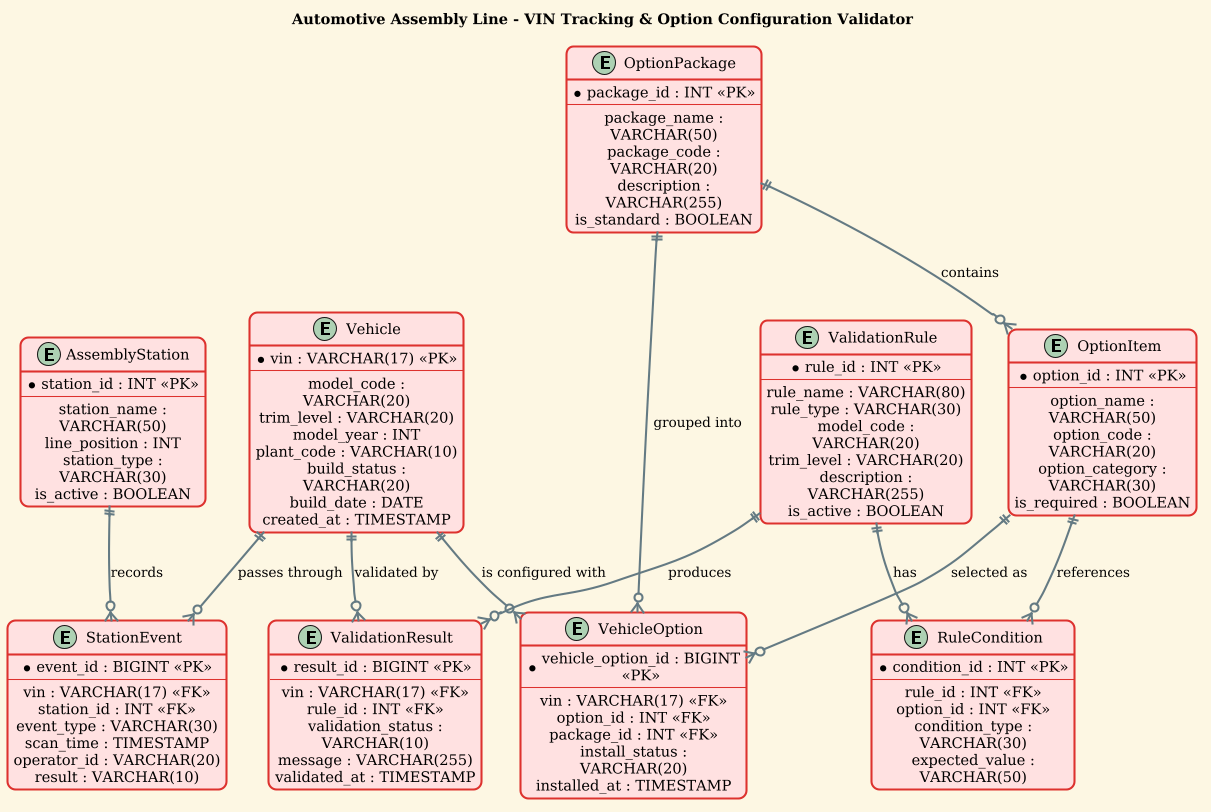
In this context, the ERD serves as the logical contract for the manufacturing database. The Vehicle entity acts as the central anchor, representing the physical unit being built. The AssemblyStation and StationEvent entities model the temporal flow of the vehicle through the factory, recording every interaction, scan, and operation. The OptionPackage and OptionItem entities manage the configuration complexity, ensuring that specific features (like heated seats or premium audio) are correctly linked to the vehicle’s build. Finally, the ValidationRule and ValidationResult entities enforce business logic, ensuring that incompatible options are never installed on a specific trim level.
Target Domain Scope & Scenario
The scope of this diagram covers the core data entities required to track a single vehicle’s journey. It explicitly excludes external systems like CRM or ERP order intake, focusing instead on the internal manufacturing execution data. The diagram models the relationships between the vehicle’s identity, its physical location on the line, its selected features, and the rules that govern its build quality. This scope is essential for database designers building the backend for MES or IoT data collection systems.
Key Takeaways & Educational Insights
By following this guide, you will learn how to structure a normalized database schema that handles one-to-many relationships between vehicles and their events, as well as many-to-many relationships between vehicles and their options. You will gain insights into how to model validation logic directly within the data schema and how to use PlantUML to create a clear, readable representation of complex manufacturing workflows.
Complete Diagram & Full Source Code
Before diving into the step-by-step construction, here is the complete, rendered view of the Automotive VIN Tracking ERD. This blueprint illustrates the relationships between the vehicle, assembly stations, options, and validation rules.
@startuml
!theme sunlust
title Automotive Assembly Line - VIN Tracking & Option Configuration Validator

/'
Diagram Context:
This ERD models the data structure for tracking vehicles on an automotive assembly line
using their Vehicle Identification Number (VIN). It captures the vehicle build record,
the assembly station sequence, installed option/feature configurations, and the
validation rules that ensure each vehicle's selected options are compatible and
allowed for its specific model and trim. The diagram supports traceability from
order intake through production to final validation.
'/

entity "Vehicle" as vehicle {
  * vin : VARCHAR(17) <<PK>>
  --
  model_code : VARCHAR(20)
  trim_level : VARCHAR(20)
  model_year : INT
  plant_code : VARCHAR(10)
  build_status : VARCHAR(20)
  build_date : DATE
  created_at : TIMESTAMP
}

entity "AssemblyStation" as station {
  * station_id : INT <<PK>>
  --
  station_name : VARCHAR(50)
  line_position : INT
  station_type : VARCHAR(30)
  is_active : BOOLEAN
}

entity "StationEvent" as station_event {
  * event_id : BIGINT <<PK>>
  --
  vin : VARCHAR(17) <<FK>>
  station_id : INT <<FK>>
  event_type : VARCHAR(30)
  scan_time : TIMESTAMP
  operator_id : VARCHAR(20)
  result : VARCHAR(10)
}

entity "OptionPackage" as option_pkg {
  * package_id : INT <<PK>>
  --
  package_name : VARCHAR(50)
  package_code : VARCHAR(20)
  description : VARCHAR(255)
  is_standard : BOOLEAN
}

entity "OptionItem" as option_item {
  * option_id : INT <<PK>>
  --
  option_name : VARCHAR(50)
  option_code : VARCHAR(20)
  option_category : VARCHAR(30)
  is_required : BOOLEAN
}

entity "VehicleOption" as vehicle_option {
  * vehicle_option_id : BIGINT <<PK>>
  --
  vin : VARCHAR(17) <<FK>>
  option_id : INT <<FK>>
  package_id : INT <<FK>>
  install_status : VARCHAR(20)
  installed_at : TIMESTAMP
}

entity "ValidationRule" as validation_rule {
  * rule_id : INT <<PK>>
  --
  rule_name : VARCHAR(80)
  rule_type : VARCHAR(30)
  model_code : VARCHAR(20)
  trim_level : VARCHAR(20)
  description : VARCHAR(255)
  is_active : BOOLEAN
}

entity "RuleCondition" as rule_condition {
  * condition_id : INT <<PK>>
  --
  rule_id : INT <<FK>>
  option_id : INT <<FK>>
  condition_type : VARCHAR(30)
  expected_value : VARCHAR(50)
}

entity "ValidationResult" as validation_result {
  * result_id : BIGINT <<PK>>
  --
  vin : VARCHAR(17) <<FK>>
  rule_id : INT <<FK>>
  validation_status : VARCHAR(10)
  message : VARCHAR(255)
  validated_at : TIMESTAMP
}

vehicle ||--o{ station_event : "passes through"
station ||--o{ station_event : "records"
vehicle ||--o{ vehicle_option : "is configured with"
option_item ||--o{ vehicle_option : "selected as"
option_pkg ||--o{ vehicle_option : "grouped into"
option_pkg ||--o{ option_item : "contains"
validation_rule ||--o{ rule_condition : "has"
option_item ||--o{ rule_condition : "references"
vehicle ||--o{ validation_result : "validated by"
validation_rule ||--o{ validation_result : "produces"

@endumlStep-by-Step Architectural Walkthrough
Phase 1: Canvas Configuration & Layout Directives
Every PlantUML diagram begins with setup directives that define the visual style and the scope of the diagram. In this manufacturing context, we use the !theme sunlust directive to apply a professional, warm color palette suitable for industrial documentation. We also define a comment block using the /' and '/ syntax to provide a high-level context for the diagram, ensuring that anyone viewing the model understands its purpose without needing to read the code. Finally, we set the @startuml and @enduml markers to enclose the entire model.
@startuml
!theme sunlust
title Automotive Assembly Line - VIN Tracking & Option Configuration Validator

/'
Diagram Context:
... (context description) ...
'/
Phase 2: Declaring Core Entities, Actors, and Boundaries
The backbone of any ERD is the definition of entities. In PlantUML, we use the entity keyword followed by the entity name and an alias for shorthand in relationships. Inside the curly braces, we define the attributes. Primary keys are marked with * and foreign keys with < (though often implied by relationships, explicit declaration helps with code generation). For example, the Vehicle entity defines the VIN as the primary key, along with critical manufacturing attributes like model_code, trim_level, and plant_code.
entity "Vehicle" as vehicle {
* vin : VARCHAR(17) <>
--
model_code : VARCHAR(20)
trim_level : VARCHAR(20)
model_year : INT
...
}
entity "AssemblyStation" as station {
* station_id : INT < >
--
station_name : VARCHAR(50)
...
}
Phase 3: Mapping Data Flows & Key Interactions
Once entities are defined, we establish the relationships that represent the flow of data and manufacturing logic. PlantUML uses specific arrow syntax to denote cardinality. The ||--o{ syntax represents a “one-to-zero-or-more” relationship. For instance, a Vehicle can pass through zero or more StationEvent records. This relationship is critical for tracing the vehicle’s history. We also model the configuration logic where a Vehicle is configured with VehicleOption records, linking the physical car to its digital features.
vehicle ||--o{ station_event : "passes through"
station ||--o{ station_event : "records"
vehicle ||--o{ vehicle_option : "is configured with"
option_item ||--o{ vehicle_option : "selected as"
Phase 4: Grouping, Annotations & Visual Polish
To ensure the diagram remains readable as complexity grows, we group related entities logically. While PlantUML ERD doesn’t have explicit “package” grouping in the same way as sequence diagrams, we can use the title directive to frame the entire model. We also ensure that the ValidationRule and ValidationResult entities are clearly linked to the OptionItem to show how business rules are enforced against specific features. The final step is verifying that all relationships are bidirectional where necessary and that the cardinality symbols accurately reflect the database constraints.
validation_rule ||--o{ rule_condition : "has"
option_item ||--o{ rule_condition : "references"
vehicle ||--o{ validation_result : "validated by"
validation_rule ||--o{ validation_result : "produces"
Syntax & Keyword Deep Dive
Understanding the specific PlantUML syntax used in this manufacturing ERD is essential for customization and extension. Below are the key keywords and conventions utilized:
entity: The fundamental keyword used to define a database table or object. It is followed by a display name (e.g.,"Vehicle") and an alias (e.g.,as vehicle).*: Placed before an attribute name to denote a Primary Key (PK). This is crucial for identifying the unique identifier of an entity, such as thevinin the Vehicle entity.<: A stereotype used to explicitly mark a Foreign Key attribute. While relationships often imply this, marking it explicitly aids in code generation and clarity.> ||--o{: The relationship arrow syntax.||denotes “one” (mandatory), ando{denotes “zero or many” (optional). This accurately models scenarios like a vehicle having many station events.--: A separator line inside an entity block that visually divides the Primary Key from the optional attributes, improving readability./' ... '/: The comment block syntax. Unlike single-line comments, this allows for multi-line text descriptions that appear as a header or context note on the diagram.
Best Practices & Pitfalls to Avoid
When modeling complex manufacturing systems like an automotive assembly line, adhering to best practices ensures your diagram remains maintainable and useful.
- Consistent Naming Conventions: Always use clear, descriptive names for entities and attributes. Avoid abbreviations like
vinwithout context; instead, usevehicle_idorvinconsistently with the domain language. - Logical Grouping: Even in a flat ERD, group related entities conceptually. For instance, keep all validation-related entities (
ValidationRule,RuleCondition,ValidationResult) close to each other in the code to make the logic easier to follow. - Cardinality Accuracy: Ensure your relationship arrows (
||--o{, etc.) accurately reflect the real-world business rules. Misrepresenting a “one-to-many” relationship as “many-to-many” can lead to significant database design errors. - Use Aliases for Clarity: Always define an alias for your entities (e.g.,
as vehicle). This makes the relationship lines much shorter and easier to read than using the full entity name repeatedly.
Start Building Professional Manufacturing ERDs Faster with VPasCode
Instantly visualize your automotive data models, test relationship cardinality, and export clean diagrams directly from your browser without installing any tools.