


In the high-stakes environment of semiconductor manufacturing, the ability to trace a single wafer from raw material through hundreds of processing steps is not just a convenience—it is a critical operational necessity. A modern wafer fabrication facility (or “fab”) operates as a complex ecosystem where thousands of lots move simultaneously through lithography, etching, deposition, and inspection stages. Without a rigorous data model to track these entities, root-cause analysis for yield failures becomes impossible, and production bottlenecks remain invisible. The challenge lies in capturing the hierarchical nature of the data: how a PRODUCT definition dictates the process flow for a LOT, how that lot splits into individual WAFER units, and how every interaction with EQUIPMENT and OPERATOR is recorded in real-time history tables.

Traditional spreadsheet-based tracking or ad-hoc database schemas often fail to scale or maintain the strict referential integrity required in a fab. This is where the diagram-as-code approach shines. By using PlantUML within the VPasCode editor, architects can define a living, versioned schema that serves as the single source of truth for the manufacturing execution system (MES). This guide walks you through building a professional Entity Relationship Diagram (ERD) that models the core lifecycle of a semiconductor lot, including defect tracking, metrology measurements, and final yield aggregation. We will leverage the power of VPasCode to instantly visualize these complex relationships, ensuring your data architecture is both logically sound and visually intuitive before a single line of SQL is written.
Understanding the Model: Purpose, Scope & Problem Framing
Diagram Abstraction & Representation
An Entity Relationship Diagram (ERD) is the blueprint for relational databases, defining how data entities connect, relate, and constrain one another. In the context of semiconductor manufacturing, this specific ERD models a Master Data Management and Production History schema. Unlike a simple inventory list, this model captures the temporal and hierarchical complexity of the fab. It distinguishes between the PRODUCT (the design definition), the LOT (the physical batch), and the WAFER (the individual unit), ensuring that data can be aggregated at any level of granularity. The inclusion of LOT_STEP_HISTORY transforms the diagram from a static inventory map into a dynamic process log, enabling the system to answer questions like “Which equipment caused the yield drop in Step 5?” or “What was the defect density for Wafer #42 in Lot #9001?”.
Target Domain Scope & Scenario
This diagram focuses strictly on the core manufacturing data domain, excluding peripheral systems like ERP (Enterprise Resource Planning) or HR (Human Resources) for brevity, though these are easily extensible. The scope covers the entire lifecycle from LOT release to YIELD_RESULT finalization. Key boundaries include:
- Product Definition: How technology nodes and target yields are stored.
- Process Execution: The linkage between lots, steps, recipes, and equipment.
- Quality Control: The integration of defect inspection and metrology data linked to specific wafer steps.
- Traceability: The ability to trace a yield result back to the specific operator, equipment, and recipe used.
Key Takeaways & Educational Insights
By constructing this diagram, you will gain a deep understanding of how to model one-to-many and many-to-many relationships in a manufacturing context. You will learn how to structure a history table (LOT_STEP_HISTORY) to decouple process definitions from execution records, a pattern critical for scalable MES architectures. Furthermore, you will see how to organize data for yield analysis, linking inspection results directly to the process step to enable precise root-cause analysis.
Complete Diagram & Full Source Code
Before diving into the step-by-step construction, here is the complete visual representation of the semiconductor wafer fabrication ERD. This model encapsulates the entities, attributes, and relationships required for a robust lot tracking system.
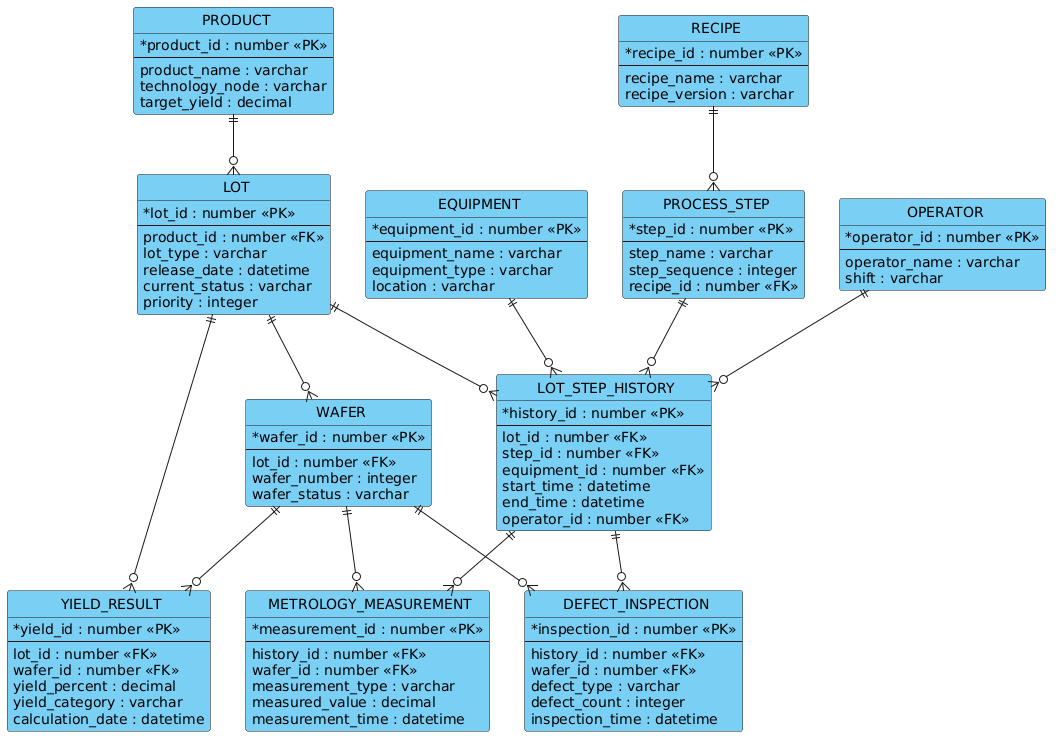
Below is the complete PlantUML source code. You can copy this entire block and paste it directly into the VPasCode editor to render the diagram instantly.
@startuml
!include https://static.visual-paradigm.com/web/resources/plantuml-stdlib/themes/vp.puml

/'
This ERD models the core entities and relationships required to track semiconductor wafer fabrication lots
from release through process completion and to analyze final yield. The central LOT entity represents a
batch of wafers moving through the fab. Each lot is associated with a PRODUCT that defines its technology
and target specifications. As the lot progresses, it is processed on various EQUIPMENT units according to
defined PROCESS STEPS. Each processing event is recorded as a LOT_STEP_HISTORY entry, capturing timestamps,
equipment used, and measured parameters. Defect and metrology data are stored in separate inspection and
measurement tables linked to the lot step history. Final yield results are aggregated per lot and per wafer,
enabling yield analysis by product, process step, equipment, and time period. The model supports traceability,
root-cause analysis, and yield improvement initiatives in wafer fabrication.
'/

entity "PRODUCT" as product {
  * product_id : number <<PK>>
  --
  product_name : varchar
  technology_node : varchar
  target_yield : decimal
}

entity "LOT" as lot {
  * lot_id : number <<PK>>
  --
  product_id : number <<FK>>
  lot_type : varchar
  release_date : datetime
  current_status : varchar
  priority : integer
}

entity "WAFER" as wafer {
  * wafer_id : number <<PK>>
  --
  lot_id : number <<FK>>
  wafer_number : integer
  wafer_status : varchar
}

entity "EQUIPMENT" as equipment {
  * equipment_id : number <<PK>>
  --
  equipment_name : varchar
  equipment_type : varchar
  location : varchar
}

entity "PROCESS_STEP" as process_step {
  * step_id : number <<PK>>
  --
  step_name : varchar
  step_sequence : integer
  recipe_id : number <<FK>>
}

entity "RECIPE" as recipe {
  * recipe_id : number <<PK>>
  --
  recipe_name : varchar
  recipe_version : varchar
}

entity "LOT_STEP_HISTORY" as lot_step_history {
  * history_id : number <<PK>>
  --
  lot_id : number <<FK>>
  step_id : number <<FK>>
  equipment_id : number <<FK>>
  start_time : datetime
  end_time : datetime
  operator_id : number <<FK>>
}

entity "OPERATOR" as operator {
  * operator_id : number <<PK>>
  --
  operator_name : varchar
  shift : varchar
}

entity "DEFECT_INSPECTION" as defect_inspection {
  * inspection_id : number <<PK>>
  --
  history_id : number <<FK>>
  wafer_id : number <<FK>>
  defect_type : varchar
  defect_count : integer
  inspection_time : datetime
}

entity "METROLOGY_MEASUREMENT" as metrology {
  * measurement_id : number <<PK>>
  --
  history_id : number <<FK>>
  wafer_id : number <<FK>>
  measurement_type : varchar
  measured_value : decimal
  measurement_time : datetime
}

entity "YIELD_RESULT" as yield_result {
  * yield_id : number <<PK>>
  --
  lot_id : number <<FK>>
  wafer_id : number <<FK>>
  yield_percent : decimal
  yield_category : varchar
  calculation_date : datetime
}

product ||--o{ lot
lot ||--o{ wafer
lot ||--o{ lot_step_history
lot ||--o{ yield_result
wafer ||--o{ yield_result
wafer ||--o{ defect_inspection
wafer ||--o{ metrology
process_step ||--o{ lot_step_history
equipment ||--o{ lot_step_history
recipe ||--o{ process_step
operator ||--o{ lot_step_history
lot_step_history ||--o{ defect_inspection
lot_step_history ||--o{ metrology

@endumlStep-by-Step Architectural Walkthrough
Building a complex ERD requires a structured approach to ensure data integrity and readability. We will break down the construction of this semiconductor manufacturing model into four logical phases.
Phase 1: Canvas Configuration & Layout Directives
The first step in any professional PlantUML diagram is setting the stage. We start by including the Visual Paradigm standard library theme. This ensures the diagram adopts a clean, modern aesthetic consistent with enterprise documentation standards.
Open your code editor and begin with the following directives:
@startuml
!include https://static.visual-paradigm.com/web/resources/plantuml-stdlib/themes/vp.puml
The @startuml tag signals the beginning of the diagram definition, while the !include directive fetches the styling rules (colors, fonts, box styles) from the VPAS standard library. This keeps your code clean and ensures the diagram looks professional immediately.
Phase 2: Declaring Core Entities, Actors, and Boundaries
Next, we define the fundamental building blocks of the system: the Entities. In PlantUML, we use the entity keyword to represent database tables. Each entity is given a unique name (e.g., “PRODUCT”), an alias (e.g., product), and a list of attributes.
Consider the PRODUCT entity. It defines the technology being manufactured. We use the * symbol to denote a Primary Key (PK) and FK for Foreign Keys. The -- separator visually divides keys from standard attributes.
entity "PRODUCT" as product {
  * product_id : number <>
  --
  product_name : varchar
  technology_node : varchar
  target_yield : decimal
}
We repeat this pattern for LOT, WAFER, and EQUIPMENT. Notice how LOT references PRODUCT via product_id, establishing the fundamental link between a physical batch and its design definition.
Phase 3: Mapping Data Flows & Key Interactions
The heart of this ERD lies in the LOT_STEP_HISTORY entity. This is a transactional table that records every action taken on a lot. It serves as a junction table, linking the LOT, the PROCESS_STEP, the EQUIPMENT, and the OPERATOR.
We define the history table with all necessary timestamps and IDs:
entity "LOT_STEP_HISTORY" as lot_step_history {
* history_id : number <>
--
lot_id : number <>
step_id : number < >
equipment_id : number < >
start_time : datetime
end_time : datetime
operator_id : number < >
} This structure allows the system to answer complex queries like “Which operator ran the lithography step on Wafer #123?” by joining this table with the OPERATOR and EQUIPMENT tables.
Phase 4: Grouping, Annotations & Visual Polish
Finally, we connect the entities using relationship arrows. In PlantUML, we use the ||--o{ syntax to represent a mandatory one-to-many relationship (one product has many lots). The || indicates mandatory participation (a lot must belong to a product), and o{ indicates zero or many (a product can have zero lots, but a lot must have a product).
We also add a descriptive comment block at the top of the file. This is crucial for documentation. We wrap the text between /' and '/:
/'
This ERD models the core entities and relationships required to track semiconductor wafer fabrication lots
from release through process completion and to analyze final yield...
'/
This comment renders as a note on the diagram, providing immediate context for anyone viewing the model.
Syntax & Keyword Deep Dive
To master this diagram, it is essential to understand the specific PlantUML syntax elements used to convey manufacturing logic.
entity "Name" as alias: Defines a database table. The alias (e.g.,product) is used in relationship definitions to keep code concise.* attribute_name : type: The asterisk denotes a Primary Key. This is critical for defining unique identifiers in the database schema.<and> <: Stereotypes used to visually label attributes as Primary Keys and Foreign Keys within the entity box.> ||--o{: This arrow notation represents a mandatory one-to-many relationship.||means “one and only one” on the left side, ando{means “zero or many” on the right side./' ... '/: The syntax for a block comment. In PlantUML, this renders as a note attached to the diagram, perfect for high-level descriptions without cluttering the code logic.!include: A directive to import external resources, such as the Visual Paradigm theme, ensuring consistent styling across all diagrams.
Best Practices & Pitfalls to Avoid
When modeling complex manufacturing systems with PlantUML, adherence to best practices ensures your diagrams remain maintainable and scalable.
- Use Consistent Naming Conventions: Always use uppercase for entity names (e.g.,
LOT) and lowercase for aliases (e.g.,lot). This distinction helps differentiate between the logical concept and the code reference. - Separate Metadata from Execution: Notice how PROCESS_STEP defines the “what” (the step name) while LOT_STEP_HISTORY records the “when” and “how” (the execution). Do not mix these concerns into a single table.
- Minimize Attribute Clutter: Only include attributes that are critical for relationships or analysis. If an attribute is only needed for a specific report, consider documenting it separately rather than bloating the ERD.
- Leverage Themes: Always use the
!includedirective for themes. This allows you to change the entire look and feel of your diagram by modifying a single external file, rather than editing every entity box.
Start Building Semiconductor ERDs Faster with VPasCode
Design complex manufacturing data models instantly in your browser with VPasCode, the free PlantUML editor that renders your code to diagrams in real time.