


In the high-stakes environment of chemical manufacturing, the integrity of data is not merely a technical requirement; it is a matter of safety, regulatory compliance, and operational efficiency. When producing hazardous substances or complex compounds, every step of the process must be meticulously documented. This begins with the Batch Recipe, which serves as the digital blueprint for production, defining precise ingredients, temperatures, and pressures. However, the lifecycle of a chemical product extends beyond the reaction itself. It encompasses the rigorous cleaning protocols required between batches to prevent cross-contamination, a process governed by strict Cleaning Logs that verify vessel cleanliness and operator accountability.
Visualizing these intricate relationships through traditional drag-and-drop tools can often lead to fragmented documentation or rigid diagrams that are difficult to update when processes change. A diagram-as-code approach offers a superior alternative for manufacturing architects. By defining the data model in code, teams can version their database schemas, automate documentation generation, and ensure that the visual representation of the system perfectly matches the underlying data structure. In this masterclass, we will construct a comprehensive Entity-Relationship Diagram (ERD) using PlantUML within VPasCode, modeling the critical connections between products, recipes, reactor vessels, and cleaning compliance records.
Understanding the Model: Purpose, Scope & Problem Framing
This tutorial focuses on the data architecture of a chemical production line, specifically addressing the Batch Recipe Management and Reactor Vessel Cleaning systems. Unlike generic database schemas, this model is designed to capture the temporal and procedural dependencies inherent in chemical manufacturing.
Diagram Abstraction & Representation
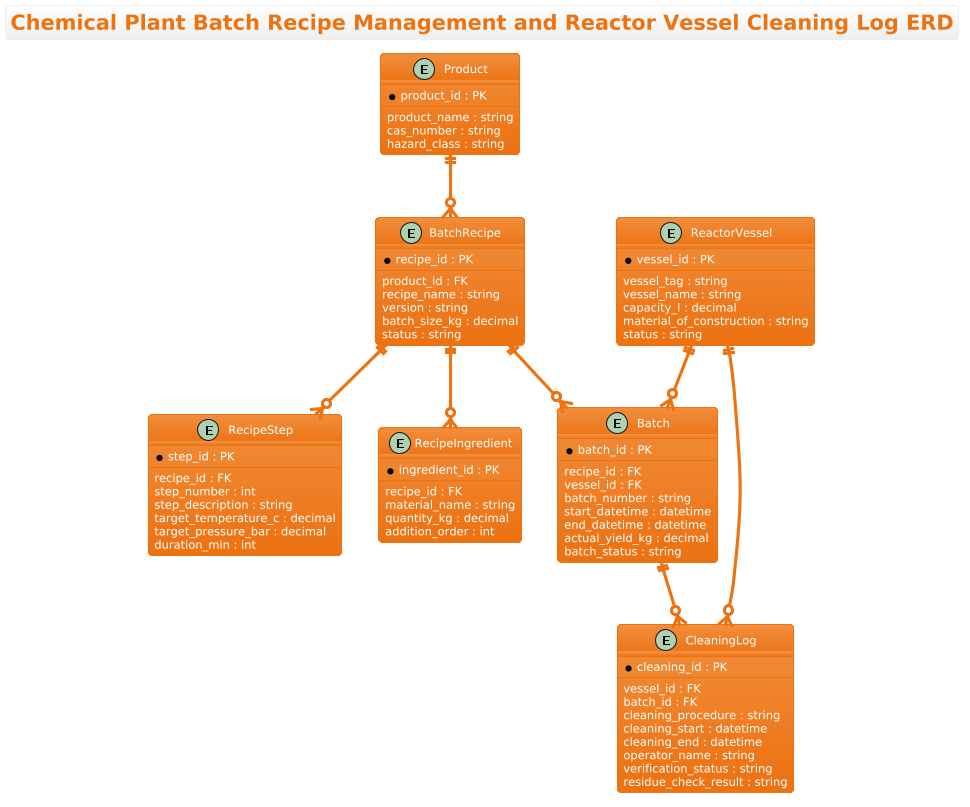
An Entity-Relationship Diagram (ERD) is the standard blueprint for relational database design. In this context, it maps the logical structure of the manufacturing data. The diagram distinguishes between static entities (like Product definitions and Reactor Vessel specifications) and dynamic transactional entities (like Batch executions and Cleaning Logs). The relationships define the cardinality of these interactions: for instance, a single Product can have multiple Recipes, but a specific Batch must be linked to exactly one Recipe and one Vessel at a time. This abstraction allows engineers to visualize the flow of data from the initial product definition through to the final cleaning verification.
Target Domain Scope & Scenario
The scope of this model covers the core production loop in a chemical plant. It intentionally excludes peripheral systems like supply chain logistics or financial billing to maintain focus on the operational data. The scenario models a facility where multiple batches are run in sequence on shared reactor vessels. The critical challenge addressed here is traceability: ensuring that every batch is linked to the specific recipe version used, the specific vessel it was processed in, and the specific cleaning procedure performed immediately before or after that batch.
Key Takeaways & Educational Insights
By the end of this guide, you will understand how to model one-to-many relationships (e.g., one recipe containing many steps), how to link transactional data (batches) to static assets (vessels), and how to enforce compliance logic through data modeling (linking cleaning logs to both the vessel and the preceding batch). You will gain the ability to rapidly prototype and modify complex manufacturing schemas using the power of text-based diagramming.
Complete Diagram & Full Source Code
Before diving into the construction steps, here is the complete, rendered ERD. This diagram illustrates the full schema for managing chemical batches and cleaning logs, utilizing the aws-orange theme for a professional, industrial aesthetic.
Copy the following code to replicate this diagram or to use as a starting point for your own manufacturing data models.
@startuml
/'
Context: Chemical Plant Batch Recipe Management and Reactor Vessel Cleaning Log
This ERD models the relationship between batch recipes, reactor vessels, and cleaning events.
A batch recipe defines the process steps and ingredients for producing a chemical product.
Each batch is executed in a specific reactor vessel. After a batch or between campaigns,
the vessel must be cleaned, and the cleaning log records the procedure, operator, and verification.
The diagram links recipe definitions, batch execution, equipment, and cleaning records to support
traceability, scheduling, and compliance in a chemical manufacturing environment.
'/
!theme aws-orange

title Chemical Plant Batch Recipe Management and Reactor Vessel Cleaning Log ERD

entity "Product" as product {
  *product_id : PK
  --
  product_name : string
  cas_number : string
  hazard_class : string
}

entity "BatchRecipe" as recipe {
  *recipe_id : PK
  --
  product_id : FK
  recipe_name : string
  version : string
  batch_size_kg : decimal
  status : string
}

entity "RecipeStep" as step {
  *step_id : PK
  --
  recipe_id : FK
  step_number : int
  step_description : string
  target_temperature_c : decimal
  target_pressure_bar : decimal
  duration_min : int
}

entity "RecipeIngredient" as ingredient {
  *ingredient_id : PK
  --
  recipe_id : FK
  material_name : string
  quantity_kg : decimal
  addition_order : int
}

entity "ReactorVessel" as vessel {
  *vessel_id : PK
  --
  vessel_tag : string
  vessel_name : string
  capacity_l : decimal
  material_of_construction : string
  status : string
}

entity "Batch" as batch {
  *batch_id : PK
  --
  recipe_id : FK
  vessel_id : FK
  batch_number : string
  start_datetime : datetime
  end_datetime : datetime
  actual_yield_kg : decimal
  batch_status : string
}

entity "CleaningLog" as clean {
  *cleaning_id : PK
  --
  vessel_id : FK
  batch_id : FK
  cleaning_procedure : string
  cleaning_start : datetime
  cleaning_end : datetime
  operator_name : string
  verification_status : string
  residue_check_result : string
}

product ||--o{ recipe
recipe ||--o{ step
recipe ||--o{ ingredient
recipe ||--o{ batch
vessel ||--o{ batch
vessel ||--o{ clean
batch ||--o{ clean

@endumlStep-by-Step Architectural Walkthrough
Building a robust ERD requires a structured approach. We will construct this diagram in four distinct phases, starting with the global configuration and moving through entity declaration, relationship mapping, and final visualization.
Phase 1: Canvas Configuration & Layout Directives
Every PlantUML diagram begins with directives that set the stage for the rendering engine. In this manufacturing context, we want a clean, professional look that matches industrial documentation standards. We start by defining the diagram type and applying a specific theme.
First, we declare the start of the PlantUML script:
@startumlNext, we insert a comment block to document the diagram’s context for future developers. This is crucial for ERDs, as the data model often changes over time, and the comments serve as immediate documentation.
/'
Context: Chemical Plant Batch Recipe Management and Reactor Vessel Cleaning Log
This ERD models the relationship between batch recipes, reactor vessels, and cleaning events.
... (additional context text) ...
'/
Finally, we apply the aws-orange theme. This directive automatically adjusts colors, borders, and fonts to match the AWS Orange color palette, providing a modern, high-contrast look suitable for technical dashboards.
!theme aws-orangePhase 2: Declaring Core Entities, Actors, and Boundaries
With the canvas set, we define the core entities. In PlantUML ERD syntax, we use the entity keyword followed by the table name in quotes, an alias for referencing, and a block defining the attributes.
We begin with the Product and BatchRecipe entities. Notice the use of * for Primary Keys (PK) and FK for Foreign Keys. This visual notation immediately tells a database architect which fields are unique identifiers and which link to other tables.
entity "Product" as product {
  *product_id : PK
  --
  product_name : string
  cas_number : string
  hazard_class : string
}

entity "BatchRecipe" as recipe {
  *recipe_id : PK
  --
  product_id : FK
  recipe_name : string
  version : string
  batch_size_kg : decimal
  status : string
}
We continue by defining the ReactorVessel (static equipment) and the Batch (transactional execution) entities. The CleaningLog is defined last, as it relies on foreign keys from both the vessel and the batch.
Phase 3: Mapping Data Flows & Key Interactions
The power of an ERD lies in its relationships. We use the ||--o{ syntax to denote a mandatory one-to-many relationship (a “one” side is mandatory, and the “many” side is optional). This is semantically precise for manufacturing data.
For example, a Product must have at least one Recipe (or it wouldn’t be a defined product), but a specific Recipe can be used for zero or many Batches. We map this as:
product ||--o{ recipeSimilarly, a Batch is executed in a specific Vessel. The relationship is:
vessel ||--o{ batchWe also link the CleaningLog to both the Vessel and the Batch, ensuring that every cleaning event is tied to the specific equipment used and the specific production run that preceded it.
vessel ||--o{ clean
batch ||--o{ clean
Phase 4: Grouping, Annotations & Visual Polish
In this final phase, we ensure the diagram is readable. PlantUML automatically handles the layout, but we can influence the visual hierarchy by ordering the entity declarations logically. We placed Product and Recipe first, as they are the foundational definitions. Batch and CleaningLog follow, as they are the execution records. The title directive at the top provides a clear caption for the entire diagram, ensuring it is self-contained when exported or embedded.
Syntax & Keyword Deep Dive
To master PlantUML ERD modeling, it is essential to understand the specific syntax elements used in this diagram:
entity "Name" as alias: Defines a database table. The"Name"is the display label, andas aliasis the shorthand used for creating relationships (e.g.,recipeinstead ofBatchRecipe).*field_name : type: The asterisk*indicates a Primary Key. Thefield_nameis the column name, andtypespecifies the data type (e.g.,string,int,decimal,datetime).--: This separator line divides the Primary Key from the other attributes, making the table structure visually distinct and easier to read.FK: While not a syntax keyword that changes rendering, labeling a field as: FKis a best practice in PlantUML to explicitly denote Foreign Keys, aiding human readability of the schema.||--o{: This is the cardinality connector. The double bar||on the left means “mandatory one,” and the circle-arrowo{on the right means “optional many.” This reads as: “One entity on the left can have zero or many entities on the right, but each entity on the right must belong to exactly one on the left.”
Best Practices & Pitfalls to Avoid
When constructing ERDs for complex systems like chemical manufacturing, adhering to best practices ensures your diagrams remain maintainable and accurate.
- Use Descriptive Aliases: While table names might be long (e.g.,
ReactorVessel), use short, meaningful aliases (e.g.,vessel) in your relationship definitions. This keeps the code clean and reduces the chance of typos in relationship lines. - Consistent Naming Conventions: Stick to a strict naming convention for your fields. Use
snake_casefor database columns (e.g.,vessel_tag) and ensure data types are consistent across similar attributes (e.g., always usedecimalfor weight, not mixingintanddecimal). - Logical Ordering: Order your entity declarations based on dependency. Define the “parent” entities (like Product and Recipe) before the “child” entities (like RecipeStep) to make the code flow logically, even though PlantUML renders them based on layout algorithms.
- Document with Comments: Never skip the comment block. In a regulated industry like chemical manufacturing, the diagram itself is a compliance document. The comment block explains the “why” behind the schema, which is invaluable for auditors and new engineers.
Start Building Chemical Plant ERDs Faster with VPasCode
Instantly visualize and edit your manufacturing database schemas in your browser with zero setup, no installations, and free access to the VPasCode PlantUML editor.