


In the high-stakes environment of aerospace manufacturing, the integrity of composite structures is non-negotiable. Every aircraft wing or fuselage component is a complex assembly of layers, where the precise orientation of each ply and the exact conditions of the cure cycle determine the final structural strength. As manufacturing moves towards Industry 4.0, the challenge shifts from simply building these parts to digitally tracking every variable that influences their quality. Engineers need a robust data model that links the physical part to its specific layup sequence, the materials used, the real-time sensor readings from the autoclave, and any defects detected during inspection.
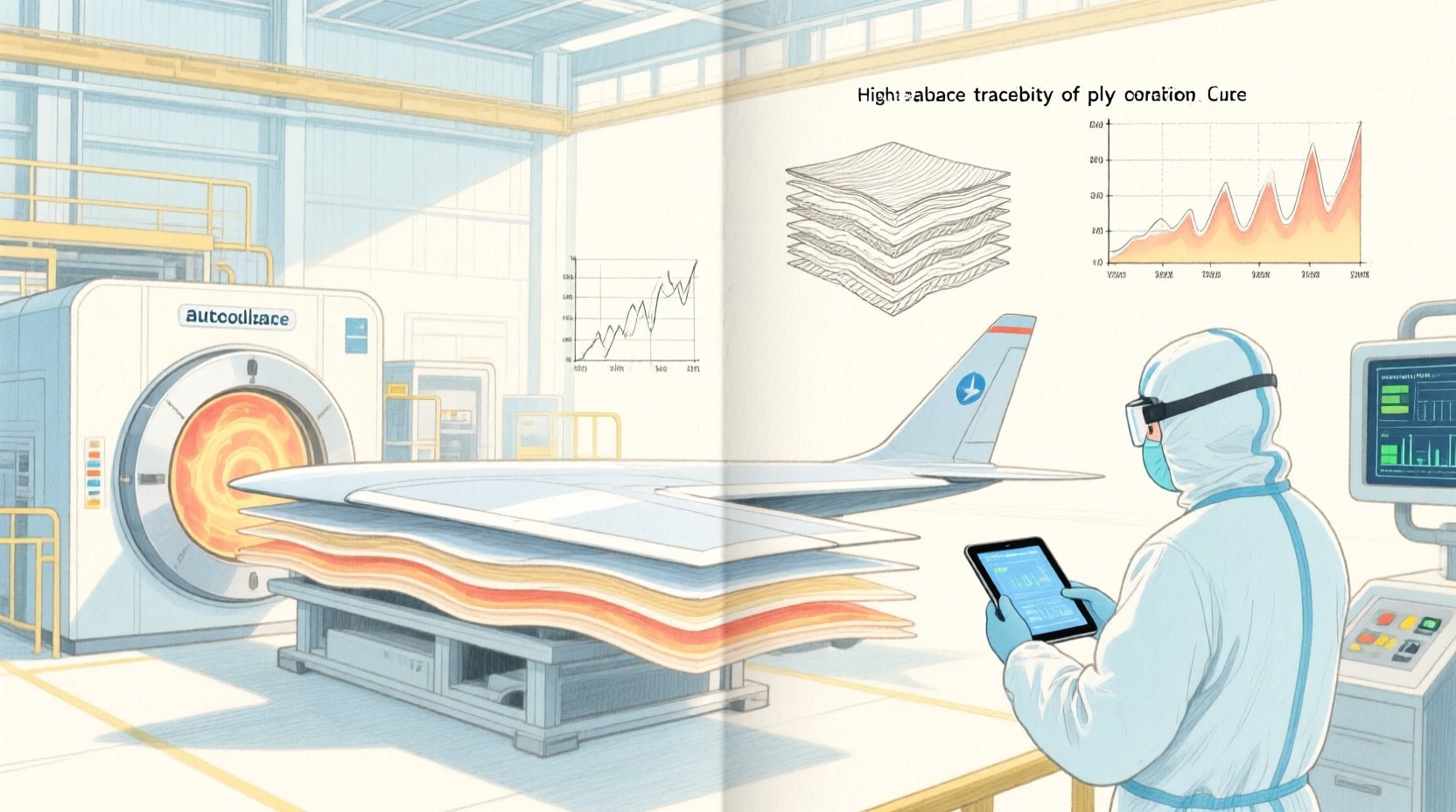
This is where Entity Relationship Diagrams (ERDs) become indispensable. A well-structured ERD acts as the blueprint for the database that will power this traceability system, ensuring that data regarding ply orientation, cure cycles, and sensor readings are stored, linked, and retrievable with absolute precision. By using PlantUML within the VPasCode editor, architects can rapidly prototype these complex schemas, visualize the relationships between manufacturing operations and quality data, and generate living documentation that evolves with the product. This approach eliminates the friction of manual diagramming, allowing teams to focus on the logical architecture of their manufacturing data.
Understanding the Model: Purpose, Scope & Problem Framing
Diagram Abstraction & Representation
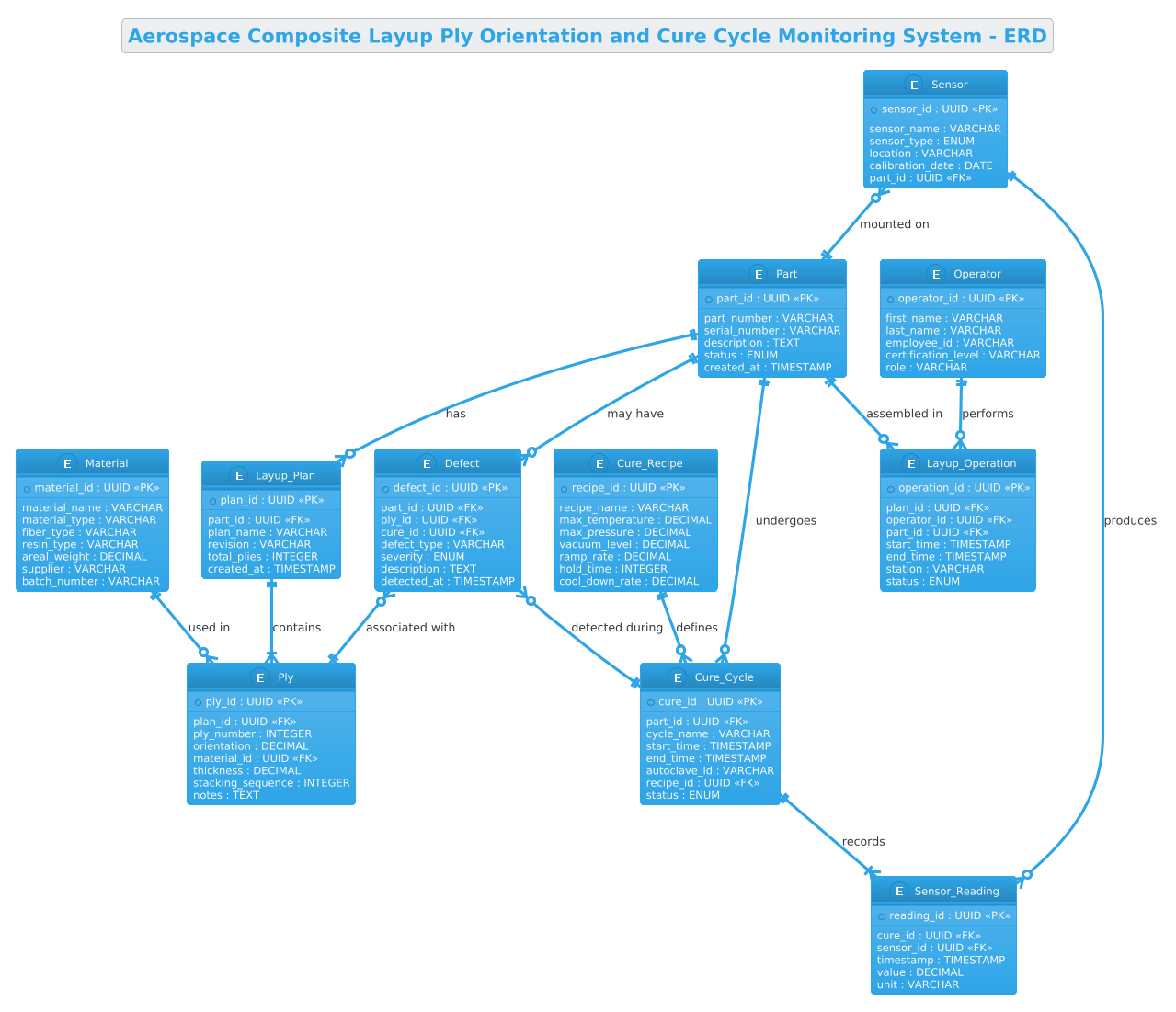
This specific ERD models the relational data structure required for a Composite Manufacturing Traceability System. Unlike simple inventory lists, this model captures a hierarchical lifecycle: a Part is the root entity, which branches into a Layup Plan (defining the stacking sequence of materials) and a Cure Cycle (defining the thermal/pressure history). The diagram abstracts the physical reality of a composite wing into data entities: Ply represents individual layers with specific orientation angles, SensorReading captures time-series data from the curing process, and Defect records quality deviations. This abstraction allows developers to design a database that enforces referential integrity, ensuring that a recorded temperature reading is always linked to a specific part and a specific cure cycle.
Target Domain Scope & Scenario
The scope of this model is strictly limited to the manufacturing and quality assurance phases of aerospace composite production. It covers the transition from design definition (layup plans) to physical execution (layup operations and curing) and finally to quality verification (defect logging). It intentionally excludes downstream assembly or in-service maintenance data, focusing instead on the “as-built” record. The scenario involves a system where a single part may have multiple layup plans (revisions), multiple cure cycles (if re-worked), and is monitored by a network of sensors.
Key Takeaways & Educational Insights
By constructing this diagram, you will gain insights into modeling one-to-many relationships in manufacturing contexts, such as how a single Layup_Plan contains many Ply entities. You will learn how to handle time-series data (SensorReadings) linked to specific events (CureCycles) and how to model optional relationships, such as a Part potentially having no defects or a Sensor being mounted on multiple parts. The diagram also demonstrates the use of UUIDs as primary keys to ensure global uniqueness across distributed manufacturing systems.
Complete Diagram & Full Source Code
The following diagram represents the complete data model for the Aerospace Composite Layup and Cure Cycle Monitoring System. It utilizes the Cerulean theme for a clean, professional look suitable for technical documentation.
@startuml
!theme cerulean
title Aerospace Composite Layup Ply Orientation and Cure Cycle Monitoring System - ERD

/'
Diagram Context:
This ERD models the data structure for an aerospace composite manufacturing monitoring system.
It captures the complete lifecycle of a composite part: from the definition of the
layup sequence (ply orientation, material, stacking order) to the real-time monitoring
of the cure cycle (temperature, pressure, vacuum). The system links each manufactured
part to its as-built ply data and its corresponding cure sensor readings, enabling
traceability, quality assurance, and non-conformance analysis for aerospace-grade
composite structures.
'/

entity "Part" as Part {
  * part_id : UUID <<PK>>
  --
  part_number : VARCHAR
  serial_number : VARCHAR
  description : TEXT
  status : ENUM
  created_at : TIMESTAMP
}

entity "Layup_Plan" as LayupPlan {
  * plan_id : UUID <<PK>>
  --
  part_id : UUID <<FK>>
  plan_name : VARCHAR
  revision : VARCHAR
  total_plies : INTEGER
  created_at : TIMESTAMP
}

entity "Ply" as Ply {
  * ply_id : UUID <<PK>>
  --
  plan_id : UUID <<FK>>
  ply_number : INTEGER
  orientation : DECIMAL
  material_id : UUID <<FK>>
  thickness : DECIMAL
  stacking_sequence : INTEGER
  notes : TEXT
}

entity "Material" as Material {
  * material_id : UUID <<PK>>
  --
  material_name : VARCHAR
  material_type : VARCHAR
  fiber_type : VARCHAR
  resin_type : VARCHAR
  areal_weight : DECIMAL
  supplier : VARCHAR
  batch_number : VARCHAR
}

entity "Cure_Cycle" as CureCycle {
  * cure_id : UUID <<PK>>
  --
  part_id : UUID <<FK>>
  cycle_name : VARCHAR
  start_time : TIMESTAMP
  end_time : TIMESTAMP
  autoclave_id : VARCHAR
  recipe_id : UUID <<FK>>
  status : ENUM
}

entity "Cure_Recipe" as CureRecipe {
  * recipe_id : UUID <<PK>>
  --
  recipe_name : VARCHAR
  max_temperature : DECIMAL
  max_pressure : DECIMAL
  vacuum_level : DECIMAL
  ramp_rate : DECIMAL
  hold_time : INTEGER
  cool_down_rate : DECIMAL
}

entity "Sensor_Reading" as SensorReading {
  * reading_id : UUID <<PK>>
  --
  cure_id : UUID <<FK>>
  sensor_id : UUID <<FK>>
  timestamp : TIMESTAMP
  value : DECIMAL
  unit : VARCHAR
}

entity "Sensor" as Sensor {
  * sensor_id : UUID <<PK>>
  --
  sensor_name : VARCHAR
  sensor_type : ENUM
  location : VARCHAR
  calibration_date : DATE
  part_id : UUID <<FK>>
}

entity "Defect" as Defect {
  * defect_id : UUID <<PK>>
  --
  part_id : UUID <<FK>>
  ply_id : UUID <<FK>>
  cure_id : UUID <<FK>>
  defect_type : VARCHAR
  severity : ENUM
  description : TEXT
  detected_at : TIMESTAMP
}

entity "Operator" as Operator {
  * operator_id : UUID <<PK>>
  --
  first_name : VARCHAR
  last_name : VARCHAR
  employee_id : VARCHAR
  certification_level : VARCHAR
  role : VARCHAR
}

entity "Layup_Operation" as LayupOperation {
  * operation_id : UUID <<PK>>
  --
  plan_id : UUID <<FK>>
  operator_id : UUID <<FK>>
  part_id : UUID <<FK>>
  start_time : TIMESTAMP
  end_time : TIMESTAMP
  station : VARCHAR
  status : ENUM
}

Part ||--o{ LayupPlan : "has"
Part ||--o{ CureCycle : "undergoes"
Part ||--o{ LayupOperation : "assembled in"
Part ||--o{ Defect : "may have"

LayupPlan ||--|{ Ply : "contains"
Material ||--o{ Ply : "used in"
CureRecipe ||--o{ CureCycle : "defines"
CureCycle ||--|{ SensorReading : "records"
Sensor ||--o{ SensorReading : "produces"
Sensor }o--|| Part : "mounted on"
Operator ||--o{ LayupOperation : "performs"

Defect }o--|| Ply : "associated with"
Defect }o--|| CureCycle : "detected during"

@endumlStep-by-Step Architectural Walkthrough
Phase 1: Canvas Configuration & Layout Directives
The first step in building this diagram is setting the stage for the visual output. We begin by initializing the PlantUML block and applying a specific theme to ensure the diagram matches professional documentation standards. We use the !theme cerulean directive, which applies a clean, blue-toned color palette suitable for technical diagrams. We also define a title directive to provide immediate context for anyone viewing the diagram.
@startuml
!theme cerulean
title Aerospace Composite Layup Ply Orientation and Cure Cycle Monitoring System - ERD
Immediately following the title, we insert a comment block using /' and '/. This is crucial for documentation, as it allows us to embed a detailed description of the diagram’s purpose directly within the code file. This comment explains the scope of the manufacturing system without cluttering the visual rendering of the entities.
/'
Diagram Context:
This ERD models the data structure for an aerospace composite manufacturing monitoring system.
It captures the complete lifecycle of a composite part...
'/
Phase 2: Declaring Core Entities, Actors, and Boundaries
With the canvas ready, we define the core entities. In an ERD, entities represent tables in the database. We start with the Part entity, which acts as the central anchor. It uses UUID for the primary key (* part_id) to ensure unique identification across global manufacturing networks. We define attributes like part_number, serial_number, and status using standard data types like VARCHAR and ENUM.
entity "Part" as Part {
  * part_id : UUID <>
  --
  part_number : VARCHAR
  serial_number : VARCHAR
  status : ENUM
}
We then define the Layup_Plan and Ply entities. The Layup_Plan is a child of Part (one part can have multiple plan revisions). The Ply entity is critical for aerospace composites, storing specific geometric data like orientation (angle in degrees) and thickness. We also define the Material entity, which stores metadata about the raw materials (fiber type, resin type) used in the plies.
Phase 3: Mapping Data Flows & Key Interactions
The most complex part of this ERD is modeling the dynamic interactions between manufacturing processes. We define the Cure_Cycle entity, which tracks the thermal history of the part. This entity links to a Cure_Recipe (the theoretical profile) and records actual Sensor_Reading data points.
entity "Cure_Cycle" as CureCycle {
* cure_id : UUID <>
--
part_id : UUID <>
start_time : TIMESTAMP
autoclave_id : VARCHAR
}
entity "Sensor_Reading" as SensorReading {
* reading_id : UUID <>
--
cure_id : UUID <>
sensor_id : UUID < >
timestamp : TIMESTAMP
value : DECIMAL
} We also introduce the Operator and Layup_Operation entities to track human involvement in the process, ensuring that every layup operation is attributed to a certified individual at a specific station.
Phase 4: Grouping, Annotations & Visual Polish
The final phase involves connecting these entities with relationships that define the data flow. We use PlantUML’s relationship syntax to map cardinalities. For example, a Part can have many Layup_Plan entries, represented by Part ||--o{ LayupPlan. We also model the relationship between Sensors and Parts, noting that a sensor is mounted on a part during the cure cycle.
Part ||--o{ LayupPlan : "has"
LayupPlan ||--|{ Ply : "contains"
CureCycle ||--|{ SensorReading : "records"
Sensor ||--o{ SensorReading : "produces"
Operator ||--o{ LayupOperation : "performs"

Defect }o--|| Ply : "associated with"
Defect }o--|| CureCycle : "detected during"
We finish by adding the Defect entity relationships, which link quality issues back to specific plies or cure cycles, completing the traceability loop.
Syntax & Keyword Deep Dive
This diagram leverages several key PlantUML ERD syntax features to achieve clarity and precision:
- entity directive: Used to define a database table. The syntax
entity "Name" as Aliasallows for a display name (e.g., “Layup_Plan”) and a shorter code alias (e.g.,LayupPlan) for use in relationships. - Attribute Declaration: Inside an entity, attributes are listed with their data types (e.g.,
UUID,VARCHAR,TIMESTAMP). The--separator visually divides primary keys from other attributes. - Primary Key (PK) & Foreign Key (FK): The
*prefix denotes a primary key, while the<<FK>>stereotype explicitly marks foreign keys, making the data model self-documenting. - Relationship Syntax: PlantUML uses specific symbols for cardinality.
||--o{means “one or more” (mandatory one to optional many), while||--|{means “one or more” (mandatory one to mandatory many). Theo--||indicates an optional one to mandatory one relationship. - Comment Blocks: The
/' ... '/syntax creates a multi-line comment that is rendered as a text box in the diagram but is not part of the database schema.
Best Practices & Pitfalls to Avoid
When modeling complex manufacturing systems like aerospace composites, adhering to best practices ensures your diagram remains maintainable and useful:
- Use Descriptive Aliases: While database tables might be named
PLY_DATA, use a readable alias likePlyin your PlantUML code to make the diagram self-explanatory for stakeholders who may not know the internal schema naming conventions. - Separate Static from Dynamic Data: Notice how Material (static reference data) is separated from Sensor_Reading (dynamic time-series data). This separation helps in understanding which tables are lookup tables and which are transactional logs.
- Manage Cardinality Carefully: Be precise with the relationship symbols. Using
||--o{(optional) vs||--|{(mandatory) changes the business logic significantly. In this diagram, a Part must have a Layup_Plan to be built, so we use the mandatory connector. - Group Related Entities: Although this diagram is linear, for larger systems, consider using
packagedirectives to group entities by domain (e.g., “Quality Control”, “Manufacturing Execution”, “Inventory”) to reduce visual clutter.
Start Building Aerospace ERDs Faster with VPasCode
Design complex manufacturing data schemas instantly in your browser with VPasCode, the free PlantUML editor that renders your diagrams in real-time with zero installation.