


In the rapidly evolving landscape of telecommunications and public Wi-Fi management, the ability to model complex data relationships is paramount for system architects. A Wi-Fi hotspot network is not merely a collection of access points; it is a sophisticated ecosystem requiring precise handling of guest identities, authentication events, session quotas, and bandwidth throttling policies. When designing a captive portal system, the underlying data model must seamlessly bridge the gap between user registration, network access control, and real-time usage monitoring. Without a clear, standardized data blueprint, developers risk creating fragmented databases that struggle to enforce session limits or track guest activity accurately.
Diagramming-as-code, specifically using PlantUML, offers a revolutionary approach to documenting these intricate telecommunications workflows. By defining the schema in code rather than dragging and dropping shapes, architects ensure that their data models are versionable, consistent, and easily auditable. This tutorial leverages VPasCode, the free web-based diagram-as-code editor, to guide you through building a comprehensive Entity-Relationship Diagram (ERD) for a Wi-Fi hotspot system. We will explore how to structure entities for guest credentials, authentication events, and policy enforcement, ensuring your documentation is as robust as the network it describes.
Understanding the Model: Purpose, Scope & Problem Framing
Diagram Abstraction & Representation
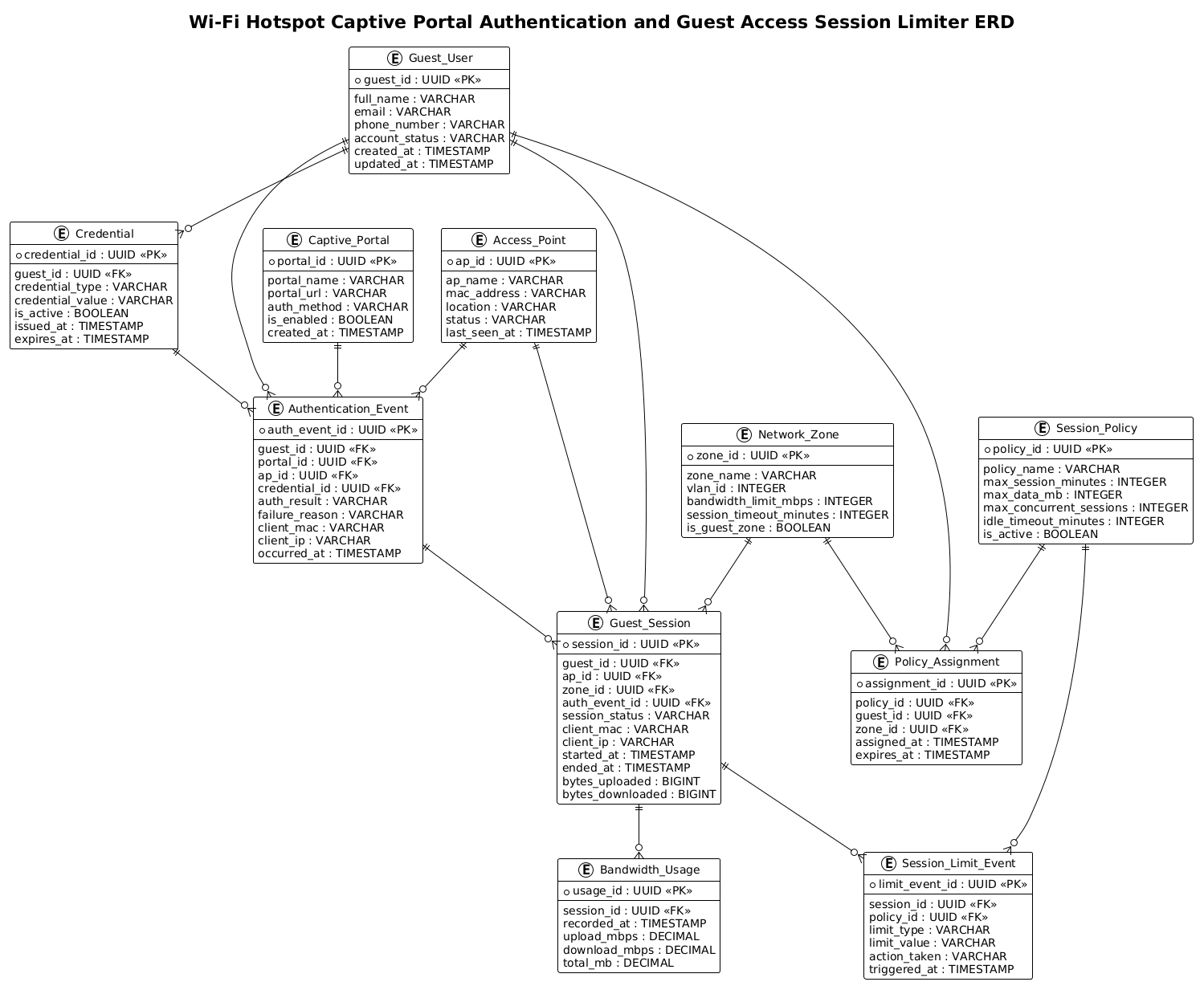
An Entity-Relationship Diagram (ERD) serves as the architectural blueprint for a database, defining the “things” (entities) within a system and how they relate to one another. In the context of a Wi-Fi hotspot, this diagram abstracts the physical hardware and software logic into logical data structures. It maps the lifecycle of a guest user from the moment they register (or are invited) through their authentication, active session, and eventual disconnection due to time or data limits. The diagram explicitly models the relationships between users, their credentials, the network zones they access, and the policies that govern their usage.
Target Domain Scope & Scenario
This specific ERD focuses on the core data requirements for a commercial or municipal Wi-Fi hotspot management system. The scope includes:
- Identity Management: Storing guest profiles and their associated authentication credentials (passwords, tokens, or SMS codes).
- Network Topology: Mapping Access Points (APs) and Network Zones (VLANs) to understand where traffic originates.
- Session Lifecycle: Tracking the start, duration, and end of a guest’s connection, including real-time data usage metrics.
- Policy Enforcement: Defining the rules (time limits, data caps) that automatically trigger session termination or throttling.
Crucially, this model addresses the “session limiter” problem: how the system knows when a user has exceeded their quota and needs to be disconnected.
Key Takeaways & Educational Insights
By constructing this diagram, you will gain a deeper understanding of how to model one-to-many relationships in telecommunications, such as a single guest having multiple authentication events or multiple sessions over time. You will also learn how to structure entities to support audit trails (e.g., Authentication_Event) and real-time monitoring (e.g., Bandwidth_Usage), ensuring your database schema is capable of supporting both operational needs and compliance reporting.
Complete Diagram & Full Source Code
Below is the complete visualization of the Wi-Fi hotspot data model. This diagram illustrates the flow of data from the guest user through the captive portal, across the network zones, and into the policy enforcement engine.
@startuml
!theme plain
title Wi-Fi Hotspot Captive Portal Authentication and Guest Access Session Limiter ERD

/'
This ERD models the data structures needed to support a Wi-Fi hotspot captive portal
authentication and guest access session limiter. The diagram covers guest identity and
credential management, captive portal authentication events, access point and network
zone assignments, active and historical guest sessions, session quotas and rate limits,
and policy enforcement records that determine when a guest must be disconnected or
throttled. It is intended to clarify how authentication, authorization, session tracking,
and usage limiting entities relate to one another in a hotspot management system.
'/

entity "Guest_User" as guest_user {
  * guest_id : UUID <<PK>>
  --
  full_name : VARCHAR
  email : VARCHAR
  phone_number : VARCHAR
  account_status : VARCHAR
  created_at : TIMESTAMP
  updated_at : TIMESTAMP
}

entity "Credential" as credential {
  * credential_id : UUID <<PK>>
  --
  guest_id : UUID <<FK>>
  credential_type : VARCHAR
  credential_value : VARCHAR
  is_active : BOOLEAN
  issued_at : TIMESTAMP
  expires_at : TIMESTAMP
}

entity "Captive_Portal" as captive_portal {
  * portal_id : UUID <<PK>>
  --
  portal_name : VARCHAR
  portal_url : VARCHAR
  auth_method : VARCHAR
  is_enabled : BOOLEAN
  created_at : TIMESTAMP
}

entity "Access_Point" as access_point {
  * ap_id : UUID <<PK>>
  --
  ap_name : VARCHAR
  mac_address : VARCHAR
  location : VARCHAR
  status : VARCHAR
  last_seen_at : TIMESTAMP
}

entity "Network_Zone" as network_zone {
  * zone_id : UUID <<PK>>
  --
  zone_name : VARCHAR
  vlan_id : INTEGER
  bandwidth_limit_mbps : INTEGER
  session_timeout_minutes : INTEGER
  is_guest_zone : BOOLEAN
}

entity "Authentication_Event" as auth_event {
  * auth_event_id : UUID <<PK>>
  --
  guest_id : UUID <<FK>>
  portal_id : UUID <<FK>>
  ap_id : UUID <<FK>>
  credential_id : UUID <<FK>>
  auth_result : VARCHAR
  failure_reason : VARCHAR
  client_mac : VARCHAR
  client_ip : VARCHAR
  occurred_at : TIMESTAMP
}

entity "Guest_Session" as guest_session {
  * session_id : UUID <<PK>>
  --
  guest_id : UUID <<FK>>
  ap_id : UUID <<FK>>
  zone_id : UUID <<FK>>
  auth_event_id : UUID <<FK>>
  session_status : VARCHAR
  client_mac : VARCHAR
  client_ip : VARCHAR
  started_at : TIMESTAMP
  ended_at : TIMESTAMP
  bytes_uploaded : BIGINT
  bytes_downloaded : BIGINT
}

entity "Session_Policy" as session_policy {
  * policy_id : UUID <<PK>>
  --
  policy_name : VARCHAR
  max_session_minutes : INTEGER
  max_data_mb : INTEGER
  max_concurrent_sessions : INTEGER
  idle_timeout_minutes : INTEGER
  is_active : BOOLEAN
}

entity "Policy_Assignment" as policy_assignment {
  * assignment_id : UUID <<PK>>
  --
  policy_id : UUID <<FK>>
  guest_id : UUID <<FK>>
  zone_id : UUID <<FK>>
  assigned_at : TIMESTAMP
  expires_at : TIMESTAMP
}

entity "Session_Limit_Event" as limit_event {
  * limit_event_id : UUID <<PK>>
  --
  session_id : UUID <<FK>>
  policy_id : UUID <<FK>>
  limit_type : VARCHAR
  limit_value : VARCHAR
  action_taken : VARCHAR
  triggered_at : TIMESTAMP
}

entity "Bandwidth_Usage" as bandwidth_usage {
  * usage_id : UUID <<PK>>
  --
  session_id : UUID <<FK>>
  recorded_at : TIMESTAMP
  upload_mbps : DECIMAL
  download_mbps : DECIMAL
  total_mb : DECIMAL
}

guest_user ||--o{ credential
guest_user ||--o{ auth_event
guest_user ||--o{ guest_session
guest_user ||--o{ policy_assignment

captive_portal ||--o{ auth_event

access_point ||--o{ auth_event
access_point ||--o{ guest_session

network_zone ||--o{ guest_session
network_zone ||--o{ policy_assignment

credential ||--o{ auth_event

auth_event ||--o{ guest_session

guest_session ||--o{ limit_event
guest_session ||--o{ bandwidth_usage

session_policy ||--o{ policy_assignment
session_policy ||--o{ limit_event

@endumlStep-by-Step Architectural Walkthrough
Building a complex ERD like this requires a structured approach. We will break down the construction into four logical phases: setting the stage, defining the core entities, mapping the relationships, and refining the visual details.
Phase 1: Canvas Configuration & Layout Directives
Before defining any data structures, we must configure the rendering environment. In PlantUML, this is done using directives at the very top of the file. We start by declaring the diagram type and the theme.
@startuml
!theme plain
The @startuml directive initializes the ERD parser. The !theme plain directive is crucial here; it removes default styling and colors, providing a clean, high-contrast black-and-white look that is ideal for technical documentation and printing. We then add a descriptive title and a comment block using the /' ... '/ syntax to provide immediate context for anyone reading the code.
Phase 2: Declaring Core Entities, Actors, and Boundaries
The backbone of an ERD is the entity definition. In this model, we start with the primary actor: the Guest_User. This entity holds the PII (Personally Identifiable Information) and account status.
entity "Guest_User" as guest_user {
  * guest_id : UUID <>
  --
  full_name : VARCHAR
  email : VARCHAR
  phone_number : VARCHAR
  account_status : VARCHAR
  created_at : TIMESTAMP
  updated_at : TIMESTAMP
}
Notice the use of * to denote the Primary Key (PK) and UUID as the data type, which is standard for modern distributed systems to ensure uniqueness across multiple access points. The double dash -- acts as a separator between keys and attributes, improving readability. We then define supporting entities like Credential, Captive_Portal, and Access_Point, ensuring each has a unique identifier and relevant attributes like timestamps for auditing.
Phase 3: Mapping Data Flows & Key Interactions
The most critical part of this ERD is the Guest_Session entity. This acts as the central hub connecting the user, the network hardware, and the policies. It records the specific instance of a user connecting to the Wi-Fi.
entity "Guest_Session" as guest_session {
* session_id : UUID <>
--
guest_id : UUID <>
ap_id : UUID < >
zone_id : UUID < >
auth_event_id : UUID < >
session_status : VARCHAR
client_mac : VARCHAR
client_ip : VARCHAR
started_at : TIMESTAMP
ended_at : TIMESTAMP
bytes_uploaded : BIGINT
bytes_downloaded : BIGINT
} Here, we see Foreign Keys (FK) explicitly marked (e.g., guest_id : UUID <). This establishes the logical link that a session belongs to a specific user and occurred on a specific access point. We also include bytes_uploaded and bytes_downloaded to track data usage, which is essential for the “session limiter” functionality.
Phase 4: Grouping, Annotations & Visual Polish
To enforce the “session limiter” logic, we introduce the Session_Policy and Policy_Assignment entities. This separates the rules (policy) from the application of those rules (assignment).
entity "Session_Policy" as session_policy {
  * policy_id : UUID <>
  --
  policy_name : VARCHAR
  max_session_minutes : INTEGER
  max_data_mb : INTEGER
  max_concurrent_sessions : INTEGER
  idle_timeout_minutes : INTEGER
  is_active : BOOLEAN
}
Finally, we define the relationships using the ||--o{ syntax. The || indicates a mandatory relationship (one guest must have a session), and the o{ indicates an optional relationship (a guest may or may not have a session, or a session may or may not have a limit event). This visual notation clearly communicates the cardinality of the data model.
Syntax & Keyword Deep Dive
PlantUML provides a powerful set of keywords specifically for ERD modeling. Understanding these allows you to create precise and semantically correct diagrams.
entity: Defines a table or class. The syntaxentity "Name" as aliasallows you to use a readable label on the diagram while using a shorter alias in relationship definitions.||--o{: This is the standard PlantUML relationship connector.||represents “one” (mandatory), ando{represents “zero or many” (optional). This is used to denote one-to-many relationships, such as one Guest having many Sessions.PKandFK: These are stereotypes.<marks a Primary Key, and> <marks a Foreign Key. PlantUML renders these with specific icons to make the diagram self-documenting.> /* ... */and/' ... '/: While/*is standard code comments,/' ... '/is a special PlantUML block comment often used for long descriptions that appear in the diagram metadata or title area, ensuring the diagram remains clean while retaining context.!theme: A directive that applies a global visual theme to the entire diagram, overriding default colors and fonts for consistency.
Best Practices & Pitfalls to Avoid
When constructing ERDs for telecommunications systems, adherence to best practices ensures the diagram remains useful as the system evolves.
- Normalize Your Data: Avoid storing redundant data. For example, do not store the
guest_emailinside theGuest_Sessiontable. Instead, link to theGuest_Userentity via a Foreign Key. This ensures that if a user changes their email, you only update it in one place. - Use UUIDs for Distributed Systems: In a Wi-Fi hotspot environment with multiple access points, local auto-increment IDs can clash. Using UUIDs (Universally Unique Identifiers) as Primary Keys ensures global uniqueness across the entire network infrastructure.
- Separate Policies from Assignments: Notice the
Session_PolicyandPolicy_Assignmentseparation in this model. This is a critical design pattern. Policies are reusable templates, while assignments are the specific instances of a policy applied to a user. Mixing them leads to rigid, hard-to-maintain schemas. - Keep Relationship Lines Clean: Avoid crossing lines where possible. PlantUML’s automatic layout engine handles this well, but defining the order of entities in your code can sometimes influence the final layout to reduce visual clutter.
Start Building Telecommunications ERDs Faster with VPasCode
Instantly render, customize, and export your Wi-Fi hotspot data models in your browser with zero local installation required.