


In the rapidly evolving landscape of telecommunications, maintaining the integrity of Cable Modem Termination System (CMTS) networks requires precise data modeling. Network engineers and architects face the daily challenge of tracking complex downstream channel bonding configurations and correlating them with signal-to-noise ratio (SNR) performance metrics. Without a clear, structured representation, debugging intermittent service issues or optimizing bandwidth allocation becomes a guessing game rather than a data-driven process.

Visualizing these relationships through an Entity Relationship Diagram (ERD) is not just a documentation exercise; it is a critical architectural tool. By defining how CMTS devices, channel groups, and modem measurements interact, engineers can create a “living blueprint” of their network’s health. Using PlantUML within VPasCode allows these complex schemas to be defined as code, ensuring version consistency, easy collaboration, and instant rendering without the friction of manual drawing tools.
Understanding the Model: Purpose, Scope & Problem Framing
This tutorial focuses on constructing a specialized ERD designed to monitor the physical and logical layer of cable broadband infrastructure. The model addresses a specific operational problem: how to efficiently store and query data regarding channel bonding (combining multiple downstream channels for higher throughput) and the associated signal quality metrics over time.
Diagram Abstraction & Representation
In this domain, an ERD serves as the logical map for a time-series monitoring database. The diagram abstracts the physical hardware (CMTS and Cable Modems) into manageable entities. It represents Downstream Channels as the fundamental bandwidth pipes and Bonding Groups as the logical aggregation of these pipes. Crucially, it introduces the SNR_Log entity to capture the temporal nature of signal quality, linking a specific modem and a specific channel to a timestamped measurement.
Target Domain Scope & Scenario
The scope of this model covers the core entities required for a performance monitoring dashboard. It explicitly models the one-to-many relationship between a CMTS and its channels, the many-to-many relationship between bonding groups and channels (resolved via a junction table), and the many-to-many relationship between modems and channels (resolved via the SNR log). It intentionally excludes subscriber billing data or upstream channel details to maintain focus on the downstream bonding and noise analysis workflow.
Key Takeaways & Educational Insights
By building this diagram, you will learn how to model hierarchical hardware relationships (CMTS to Channel), associative relationships (Bonding Groups), and transactional logging (SNR Logs). You will gain insight into how to structure a database schema that supports complex queries, such as “Find all modems on bonded channels with SNR below a specific threshold in the last 24 hours.”
Complete Diagram & Full Source Code
Below is the final architectural blueprint for the CMTS Downstream Channel Bonding and SNR Logger. This ERD defines the entities, attributes, and relationships necessary to support high-fidelity network performance analysis.
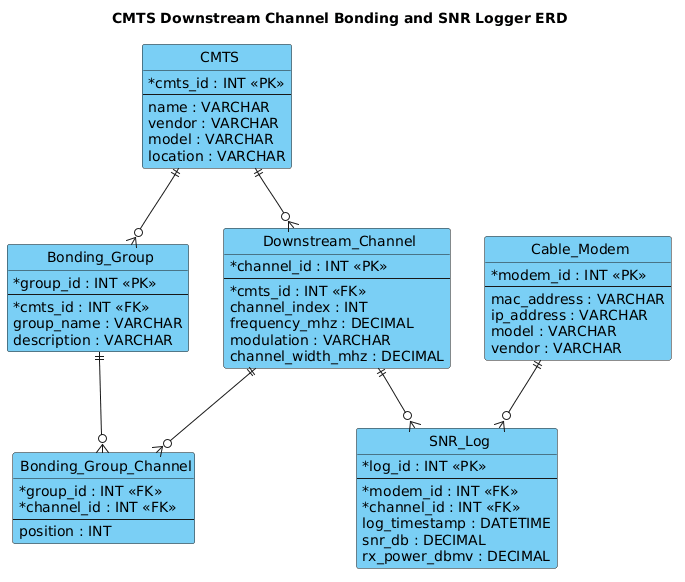
@startuml
!include https://static.visual-paradigm.com/web/resources/plantuml-stdlib/themes/vp.puml

title CMTS Downstream Channel Bonding and SNR Logger ERD

/'
Diagram Context:
This ERD models a monitoring system for a Cable Modem Termination System (CMTS).
It captures downstream channel bonding groups, individual downstream channels,
and periodic signal-to-noise ratio (SNR) measurements collected from cable modems.
The design supports tracking which channels are bonded together and logging
SNR values over time for performance analysis and troubleshooting.
'/

entity "CMTS" as cmts {
  *cmts_id : INT <<PK>>
  --
  name : VARCHAR
  vendor : VARCHAR
  model : VARCHAR
  location : VARCHAR
}

entity "Downstream_Channel" as ds_channel {
  *channel_id : INT <<PK>>
  --
  *cmts_id : INT <<FK>>
  channel_index : INT
  frequency_mhz : DECIMAL
  modulation : VARCHAR
  channel_width_mhz : DECIMAL
}

entity "Bonding_Group" as bonding_group {
  *group_id : INT <<PK>>
  --
  *cmts_id : INT <<FK>>
  group_name : VARCHAR
  description : VARCHAR
}

entity "Bonding_Group_Channel" as bg_channel {
  *group_id : INT <<FK>>
  *channel_id : INT <<FK>>
  --
  position : INT
}

entity "Cable_Modem" as cable_modem {
  *modem_id : INT <<PK>>
  --
  mac_address : VARCHAR
  ip_address : VARCHAR
  model : VARCHAR
  vendor : VARCHAR
}

entity "SNR_Log" as snr_log {
  *log_id : INT <<PK>>
  --
  *modem_id : INT <<FK>>
  *channel_id : INT <<FK>>
  log_timestamp : DATETIME
  snr_db : DECIMAL
  rx_power_dbmv : DECIMAL
}

cmts ||--o{ ds_channel
cmts ||--o{ bonding_group
bonding_group ||--o{ bg_channel
ds_channel ||--o{ bg_channel
cable_modem ||--o{ snr_log
ds_channel ||--o{ snr_log

@endumlStep-by-Step Architectural Walkthrough
Building a robust ERD requires a structured approach. We will construct this diagram in four logical phases: setting the visual theme, defining the core hardware entities, establishing the bonding logic, and finally, modeling the performance logging.
Phase 1: Canvas Configuration & Layout Directives
Every professional PlantUML diagram starts with proper configuration. We begin by including the Visual Paradigm standard library theme to ensure the diagram renders with a modern, clean aesthetic consistent with enterprise documentation standards. We also define a title to provide immediate context.
@startuml
!include https://static.visual-paradigm.com/web/resources/plantuml-stdlib/themes/vp.puml

title CMTS Downstream Channel Bonding and SNR Logger ERD
The !include directive fetches the theme definitions, while the title directive sets the header displayed at the top of the rendered diagram.
Phase 2: Declaring Core Entities, Actors, and Boundaries
The foundation of our model lies in the CMTS and Cable_Modem entities. These represent the physical hardware. We define the CMTS with a primary key cmts_id and attributes like vendor and location. Similarly, the Cable Modem is defined with its unique modem_id and network identifiers like mac_address.
entity "CMTS" as cmts {
*cmts_id : INT <>
--
name : VARCHAR
vendor : VARCHAR
model : VARCHAR
location : VARCHAR
}
entity "Cable_Modem" as cable_modem {
*modem_id : INT < >
--
mac_address : VARCHAR
ip_address : VARCHAR
model : VARCHAR
vendor : VARCHAR
} Notice the * prefix for the primary keys and the <<PK>> stereotype, which explicitly tells the database designer that this field is the unique identifier.
Phase 3: Mapping Data Flows & Key Interactions
The complexity of cable networking arises from channel bonding. We model the Downstream_Channel as an entity linked to the CMTS. Crucially, we introduce the Bonding_Group and the junction entity Bonding_Group_Channel to handle the many-to-many relationship. A single channel can belong to multiple bonding groups (in some advanced configurations), and a bonding group is composed of multiple channels.
entity "Downstream_Channel" as ds_channel {
*channel_id : INT <>
--
*cmts_id : INT <>
channel_index : INT
frequency_mhz : DECIMAL
modulation : VARCHAR
channel_width_mhz : DECIMAL
}
entity "Bonding_Group" as bonding_group {
*group_id : INT <>
--
*cmts_id : INT <>
group_name : VARCHAR
description : VARCHAR
}
entity "Bonding_Group_Channel" as bg_channel {
*group_id : INT < >
*channel_id : INT < >
--
position : INT
} The position attribute in the junction table is vital for defining the order in which channels are bonded, which affects data transmission logic.
Phase 4: Grouping, Annotations & Visual Polish
The final phase introduces the SNR_Log entity. This is a transactional table that records the health of the network. It links a specific Cable_Modem and a specific Downstream_Channel to a log_timestamp and signal metrics like snr_db. Finally, we define the relationships using PlantUML’s cardinality syntax.
cmts ||--o{ ds_channel
cmts ||--o{ bonding_group
bonding_group ||--o{ bg_channel
ds_channel ||--o{ bg_channel
cable_modem ||--o{ snr_log
ds_channel ||--o{ snr_log
The ||--o{ syntax denotes a “one or more” relationship, indicating that a CMTS must have at least one channel, but can have many.
Syntax & Keyword Deep Dive
PlantUML provides a robust set of keywords for defining Entity Relationship Diagrams. Here is a breakdown of the specific syntax features used in this telecommunications model:
- entity: The primary keyword used to define a table or object in the ERD. It accepts a display name and an alias.
- <<PK>> and <<FK>>: Stereotypes used to visually mark Primary Keys and Foreign Keys, respectively. The
*prefix in the attribute list is the PlantUML shorthand for these keys. - ||–o{: This relationship connector indicates a “One or More” cardinality. The double bar
||represents “one” (mandatory), and the crow’s foot{represents “many” (optional). - /: The forward slash is used to wrap comment blocks. In this diagram, it is used to provide a high-level architectural summary without cluttering the visual model.
- !include: A preprocessor directive that allows you to import external theme files or libraries, ensuring consistent styling across different diagrams.
Best Practices & Pitfalls to Avoid
When modeling telecommunications data, precision is key. Follow these best practices to ensure your ERD remains maintainable and accurate:
- Normalize Your Junction Tables: Never attempt to store a list of channel IDs directly in the
Bonding_Groupentity. Always use a separate junction entity (likeBonding_Group_Channel) to handle many-to-many relationships. This allows for flexible re-bonding of channels without data redundancy. - Use Descriptive Attribute Names: Avoid generic names like
val1ordata. Use domain-specific terms likefrequency_mhzormodulationto make the diagram self-documenting. - Separate Logical and Physical Keys: While PlantUML allows you to define keys visually, ensure your actual database implementation distinguishes between surrogate keys (auto-incrementing IDs) and natural keys (like MAC addresses).
- Keep Entities Atomic: Do not combine the
Cable_ModemandSNR_Loginto a single entity. The modem is a static device, while the log is a historical record of events. Separating them allows for efficient querying of device inventory versus performance history.
Start Building CMTS ERDs Faster with VPasCode
Instantly render, test, and customize your telecommunications database schemas online with VPasCode’s free PlantUML editor—no installation required.