


In the complex ecosystem of government justice systems, the integrity of data flows is paramount. A court case management system is not merely a database; it is the digital heartbeat of judicial operations, handling the lifecycle of cases from initial filing to final archival. When architects design these systems, they face the challenge of modeling intricate relationships: how a specific case type dictates the required hearings, how multiple parties and attorneys interact within a single docket, and how judicial opinions are permanently archived for legal precedent. Visualizing these constraints and associations is critical before a single line of backend code is written.

Traditional drag-and-drop modeling tools often struggle with the scale and specificity required for government-grade schemas. This is where diagram-as-code shines. By using PlantUML, architects can define the rigorous structure of entities like Hearing, DocketEntry, and OpinionArchive with precise syntax, ensuring that every foreign key and cardinality is explicitly defined. VPasCode, the free web-based editor, allows you to write this code and see the resulting Entity Relationship Diagram (ERD) instantly, enabling rapid iteration on the logical design of complex judicial workflows without the overhead of local software installation.
Understanding the Model: Purpose, Scope & Problem Framing
Diagram Abstraction & Representation
This Entity Relationship Diagram (ERD) serves as the logical blueprint for a robust Case Management System. Unlike a flowchart that depicts temporal sequences, an ERD focuses on static data relationships and structural integrity. In this model, Entities represent the core nouns of the domain (e.g., Case, Judge, Courtroom), while Relationships define how these nouns interact (e.g., a Case is assigned_to a Judge).
The diagram specifically addresses the many-to-many complexities inherent in legal proceedings. For instance, a single Case may involve multiple Parties and multiple Attorneys, while a single Attorney may represent multiple parties across different cases. The ERD resolves these complexities through associative entities (like CaseParty and CaseAttorney), ensuring data normalization and preventing redundancy.
Target Domain Scope & Scenario
This model is scoped specifically for the Government Justice Sector. It covers the end-to-end lifecycle of a judicial case, including:
- Case Filing & Classification: Defining the nature of the dispute via CaseType.
- Resource Allocation: Mapping Judges to Courtrooms and Hearings.
- Procedural Tracking: Logging DocketEntries and scheduling Hearings.
- Judicial Output & Preservation: Generating Opinions and managing their long-term Archive status.
Key Takeaways & Educational Insights
By constructing this diagram, you will gain a clear understanding of how to model historical data retention (via the OpinionArchive entity) and temporal constraints (via DATETIME fields in Hearing). You will also learn how to represent the role-based nature of legal participants, distinguishing between a Party (the litigant) and an Attorney (the legal representative) while linking them dynamically to the Case.
Complete Diagram & Full Source Code
Below is the complete, rendered Entity Relationship Diagram for the Court Case Management System. This visual representation consolidates all entities, attributes, and relationships into a single, coherent schema.
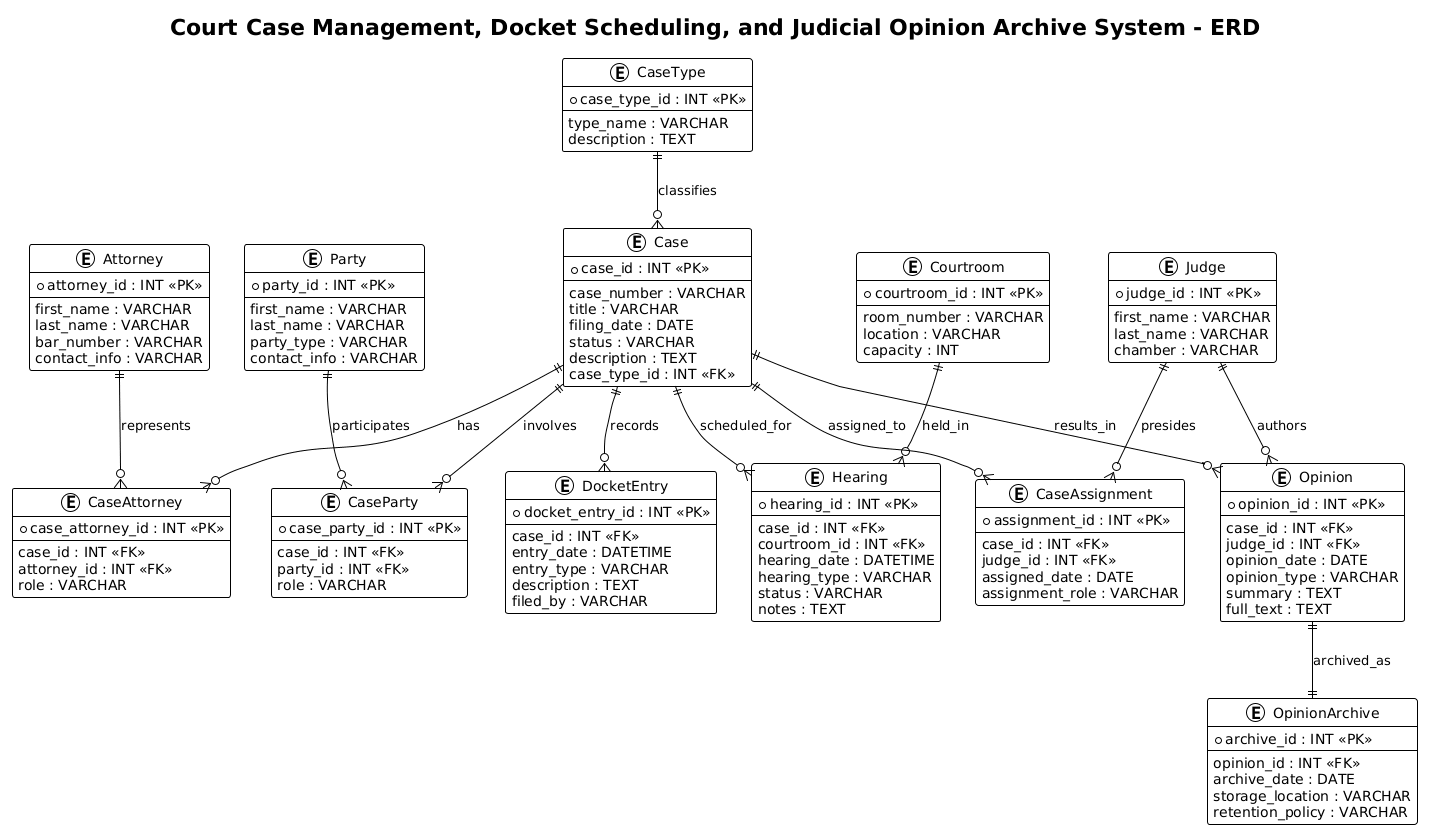
The following is the complete PlantUML source code. You can copy this directly into the VPasCode editor to interact with the diagram.
@startuml
!theme plain

/'
Diagram Context:
This ERD models a court case management system that supports docket scheduling
and judicial opinion archiving. It captures how cases are filed by parties,
assigned to judges, scheduled for hearings, and resolved through opinions.
The diagram also represents attorneys, courtrooms, case types, docket entries,
and archived judicial opinions for future reference.
'/

title Court Case Management, Docket Scheduling, and Judicial Opinion Archive System - ERD

' Core entities
entity "Case" as case {
  * case_id : INT <<PK>>
  --
  case_number : VARCHAR
  title : VARCHAR
  filing_date : DATE
  status : VARCHAR
  description : TEXT
  case_type_id : INT <<FK>>
}

entity "CaseType" as case_type {
  * case_type_id : INT <<PK>>
  --
  type_name : VARCHAR
  description : TEXT
}

entity "Party" as party {
  * party_id : INT <<PK>>
  --
  first_name : VARCHAR
  last_name : VARCHAR
  party_type : VARCHAR
  contact_info : VARCHAR
}

entity "CaseParty" as case_party {
  * case_party_id : INT <<PK>>
  --
  case_id : INT <<FK>>
  party_id : INT <<FK>>
  role : VARCHAR
}

entity "Attorney" as attorney {
  * attorney_id : INT <<PK>>
  --
  first_name : VARCHAR
  last_name : VARCHAR
  bar_number : VARCHAR
  contact_info : VARCHAR
}

entity "CaseAttorney" as case_attorney {
  * case_attorney_id : INT <<PK>>
  --
  case_id : INT <<FK>>
  attorney_id : INT <<FK>>
  role : VARCHAR
}

entity "Judge" as judge {
  * judge_id : INT <<PK>>
  --
  first_name : VARCHAR
  last_name : VARCHAR
  chamber : VARCHAR
}

entity "CaseAssignment" as case_assignment {
  * assignment_id : INT <<PK>>
  --
  case_id : INT <<FK>>
  judge_id : INT <<FK>>
  assigned_date : DATE
  assignment_role : VARCHAR
}

entity "Courtroom" as courtroom {
  * courtroom_id : INT <<PK>>
  --
  room_number : VARCHAR
  location : VARCHAR
  capacity : INT
}

entity "Hearing" as hearing {
  * hearing_id : INT <<PK>>
  --
  case_id : INT <<FK>>
  courtroom_id : INT <<FK>>
  hearing_date : DATETIME
  hearing_type : VARCHAR
  status : VARCHAR
  notes : TEXT
}

entity "DocketEntry" as docket_entry {
  * docket_entry_id : INT <<PK>>
  --
  case_id : INT <<FK>>
  entry_date : DATETIME
  entry_type : VARCHAR
  description : TEXT
  filed_by : VARCHAR
}

entity "Opinion" as opinion {
  * opinion_id : INT <<PK>>
  --
  case_id : INT <<FK>>
  judge_id : INT <<FK>>
  opinion_date : DATE
  opinion_type : VARCHAR
  summary : TEXT
  full_text : TEXT
}

entity "OpinionArchive" as opinion_archive {
  * archive_id : INT <<PK>>
  --
  opinion_id : INT <<FK>>
  archive_date : DATE
  storage_location : VARCHAR
  retention_policy : VARCHAR
}

' Relationships
case_type ||--o{ case : classifies
case ||--o{ case_party : involves
party ||--o{ case_party : participates
case ||--o{ case_attorney : has
attorney ||--o{ case_attorney : represents
case ||--o{ case_assignment : assigned_to
judge ||--o{ case_assignment : presides
case ||--o{ hearing : scheduled_for
courtroom ||--o{ hearing : held_in
case ||--o{ docket_entry : records
case ||--o{ opinion : results_in
judge ||--o{ opinion : authors
opinion ||--|| opinion_archive : archived_as

@endumlStep-by-Step Architectural Walkthrough
Phase 1: Canvas Configuration & Layout Directives
Every PlantUML diagram begins with the initialization of the rendering environment. In this government-grade ERD, we prioritize clarity and readability. We start by setting the @startuml directive to signal the beginning of the code. Immediately following, we apply !theme plain. This directive strips away decorative elements, ensuring the diagram remains clean, professional, and suitable for official documentation. We also include a comment block using /' ... '/ to provide a human-readable context for the diagram’s purpose, which is essential for collaborative teams.
Finally, we define the title to explicitly label the system being modeled. This ensures that anyone viewing the diagram immediately understands its scope.
Phase 2: Declaring Core Entities, Actors, and Boundaries
The backbone of an ERD is the Entity. In PlantUML, we declare entities using the entity keyword. Each entity represents a table in the database. We define the primary key (PK) by placing an asterisk * before the attribute name and the foreign key (FK) by placing double angle brackets <.
For example, the Case entity is the central hub of this system. It holds the core attributes like case_number and filing_date. Notice how we use the -- separator to visually distinguish between the primary key and the remaining attributes within the entity box:
entity "Case" as case {
  * case_id : INT <>
  --
  case_number : VARCHAR
  title : VARCHAR
  ...
We also introduce associative entities like CaseParty and CaseAttorney. These are critical for resolving many-to-many relationships. Instead of linking a Case directly to multiple Parties, we create an intermediate table that holds the case_id and party_id, allowing us to store additional metadata like the role of the party in that specific case.
Phase 3: Mapping Data Flows & Key Interactions
Once entities are defined, we must establish how they relate. PlantUML uses cardinality notation to define these relationships. The syntax ||--o{ is used to represent a One-to-Many relationship where the entity on the left is mandatory (one) and the entity on the right is optional (zero or many).
For instance, the relationship between Courtroom and Hearing is defined as:
courtroom ||--o{ hearing : held_inThis reads: One Courtroom can hold zero or many Hearings. Conversely, a Hearing must be held in exactly one Courtroom. Similarly, the relationship between Opinion and OpinionArchive uses opinion ||--|| opinion_archive : archived_as, indicating a strict one-to-one relationship, ensuring that every archived opinion corresponds to exactly one original opinion record.
Phase 4: Grouping, Annotations & Visual Polish
To enhance readability, we utilize the title directive for the main heading and the comment block for context. While PlantUML allows for complex grouping using packages, this ERD relies on the spatial arrangement of entities. The !theme plain directive ensures that the font sizes, line thicknesses, and box borders remain consistent and professional, adhering to the strict documentation standards often required in government sectors.
Syntax & Keyword Deep Dive
Understanding the specific syntax of PlantUML is essential for building robust ERDs. Here are the key keywords and conventions used in this Court Case Management diagram:
entity: The keyword used to define a database table. It is followed by the table name in quotes and an alias (e.g.,"Case" as case) for easier reference in relationship definitions.attributedefinition: Inside an entity, attributes are defined asName : Type. For example,case_number : VARCHARdefines a string attribute.primary key(*): Placing an asterisk*before an attribute (e.g.,* case_id) marks it as the Primary Key, which uniquely identifies the record.foreign key(<): The notation> <is used to explicitly mark attributes that reference the primary key of another table, aiding in visual schema validation.> cardinality notation(||--o{): This is the standard Crow’s Foot notation.||means “one and only one” (mandatory), ando{means “zero or more” (optional). This is used to define the 1:N relationships between entities.comment block(/' ... '/): A multi-line comment syntax used to add descriptive text that does not render in the diagram but is visible in the source code for documentation purposes.
Best Practices & Pitfalls to Avoid
When modeling complex government systems like court case management, adherence to best practices ensures the diagram remains maintainable and accurate.
- Use Descriptive Aliases: Always define an alias for your entities (e.g.,
as case). This makes the relationship lines much shorter and readable than using the full entity name. - Normalize Associative Entities: Never skip the intermediate table for many-to-many relationships. Always create a junction table (like CaseParty) to store the specific role or metadata of that relationship.
- Consistent Naming Conventions: Use snake_case for internal aliases (e.g.,
case_attorney) but keep the display names in quotes clear and readable (e.g.,"Case Attorney"). This helps in code generation if you choose to export the schema later. - Explicit Cardinality: Always specify the cardinality (e.g.,
||--o{) rather than leaving it implicit. In legal systems, knowing whether a Hearing must be in a Courtroom or can be virtual is a critical business rule.
Start Building Court ERDs Faster with VPasCode
Design complex government database schemas instantly in your browser with VPasCode, the free PlantUML editor for software architects.