


In the modern era of digital governance, the integrity of citizen data and the transparency of service delivery are paramount. Government agencies are increasingly migrating legacy systems to cloud-native platforms that require rigorous data modeling to ensure security, auditability, and scalability. A critical challenge in these architectures is managing the complex lifecycle of a citizen’s journey: from initial identity verification to the submission and tracking of various service applications. Without a clear, unified data model, these systems risk data silos, inconsistent status reporting, and compliance failures.
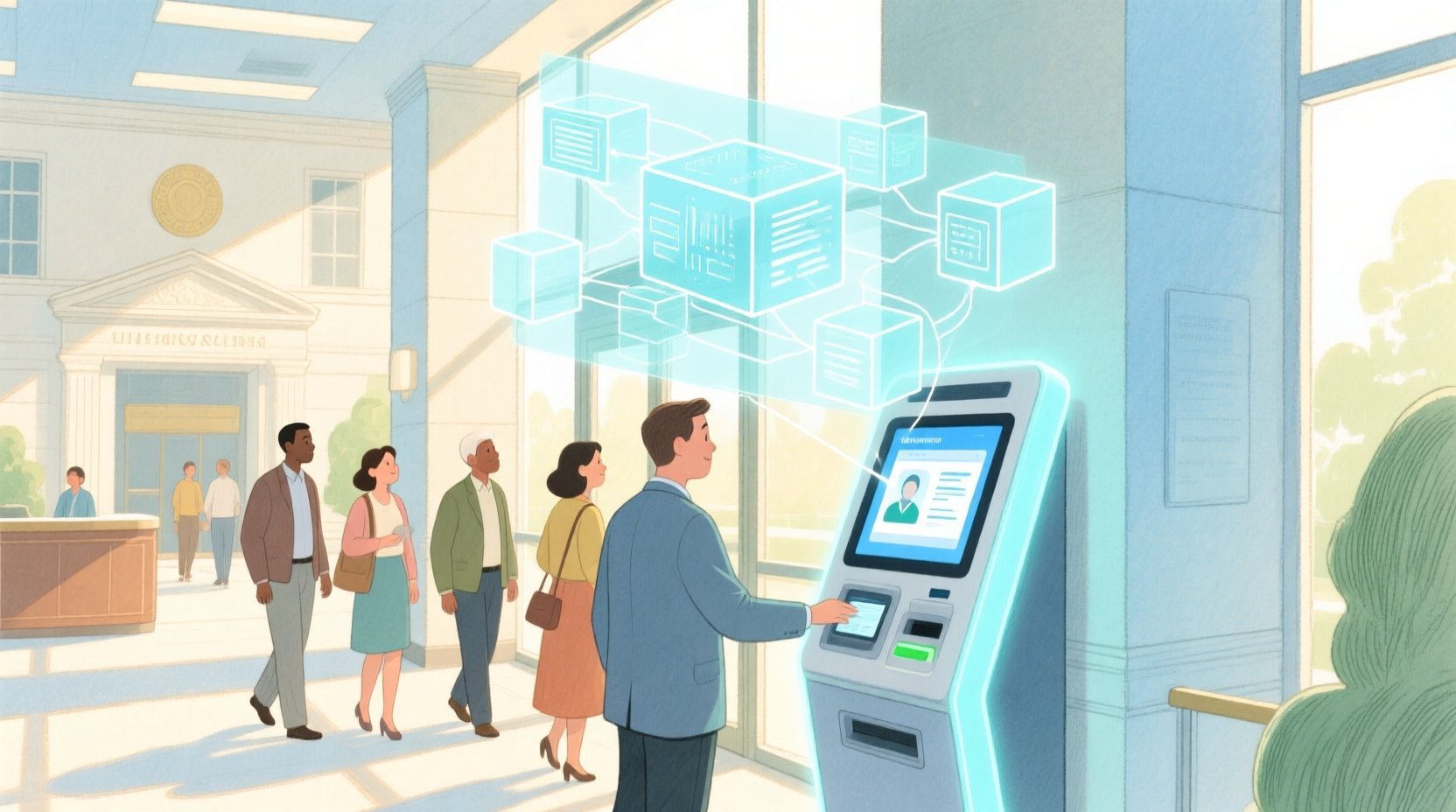
Diagramming-as-code offers a superior approach to designing these complex schemas. By using PlantUML within the VPasCode editor, architects can define precise entity relationships, cardinalities, and attributes in a text-based format that is version-friendly and instantly renderable. This tutorial walks through the construction of an Entity Relationship Diagram (ERD) for a Citizen Public Service Portal, focusing on the separation of identity proofing from service request processing, and the robust tracking of application statuses over time.
Understanding the Model: Purpose, Scope & Problem Framing
Diagram Abstraction & Representation
The Entity Relationship Diagram (ERD) is the foundational blueprint for any relational database system. In this specific context, the ERD models the static structure of a government service platform. It defines the core entities (Citizen, Application, Document) and the dynamic relationships between them (e.g., a Citizen submits an Identity Verification). The diagram abstracts complex database logic into visual components, allowing stakeholders to verify data integrity rules, such as ensuring that every Application is linked to exactly one Citizen, while a Citizen can have many Applications.
Target Domain Scope & Scenario
This model specifically addresses the operational needs of a public service portal. The scope includes the registration of citizens, the mandatory identity verification process (which often involves document uploads), the submission of service requests (like license renewals or permit applications), and the historical tracking of these applications as they move through different approval stages. It explicitly excludes internal administrative workflows or payment gateway integrations, focusing purely on the data persistence layer required for the user-facing portal.
Key Takeaways & Educational Insights
By following this guide, you will learn how to model a one-to-many relationship between a citizen and their verification records, how to implement a history-tracking pattern for application statuses, and how to link documents to multiple different entities (both identity and applications) using foreign keys. You will gain insights into how to structure a database schema that supports both strict identity proofing and flexible service request processing.
Complete Diagram & Full Source Code
Below is the complete visual representation of the Citizen Public Service Portal ERD. This diagram encapsulates the entities for Citizens, Identity Verifications, Service Types, Applications, Status Histories, and Documents, along with their interconnections.
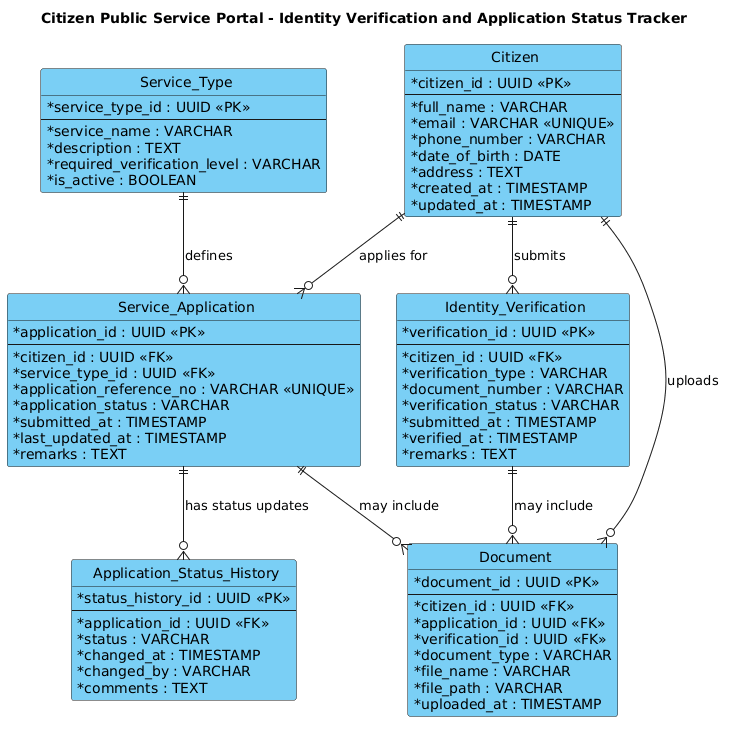
Here is the complete PlantUML source code used to generate this diagram. You can copy this code directly into the VPasCode editor to view and interact with the model.
@startuml
!include https://static.visual-paradigm.com/web/resources/plantuml-stdlib/themes/vp.puml

title Citizen Public Service Portal - Identity Verification and Application Status Tracker

/'
Diagram Context:
This ERD models the core data structures for a citizen public service portal that supports identity verification and application status tracking.
The Citizen entity represents registered portal users. Each citizen may submit one or more Identity Verification records to validate their identity for accessing services.
Once verified, citizens can create Service Applications. Each application is associated with a specific Service Type and passes through multiple Application Status History records to track progress over time.
Documents can be uploaded and linked to either identity verification or service applications.
The model supports auditing, status transparency, and separation of identity proofing from service request processing.
'/

' Entities

entity "Citizen" as citizen {
  * citizen_id : UUID <<PK>>
  --
  * full_name : VARCHAR
  * email : VARCHAR <<UNIQUE>>
  * phone_number : VARCHAR
  * date_of_birth : DATE
  * address : TEXT
  * created_at : TIMESTAMP
  * updated_at : TIMESTAMP
}

entity "Identity_Verification" as identity_verification {
  * verification_id : UUID <<PK>>
  --
  * citizen_id : UUID <<FK>>
  * verification_type : VARCHAR
  * document_number : VARCHAR
  * verification_status : VARCHAR
  * submitted_at : TIMESTAMP
  * verified_at : TIMESTAMP
  * remarks : TEXT
}

entity "Service_Type" as service_type {
  * service_type_id : UUID <<PK>>
  --
  * service_name : VARCHAR
  * description : TEXT
  * required_verification_level : VARCHAR
  * is_active : BOOLEAN
}

entity "Service_Application" as service_application {
  * application_id : UUID <<PK>>
  --
  * citizen_id : UUID <<FK>>
  * service_type_id : UUID <<FK>>
  * application_reference_no : VARCHAR <<UNIQUE>>
  * application_status : VARCHAR
  * submitted_at : TIMESTAMP
  * last_updated_at : TIMESTAMP
  * remarks : TEXT
}

entity "Application_Status_History" as application_status_history {
  * status_history_id : UUID <<PK>>
  --
  * application_id : UUID <<FK>>
  * status : VARCHAR
  * changed_at : TIMESTAMP
  * changed_by : VARCHAR
  * comments : TEXT
}

entity "Document" as document {
  * document_id : UUID <<PK>>
  --
  * citizen_id : UUID <<FK>>
  * application_id : UUID <<FK>>
  * verification_id : UUID <<FK>>
  * document_type : VARCHAR
  * file_name : VARCHAR
  * file_path : VARCHAR
  * uploaded_at : TIMESTAMP
}

' Relationships

citizen ||--o{ identity_verification : "submits"
citizen ||--o{ service_application : "applies for"
service_type ||--o{ service_application : "defines"
service_application ||--o{ application_status_history : "has status updates"
citizen ||--o{ document : "uploads"
service_application ||--o{ document : "may include"
identity_verification ||--o{ document : "may include"

@endumlStep-by-Step Architectural Walkthrough
Phase 1: Canvas Configuration & Layout Directives
The foundation of a professional diagram lies in its setup. We begin by including the standard PlantUML library and applying a consistent visual theme. This ensures the diagram renders with a clean, modern aesthetic suitable for enterprise documentation.
The code starts with @startuml to initiate the diagram. We then include the VPAS theme using !include, which standardizes colors, fonts, and box styles. A descriptive title is added to identify the system. Finally, a comment block is wrapped in /' and '/ to provide a high-level context description without affecting the rendering logic.
@startuml
!include https://static.visual-paradigm.com/web/resources/plantuml-stdlib/themes/vp.puml

title Citizen Public Service Portal - Identity Verification and Application Status Tracker

/'
Diagram Context:
...
'/
Phase 2: Declaring Core Entities, Actors, and Boundaries
Next, we define the core entities. In PlantUML ERD, the entity keyword is used to create a table-like structure. We define the Citizen entity first, as it is the central actor. We use UUID as the primary key type for scalability and VARCHAR or TEXT for string data.
Key attributes like email are marked with the UNIQUE stereotype to enforce data integrity rules visually. We also include timestamps like created_at and updated_at to support auditing, a critical requirement for government systems.
entity "Citizen" as citizen {
  * citizen_id : UUID <>
  --
  * full_name : VARCHAR
  * email : VARCHAR <>
  * phone_number : VARCHAR
  * date_of_birth : DATE
  * address : TEXT
  * created_at : TIMESTAMP
  * updated_at : TIMESTAMP
}
We then define the Identity_Verification and Service_Application entities. Notice how the Service_Type is modeled as a separate entity to allow for dynamic management of available services (e.g., activating/deactivating a permit type) without altering the application records.
Phase 3: Mapping Data Flows & Key Interactions
With entities defined, we establish the relationships using the ||--o{ syntax. This notation represents a one-to-many relationship where the || indicates “one and only one” (mandatory) on the parent side, and o{ indicates “zero or many” (optional) on the child side.
For example, citizen ||--o{ identity_verification : "submits" means a Citizen must exist to submit a verification, but a Citizen might not have submitted one yet (depending on business rules, though often mandatory for access). We also model the Application_Status_History, which is a classic “snapshot” pattern. This entity allows us to store the entire history of status changes (e.g., “Submitted”, “Under Review”, “Approved”) for a single application, ensuring full auditability.
citizen ||--o{ identity_verification : "submits"
citizen ||--o{ service_application : "applies for"
service_type ||--o{ service_application : "defines"
service_application ||--o{ application_status_history : "has status updates"
Phase 4: Grouping, Annotations & Visual Polish
The final phase involves handling the Document entity, which is unique because it acts as a bridge. A document can be attached to a Citizen, a specific Application, or a specific Identity Verification. We achieve this by including foreign keys for all three parent entities within the Document entity definition.
entity "Document" as document {
* document_id : UUID <>
--
* citizen_id : UUID <>
* application_id : UUID < >
* verification_id : UUID < >
...
} We then link the document to these entities using relationships like service_application ||--o{ document : "may include". This completes the model, ensuring that all data dependencies are clearly visualized and that the separation of concerns (identity vs. service) is maintained.
Syntax & Keyword Deep Dive
To effectively build ERDs in PlantUML, understanding the specific syntax keywords is essential. Here is a breakdown of the features used in this government portal diagram:
- entity: The keyword used to define a database table or object. It takes a label (e.g.,
Citizen) and an alias (e.g.,citizen) for referencing. - attribute syntax: Defined as
* attribute_name : Type <. The> *denotes a required field.UUIDis used for primary keys, whileFKandPKstereotypes visually highlight relationships. - Relationship arrows: The
||--o{syntax is used for mandatory one-to-many relationships. The||represents the “one” side (mandatory), ando{represents the “many” side (optional). Other variations include|o--|(optional one-to-one) or||--||(mandatory one-to-one). - Comment blocks: Wrapped in
/'and'/, these allow for multi-line descriptions that appear in the diagram metadata or are ignored by the renderer, perfect for documenting business logic. - Theme inclusion: The
!includedirective pulls in external style definitions (like the VP theme) to ensure consistent styling across all diagrams.
Best Practices & Pitfalls to Avoid
When designing ERDs for complex government portals, adhering to best practices ensures the model remains maintainable and scalable:
- Separation of Concerns: As seen in this model, keep Identity Verification distinct from Service Applications. This allows you to update verification logic (e.g., adding a new ID type) without impacting the application workflow logic.
- Auditability First: Always include timestamp columns (
created_at,updated_at) and a history table for critical state changes. Never rely solely on the current status of an entity. - Consistent Naming Conventions: Use snake_case for database columns (e.g.,
application_reference_no) and PascalCase for entity labels to maintain clarity between code and diagrams. - Avoid Circular Dependencies: Ensure your relationships flow logically. For example, a
Documentshould reference aCitizenorApplication, but theCitizenshould not reference aDocumentdirectly if the document is optional, to prevent infinite loops in data retrieval.
Try It Yourself with VPasCode
Ready to design your own government service portal schema? Start building ERDs faster with VPasCode. Our free, browser-based PlantUML editor allows you to write code, preview the diagram instantly, and export professional visuals without installing any software or configuring a local environment. Perfect for architects and developers who need to document complex data models quickly.
Start Building ERDs Faster with VPasCode
Design your Citizen Portal schema instantly with our free PlantUML editor, featuring live previews and zero local installation.