


In the high-stakes world of cold chain logistics, maintaining precise temperature control is not merely a matter of efficiency—it is a critical requirement for product safety and regulatory compliance. Whether transporting vaccines, fresh produce, or pharmaceuticals, a single deviation in temperature can lead to irreversible spoilage, financial loss, and severe health risks. To mitigate these risks, modern logistics operations rely on sophisticated monitoring systems that continuously record data from IoT sensors, evaluate conditions against strict thresholds, and trigger automated spoilage alerts the moment a breach occurs. However, the complexity of these workflows requires a robust data architecture capable of handling massive streams of sensor readings, managing shipment lifecycles, and correlating alerts with specific shipment events.
Building a reliable system for this domain starts with a clear, visual blueprint of the underlying data model. An Entity Relationship Diagram (ERD) serves as the foundational map for database architects, allowing them to define how shipments, sensors, readings, and alerts relate to one another before a single line of application code is written. By using diagram-as-code with PlantUML, engineers can diagram-as-code modeling their data models, iterate on designs rapidly, and ensure that the logical structure of the database aligns perfectly with the operational realities of the cold chain. This tutorial guides you through constructing a comprehensive ERD that models the entire lifecycle of a temperature-sensitive shipment, from dispatch to potential spoilage alert generation.
Understanding the Model: Purpose, Scope & Problem Framing
This ERD is designed to solve a specific architectural challenge: how to structurally represent the dynamic interaction between physical logistics assets (shipments and sensors) and the digital monitoring logic (readings and alerts). Unlike a static inventory list, this model must capture time-series data (temperature readings), event-driven logic (alert rules), and multi-channel notification workflows. The scope is strictly defined around the “monitoring and alerting” domain, focusing on the data entities required to detect anomalies and communicate them to stakeholders.
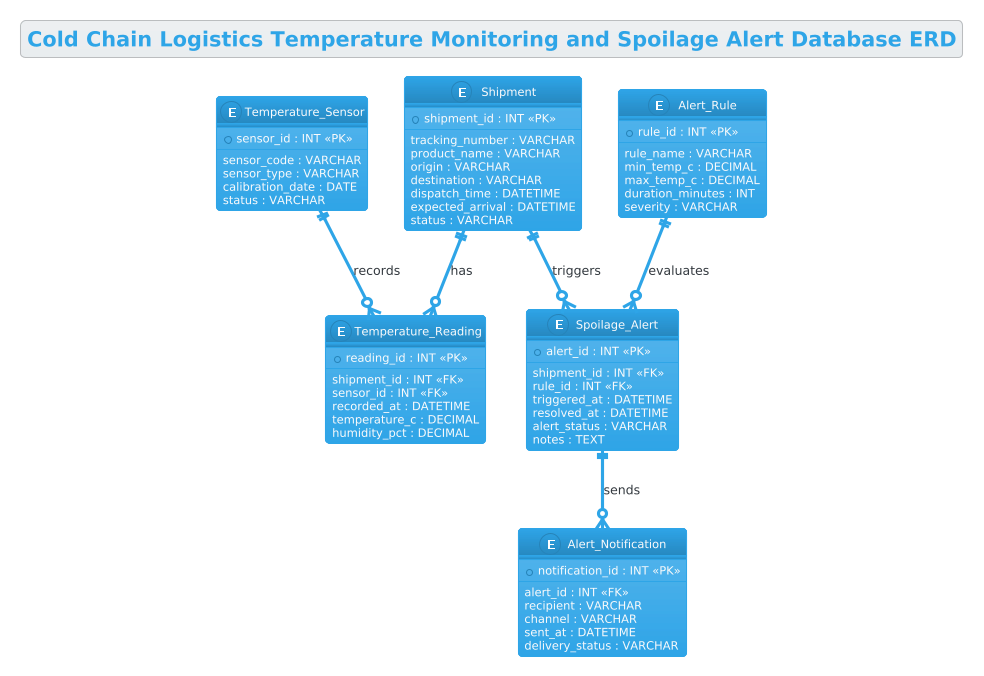
At its core, the diagram models a many-to-many relationship between shipments and sensors, mediated by a central Temperature_Reading entity. This junction table is critical because it allows a single shipment to be monitored by multiple sensors over time, and a single sensor to potentially monitor multiple shipments sequentially. The model also introduces a rule-based engine concept, where Alert_Rule entities define the thresholds (e.g., “temperature > -18°C for > 10 minutes”) that trigger the creation of a Spoilage_Alert. This separation of rules from data allows for flexible configuration without altering the core data schema.
By the end of this guide, you will gain a deep understanding of how to normalize data for time-series monitoring, how to implement event-driven alerting structures, and how to model the notification pipeline. You will learn to visualize the cardinality constraints that ensure data integrity, such as ensuring every reading is linked to a valid shipment and sensor, and that every alert is grounded in a specific rule violation.
Complete Diagram & Full Source Code
Before diving into the step-by-step construction, here is the complete, finalized ERD that we will be building. This diagram encapsulates the entire cold chain monitoring workflow, visualizing the flow of data from physical sensors to actionable alerts.
@startuml
!theme cerulean
title Cold Chain Logistics Temperature Monitoring and Spoilage Alert Database ERD

/'
Diagram Context:
This ERD models the core data structures needed to monitor temperature conditions
for cold chain shipments and trigger spoilage alerts when acceptable thresholds are
breached. It supports tracking shipments, temperature sensors, recorded readings,
alert rules, and generated spoilage alerts. The entities capture the relationships
between shipments, sensor devices, temperature logs, and the alerting workflow
used to protect temperature-sensitive goods.
'/

entity "Shipment" as shipment {
  * shipment_id : INT <<PK>>
  --
  tracking_number : VARCHAR
  product_name : VARCHAR
  origin : VARCHAR
  destination : VARCHAR
  dispatch_time : DATETIME
  expected_arrival : DATETIME
  status : VARCHAR
}

entity "Temperature_Sensor" as sensor {
  * sensor_id : INT <<PK>>
  --
  sensor_code : VARCHAR
  sensor_type : VARCHAR
  calibration_date : DATE
  status : VARCHAR
}

entity "Temperature_Reading" as reading {
  * reading_id : INT <<PK>>
  --
  shipment_id : INT <<FK>>
  sensor_id : INT <<FK>>
  recorded_at : DATETIME
  temperature_c : DECIMAL
  humidity_pct : DECIMAL
}

entity "Alert_Rule" as rule {
  * rule_id : INT <<PK>>
  --
  rule_name : VARCHAR
  min_temp_c : DECIMAL
  max_temp_c : DECIMAL
  duration_minutes : INT
  severity : VARCHAR
}

entity "Spoilage_Alert" as alert {
  * alert_id : INT <<PK>>
  --
  shipment_id : INT <<FK>>
  rule_id : INT <<FK>>
  triggered_at : DATETIME
  resolved_at : DATETIME
  alert_status : VARCHAR
  notes : TEXT
}

entity "Alert_Notification" as notification {
  * notification_id : INT <<PK>>
  --
  alert_id : INT <<FK>>
  recipient : VARCHAR
  channel : VARCHAR
  sent_at : DATETIME
  delivery_status : VARCHAR
}

shipment ||--o{ reading : "has"
sensor ||--o{ reading : "records"
shipment ||--o{ alert : "triggers"
rule ||--o{ alert : "evaluates"
alert ||--o{ notification : "sends"

@endumlStep-by-Step Architectural Walkthrough
Phase 1: Canvas Configuration & Layout Directives
Every professional PlantUML diagram begins with setting the stage. We start by defining the visual theme to ensure the diagram looks polished and consistent with modern enterprise standards. In this case, we use the cerulean theme, which provides a clean, blue-toned aesthetic suitable for technical documentation.
We also add a title directive to give the diagram a clear header. Crucially, we include a comment block to document the context of the model directly within the code. This ensures that anyone reading the source code understands the business logic without needing to look at the rendered image.
!theme cerulean
title Cold Chain Logistics Temperature Monitoring and Spoilage Alert Database ERD

/'
Diagram Context:
This ERD models the core data structures needed to monitor temperature conditions
for cold chain shipments and trigger spoilage alerts when acceptable thresholds are
breached. It supports tracking shipments, temperature sensors, recorded readings,
alert rules, and generated spoilage alerts. The entities capture the relationships
between shipments, sensor devices, temperature logs, and the alerting workflow
used to protect temperature-sensitive goods.
'/
Phase 2: Declaring Core Entities, Actors, and Boundaries
The foundation of an ERD is the entity definition. In PlantUML, we use the entity keyword followed by the entity name in quotes and an alias for referencing. Inside the curly braces, we define the attributes, data types, and keys.
We begin with the Shipment and Temperature_Sensor entities. These are the primary “nouns” of our system. The Shipment entity holds the logistical metadata (origin, destination, tracking number), while the Temperature_Sensor entity manages the hardware details (sensor code, calibration date). We use INT for IDs and VARCHAR for text fields to reflect standard database practices. The * prefix before the primary key attribute (e.g., * shipment_id) indicates it is the primary key.
entity "Shipment" as shipment {
* shipment_id : INT <>
--
tracking_number : VARCHAR
product_name : VARCHAR
origin : VARCHAR
destination : VARCHAR
dispatch_time : DATETIME
expected_arrival : DATETIME
status : VARCHAR
}
entity "Temperature_Sensor" as sensor {
* sensor_id : INT < >
--
sensor_code : VARCHAR
sensor_type : VARCHAR
calibration_date : DATE
status : VARCHAR
}
Phase 3: Mapping Data Flows & Key Interactions
The most critical part of a monitoring system is the junction between the physical world and the digital record. We achieve this by creating the Temperature_Reading entity. This is a transactional table that links a specific shipment_id and sensor_id to a timestamp and a measurement value. This many-to-many relationship is essential because a shipment can have multiple sensors, and a sensor can be used across multiple shipments over time.
Next, we model the logic layer. The Alert_Rule entity defines the conditions (min/max temperature, duration) that constitute a violation. This separates the “what to check” from the “data being checked.” Finally, the Spoilage_Alert entity captures the event when a rule is violated, linking back to the shipment and the rule that triggered it.
entity "Temperature_Reading" as reading {
* reading_id : INT <>
--
shipment_id : INT <>
sensor_id : INT < >
recorded_at : DATETIME
temperature_c : DECIMAL
humidity_pct : DECIMAL
}
entity "Alert_Rule" as rule {
* rule_id : INT <>
--
rule_name : VARCHAR
min_temp_c : DECIMAL
max_temp_c : DECIMAL
duration_minutes : INT
severity : VARCHAR
}
entity "Spoilage_Alert" as alert {
* alert_id : INT < >
--
shipment_id : INT <>
rule_id : INT < >
triggered_at : DATETIME
resolved_at : DATETIME
alert_status : VARCHAR
notes : TEXT
}
Phase 4: Grouping, Annotations & Visual Polish
The final phase involves defining the relationships using the ||--o{ syntax. This notation represents a one-to-many relationship with optional participation (zero or more). For example, a Shipment ||--o{ Reading means a shipment must have at least one reading (or zero if the sensor hasn’t started), but a reading cannot exist without a shipment.
We also add the Alert_Notification entity to close the loop. Once an alert is triggered, it must be communicated. This entity tracks who was notified, via what channel (email, SMS, webhook), and the delivery status. Finally, we draw the relationships to visualize the flow: Shipment triggers Alert, Rule evaluates Alert, and Alert sends Notification.
shipment ||--o{ reading : "has"
sensor ||--o{ reading : "records"
shipment ||--o{ alert : "triggers"
rule ||--o{ alert : "evaluates"
alert ||--o{ notification : "sends"
Syntax & Keyword Deep Dive
To build robust diagrams in PlantUML, it is essential to understand the specific syntax elements used in this Cold Chain ERD. These keywords allow for precise control over data modeling and visual representation.
entity: The primary directive used to define a database table or entity. It is followed by the display name and an alias (e.g.,as shipment) for use in relationship definitions./* ... */(Block Comments): PlantUML supports multi-line comments enclosed in/*and*/(or in this specific template, the/' ... '/syntax is used for context blocks). These are ignored by the renderer but are vital for documentation within the code.«PK»(Stereotype): The double angle brackets denote a stereotype.«PK»specifically marks an attribute as the Primary Key, which is a standard convention in ERD notation to identify unique identifiers.«FK»(Stereotype): Marks an attribute as a Foreign Key, indicating a relationship to the primary key of another table. This helps in visualizing the referential integrity of the database.||--o{(Cardinality): This is the relationship arrow syntax.||represents “one and only one” (mandatory), ando{represents “zero or many” (optional). This specific combination defines a standard one-to-many relationship where the parent entity is mandatory, but the child entity is optional.--(Separator): Used inside an entity block to visually separate primary keys from other attributes, improving readability.!theme: A global directive that applies a specific visual style (color palette, font, border style) to the entire diagram, ensuring consistency.
Best Practices & Pitfalls to Avoid
When modeling complex logistics systems like cold chain monitoring, adhering to best practices ensures your ERD remains maintainable and scalable.
- Normalize Time-Series Data: Never store temperature readings directly inside the
ShipmentorSensorentity. Always create a separate junction table (likeTemperature_Reading) to handle the high volume of time-stamped data. This prevents the main entities from becoming unmanageable blobs of data. - Separate Logic from Data: As demonstrated with the
Alert_Ruleentity, keep your business rules (thresholds) separate from the data they evaluate. This allows you to change alert criteria (e.g., adjusting the temperature limit for a new product type) without altering the core data structure. - Use Clear Aliases: Always define a short alias (e.g.,
as shipment) for your entities. This makes the relationship lines much cleaner and the code easier to read than using the full entity names repeatedly. - Document Cardinality Explicitly: Don’t just draw lines; label them with verbs (e.g., “has”, “triggers”, “evaluates”). This turns the diagram into a self-documenting narrative of how the system behaves, not just how the data is stored.
Start Building Cold Chain ERDs Faster with VPasCode
Instantly render, edit, and customize your logistics database schema in your browser with VPasCode, the free PlantUML editor designed for database architects.