


In the high-stakes environment of defense logistics, the integrity of data flows between military units, supply depots, and maintenance facilities is paramount. A single discrepancy in inventory tracking or requisition status can delay critical equipment repairs or compromise operational readiness. To manage this complexity, architects rely on precise data modeling to define how entities like Military Units, Depots, Supply Items, and Maintenance Work Orders interact. Visualizing these relationships is not merely about documentation; it is about establishing a clear blueprint for database integrity and system interoperability.
Traditional drag-and-drop diagramming tools often struggle to capture the intricate cardinality and foreign key constraints required in military-grade systems. They can become unwieldy when managing dozens of interconnected tables. This is where diagram-as-code shines. By using PlantUML within the VPasCode editor, architects can define the entire schema programmatically, ensuring that every relationship, primary key, and foreign key is explicitly declared and logically consistent. This approach allows for rapid iteration, versioning of the schema logic, and instant visualization of the complex workflow connecting supply requisitions to depot-level maintenance.
Understanding the Model: Purpose, Scope & Problem Framing
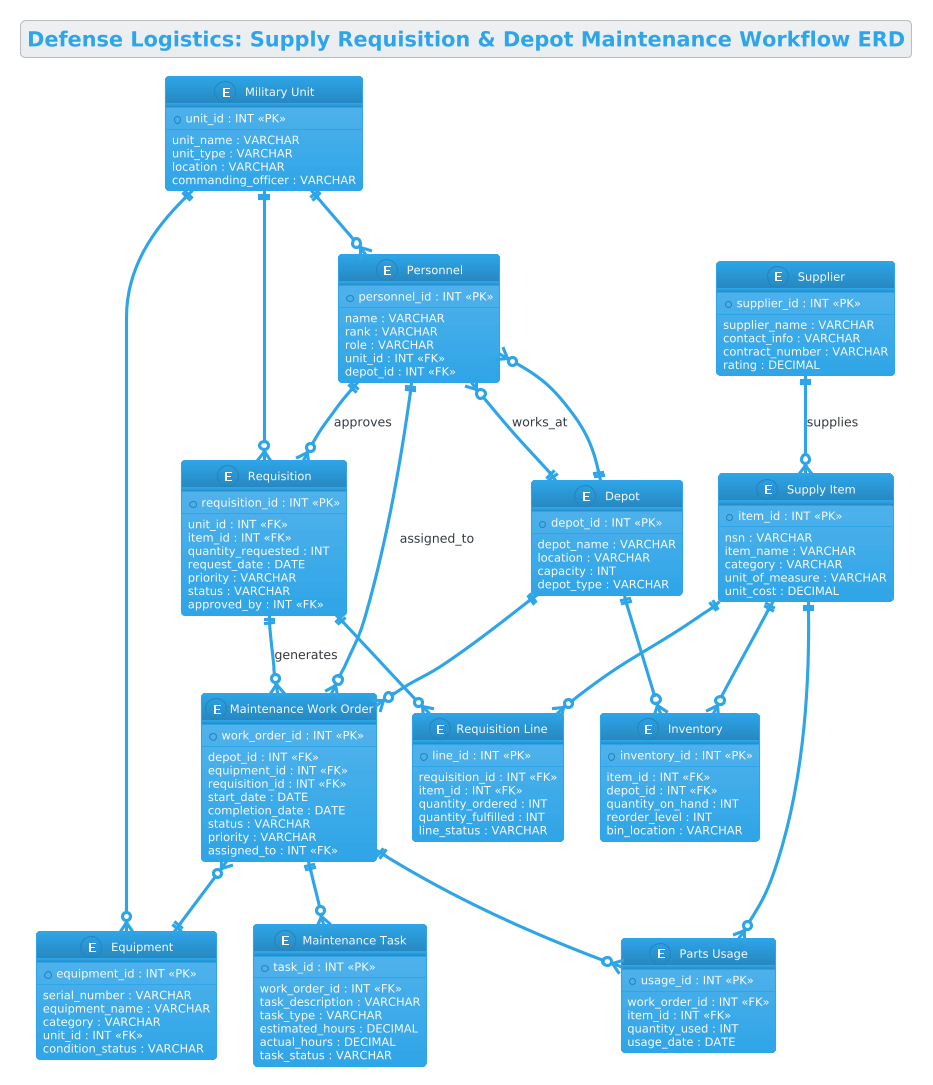
This tutorial focuses on constructing an Entity-Relationship Diagram (ERD) specifically tailored for a Defense Logistics Military Supply Requisition and Depot Maintenance Workflow System. Unlike generic inventory systems, this model addresses the unique dual-flow of military operations: the Requisition Flow (units requesting parts) and the Maintenance Flow (depots repairing equipment using those parts).
Diagram Abstraction & Representation
In this ERD, we model the static structure of the database that supports these dynamic processes. The diagram uses standard ERD notation to represent:
- Entities: Represented as tables (e.g., Requisition, WorkOrder, SupplyItem) that store specific data points.
- Attributes: The columns within each entity (e.g., NSN for National Stock Number, Rank for personnel).
- Relationships: The lines connecting entities that define how data relates, such as a Military Unit having many Requisitions or a Depot managing many Work Orders.
Target Domain Scope & Scenario
The scope of this model covers the end-to-end lifecycle of a supply request and its subsequent use in maintenance. It explicitly models the boundary between the Military Unit (the consumer of parts) and the Depot (the provider of parts and maintenance services). It also bridges the gap between Personnel (who approve and execute tasks) and the physical assets (Equipment and Supply Items).
Key Takeaways & Educational Insights
By building this diagram, you will gain insights into how to model one-to-many relationships (e.g., one unit making many requisitions), how to handle junction tables for many-to-many scenarios (e.g., a requisition containing multiple line items), and how to link operational workflows (maintenance) with logistical data (inventory).
Complete Diagram & Full Source Code
Below is the final visualization of the Defense Logistics ERD. This diagram encapsulates the complex web of dependencies between units, depots, and supply chains, rendered instantly using the Cerulean theme for a clean, professional look.
Copy the complete source code below to explore the full schema structure. This code is ready to be pasted directly into the VPasCode editor.
@startuml
!theme cerulean
title Defense Logistics: Supply Requisition & Depot Maintenance Workflow ERD

/'
This ERD models the core data structure for a defense logistics system that manages
military supply requisitions alongside depot-level maintenance operations. It captures
how units request parts and materials, how depots receive and execute maintenance work
orders, and how inventory, suppliers, and personnel are connected across the workflow.
The diagram supports tracking of requisition status, maintenance tasks, stock levels,
and the relationships between units, depots, and supply items.
'/

entity "Military Unit" as Unit {
  * unit_id : INT <<PK>>
  --
  unit_name : VARCHAR
  unit_type : VARCHAR
  location : VARCHAR
  commanding_officer : VARCHAR
}

entity "Personnel" as Personnel {
  * personnel_id : INT <<PK>>
  --
  name : VARCHAR
  rank : VARCHAR
  role : VARCHAR
  unit_id : INT <<FK>>
  depot_id : INT <<FK>>
}

entity "Supply Item" as SupplyItem {
  * item_id : INT <<PK>>
  --
  nsn : VARCHAR
  item_name : VARCHAR
  category : VARCHAR
  unit_of_measure : VARCHAR
  unit_cost : DECIMAL
}

entity "Inventory" as Inventory {
  * inventory_id : INT <<PK>>
  --
  item_id : INT <<FK>>
  depot_id : INT <<FK>>
  quantity_on_hand : INT
  reorder_level : INT
  bin_location : VARCHAR
}

entity "Supplier" as Supplier {
  * supplier_id : INT <<PK>>
  --
  supplier_name : VARCHAR
  contact_info : VARCHAR
  contract_number : VARCHAR
  rating : DECIMAL
}

entity "Requisition" as Requisition {
  * requisition_id : INT <<PK>>
  --
  unit_id : INT <<FK>>
  item_id : INT <<FK>>
  quantity_requested : INT
  request_date : DATE
  priority : VARCHAR
  status : VARCHAR
  approved_by : INT <<FK>>
}

entity "Requisition Line" as ReqLine {
  * line_id : INT <<PK>>
  --
  requisition_id : INT <<FK>>
  item_id : INT <<FK>>
  quantity_ordered : INT
  quantity_fulfilled : INT
  line_status : VARCHAR
}

entity "Depot" as Depot {
  * depot_id : INT <<PK>>
  --
  depot_name : VARCHAR
  location : VARCHAR
  capacity : INT
  depot_type : VARCHAR
}

entity "Maintenance Work Order" as WorkOrder {
  * work_order_id : INT <<PK>>
  --
  depot_id : INT <<FK>>
  equipment_id : INT <<FK>>
  requisition_id : INT <<FK>>
  start_date : DATE
  completion_date : DATE
  status : VARCHAR
  priority : VARCHAR
  assigned_to : INT <<FK>>
}

entity "Equipment" as Equipment {
  * equipment_id : INT <<PK>>
  --
  serial_number : VARCHAR
  equipment_name : VARCHAR
  category : VARCHAR
  unit_id : INT <<FK>>
  condition_status : VARCHAR
}

entity "Maintenance Task" as MaintTask {
  * task_id : INT <<PK>>
  --
  work_order_id : INT <<FK>>
  task_description : VARCHAR
  task_type : VARCHAR
  estimated_hours : DECIMAL
  actual_hours : DECIMAL
  task_status : VARCHAR
}

entity "Parts Usage" as PartsUsage {
  * usage_id : INT <<PK>>
  --
  work_order_id : INT <<FK>>
  item_id : INT <<FK>>
  quantity_used : INT
  usage_date : DATE
}

Unit ||--o{ Personnel
Unit ||--o{ Requisition
Unit ||--o{ Equipment

Personnel ||--o{ Requisition : approves
Personnel ||--o{ WorkOrder : assigned_to
Personnel }o--|| Depot : works_at

Depot ||--o{ Inventory
Depot ||--o{ WorkOrder
Depot ||--o{ Personnel

SupplyItem ||--o{ Inventory
SupplyItem ||--o{ ReqLine
SupplyItem ||--o{ PartsUsage

Supplier ||--o{ SupplyItem : supplies

Requisition ||--o{ ReqLine
Requisition ||--o{ WorkOrder : generates

WorkOrder ||--o{ MaintTask
WorkOrder ||--o{ PartsUsage
WorkOrder }o--|| Equipment

@endumlStep-by-Step Architectural Walkthrough
Building a complex ERD like this requires a structured approach. We will break down the construction into four logical phases, mirroring how a database architect would design the system.
Phase 1: Canvas Configuration & Layout Directives
Before defining any data, we must set the stage for the diagram. We start by initializing the PlantUML environment and applying a professional theme. In this case, we use the !theme cerulean directive to ensure the diagram renders with a clean, blue-toned aesthetic suitable for technical documentation.
@startuml
!theme cerulean
title Defense Logistics: Supply Requisition & Depot Maintenance Workflow ERD
We also include a multi-line comment block using /' and '/ to document the context of the diagram. This ensures that anyone viewing the raw code understands the business logic immediately.
Phase 2: Declaring Core Entities, Actors, and Boundaries
Next, we define the fundamental building blocks of our system. In PlantUML, we use the entity keyword to create tables. We define the primary entities first: Military Unit, Personnel, Depot, and Supply Item.
entity "Military Unit" as Unit {
  * unit_id : INT <>
  --
  unit_name : VARCHAR
  unit_type : VARCHAR
  location : VARCHAR
  commanding_officer : VARCHAR
}
Notice the use of * to denote the Primary Key (PK) and -- to separate keys from other attributes. We also define Foreign Keys (FK) later in the code, but here we establish the core identity of each entity.
Phase 3: Mapping Data Flows & Key Interactions
With the entities defined, we introduce the transactional tables that link them together. The Requisition and Maintenance Work Order are the bridges between the static data and the dynamic workflow. We define the Requisition Line entity to handle the many-to-many relationship between a requisition and multiple supply items.
entity "Requisition Line" as ReqLine {
* line_id : INT <>
--
requisition_id : INT <>
item_id : INT < >
quantity_ordered : INT
quantity_fulfilled : INT
line_status : VARCHAR
} This structure allows a single requisition to contain multiple line items, each tracking its own fulfillment status, which is critical for partial shipments in logistics.
Phase 4: Grouping, Annotations & Visual Polish
The final phase involves connecting the entities using relationship arrows. We use the ||--o{ syntax to denote a mandatory one-to-many relationship (e.g., a Unit must have at least one Personnel member, or a Unit can have zero or more Requisitions). We also add labels to the relationships to clarify the nature of the connection.
Unit ||--o{ Personnel
Unit ||--o{ Requisition
Personnel ||--o{ Requisition : approves
Requisition ||--o{ ReqLine
The ||--o{ syntax ensures that the crow’s foot notation is rendered correctly, visually indicating the cardinality of the relationship.
Syntax & Keyword Deep Dive
To master PlantUML ERD modeling, it is essential to understand the specific keywords and symbols used in this diagram.
entity: The directive used to define a database table. The syntax isentity "Table Name" as Alias { ... }.*(Asterisk):** Placed before an attribute name (e.g.,* unit_id) to indicate a Primary Key. This is crucial for database integrity.<&> <: Stereotypes used to explicitly label Primary Keys and Foreign Keys in the visual output, making the diagram self-documenting.> ||--o{: A relationship arrow indicating a mandatory one-to-many relationship. The||represents the “one” side (mandatory), and theo{represents the “many” side (optional).:(Colon):** Used to add a label to a relationship line, explaining the action (e.g.,: approvesor: supplies)./'&'/: The syntax for multi-line comments. Anything between these markers is ignored by the renderer but remains visible in the source code for human readers.
Best Practices & Pitfalls to Avoid
When designing complex ERDs for defense or enterprise logistics, following best practices ensures your diagrams remain maintainable and accurate.
- Use Aliases for Clarity: Long entity names like “Maintenance Work Order” can clutter the diagram. Use the
askeyword (e.g.,as WorkOrder) to create short aliases for the relationship lines, keeping the diagram clean. - Consistent Naming Conventions: Ensure that Foreign Keys in your code match the Primary Keys they reference (e.g.,
unit_idin Requisition must matchunit_idin Military Unit). Inconsistent naming leads to broken relationships in the rendered output. - Modularize Complex Entities: If an entity becomes too large (like Requisition with many attributes), consider breaking it down or using sub-entities (like Requisition Line) to manage complexity.
- Document Relationships: Don’t rely solely on arrows. Always use labels (e.g.,
: generates) to explain the semantic meaning of the relationship, especially in complex workflows.
Start Building Defense Logistics ERDs Faster with VPasCode
Instantly render, test, and customize your military supply and maintenance workflow diagrams online with VPasCode’s free PlantUML editor—no local installation required.