


¿Los ingenieros de software aún utilizan UML hoy en día? Sí, pero no de la manera en que lo hacían antes. Aunque el modelado UML completo y rígido ha desaparecido en gran medida de los flujos de trabajo ágiles modernos, diagramas centrales específicos, como los diagramas de secuencia y de clases, siguen siendo esenciales para el diseño técnico. Hoy en día, los ingenieros de software se han alejado de las pesadas herramientas visuales de arrastrar y soltar hacia soluciones ligerasDiagramas como código (DaC) flujos de trabajo y capacidades nativas de IA utilizando herramientas como PlantUML y Mermaid.
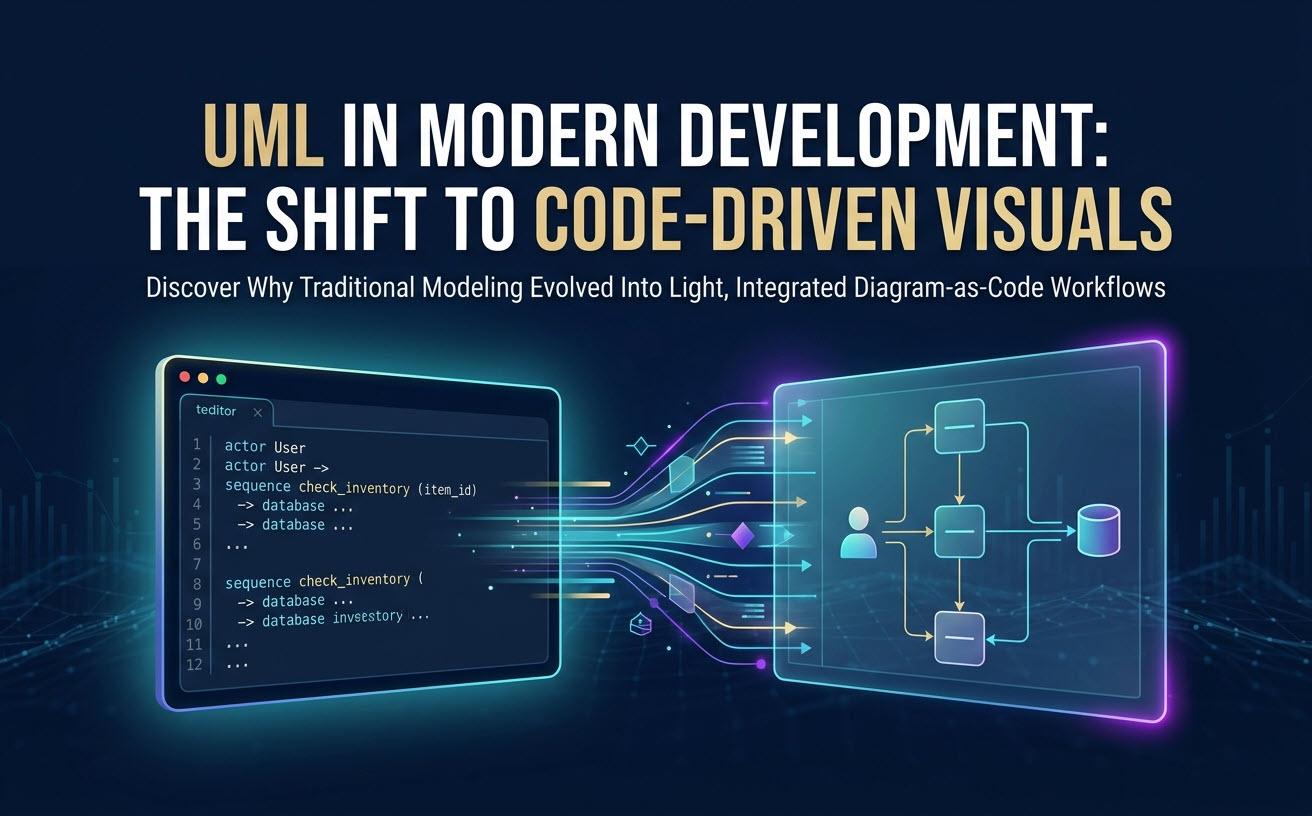
¿Los ingenieros de software aún utilizan UML hoy en día? (La respuesta breve)
Los ingenieros de software aún utilizan UML de forma selectiva como herramienta de comunicación en lugar de un lenguaje formal de planificación. El desarrollo moderno prioriza el código funcional sobre la documentación exhaustiva previa, lo que significa que los ingenieros rara vez construyen modelos UML completos que cubran toda la base de código. En su lugar, los equipos utilizan diagramas UML ligeros para bosquejar flujos de API complejos, modelar esquemas de bases de datos o aclarar la comunicación entre microservicios antes de escribir el código.
El declive del UML pesado: por qué los desarrolladores se alejaron
El paradigma tradicional del Lenguaje Unificado de Modelado (UML) cayó en desgracia debido a la fricción con las prácticas modernas de entrega de software. Los principales impulsores de este cambio incluyen:
- La trampa del mantenimiento: Los diagramas visuales creados en herramientas tradicionales de arrastrar y soltar se vuelven obsoletos rápidamente a medida que evoluciona la base de código subyacente, convirtiendo los diagramas estáticos en documentación engañosa.
- Ágil sobre BDUF (Gran Diseño Inicial): La ingeniería iterativa de ritmo rápido favorece los bocetos de diseño mínimos y adaptables sobre los planos arquitectónicos rígidos.
- Cambio de contexto: Salir del editor de código para alinear manualmente cajas y flechas en una interfaz gráfica separada rompe la concentración del desarrollador y ralentiza la ejecución.
La trampa del mantenimiento: Visuales desincronizados frente al código de producción
Cuando un diagrama visual vive fuera del repositorio de código, cada refactorización o actualización de API requiere ediciones visuales manuales. En la práctica, los equipos de desarrollo ocupados omiten actualizar estas imágenes estáticas. Con el tiempo, la documentación de diseño se convierte en “deuda técnica”, engañando a los nuevos ingenieros y complicando las auditorías del sistema.
Ágil moderno frente a Gran Diseño Inicial (BDUF)
Las primeras metodologías de ingeniería de software se basaban en diseños UML detallados generados durante ciclos de planificación largos. Los marcos ágiles y DevOps modernos enfatizan la entrega continua y el diseño iterativo. Los equipos de ingeniería ahora prefieren diagramas concisos y de alto impacto que sirvan para discusiones de diseño inmediatas en lugar de especificaciones exhaustivas.
Dónde los diagramas arquitectónicos siguen siendo obligatorios
La comunicación visual sigue siendo vital en la ingeniería de software moderna. Aunque rara vez se exigen suites completas de UML, diagramas UML específicos son críticos en escenarios clave de ingeniería:
| Tipo de diagrama | Caso de uso principal de ingeniería | Por qué sobrevive |
|---|---|---|
| Diagrama de secuencia | Llamadas de microservicios, flujos de autenticación, mensajería de API | Visualiza claramente la sincronización asíncrona/síncrona entre sistemas. |
| Diagrama de clases / componentes | Modelado de dominio, límites del sistema, estructuras de objetos | Proporciona claridad inmediata sobre las relaciones del sistema durante las revisiones de diseño. |
| Diagrama de Estado | Procesamiento de pagos, ciclos de vida de pedidos complejos, estados de la interfaz de usuario | Mapea explícitamente las transiciones de estado para evitar errores lógicos en flujos de trabajo complejos. |
Diagramas de Secuencia para Microservicios Complejos e Interacciones de API
Los diagramas de secuencia son el diagrama UML más utilizado en la ingeniería de software moderna. A medida que los sistemas migran a microservicios distribuidos, rastrear una sola transacción a través de múltiples servicios, colas de mensajes y bases de datos solo en texto se vuelve difícil. Un diagrama de secuencia revela condiciones de carrera, cuellos de botella de latencia y pasos de manejo de errores faltantes antes de comenzar la implementación.
Incorporación Técnica y Alineación Multidisciplinaria
Un solo diagrama claro acelera la incorporación de ingenieros mucho más eficazmente que miles de líneas de código o documentos de texto densos. Las visuales de arquitectura de alto nivel ayudan a equipos remotos y multidisciplinarios a comprender rápidamente los límites del sistema, los perímetros de seguridad y las tuberías de datos.
La Evolución: Por Qué los Desarrolladores Están Adoptando el Diagrama como Código (DaC) y la IA
Para eliminar el dolor de las herramientas de diseño visual manteniendo la claridad de UML, los equipos de ingeniería de software están recurriendo a Diagrama como Código (DaC) combinado con asistencia de IA nativa. DaC trata los diagramas arquitectónicos como código fuente de software: escritos en lenguajes específicos de dominio (DSL) en texto plano o generados instantáneamente mediante indicaciones en lenguaje natural.
Optimización de Flujos de Trabajo DSL con VPasCode
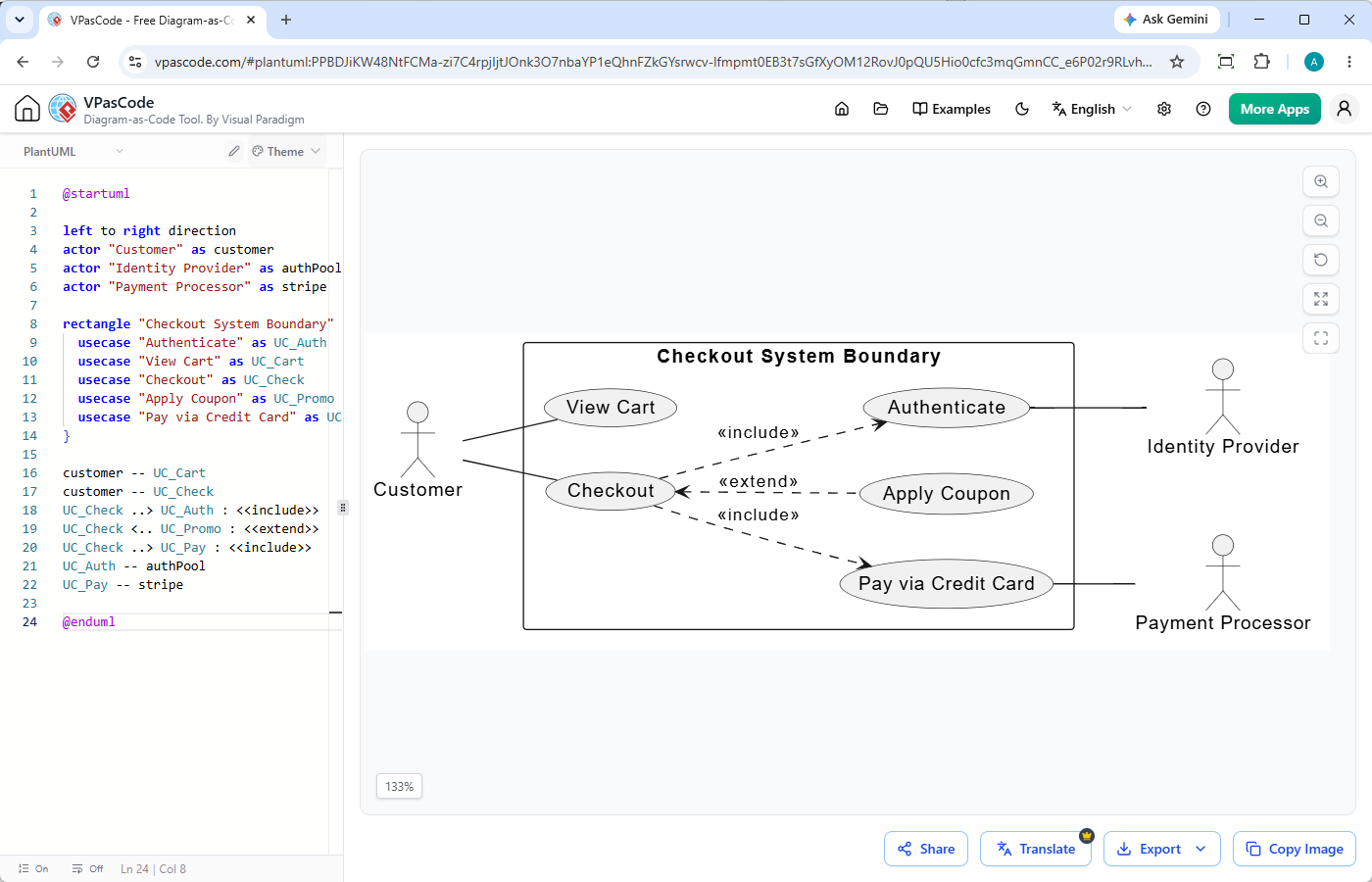
Escribir scripts crudos de texto a diagrama o configurar plugins complejos a menudo introduce fricción. Visual Paradigm VPasCode elimina esta fricción de configuración al proporcionar un editor unificado y basado en la web editor UML gratuito mejorado con herramientas de IA integradas.
Como un editor PlantUML gratuito y renderizador multi-formato, VPasCode ofrece características de productividad inmediata:
- Generación y Modificación Nativa con IA: Crea diagramas UML completos a partir de indicaciones en lenguaje natural (por ejemplo, “Genera un diagrama de casos de uso en PlantUML para un sistema de cajero automático”) o instruye a la IA para modificar el código existente directamente dentro de la interfaz.
- Detección Automática de Formato: Pega el script crudo en el editor en línea, ya sea PlantUML, Mermaid, Graphviz o JSON, y VPasCode detecta el formato automáticamente sin configuración manual.
- Vista Previa en Tiempo Real: La renderización en vivo actualiza los diagramas visuales instantáneamente a medida que se escribe o se indica el código, permitiendo una iteración rápida en las ideas arquitectónicas.
- Opciones de Exportación Limpia:Descargue los diagramas renderizados como imágenes vectoriales escalables (SVG) o archivos PNG de alta resolución para documentación, o compártalos directamente mediante URLs instantáneas.
Superar la curva de aprendizaje de la sintaxis en el modelado basado en texto
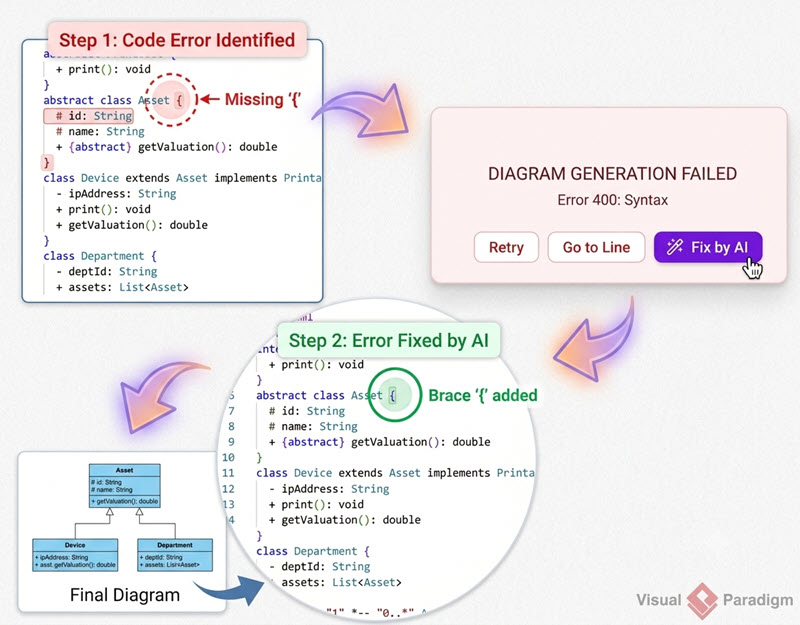
Aunque Diagram-as-Code resuelve los problemas de alineación visual, los ingenieros aún deben dominar las reglas de sintaxis de DSL en múltiples lenguajes (PlantUML, Mermaid, C4, etc.). Un solo corchete faltante o un error tipográfico puede romper el renderizado e interrumpir el impulso del diseño.
Corrección de errores con IA y diferencias de código transparentes
Para superar los obstáculos de sintaxis, VPasCode integra asistencia de IA nativa directamente en el entorno de renderizado. Si un script de PlantUML o Mermaid falla debido a errores de sintaxis, al hacer clic en“Corregir con IA“analiza y repara el código instantáneamente. El editor muestra una comparación de código lado a lado junto con explicaciones, ayudando a los desarrolladores a corregir errores de sintaxis sin tener que buscar en manuales de documentación.
Traducción de diagramas multilingües para equipos distribuidos
Los equipos de desarrollo globales trabajan frecuentemente en múltiples idiomas. VPasCode incluye traducción de texto con IA nativa directamente dentro del editor. Los ingenieros pueden traducir automáticamente descripciones de nodos, pasos de secuencia y etiquetas entre idiomas globales (por ejemplo, convertir “Process Order” a “处理订单”) sin romper la lógica del código DSL subyacente ni la estructura visual.
(Nota: Las funciones avanzadas de generación, modificación y corrección de errores de diagramas con IA están disponibles en Visual Paradigm Online Deluxe Edition / Visual Paradigm Desktop Professional Edition+).
Integración de diagramas en documentación técnica viva
Un diagrama solo aporta valor si los desarrolladores pueden encontrarlo y verlo durante el desarrollo activo. Las prácticas modernas de arquitectura incrustan diagramas visuales directamente en bases de conocimientos, portales internos de desarrolladores y archivos README.
Centralización de especificaciones del sistema con integración de OpenDocs
VPasCode se integra nativamente con Visual Paradigm OpenDocs. Los ingenieros pueden crear o refinar diagramas utilizando scripts basados en texto ogeneración de diagramas con IAen VPasCode y publicarlos directamente en suites de documentación técnica viva. Este flujo de trabajo mantiene un centro central y buscable para la arquitectura de ingeniería sin requerir exportaciones manuales de imágenes ni servidores de activos de terceros.
Veredicto: UML no está muerto; simplemente ha evolucionado hacia código e IA
¿Los ingenieros de software utilizan UML? Sí, pero las herramientas de dibujo UML estáticas de arrastrar y soltar han sido reemplazadas por flujos de trabajo amigables para desarrolladores, impulsados por código y asistidos por IA. Los ingenieros modernos escriben modelos de secuencia, clase y estado en texto plano o los generan instantáneamente utilizando indicaciones en lenguaje natural a través de PlantUML y Mermaid, manteniendo la documentación junto al código fuente.
Ya sea que necesite una herramienta UML gratuita rápidapara diagramas de secuencia o un editor de PlantUML gratuito fiablepara revisiones de arquitectura, puede escribir, solicitar, renderizar y refinar sus diagramas en línea utilizandoVPasCodeVPasCodeVPasCode.
Recursos relacionados
- Entorno de prueba interactivo de Visual Paradigm VPasCode: Pruebe Visual Paradigm VPasCode en el entorno de prueba interactivo de VPasCode
- Vista general de VPasCode: Obtenga más información sobre VPasCode
- Gran actualización de VPasCode: Genere y modifique diagramas al instante con IA