


In the modern financial technology landscape, clarity is currency. For software architects and business analysts designing retail banking systems, the complexity of customer onboarding processes often becomes a bottleneck. Whether it is compliance with Anti-Money Laundering (AML) regulations, credit risk assessment, or simply ensuring a smooth user experience, visualizing the flow of data and decision-making is critical.

Traditional whiteboarding tools often fail to capture the precise logic required for these systems. Diagram-as-code with PlantUML offers a robust alternative. By treating diagrams as text, teams can version their visual documentation, iterate quickly, and maintain a single source of truth. Using VPasCode, the free web-based diagram-as-code editor, architects can prototype these complex banking workflows instantly without local installation.
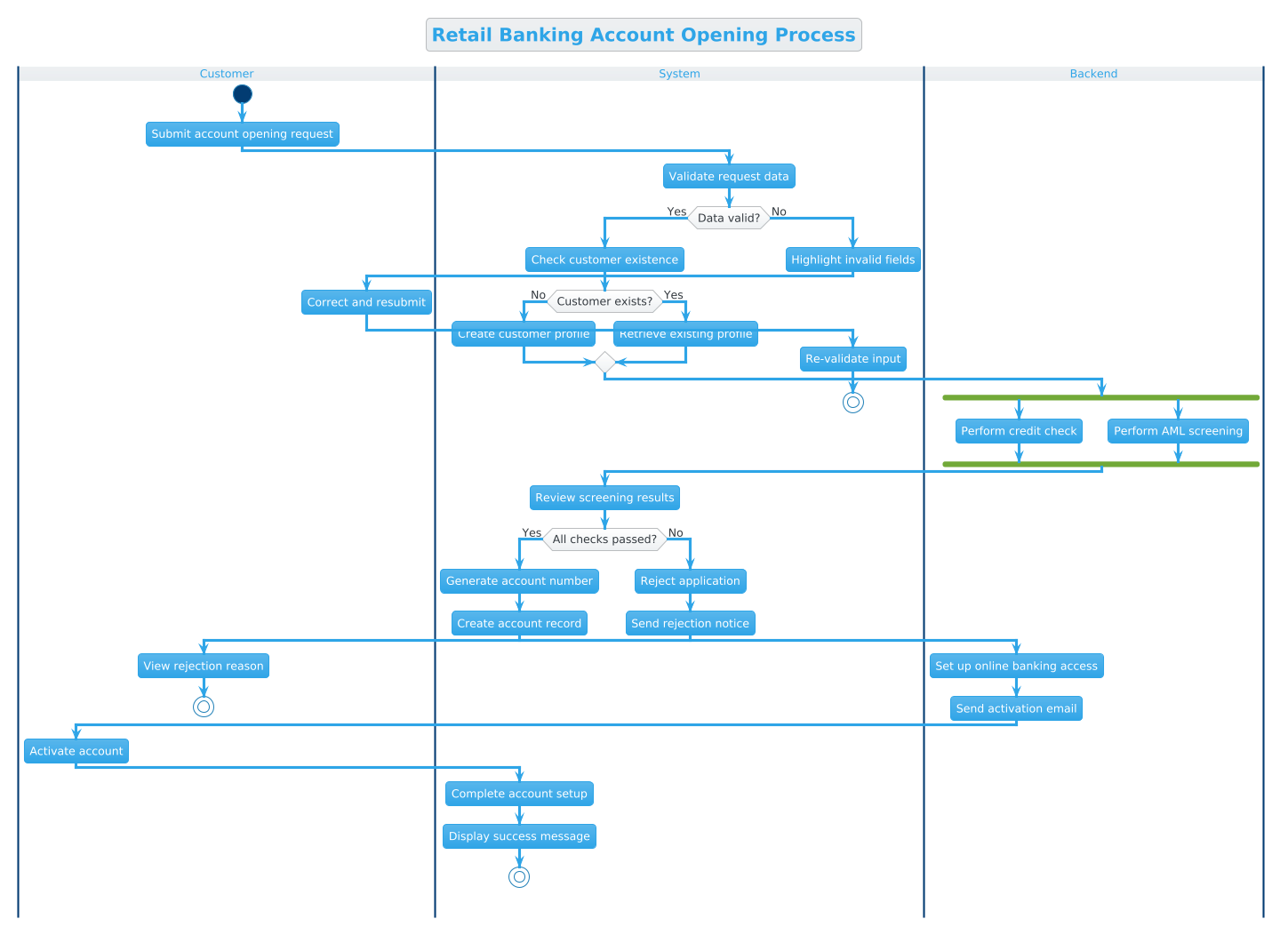
This masterclass demonstrates how to construct a professional Activity Diagram for a Retail Banking Account Opening Process. We will explore how to model swimlanes for different actors, implement conditional logic for validation, and handle parallel processing for security checks, all within a browser-based environment.
Understanding the Model: Purpose, Scope & Problem Framing
Diagram Abstraction & Representation
An Activity Diagram is the most appropriate visual tool for this scenario because it focuses on the flow of control rather than static structure. Unlike a Sequence Diagram, which emphasizes object interactions over time, an Activity Diagram excels at showing the business logic and decision points within a process.
In this model, we utilize Swimlanes to partition responsibilities. This is essential in banking systems where distinct boundaries exist between the end-user (Customer), the front-end application (System), and the core processing engine (Backend). This separation ensures that the diagram clearly communicates which component is responsible for specific actions, such as data validation or credit checks.
Target Domain Scope & Scenario
This diagram models the end-to-end lifecycle of opening a new retail bank account. It intentionally excludes downstream processes like daily transaction handling to focus on the onboarding state machine. The scope covers:
- Input Validation: Ensuring customer data integrity before processing.
- Identity Verification: Checking existing profiles and creating new ones.
- Compliance & Risk: Parallel execution of credit checks and AML screenings.
- Outcome Handling: Success paths for account activation and failure paths for rejection.
Key Takeaways & Educational Insights
By constructing this model in VPasCode, you will gain actionable insights into:
- How to use
forkblocks to represent parallel compliance checks, a common requirement in finance. - How to structure nested
ifstatements to handle complex decision trees without visual clutter. - How to maintain clean separation of concerns using swimlanes for system boundaries.
Complete Diagram & Full Source Code
Below is the finished blueprint for the Retail Banking Account Opening Process. This code is ready to be pasted directly into the VPasCode editor to render the live diagram.
@startuml
!theme cerulean
title Retail Banking Account Opening Process

|Customer|
|System|
|Backend|

|Customer|
start
:Submit account opening request;

|System|
:Validate request data;

if (Data valid?) then (Yes)
  :Check customer existence;
  if (Customer exists?) then (No)
    :Create customer profile;
  else (Yes)
    :Retrieve existing profile;
  endif
  |Backend|
  fork
    :Perform credit check;
  fork again
    :Perform AML screening;
  end fork
  |System|
  :Review screening results;

  if (All checks passed?) then (Yes)
    :Generate account number;
    :Create account record;
    |Backend|
    :Set up online banking access;
    :Send activation email;
    |Customer|
    :Activate account;
    |System|
    :Complete account setup;
    :Display success message;
    stop
  else (No)
    |System|
    :Reject application;
    :Send rejection notice;
    |Customer|
    :View rejection reason;
    stop
  endif
else (No)
  |System|
  :Highlight invalid fields;
  |Customer|
  :Correct and resubmit;
  |System|
  :Re-validate input;
  stop
endif
@endumlStep-by-Step Architectural Walkthrough
Building a professional diagram requires a structured approach. We will break down the construction of this banking workflow into four distinct phases.
Phase 1: Canvas Configuration & Layout Directives
Before defining logic, we must set the visual theme and title. This ensures consistency with your organization’s documentation standards.
In the code, we begin with the @startuml directive to initialize the engine. We immediately apply the !theme cerulean directive to give the diagram a professional, clean blue aesthetic suitable for financial contexts. Finally, the title directive provides a clear header for the diagram when exported or viewed.
!theme cerulean
title Retail Banking Account Opening Process
Phase 2: Declaring Core Entities, Actors, and Boundaries
The foundation of this diagram is the swimlane structure. Swimlanes visually group activities by the actor responsible for them. In banking, this is critical for auditing and responsibility mapping.
We define the three primary lanes: |Customer|, |System|, and |Backend|. Note that swimlanes can be re-entered as the process flows between actors. This allows the diagram to show a continuous flow even when responsibility shifts.
|Customer|
|System|
|Backend|

|Customer|
start
Phase 3: Mapping Data Flows & Key Interactions
This phase covers the core logic. We start with the start node, followed by the customer action. The process then moves to the System lane for validation.
We implement the first decision point using the if syntax. This allows for branching logic based on data validity. If validation fails, the flow loops back to the customer for correction. If it passes, we check for customer existence.
:Validate request data;

if (Data valid?) then (Yes)
  :Check customer existence;
Phase 4: Grouping, Annotations & Visual Polish
Complex banking workflows often require parallel processing for efficiency. Here, we use the fork and end fork syntax to represent simultaneous actions.
The fork block splits the flow into two parallel paths: a Credit Check and an AML Screening. These run independently and converge at the end fork node before proceeding to the final review. This accurately models how modern banking systems handle security checks to minimize latency.
  fork
    :Perform credit check;
  fork again
    :Perform AML screening;
  end fork
Syntax & Keyword Deep Dive
Understanding the specific PlantUML syntax used in this diagram empowers you to extend the model for other scenarios.
start: Marks the entry point of the activity diagram. It is the anchor from which all other flows originate.stop: Marks the termination point of a specific flow path. A diagram can have multiplestopnodes for different outcomes (e.g., success vs. rejection).|Swimlane|: Defines a partition in the diagram. You can switch lanes at any point to indicate a change in responsibility.if (Condition) then (Label): Creates a decision diamond. Thethenlabel indicates the path taken if the condition is true, while theelsepath is implied if nothenlabel is specified for the alternative.fork/fork again/end fork: Defines parallel processing paths.forkstarts the split,fork againadds additional parallel branches, andend fork merges them back into a single flow.
Best Practices & Pitfalls to Avoid
When modeling financial processes, clarity and accuracy are paramount. Follow these guidelines to maintain high-quality diagrams.
- Maintain Abstraction Levels: Do not mix high-level business logic with low-level technical implementation details. For example, focus on the decision to "Perform Credit Check" rather than the SQL query used to execute it.
- Limit Swimlane Depth: While you can have many swimlanes, too many can clutter the view. Stick to the key actors involved in the primary workflow (e.g., Customer, System, Backend).
- Consistent Naming: Use action verbs for activity labels (e.g., "Validate Request" instead of "Validation") to maintain a consistent flow of action.
- Handle All Exit Paths: Ensure every
ifstatement has a defined path for both true and false outcomes. Unhandled branches lead to dead ends in the diagram logic.
Try It Yourself with VPasCode
Start Building PlantUML Activity Diagrams Faster with VPasCode
Test, preview, and customize this banking workflow diagram online in VPasCode without installing any tools or configuring local environments.