


In the high-stakes environment of financial technology, clarity is currency. For architects and developers building Foreign Exchange (FX) platforms, the complexity of transaction flows can quickly obscure critical business logic. A single currency exchange operation involves multiple actors, real-time data fetching, balance validations, and parallel processing for notifications and logging. Without a unified visual model, these workflows risk becoming disjointed documentation that fails to communicate system behavior to stakeholders.

This tutorial demonstrates how to model a robust Currency Exchange Process using PlantUML activity diagrams within VPasCode. By utilizing diagram-as-code practices, we ensure that our architectural blueprints remain version-agnostic, reproducible, and instantly renderable. VPasCode allows you to write the code once and see the diagram live in the browser, making it the ideal tool for prototyping financial workflows without the overhead of desktop installations or complex environment configurations.
Through this masterclass, you will learn how to leverage swimlanes to separate concerns between the user and the backend system, implement conditional logic for error handling, and utilize parallel processing to model concurrent system actions. This approach enhances architectural clarity, supports rapid visual prototyping, and serves as living technical documentation for your finance domain.
Understanding the Model: Purpose, Scope & Problem Framing
Before writing a single line of code, it is crucial to understand the abstraction we are building. An Activity Diagram is not merely a flowchart; it is a behavioral model that captures the dynamic aspects of a system. It answers the question: “What happens when a user initiates this action?”
Diagram Abstraction & Representation
In this specific model, we are using swimlanes to represent the division of responsibility. The Customer lane encapsulates user actions and decisions, while the System lane encapsulates backend processing, API calls, and database updates. This separation is vital in finance to clearly delineate where the application ends and the user begins, ensuring that audit trails and user feedback loops are explicitly modeled.
Target Domain Scope & Scenario
The scope of this diagram is limited to the core transaction lifecycle of a currency exchange. We intentionally exclude peripheral features like account registration or customer support ticketing to focus on the critical path of monetary transfer. The boundaries cover the initiation of a trade, the validation of funds, the execution of the trade at market rates, and the post-trade confirmation.
Key Takeaways & Educational Insights
By constructing this model, you will gain insights into:
- Boundary Definition: How to effectively use swimlanes to prevent logic leakage between user and system.
- Error Handling: Modeling negative paths (insufficient balance) alongside positive paths.
- Concurrency: Using split nodes to represent parallel tasks like logging and notification sending.
Complete Diagram & Full Source Code
Below is the final blueprint for the Currency Exchange Process. This diagram utilizes the aws-orange theme for a professional financial aesthetic and includes all necessary control flow structures.
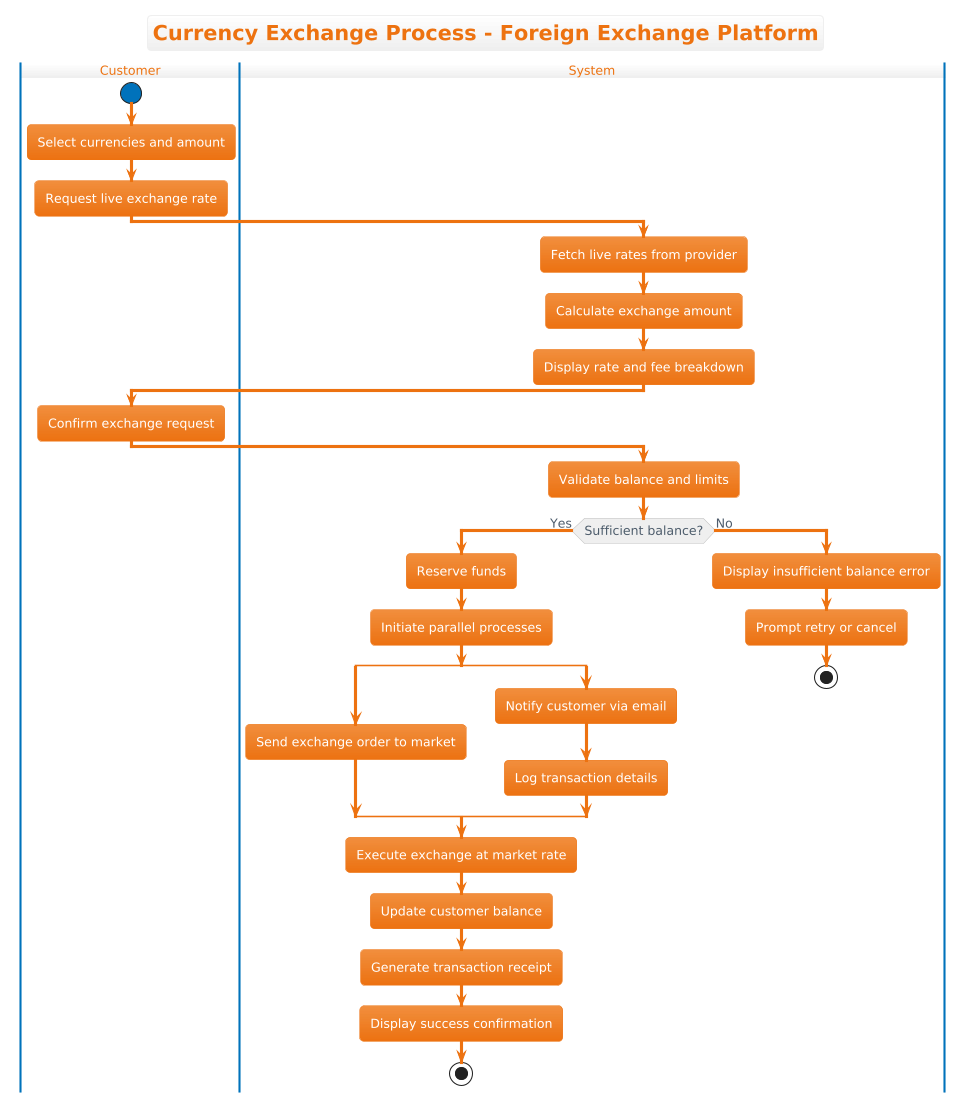
@startuml
!theme aws-orange
title Currency Exchange Process - Foreign Exchange Platform

|Customer|
start
:Select currencies and amount;
:Request live exchange rate;

|System|
:Fetch live rates from provider;
:Calculate exchange amount;
:Display rate and fee breakdown;

|Customer|
:Confirm exchange request;

|System|
:Validate balance and limits;

if (Sufficient balance?) then (Yes)
  :Reserve funds;
  :Initiate parallel processes;
  split
    :Send exchange order to market;
  split again
    :Notify customer via email;
    :Log transaction details;
  end split
  :Execute exchange at market rate;
  :Update customer balance;
  :Generate transaction receipt;
  :Display success confirmation;
  stop
else (No)
  :Display insufficient balance error;
  :Prompt retry or cancel;
  stop
endif

@endumlStep-by-Step Architectural Walkthrough
We will now deconstruct this diagram into four distinct phases. This breakdown allows you to replicate the logic for your own financial or enterprise workflows.
Phase 1: Canvas Configuration & Layout Directives
Every PlantUML diagram begins with metadata that defines the canvas. We start with @startuml to signal the beginning of the code. Crucially, we apply the theme immediately using !theme aws-orange. This ensures consistent styling across all nodes and connectors. We also define the title directive to provide context for the diagram when rendered.
@startuml
!theme aws-orange
title Currency Exchange Process - Foreign Exchange Platform
Phase 2: Declaring Core Entities, Actors, and Boundaries
The core of the activity diagram lies in the swimlanes. In PlantUML, swimlanes are declared using the pipe syntax |Name|. This creates a visual partition. We alternate between the |Customer| and |System| lanes to reflect the interaction flow.
|Customer|
start
:Select currencies and amount;
:Request live exchange rate;

|System|
:Fetch live rates from provider;
Notice the use of start to initialize the flow. Activities are defined using colons :Action;. This phase establishes the physical boundaries of our architecture.
Phase 3: Mapping Data Flows & Key Interactions
This phase handles the core logic. We introduce a conditional check using the if statement. This is essential for financial validation. The syntax if (Condition) then (Yes) else (No) creates a diamond shape in the diagram.
:Validate balance and limits;

if (Sufficient balance?) then (Yes)
  :Reserve funds;
else (No)
  :Display insufficient balance error;
We also utilize the split construct to model parallel execution. In modern FX platforms, sending a market order and logging a transaction often happen simultaneously to optimize latency. The split and split again blocks allow these paths to run concurrently before rejoining.
Phase 4: Grouping, Annotations & Visual Polish
The final phase ensures the diagram terminates correctly. We use stop to mark the end of a flow path. In the success path, we chain several activities (Update balance, Generate receipt) before stopping. In the error path, we stop immediately after prompting the user. This ensures the diagram is acyclic and logically complete.
:Display success confirmation;
stop

@enduml
Syntax & Keyword Deep Dive
Understanding the specific PlantUML syntax is key to mastering diagram-as-code. Here are the critical keywords used in this tutorial:
@startuml: The mandatory entry point that tells the parser to begin processing the activity diagram.|Lane|: Defines a swimlane. The content following this tag belongs to that specific actor until a new lane is declared.:Action;: Represents an activity node. The colon indicates a processing step, and the semicolon terminates the statement.if ... then ... else ... endif: Creates conditional branching. It allows the diagram to represent decision points like balance validation.split ... end split: Represents parallel execution. It splits a single flow into multiple concurrent paths that merge at the end.start/stop: Mark the entry and exit points of the activity flow, ensuring the diagram has a clear beginning and end.!theme: Applies a predefined visual theme (in this case,aws-orange) to standardize colors and fonts.
Best Practices & Pitfalls to Avoid
To maintain high-quality architectural documentation, adhere to these modeling best practices when using VPasCode:
- Maintain Swimlane Integrity: Ensure that every action belongs to the correct lane. Avoid placing system logic in the customer lane, as this obscures the separation of concerns.
- Limit Parallel Complexity: While
splitis powerful, avoid nesting too many parallel blocks. Keep concurrent flows shallow to maintain readability. - Consistent Naming: Use verb-noun phrases for activities (e.g., “Validate balance” instead of “Validation”). This makes the diagram self-explanatory.
- Error Path Visibility: Never hide the error paths. In finance, the “No” branch of a decision is often as important as the “Yes” branch for compliance audits.
Start Building Activity Diagrams Faster with VPasCode
Instantly prototype and visualize complex financial workflows online in VPasCode without installing any tools or configuring local environments.