


In the complex ecosystem of modern healthcare, data integrity is the backbone of efficient patient care and financial sustainability. For dental practices, the workflow extends far beyond simple appointment scheduling; it involves a rigorous chain of clinical documentation, treatment planning, and intricate insurance claim submissions. A single error in mapping the relationship between a clinical procedure and its corresponding billing code can lead to denied claims, delayed reimbursements, and compliance risks. Visualizing these data structures is not merely an academic exercise but a critical operational necessity for ensuring that patient records, clinical notes, and financial transactions are perfectly synchronized.

This is where diagram-as-code methodologies, specifically using PlantUML within the VPasCode editor, transform the documentation process. Instead of manually dragging boxes in a GUI, architects can define the entire data schema in a concise, versionable text format. This approach ensures that the Entity-Relationship Diagram (ERD) for a dental practice remains consistent, scalable, and easy to update as regulations or software requirements evolve. By leveraging VPasCode, you can instantly render, validate, and refine complex healthcare data models without the friction of traditional CAD tools or the ambiguity of hand-drawn sketches.
Understanding the Model: Purpose, Scope & Problem Framing
Diagram Abstraction & Representation
The Entity-Relationship Diagram (ERD) is the foundational blueprint for any relational database system. In the context of a dental practice, this diagram abstracts the physical reality of patient visits into logical data structures. It defines Entities (such as Patients, Providers, and Procedures) as the core nouns of the system and Relationships (such as a Patient having multiple Appointments) as the verbs that drive business logic. The ERD explicitly maps cardinalities—how many entities relate to one another—ensuring that the database can enforce rules like “a Claim must be linked to a specific Performed Procedure” while preventing orphaned data.
Target Domain Scope & Scenario
This specific model focuses on the end-to-end lifecycle of a dental claim. It covers the patient demographic data, the provider credentials (including NPI numbers), the clinical charting of tooth conditions, the planning of treatments, and the final submission of insurance claims. The scope intentionally excludes internal pharmacy inventory or HR payroll, focusing strictly on the clinical-to-billing pipeline. This ensures the diagram remains a clear representation of the core value stream: turning clinical work into billable, reimbursable events.
Key Takeaways & Educational Insights
By studying and building this diagram, you will gain insights into how to normalize complex healthcare data without losing essential context. You will learn how to model many-to-many relationships (like a Procedure being part of multiple Treatment Plans) through associative entities like PerformedProcedure. Furthermore, you will understand how to structure the diagram to support audit trails, tracking the status of claims from submission to payment, a critical requirement for healthcare financial compliance.
Complete Diagram & Full Source Code
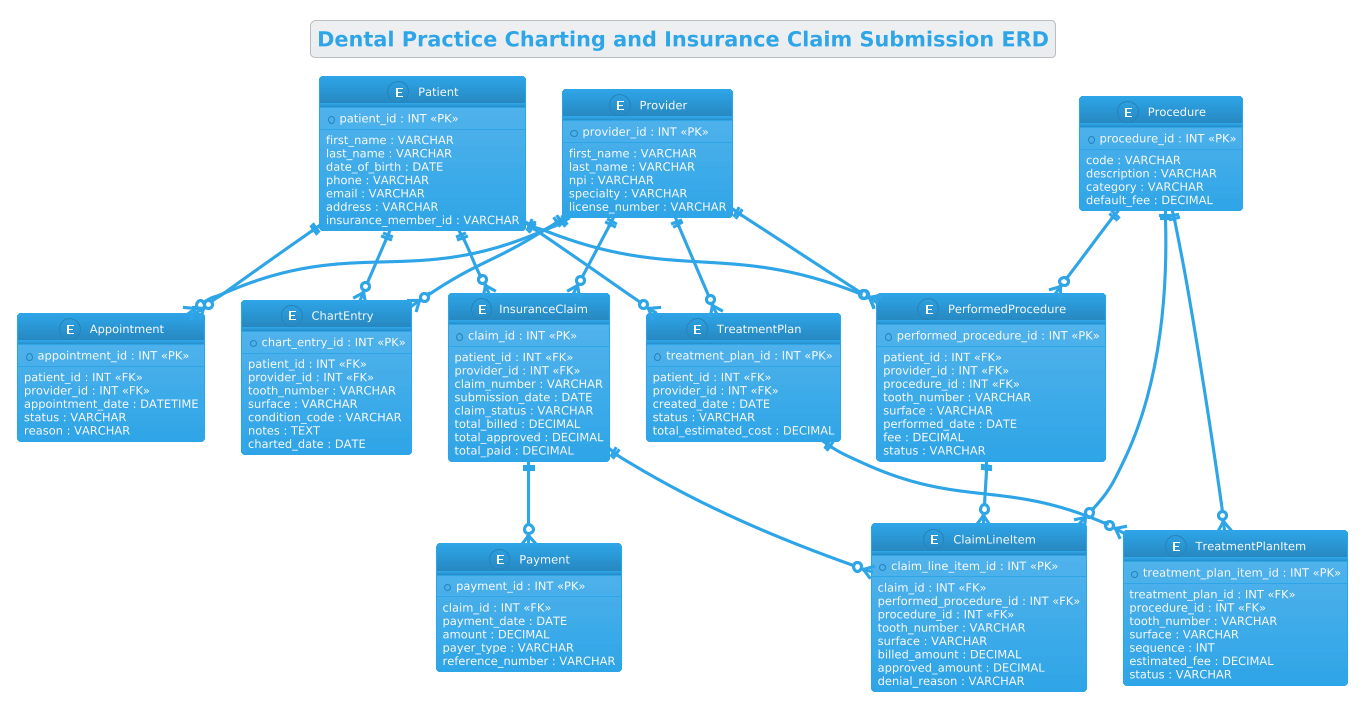
Below is the complete, rendered visualization of the Dental Practice Charting and Insurance Claim Submission ERD. This diagram illustrates the interconnected nature of patient data, clinical actions, and financial outcomes.
@startuml
!theme cerulean
title Dental Practice Charting and Insurance Claim Submission ERD

/'
This ERD models the core data structures and relationships involved in a dental practice's
charting and insurance claim submission workflow. It captures patient demographics, provider
information, clinical charting entries such as tooth conditions and procedures performed,
treatment planning, and the subsequent generation and tracking of insurance claims.
The diagram is intended to show how clinical documentation connects to billing and
reimbursement processes within a dental practice management system.
'/

entity "Patient" as patient {
  * patient_id : INT <<PK>>
  --
  first_name : VARCHAR
  last_name : VARCHAR
  date_of_birth : DATE
  phone : VARCHAR
  email : VARCHAR
  address : VARCHAR
  insurance_member_id : VARCHAR
}

entity "Provider" as provider {
  * provider_id : INT <<PK>>
  --
  first_name : VARCHAR
  last_name : VARCHAR
  npi : VARCHAR
  specialty : VARCHAR
  license_number : VARCHAR
}

entity "Appointment" as appointment {
  * appointment_id : INT <<PK>>
  --
  patient_id : INT <<FK>>
  provider_id : INT <<FK>>
  appointment_date : DATETIME
  status : VARCHAR
  reason : VARCHAR
}

entity "ChartEntry" as chart_entry {
  * chart_entry_id : INT <<PK>>
  --
  patient_id : INT <<FK>>
  provider_id : INT <<FK>>
  tooth_number : VARCHAR
  surface : VARCHAR
  condition_code : VARCHAR
  notes : TEXT
  charted_date : DATE
}

entity "Procedure" as procedure {
  * procedure_id : INT <<PK>>
  --
  code : VARCHAR
  description : VARCHAR
  category : VARCHAR
  default_fee : DECIMAL
}

entity "PerformedProcedure" as performed_procedure {
  * performed_procedure_id : INT <<PK>>
  --
  patient_id : INT <<FK>>
  provider_id : INT <<FK>>
  procedure_id : INT <<FK>>
  tooth_number : VARCHAR
  surface : VARCHAR
  performed_date : DATE
  fee : DECIMAL
  status : VARCHAR
}

entity "TreatmentPlan" as treatment_plan {
  * treatment_plan_id : INT <<PK>>
  --
  patient_id : INT <<FK>>
  provider_id : INT <<FK>>
  created_date : DATE
  status : VARCHAR
  total_estimated_cost : DECIMAL
}

entity "TreatmentPlanItem" as treatment_plan_item {
  * treatment_plan_item_id : INT <<PK>>
  --
  treatment_plan_id : INT <<FK>>
  procedure_id : INT <<FK>>
  tooth_number : VARCHAR
  surface : VARCHAR
  sequence : INT
  estimated_fee : DECIMAL
  status : VARCHAR
}

entity "InsuranceClaim" as insurance_claim {
  * claim_id : INT <<PK>>
  --
  patient_id : INT <<FK>>
  provider_id : INT <<FK>>
  claim_number : VARCHAR
  submission_date : DATE
  claim_status : VARCHAR
  total_billed : DECIMAL
  total_approved : DECIMAL
  total_paid : DECIMAL
}

entity "ClaimLineItem" as claim_line_item {
  * claim_line_item_id : INT <<PK>>
  --
  claim_id : INT <<FK>>
  performed_procedure_id : INT <<FK>>
  procedure_id : INT <<FK>>
  tooth_number : VARCHAR
  surface : VARCHAR
  billed_amount : DECIMAL
  approved_amount : DECIMAL
  denial_reason : VARCHAR
}

entity "Payment" as payment {
  * payment_id : INT <<PK>>
  --
  claim_id : INT <<FK>>
  payment_date : DATE
  amount : DECIMAL
  payer_type : VARCHAR
  reference_number : VARCHAR
}

patient ||--o{ appointment
provider ||--o{ appointment

patient ||--o{ chart_entry
provider ||--o{ chart_entry

patient ||--o{ performed_procedure
provider ||--o{ performed_procedure
procedure ||--o{ performed_procedure

patient ||--o{ treatment_plan
provider ||--o{ treatment_plan
treatment_plan ||--o{ treatment_plan_item
procedure ||--o{ treatment_plan_item

patient ||--o{ insurance_claim
provider ||--o{ insurance_claim
insurance_claim ||--o{ claim_line_item
performed_procedure ||--o{ claim_line_item
procedure ||--o{ claim_line_item

insurance_claim ||--o{ payment

@endumlStep-by-Step Architectural Walkthrough
Building a robust ERD requires a logical progression from defining the core actors to mapping the complex financial flows. We will construct this dental practice model in four distinct phases.
Phase 1: Canvas Configuration & Layout Directives
The first step in any PlantUML diagram is setting the stage. We begin with the @startuml directive to signal the start of the code. Crucially, we apply the !theme cerulean directive. This single line applies a professional, blue-toned color scheme that is highly readable for technical documentation, giving the diagram a polished, enterprise-grade appearance immediately. Following this, we define the title to provide context for anyone viewing the rendered output. Finally, we insert a comment block using the /' ... '/ syntax. This block allows us to document the diagram’s purpose and scope directly within the source code, serving as living documentation that stays synchronized with the model.
Phase 2: Declaring Core Entities, Actors, and Boundaries
With the canvas ready, we define the fundamental building blocks of the system. In PlantUML, we use the entity keyword followed by the name and an alias. For example, entity "Patient" as patient creates a box labeled “Patient” with the internal alias patient for referencing later. Inside the curly braces, we list the attributes. We use * to denote Primary Keys (PK) and -- to visually separate keys from other fields. For instance, the Provider entity includes npi (National Provider Identifier) and license_number, which are critical for healthcare compliance. We also define the Procedure entity, which acts as a master catalog of dental services, ensuring that every procedure performed is linked to a standardized code and description.
Phase 3: Mapping Data Flows & Key Interactions
The heart of the ERD lies in the relationships that connect these entities. We use the ||--o{ syntax to represent a one-to-many relationship. For example, patient ||--o{ appointment means one Patient can have zero or many Appointments. We also model the complex flow of clinical work. The PerformedProcedure entity is a crucial associative table. It links a Patient, a Provider, and a Procedure together, capturing the specific instance of a service being delivered (including the tooth_number and surface). This entity is the bridge between the clinical record and the billing record, ensuring that what was done is exactly what gets billed.
Phase 4: Grouping, Annotations & Visual Polish
The final phase involves connecting the billing workflow. We link the InsuranceClaim to the ClaimLineItem, which breaks down the claim into individual line items referencing the PerformedProcedure. This structure allows for granular tracking of approvals and denials per tooth or procedure. We also include the Payment entity, which closes the loop by recording the actual funds received against a specific claim. The visual polish comes from the consistent use of data types (INT, VARCHAR, DECIMAL) and the logical grouping of foreign keys (FK) which, while not explicitly drawn as arrows in this specific syntax, are implied by the relationship lines and the naming convention (e.g., patient_id inside appointment). This ensures the diagram is not just a picture, but a precise specification for database engineers.
Syntax & Keyword Deep Dive
To fully leverage PlantUML for ERD creation, it is essential to understand the specific keywords and symbols used in this model. These elements provide the semantic meaning that renders the diagram.
- entity: The fundamental keyword used to define a table or class. It takes a display name and an alias (e.g.,
entity "Patient" as patient). - ||–o{: This arrow notation represents a one-to-many relationship. The double line
||indicates “one” (mandatory) on the source side, and the crow’s footo{indicates “zero or many” on the target side. This is the standard notation for foreign key relationships in this diagram. - /* */ and /’ ‘/: PlantUML supports multi-line comments. The
/' ... '/syntax is specifically used here to embed a descriptive abstract at the top of the diagram, which appears in the rendered output as a note, providing immediate context without cluttering the code logic. - !* and <
> / < While>: entitydefines the structure, the*prefix in the attribute list (e.g.,* patient_id) visually highlights the Primary Key. The stereotype notation<and> <further clarifies the role of each attribute within the database schema.> - !theme: A directive that applies a predefined color palette. In this case,
!theme ceruleansets the background and border colors to a professional blue theme, enhancing readability. - data types: Keywords like
INT,VARCHAR,DATE, andDECIMALare used to define the expected data format for each attribute, bridging the gap between the diagram and the actual database schema definition.
Best Practices & Pitfalls to Avoid
When constructing ERDs for complex domains like healthcare, adhering to best practices ensures the diagram remains a useful tool rather than a confusing artifact.
- Use Associative Entities for Many-to-Many Relationships: Never try to force a many-to-many relationship directly between two entities (e.g.,
ProcedureandAppointment) without an intermediate table. As seen withPerformedProcedure, creating a junction table allows you to store additional attributes (liketooth_numberandfee) that are specific to that instance of the relationship. - Consistent Naming Conventions: Maintain a strict naming convention for attributes. Using
_idfor keys and_idfor foreign keys (e.g.,patient_id) makes the diagram self-documenting. Avoid abbreviations that might be ambiguous in a healthcare context (e.g., usefirst_nameinstead offn). - Separate Master Data from Transactional Data: Notice the distinction between
Procedure(a master list of codes) andPerformedProcedure(a transaction record). Keeping these separate prevents data redundancy and ensures that if a procedure description changes, it updates everywhere without altering historical records. - Document Cardinality Explicitly: Always use the correct arrow notation. Using
--(many-to-many) instead of||--o{(one-to-many) can lead to database design errors where the system expects multiple parent records for a single child record.
Try It Yourself with VPasCode
Ready to architect your own healthcare data models? Start building professional ERDs for dental practices, hospitals, or clinics faster with VPasCode. Our free, browser-based PlantUML editor lets you write code, instantly preview the diagram, and refine your data structures without installing any software. Test your syntax, apply themes, and export your diagrams in seconds—all directly from your web browser.
Start Building PlantUML ERDs Faster with VPasCode
Instantly render, customize, and export your Dental Practice ERD online with zero installation required.