


In the rapidly evolving landscape of fintech, clarity is currency. When designing a Digital Wallet System, the underlying architecture must be robust, secure, and scalable. A single misinterpreted relationship between a User and a Wallet entity can lead to critical data integrity issues during deployment. This is where diagramming-as-code becomes indispensable. By using PlantUML within the VPasCode editor, software architects can define complex financial data structures in a text-based format that renders instantly into professional diagrams.

This tutorial serves as a masterclass in modeling a Financial Class Diagram. We will construct a complete Digital Wallet System blueprint, encompassing user authentication, wallet management, transaction processing, and compliance verification. Unlike static drawing tools, VPasCode allows you to iterate on your model instantly. You can tweak a class attribute or relationship cardinality and see the visual impact immediately, ensuring your documentation remains a living artifact of your system’s design.
Understanding the Model: Purpose, Scope & Problem Framing
Before writing a single line of code, it is essential to understand the abstraction we are creating. A Class Diagram is the backbone of object-oriented design, defining the static structure of the system.
Diagram Abstraction & Representation
In the context of finance, a Class Diagram maps the data entities (like Users, Wallets, and Transactions) to their attributes (such as balance, currency, and status) and behaviors (such as deposit, withdraw, and verify). This visualization helps stakeholders understand how money flows through the system logically. For example, the relationship between a User and a Wallet dictates ownership rules, while the link between Transaction and Transfer defines the flow of funds.
Target Domain Scope & Scenario
This model focuses on the core operational layer of a digital wallet. We are intentionally modeling the following domains:
- User Management: Identity verification (KYC) and profile data.
- Asset Management: Wallet creation, balance tracking, and currency handling.
- Transaction Engine: Payments, transfers, bill payments, and merchant integrations.
- Support Systems: Notifications, loyalty points, and card management.
Dependencies such as external banking ledgers are abstracted away to focus on the internal system boundaries.
Key Takeaways & Educational Insights
By following this guide, you will gain the ability to:
- Define strict data contracts using PlantUML syntax.
- Visualize cardinality constraints (e.g., One User owns Many Wallets).
- Apply professional themes to ensure diagram readability for stakeholders.
Complete Diagram & Full Source Code
Below is the finished blueprint for the Digital Wallet System. This complete source code can be pasted directly into the VPasCode editor to render the diagram instantly.
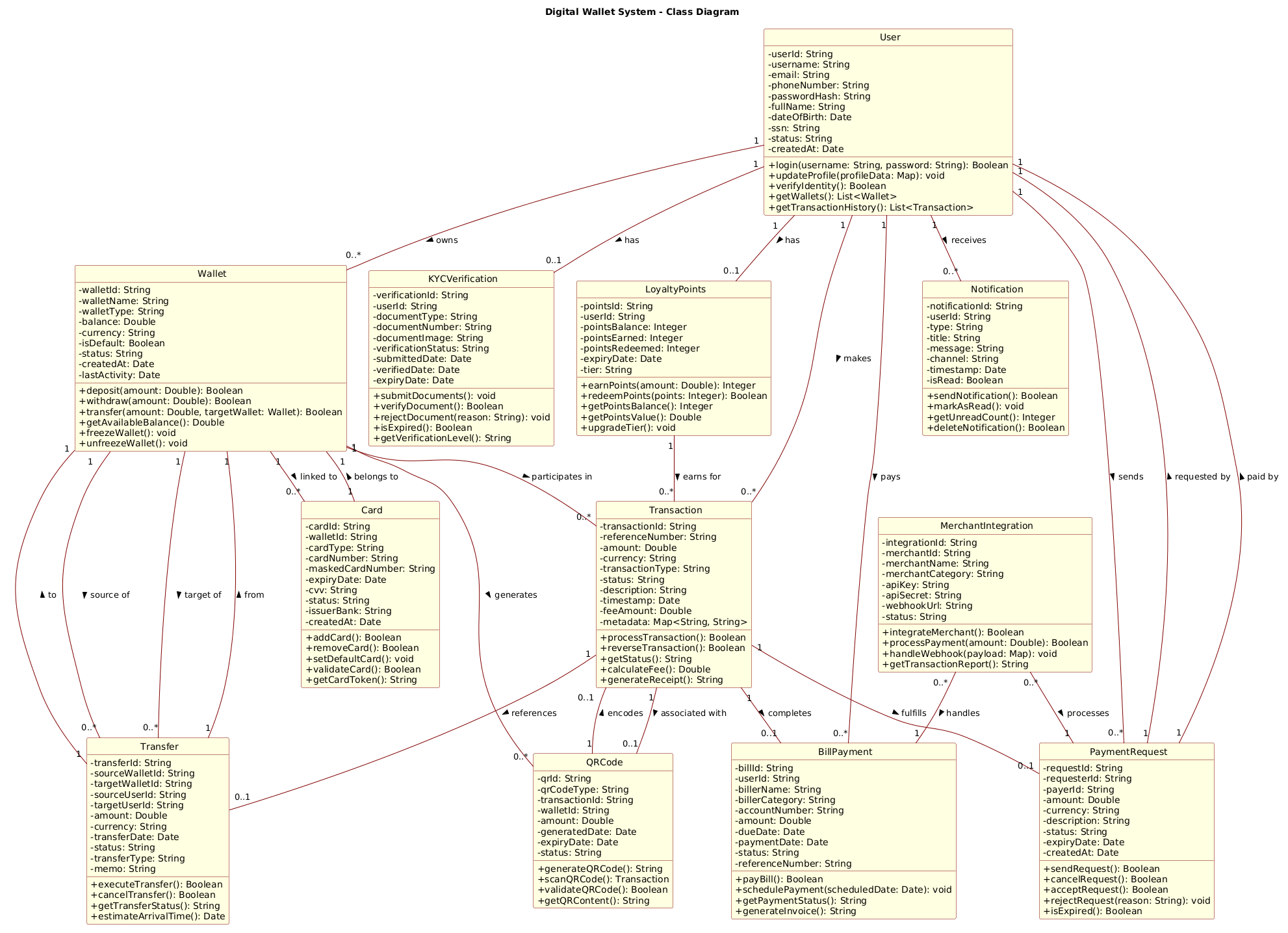
@startuml
!include https://static.visual-paradigm.com/web/resources/plantuml-stdlib/themes/rose.puml
title Digital Wallet System - Class Diagram

' User and Profile classes
class User {
  - userId: String
  - username: String
  - email: String
  - phoneNumber: String
  - passwordHash: String
  - fullName: String
  - dateOfBirth: Date
  - ssn: String
  - status: String
  - createdAt: Date
  + login(username: String, password: String): Boolean
  + updateProfile(profileData: Map): void
  + verifyIdentity(): Boolean
  + getWallets(): List<Wallet>
  + getTransactionHistory(): List<Transaction>
}

class Wallet {
  - walletId: String
  - walletName: String
  - walletType: String
  - balance: Double
  - currency: String
  - isDefault: Boolean
  - status: String
  - createdAt: Date
  - lastActivity: Date
  + deposit(amount: Double): Boolean
  + withdraw(amount: Double): Boolean
  + transfer(amount: Double, targetWallet: Wallet): Boolean
  + getAvailableBalance(): Double
  + freezeWallet(): void
  + unfreezeWallet(): void
}

class KYCVerification {
  - verificationId: String
  - userId: String
  - documentType: String
  - documentNumber: String
  - documentImage: String
  - verificationStatus: String
  - submittedDate: Date
  - verifiedDate: Date
  - expiryDate: Date
  + submitDocuments(): void
  + verifyDocument(): Boolean
  + rejectDocument(reason: String): void
  + isExpired(): Boolean
  + getVerificationLevel(): String
}

' Transaction and Payment classes
class Transaction {
  - transactionId: String
  - referenceNumber: String
  - amount: Double
  - currency: String
  - transactionType: String
  - status: String
  - description: String
  - timestamp: Date
  - feeAmount: Double
  - metadata: Map<String, String>
  + processTransaction(): Boolean
  + reverseTransaction(): Boolean
  + getStatus(): String
  + calculateFee(): Double
  + generateReceipt(): String
}

class Transfer {
  - transferId: String
  - sourceWalletId: String
  - targetWalletId: String
  - sourceUserId: String
  - targetUserId: String
  - amount: Double
  - currency: String
  - transferDate: Date
  - status: String
  - transferType: String
  - memo: String
  + executeTransfer(): Boolean
  + cancelTransfer(): Boolean
  + getTransferStatus(): String
  + estimateArrivalTime(): Date
}

class PaymentRequest {
  - requestId: String
  - requesterId: String
  - payerId: String
  - amount: Double
  - currency: String
  - description: String
  - status: String
  - expiryDate: Date
  - createdAt: Date
  + sendRequest(): Boolean
  + cancelRequest(): Boolean
  + acceptRequest(): Boolean
  + rejectRequest(reason: String): void
  + isExpired(): Boolean
}

class BillPayment {
  - billId: String
  - userId: String
  - billerName: String
  - billerCategory: String
  - accountNumber: String
  - amount: Double
  - dueDate: Date
  - paymentDate: Date
  - status: String
  - referenceNumber: String
  + payBill(): Boolean
  + schedulePayment(scheduledDate: Date): void
  + getPaymentStatus(): String
  + generateInvoice(): String
}

' Card and External classes
class Card {
  - cardId: String
  - walletId: String
  - cardType: String
  - cardNumber: String
  - maskedCardNumber: String
  - expiryDate: Date
  - cvv: String
  - status: String
  - issuerBank: String
  - createdAt: Date
  + addCard(): Boolean
  + removeCard(): Boolean
  + setDefaultCard(): void
  + validateCard(): Boolean
  + getCardToken(): String
}

class QRCode {
  - qrId: String
  - qrCodeType: String
  - transactionId: String
  - walletId: String
  - amount: Double
  - generatedDate: Date
  - expiryDate: Date
  - status: String
  + generateQRCode(): String
  + scanQRCode(): Transaction
  + validateQRCode(): Boolean
  + getQRContent(): String
}

class MerchantIntegration {
  - integrationId: String
  - merchantId: String
  - merchantName: String
  - merchantCategory: String
  - apiKey: String
  - apiSecret: String
  - webhookUrl: String
  - status: String
  + integrateMerchant(): Boolean
  + processPayment(amount: Double): Boolean
  + handleWebhook(payload: Map): void
  + getTransactionReport(): String
}

class Notification {
  - notificationId: String
  - userId: String
  - type: String
  - title: String
  - message: String
  - channel: String
  - timestamp: Date
  - isRead: Boolean
  + sendNotification(): Boolean
  + markAsRead(): void
  + getUnreadCount(): Integer
  + deleteNotification(): Boolean
}

class LoyaltyPoints {
  - pointsId: String
  - userId: String
  - pointsBalance: Integer
  - pointsEarned: Integer
  - pointsRedeemed: Integer
  - expiryDate: Date
  - tier: String
  + earnPoints(amount: Double): Integer
  + redeemPoints(points: Integer): Boolean
  + getPointsBalance(): Integer
  + getPointsValue(): Double
  + upgradeTier(): void
}

' Relationships
User "1" -- "0..*" Wallet : owns >
User "1" -- "0..1" KYCVerification : has >
User "1" -- "0..*" Transaction : makes >
User "1" -- "0..*" PaymentRequest : sends >
User "1" -- "0..*" BillPayment : pays >
User "1" -- "0..*" Notification : receives >
User "1" -- "0..1" LoyaltyPoints : has >

Wallet "1" -- "0..*" Transaction : participates in >
Wallet "1" -- "0..*" Transfer : source of >
Wallet "1" -- "0..*" Transfer : target of >
Wallet "1" -- "0..*" Card : linked to >
Wallet "1" -- "0..*" QRCode : generates >

Transaction "1" -- "0..1" Transfer : references >
Transaction "1" -- "0..1" PaymentRequest : fulfills >
Transaction "1" -- "0..1" BillPayment : completes >
Transaction "1" -- "0..1" QRCode : associated with >

Transfer "1" -- "1" Wallet : from >
Transfer "1" -- "1" Wallet : to >

PaymentRequest "1" -- "1" User : requested by >
PaymentRequest "1" -- "1" User : paid by >

Card "1" -- "1" Wallet : belongs to >

MerchantIntegration "0..*" -- "1" PaymentRequest : processes >
MerchantIntegration "0..*" -- "1" BillPayment : handles >

QRCode "1" -- "0..1" Transaction : encodes >

LoyaltyPoints "1" -- "0..*" Transaction : earns for >

@endumlStep-by-Step Architectural Walkthrough
Now that we have the full view, let’s deconstruct the construction process. We will build this diagram in four logical phases.
Phase 1: Canvas Configuration & Layout Directives
Every PlantUML diagram begins with setup directives. We start with the @startuml command and immediately include a theme. This ensures consistency and professional styling without manual CSS adjustments.
@startuml
!include https://static.visual-paradigm.com/web/resources/plantuml-stdlib/themes/rose.puml
title Digital Wallet System - Class Diagram
The !include directive fetches the Rose theme, which applies a clean color palette and modern styling. The title directive sets the diagram header, providing immediate context for viewers.
Phase 2: Declaring Core Entities, Actors, and Boundaries
We begin with the foundational entities: User and Wallet. In finance, the User is the actor, and the Wallet is the container for assets. We define private attributes (prefixed with -) and public methods (prefixed with +).
class User {
  - userId: String
  - passwordHash: String
  + login(username: String, password: String): Boolean
}
Notice the type annotations (e.g., String, Double). These are crucial for code generation and API documentation. The Wallet class mirrors this structure but includes financial logic like deposit and withdraw.
Phase 3: Mapping Data Flows & Key Interactions
Financial systems rely on transaction records. We define Transaction, Transfer, and PaymentRequest. These classes capture the history and state of money movement. We also include BillPayment and MerchantIntegration to show external interactions.
class Transfer {
  - sourceWalletId: String
  - targetWalletId: String
  + executeTransfer(): Boolean
}
Here, we model the specific data needed to execute a transfer: source and target identifiers. The method executeTransfer returns a Boolean, indicating success or failure, which is standard for transactional integrity checks.
Phase 4: Grouping, Annotations & Visual Polish
The final phase connects these entities. We use association lines to define relationships. For instance, a User “owns” multiple Wallets. We also include compliance classes like KYCVerification and LoyaltyPoints to round out the business logic.
User "1" -- "0..*" Wallet : owns >
Wallet "1" -- "0..*" Transaction : participates in >
The notation "1" -- "0..*" defines the cardinality: One User owns zero or more Wallets. The : owns > text adds a semantic label to the relationship line, making the diagram self-explanatory.
Syntax & Keyword Deep Dive
To master PlantUML for financial modeling, you must understand the core syntax keywords used in this diagram.
class: Defines a structural entity. It encapsulates data (attributes) and behavior (methods).-vs+: The minus sign denotesprivatevisibility (internal data), while the plus sign denotespublicvisibility (accessible methods).--: Represents a standard association line connecting two classes.: label: Adds a text label to the relationship line to explain the nature of the connection."1" -- "0..*": Specifies cardinality.1means exactly one, and0..*means zero to many.Map<Type, Type>: Allows for flexible metadata storage, common in financial transaction logs.
Best Practices & Pitfalls to Avoid
When building class diagrams for complex systems like Digital Wallets, keep these guidelines in mind to maintain clarity.
- Modularize Your Classes: Do not cram all logic into the
Userclass. Split concerns intoWallet,Transaction, andNotificationto keep the diagram readable. - Use Consistent Naming: Use PascalCase for classes (e.g.,
KYCVerification) and camelCase for methods (e.g.,verifyIdentity) to align with standard coding conventions. - Define Cardinality Explicitly: Never leave relationships ambiguous. Always specify if a relationship is mandatory (
1) or optional (0..1). - Keep Attributes Relevant: Only include attributes that are critical to the system’s logic. Avoid exposing internal implementation details like database IDs unless necessary.
Try It Yourself with VPasCode
Start Building PlantUML Class Diagrams Faster with VPasCode
Instantly render your financial architecture models online with zero local installation. Test syntax, customize themes, and share your diagrams with a single click.