


In the logistics and supply chain industry, operational efficiency hinges on precise data modeling. A Fleet Management System (FMS) is not merely a database schema; it is a complex ecosystem of vehicles, drivers, maintenance schedules, and dynamic trip assignments. When software architects begin designing such a system, clarity is paramount. Ambiguity in class relationships can lead to data integrity issues, such as orphaned maintenance logs or incorrect driver assignments.
Visual modeling serves as the bridge between business requirements and technical implementation. By using a Class Diagram, teams can visualize the static structure of the system, defining how entities interact before writing a single line of production code. With VPasCode, this process becomes instantaneous. As a free, web-based diagram-as-code tool, VPasCode allows you to write PlantUML syntax and see the rendered architecture in real-time within your browser. This eliminates the friction of local environment setup, enabling architects to prototype, validate, and document the logistics domain faster than ever.
Understanding the Model: Purpose, Scope & Problem Framing
Diagram Abstraction & Representation
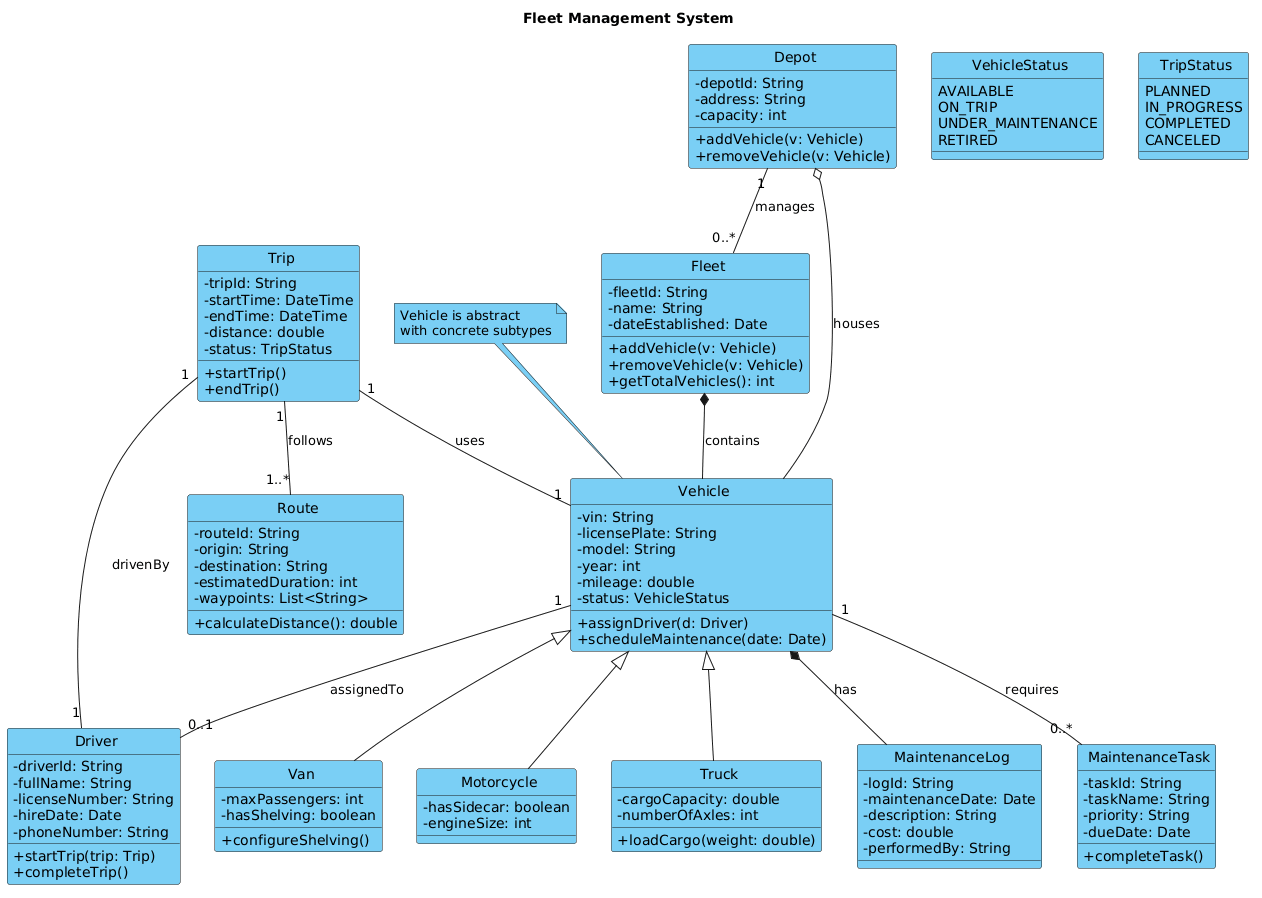
This diagram utilizes the Unified Modeling Language (UML) Class Diagram notation to model the core domain entities of a logistics platform. Unlike sequence diagrams which capture runtime behavior, a Class Diagram defines the blueprint of the system. It specifies:
- Entities: The nouns of the system (e.g., Vehicle, Driver, Fleet).
- Attributes: The data properties held by each entity (e.g., License Plate, Hire Date).
- Methods: The behaviors available to each entity (e.g.,
assignDriver,completeTrip). - Relationships: The structural links between entities, such as inheritance, composition, and aggregation.
Target Domain Scope & Scenario
The scope of this model focuses on the operational lifecycle of a fleet. It intentionally excludes external billing systems or third-party GPS hardware interfaces to maintain focus on the internal domain logic. The diagram covers the hierarchy of vehicles (Trucks, Vans, Motorcycles), the management of drivers, and the orchestration of trips and routes. It addresses the problem of how to structure data so that a Fleet can own multiple Vehicle instances, while ensuring that a Driver is correctly associated with a specific trip without violating data constraints.
Key Takeaways & Educational Insights
By studying and building this diagram in VPasCode, you will gain insights into:
- How to differentiate between Composition (strong ownership) and Aggregation (weak association) in logistics contexts.
- How to implement Generalization to handle vehicle subtypes without code duplication.
- How to use Enums to enforce valid states for vehicles and trips.
Complete Diagram & Full Source Code
Below is the finalized blueprint for the Fleet Management System. This model incorporates a modern theme, detailed class definitions, and precise relationship arrows to ensure architectural accuracy.
@startuml
!include https://static.visual-paradigm.com/web/resources/plantuml-stdlib/themes/vp.puml

title Fleet Management System

/'
This class diagram models the core domain of a Fleet Management System used by a logistics company.
The system tracks vehicles, drivers, maintenance schedules, and trip assignments.
A fleet consists of multiple vehicles, each assigned to a driver.
Each vehicle has a maintenance log and may be part of a specific depot.
Trips are planned and executed, with each trip linked to a vehicle, a driver, and a route.
The diagram illustrates key relationships: inheritance (e.g., Vehicle subtypes), composition (e.g., Fleet owns Vehicles),
aggregation (e.g., Depot groups Vehicles), and associations (e.g., Driver assigned to Vehicle).
'/

class Fleet {
  - fleetId: String
  - name: String
  - dateEstablished: Date
  + addVehicle(v: Vehicle)
  + removeVehicle(v: Vehicle)
  + getTotalVehicles(): int
}

class Vehicle {
  - vin: String
  - licensePlate: String
  - model: String
  - year: int
  - mileage: double
  - status: VehicleStatus
  + assignDriver(d: Driver)
  + scheduleMaintenance(date: Date)
}

enum VehicleStatus {
  AVAILABLE
  ON_TRIP
  UNDER_MAINTENANCE
  RETIRED
}

class Truck {
  - cargoCapacity: double
  - numberOfAxles: int
  + loadCargo(weight: double)
}

class Van {
  - maxPassengers: int
  - hasShelving: boolean
  + configureShelving()
}

class Motorcycle {
  - hasSidecar: boolean
  - engineSize: int
}

class Driver {
  - driverId: String
  - fullName: String
  - licenseNumber: String
  - hireDate: Date
  - phoneNumber: String
  + startTrip(trip: Trip)
  + completeTrip()
}

class Trip {
  - tripId: String
  - startTime: DateTime
  - endTime: DateTime
  - distance: double
  - status: TripStatus
  + startTrip()
  + endTrip()
}

enum TripStatus {
  PLANNED
  IN_PROGRESS
  COMPLETED
  CANCELED
}

class Route {
  - routeId: String
  - origin: String
  - destination: String
  - estimatedDuration: int
  - waypoints: List<String>
  + calculateDistance(): double
}

class MaintenanceLog {
  - logId: String
  - maintenanceDate: Date
  - description: String
  - cost: double
  - performedBy: String
}

class Depot {
  - depotId: String
  - address: String
  - capacity: int
  + addVehicle(v: Vehicle)
  + removeVehicle(v: Vehicle)
}

class MaintenanceTask {
  - taskId: String
  - taskName: String
  - priority: String
  - dueDate: Date
  + completeTask()
}

' Inheritance (Generalization)
Vehicle <|-- Truck
Vehicle <|-- Van
Vehicle <|-- Motorcycle

' Composition (Fleet owns Vehicles, strong lifecycle dependency)
Fleet *-- Vehicle : contains

' Aggregation (Depot groups Vehicles, weaker lifecycle)
Depot o-- Vehicle : houses

' Association (Driver assigned to Vehicle)
Vehicle "1" -- "0..1" Driver : assignedTo

' Association (Trip involves Vehicle and Driver)
Trip "1" -- "1..*" Route : follows
Trip "1" -- "1" Vehicle : uses
Trip "1" -- "1" Driver : drivenBy

' Composition (Vehicle has MaintenanceLogs)
Vehicle *-- MaintenanceLog : has

' Association (MaintenanceTask related to Vehicle)
Vehicle "1" -- "0..*" MaintenanceTask : requires

' Association (Depot has Fleet)
Depot "1" -- "0..*" Fleet : manages

' Note for extra clarity
note top of Vehicle : Vehicle is abstract\nwith concrete subtypes
@endumlStep-by-Step Architectural Walkthrough
Building a professional class diagram requires a structured approach. We will break down the construction of this Fleet Management System model into four distinct phases.
Phase 1: Canvas Configuration & Layout Directives
Before defining classes, we must set the stage for the diagram. In PlantUML, this involves including the necessary theme library and defining the diagram title. We also add a comment block to document the context of the diagram for future readers.
!include https://static.visual-paradigm.com/web/resources/plantuml-stdlib/themes/vp.puml

title Fleet Management System

/'
This class diagram models the core domain...
'/
The !include directive pulls in the Visual Paradigm theme, ensuring the diagram renders with a professional, consistent look. The title directive provides a clear header. The comment block starting with /' and ending with '/ acts as documentation embedded directly in the code, describing the problem space without affecting the rendering.
Phase 2: Declaring Core Entities, Actors, and Boundaries
Next, we define the fundamental classes that represent the nouns of our logistics domain. We start with the central container, Fleet, and the core asset, Vehicle. We also define the human element, Driver.
class Fleet {
  - fleetId: String
  + addVehicle(v: Vehicle)
}

class Vehicle {
  - vin: String
  - licensePlate: String
  + assignDriver(d: Driver)
}
Notice the use of visibility modifiers. A hyphen - denotes a private attribute (e.g., - vin), while a plus + denotes a public method (e.g., + addVehicle). This encapsulation is critical for maintaining data integrity in the system design.
Phase 3: Mapping Data Flows & Key Interactions
Once the classes are defined, we establish the relationships between them. This is the most critical part of a class diagram. We distinguish between Composition (strong ownership) and Aggregation (weak association).
' Composition (Fleet owns Vehicles)
Fleet *-- Vehicle : contains

' Aggregation (Depot groups Vehicles)
Depot o-- Vehicle : houses
In the Fleet *-- Vehicle relationship, the diamond symbol is filled, indicating Composition. If the Fleet is destroyed, the Vehicle instances should logically cease to exist within that context. Conversely, Depot o-- Vehicle uses an empty diamond, indicating Aggregation. A Vehicle can exist independently of a specific Depot assignment.
Phase 4: Grouping, Annotations & Visual Polish
Finally, we refine the model with inheritance hierarchies and notes. We use the Vehicle class as a parent for specific vehicle types like Truck and Van.
' Inheritance (Generalization)
Vehicle <|-- Truck
Vehicle <|-- Van
We also add a note to clarify that Vehicle itself is an abstract concept in this design, represented by the concrete subtypes. This visual polish ensures that anyone reading the diagram understands the abstraction layer immediately.
Syntax & Keyword Deep Dive
To master PlantUML class diagrams, you must understand the specific syntax symbols that define relationships. Here is a breakdown of the keywords used in the Fleet Management System model:
class: Declares a class definition. Followed by the class name and an optional block for attributes and methods.enum: Defines an enumeration, restricting a field to a fixed set of values (e.g.,VehicleStatus).class <|-- subclass: Represents Generalization (Inheritance). The arrow points from the subclass to the superclass.class *-- class: Represents Composition. The filled diamond indicates strong lifecycle dependency.class o-- class: Represents Aggregation. The empty diamond indicates a weaker "has-a" relationship.class -- class: Represents a standard Association (link) between two classes.note top of class: Adds a textual annotation attached to a specific class for context.: label: Used after a relationship arrow to define the name of the relationship (e.g.,: contains).
Best Practices & Pitfalls to Avoid
When designing class diagrams for complex systems like logistics platforms, adhere to these best practices to maintain clarity:
- Separation of Concerns: Keep related classes together. For example, group all vehicle-related types (Truck, Van) near the parent
Vehicleclass. - Consistent Naming: Use singular nouns for classes (e.g.,
VehiclenotVehicles) and camelCase for methods. - Manage Cardinality: Always specify cardinality (e.g.,
"1" -- "0..*") to clarify how many instances can be associated. This prevents logical errors in the database schema. - Avoid Over-Engineering: Do not model every possible relationship. Focus on the primary domain logic required for the current iteration of the system.
Try It Yourself with VPasCode
Start Building Class Diagrams Faster with VPasCode
Instantly prototype your logistics architecture with a free, browser-based PlantUML editor. No installation required, just write code and see the result.