


In the competitive landscape of online gaming, the matchmaking system is the invisible engine that drives player retention and satisfaction. A robust matchmaking server must balance player skill levels, manage queue priorities, and orchestrate game sessions seamlessly. Without a clear architectural blueprint, these systems can quickly become tangled, leading to bugs, unfair matches, and poor user experiences. This is where visual modeling becomes critical for software architects and backend engineers.

By using diagramming-as-code with PlantUML, teams can maintain living documentation that stays synchronized with the actual codebase. This approach allows developers to define the structure of the matchmaking logic, player data models, and session management flows in a text-based format that is easy to version, review, and render instantly. In this masterclass, we will build a comprehensive class diagram for a Gaming Matchmaking Server, demonstrating how to model complex relationships like aggregation, composition, and generalization within a single, cohesive system.
Understanding the Model: Purpose, Scope & Problem Framing
Diagram Abstraction & Representation
A class diagram serves as the structural backbone for the software architecture. In this specific context, the diagram abstracts the core components of a matchmaking engine into discrete classes. Each class represents a distinct entity with defined attributes (data) and methods (behavior). For example, the Player class encapsulates user identity and skill metrics, while the Matchmaker class encapsulates the algorithmic logic used to pair players together. This visual representation clarifies how data flows between entities and where business logic resides.
Target Domain Scope & Scenario
The scope of this diagram is strictly limited to the backend logic of a matchmaking server. It covers the lifecycle from a player joining a queue to the finalization of a match. It intentionally excludes UI components or client-side networking protocols, focusing instead on the server-side orchestration. The diagram models the interaction between the matchmaking logic, player statistics tracking, and game session hosting, providing a clear boundary for the server’s responsibilities.
Key Takeaways & Educational Insights
By studying this model, readers will gain insights into how to separate concerns in a complex system. You will learn how to model the relationship between a MatchmakingServer and its internal components like QueueManager and Matchmaker. Additionally, the diagram demonstrates how to handle one-to-many relationships, such as a single match consisting of multiple teams, or a player generating multiple performance records over time.
Complete Diagram & Full Source Code
Before diving into the step-by-step construction, here is the complete visualization of the Gaming Matchmaking Server architecture. This blueprint showcases the 13 core classes, their attributes, methods, and the inter-relationships that bind them together.
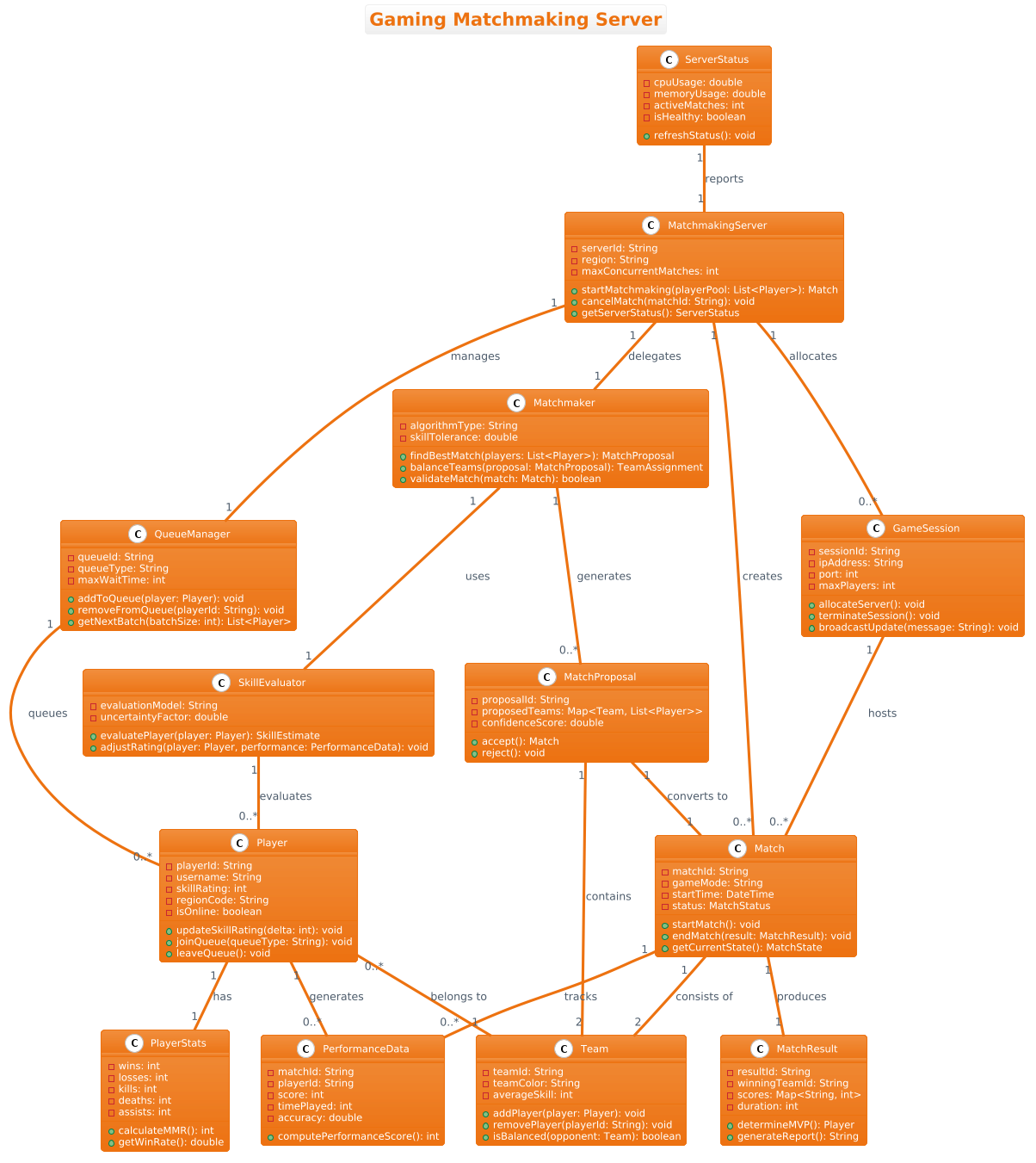
Copy the following complete source code to replicate this diagram in VPasCode:
@startuml
!theme aws-orange
title Gaming Matchmaking Server

/'
This class diagram models the core architecture of a Gaming Matchmaking Server.
The system is responsible for managing player sessions, forming balanced teams,
and orchestrating the lifecycle of game matches. It handles player skill ratings,
queue priorities, and match finalization. The context includes interactions
between player management, match formation algorithms, and game session hosting.
The diagram emphasizes the separation of concerns between player data,
matchmaking logic, and active game instances.
'/

class MatchmakingServer {
  - serverId: String
  - region: String
  - maxConcurrentMatches: int
  + startMatchmaking(playerPool: List<Player>): Match
  + cancelMatch(matchId: String): void
  + getServerStatus(): ServerStatus
}

class Matchmaker {
  - algorithmType: String
  - skillTolerance: double
  + findBestMatch(players: List<Player>): MatchProposal
  + balanceTeams(proposal: MatchProposal): TeamAssignment
  + validateMatch(match: Match): boolean
}

class Player {
  - playerId: String
  - username: String
  - skillRating: int
  - regionCode: String
  - isOnline: boolean
  + updateSkillRating(delta: int): void
  + joinQueue(queueType: String): void
  + leaveQueue(): void
}

class PlayerStats {
  - wins: int
  - losses: int
  - kills: int
  - deaths: int
  - assists: int
  + calculateMMR(): int
  + getWinRate(): double
}

class Match {
  - matchId: String
  - gameMode: String
  - startTime: DateTime
  - status: MatchStatus
  + startMatch(): void
  + endMatch(result: MatchResult): void
  + getCurrentState(): MatchState
}

class MatchProposal {
  - proposalId: String
  - proposedTeams: Map<Team, List<Player>>
  - confidenceScore: double
  + accept(): Match
  + reject(): void
}

class Team {
  - teamId: String
  - teamColor: String
  - averageSkill: int
  + addPlayer(player: Player): void
  + removePlayer(playerId: String): void
  + isBalanced(opponent: Team): boolean
}

class GameSession {
  - sessionId: String
  - ipAddress: String
  - port: int
  - maxPlayers: int
  + allocateServer(): void
  + terminateSession(): void
  + broadcastUpdate(message: String): void
}

class QueueManager {
  - queueId: String
  - queueType: String
  - maxWaitTime: int
  + addToQueue(player: Player): void
  + removeFromQueue(playerId: String): void
  + getNextBatch(batchSize: int): List<Player>
}

class SkillEvaluator {
  - evaluationModel: String
  - uncertaintyFactor: double
  + evaluatePlayer(player: Player): SkillEstimate
  + adjustRating(player: Player, performance: PerformanceData): void
}

class PerformanceData {
  - matchId: String
  - playerId: String
  - score: int
  - timePlayed: int
  - accuracy: double
  + computePerformanceScore(): int
}

class MatchResult {
  - resultId: String
  - winningTeamId: String
  - scores: Map<String, int>
  - duration: int
  + determineMVP(): Player
  + generateReport(): String
}

class ServerStatus {
  - cpuUsage: double
  - memoryUsage: double
  - activeMatches: int
  - isHealthy: boolean
  + refreshStatus(): void
}

' Relationships
MatchmakingServer "1" -- "1" Matchmaker : delegates
MatchmakingServer "1" -- "1" QueueManager : manages
MatchmakingServer "1" -- "0..*" Match : creates
MatchmakingServer "1" -- "0..*" GameSession : allocates

Matchmaker "1" -- "0..*" MatchProposal : generates
Matchmaker "1" -- "1" SkillEvaluator : uses

MatchProposal "1" -- "2" Team : contains
MatchProposal "1" -- "1" Match : converts to

Match "1" -- "2" Team : consists of
Match "1" -- "1" MatchResult : produces
Match "1" -- "0..*" PerformanceData : tracks

Player "1" -- "1" PlayerStats : has
Player "1" -- "0..*" PerformanceData : generates
Player "0..*" -- "1" Team : belongs to

QueueManager "1" -- "0..*" Player : queues

SkillEvaluator "1" -- "0..*" Player : evaluates

GameSession "1" -- "0..*" Match : hosts

ServerStatus "1" -- "1" MatchmakingServer : reports
@endumlStep-by-Step Architectural Walkthrough
Building a complex class diagram requires a structured approach. We will deconstruct the construction of this Gaming Matchmaking Server diagram into four logical phases, moving from configuration to detailed relationship mapping.
Phase 1: Canvas Configuration & Layout Directives
Every PlantUML diagram begins with configuration directives that set the visual style and context. In this tutorial, we start by defining the theme to ensure the diagram matches the branding of the project.
!theme aws-orange
title Gaming Matchmaking Server
The !theme directive applies the aws-orange style, which uses a specific color palette to make the diagram visually distinct. The title directive provides a clear caption for the diagram. Following this, we add a comment block to document the diagram’s purpose. This is crucial for maintaining documentation over time.
/'
This class diagram models the core architecture of a Gaming Matchmaking Server.
The system is responsible for managing player sessions...
'/
Phase 2: Declaring Core Entities, Actors, and Boundaries
Next, we define the fundamental building blocks of the system. We start with the central orchestrator, MatchmakingServer, which acts as the entry point for the system’s logic. It holds configuration data like region and maxConcurrentMatches.
class MatchmakingServer {
  - serverId: String
  - region: String
  - maxConcurrentMatches: int
  + startMatchmaking(playerPool: List): Match
}
We then define the Player class, which represents the core entity interacting with the system. Attributes like skillRating and isOnline are private (-), while public methods like joinQueue define the interaction API.
Phase 3: Mapping Data Flows & Key Interactions
With the entities defined, we establish the relationships that drive the system. The MatchmakingServer delegates logic to a Matchmaker and manages queues via a QueueManager. These relationships are critical for understanding the flow of control.
MatchmakingServer "1" -- "1" Matchmaker : delegates
MatchmakingServer "1" -- "1" QueueManager : manages
MatchmakingServer "1" -- "0..*" Match : creates
Here, we see aggregation and composition patterns. The MatchmakingServer creates multiple Match instances, indicated by the 0..* cardinality. This implies that while the server is single, it manages a potentially infinite number of active matches.
Phase 4: Grouping, Annotations & Visual Polish
The final phase involves refining the diagram with specific relationship types and ensuring all necessary data structures are present. We add the MatchResult and PerformanceData classes to capture post-match analytics. We also define the relationship between a Match and Team, showing that a match consists of exactly two teams.
Match "1" -- "2" Team : consists of
Match "1" -- "1" MatchResult : produces
This structure ensures that the diagram accurately reflects the business logic: a match produces a result, and that result is tied to the performance data of the players involved.
Syntax & Keyword Deep Dive
To master PlantUML class diagrams, it is essential to understand the specific syntax features used in this architecture.
classKeyword: Declares a new class entity. The syntax isclass ClassName { attributes; methods }.+and-Symbols: Define visibility.+indicates a public method or attribute, while-indicates private.--Relationship Line: Represents a standard association between two classes. It can be customized to show composition or aggregation."1"and"0..*"Cardinality: Defines the multiplicity of the relationship.1means exactly one, while0..*means zero or many.:/Label: Adds a descriptive label to the relationship line, explaining the nature of the connection (e.g.,: delegates)./' ... '/Comment Block: Allows for multi-line comments that are rendered as documentation within the diagram.
Best Practices & Pitfalls to Avoid
When modeling complex systems like a matchmaking server, following best practices ensures your diagram remains readable and useful.
- Keep Diagrams Modular: Avoid creating a single diagram with hundreds of classes. Focus on specific subsystems, such as the matchmaking logic or player management, and link them conceptually.
- Use Clear Naming Conventions: Class names should be nouns (e.g.,
Player,Match), and method names should be verbs (e.g.,joinQueue,calculateMMR). This makes the diagram self-explanatory. - Manage Visual Complexity: Use the
!themedirective to apply consistent styling. Avoid cluttering the diagram with unnecessary attributes; focus on the data that defines the entity’s identity and behavior. - Separate Logic from Data: Ensure that classes representing data (like
PlayerStats) are distinct from classes representing logic (likeMatchmaker). This separation of concerns is critical for maintainable code.
Start Building PlantUML Class Diagrams Faster with VPasCode
Test, preview, and customize your Gaming Matchmaking Server architecture instantly in your browser with VPasCode, the free PlantUML editor.