


In the modern retail landscape, particularly within the specialized niche of gardening and horticulture, data integrity is the cornerstone of customer trust and operational efficiency. A garden center must do more than simply stock inventory; it must provide actionable, context-aware advice to help customers select plants that will thrive in their specific local conditions. This requires a sophisticated data model that connects the biological characteristics of plant species with environmental factors like climate zones and seasonal timing, creating a living bridge between inventory and customer success.
Developing an Entity-Relationship Diagram (ERD) for such a system presents a unique challenge: the data is inherently multi-dimensional. You must model static attributes (like a plant’s scientific name), dynamic requirements (watering frequency), and relational logic (which plants grow best in which seasons). Diagramming-as-code with PlantUML offers a distinct advantage here, allowing architects to define these complex relationships in a structured, version-friendly text format before visualizing them. Using VPasCode, a free web-based diagram editor, teams can instantly render these schemas, ensuring that the database structure aligns perfectly with the business logic of seasonal planting calendars and care guides.
Understanding the Model: Purpose, Scope & Problem Framing
This tutorial focuses on constructing a robust Entity-Relationship Diagram for a Garden Center Plant Care Guide and Seasonal Planting Calendar. The primary goal of this model is to solve the “matching problem” in retail gardening: ensuring that a customer’s local climate and the current season are perfectly aligned with the specific biological needs of the plants they purchase.
Diagram Abstraction & Representation
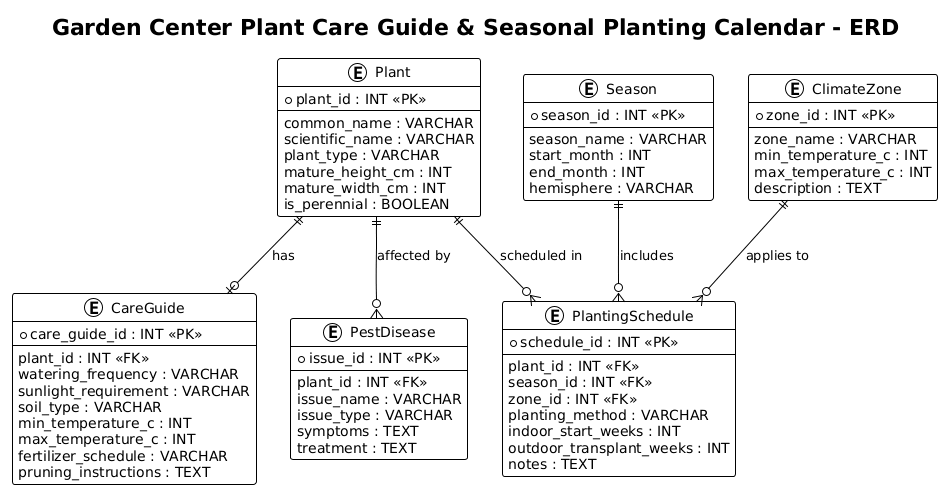
An Entity-Relationship Diagram (ERD) is the blueprint for relational databases. In this specific context, the diagram abstracts the physical database tables into visual entities (rectangles) and their logical relationships (lines with cardinality indicators). We are modeling a many-to-many relationship scenario that is resolved through junction tables. For instance, a single plant species can be planted in multiple seasons, and a single season can accommodate multiple plant species. The ERD visualizes how the PlantingSchedule entity acts as the crucial intermediary that links Plant, Season, and ClimateZone, ensuring data integrity across these dimensions.
Target Domain Scope & Scenario
The scope of this diagram covers the core data entities required to power a customer-facing digital tool. It explicitly models:
- Botanical Data: Basic plant attributes (height, width, perennial status).
- Care Logic: Specific instructions for maintenance (watering, soil, pruning).
- Environmental Context: Seasonal definitions and regional climate zone constraints.
- Health Management: A tracking system for pests and diseases associated with specific plants.
It intentionally excludes inventory management (stock levels) or point-of-sale transaction data, focusing purely on the knowledge base that drives planting recommendations.
Key Takeaways & Educational Insights
By following this guide, you will learn how to structure a normalized database schema that handles complex biological and environmental data. You will gain insight into how to use PlantUML to define primary and foreign keys, manage cardinality (one-to-many, zero-to-many), and organize entities into a cohesive, readable visual map that developers and stakeholders can instantly understand.
Complete Diagram & Full Source Code
Before we dive into the step-by-step construction, here is the complete visual result of the Garden Center ERD. This diagram illustrates the relationships between the core entities, highlighting how the PlantingSchedule serves as the central hub connecting plants to seasons and zones.
Below is the complete, full source code for the diagram. You can copy this entire block and paste it directly into the VPasCode Editor to see the live rendering and interact with the syntax.
@startuml
!theme plain
title Garden Center Plant Care Guide & Seasonal Planting Calendar - ERD

/'
Diagram Context:
This ERD models a garden center's plant care guide database integrated with a seasonal planting calendar tool.
The system manages plant species, their specific care requirements (watering, sunlight, soil, temperature),
and links them to appropriate planting seasons and regional climate zones.
It supports garden center staff and customers in selecting plants that thrive in specific conditions
and knowing the optimal times to plant them throughout the year.
Key entities include plants, care guides, seasons, climate zones, and planting schedules.
'/

entity "Plant" as plant {
  *plant_id : INT <<PK>>
  --
  common_name : VARCHAR
  scientific_name : VARCHAR
  plant_type : VARCHAR
  mature_height_cm : INT
  mature_width_cm : INT
  is_perennial : BOOLEAN
}

entity "CareGuide" as care_guide {
  *care_guide_id : INT <<PK>>
  --
  plant_id : INT <<FK>>
  watering_frequency : VARCHAR
  sunlight_requirement : VARCHAR
  soil_type : VARCHAR
  min_temperature_c : INT
  max_temperature_c : INT
  fertilizer_schedule : VARCHAR
  pruning_instructions : TEXT
}

entity "Season" as season {
  *season_id : INT <<PK>>
  --
  season_name : VARCHAR
  start_month : INT
  end_month : INT
  hemisphere : VARCHAR
}

entity "ClimateZone" as climate_zone {
  *zone_id : INT <<PK>>
  --
  zone_name : VARCHAR
  min_temperature_c : INT
  max_temperature_c : INT
  description : TEXT
}

entity "PlantingSchedule" as planting_schedule {
  *schedule_id : INT <<PK>>
  --
  plant_id : INT <<FK>>
  season_id : INT <<FK>>
  zone_id : INT <<FK>>
  planting_method : VARCHAR
  indoor_start_weeks : INT
  outdoor_transplant_weeks : INT
  notes : TEXT
}

entity "PestDisease" as pest_disease {
  *issue_id : INT <<PK>>
  --
  plant_id : INT <<FK>>
  issue_name : VARCHAR
  issue_type : VARCHAR
  symptoms : TEXT
  treatment : TEXT
}

plant ||--o| care_guide : "has"
plant ||--o{ planting_schedule : "scheduled in"
plant ||--o{ pest_disease : "affected by"
season ||--o{ planting_schedule : "includes"
climate_zone ||--o{ planting_schedule : "applies to"

@endumlStep-by-Step Architectural Walkthrough
Building this ERD requires a logical progression from setting the canvas environment to defining individual entities and finally mapping the complex relationships between them. We will break this down into four distinct phases.
Phase 1: Canvas Configuration & Layout Directives
Every PlantUML diagram begins with configuration directives that set the visual tone and structure. In this Garden Center ERD, we prioritize clarity and a clean, professional look suitable for technical documentation.
First, we initialize the diagram with @startuml. Immediately after, we apply the !theme plain directive. This removes default decorative elements, ensuring the diagram relies on clear lines and text rather than complex styling, which is ideal for database schemas where readability is paramount.
@startuml
!theme plain
title Garden Center Plant Care Guide & Seasonal Planting Calendar - ERD
We also include a multi-line comment block using /' ... '/. This is not rendered in the diagram but serves as vital documentation for anyone reading the source code, explaining the business context of the schema without cluttering the visual output.
Phase 2: Declaring Core Entities, Actors, and Boundaries
The backbone of an ERD is the entity definition. In PlantUML, we use the entity keyword followed by the entity name and an alias for referencing. Inside the curly braces {}, we define the attributes.
Consider the Plant entity. We define the primary key using the asterisk * prefix and the type INT. We use the double arrow notation < to explicitly mark it as a Primary Key. The double dash -- acts as a visual separator between keys and other attributes.
entity "Plant" as plant {
  *plant_id : INT <>
  --
  common_name : VARCHAR
  scientific_name : VARCHAR
  plant_type : VARCHAR
  mature_height_cm : INT
  mature_width_cm : INT
  is_perennial : BOOLEAN
}
We repeat this pattern for CareGuide, Season, ClimateZone, PlantingSchedule, and PestDisease. Notice how the PlantingSchedule entity acts as a junction table, containing foreign keys (plant_id, season_id, zone_id) that link it to the other core entities.
Phase 3: Mapping Data Flows & Key Interactions
Once entities are defined, we must establish the relationships between them using the ||-- syntax. This syntax allows us to define cardinality (how many instances of one entity relate to another).
For example, the relationship between Plant and CareGuide is one-to-one or one-to-zero (a plant might not have a guide yet). We use ||--o| where the double bar || represents “one and only one” on the plant side, and the circle-bar o| represents “zero or one” on the care guide side.
plant ||--o| care_guide : "has"
plant ||--o{ planting_schedule : "scheduled in"
plant ||--o{ pest_disease : "affected by"
season ||--o{ planting_schedule : "includes"
climate_zone ||--o{ planting_schedule : "applies to"
The curly brace { indicates a “many” relationship. This accurately reflects the business rule: a single plant can have many planting schedules (across different seasons and zones), and a season can include many plants.
Phase 4: Grouping, Annotations & Visual Polish
While this specific ERD relies on entity names and relationship lines for clarity, the structure allows for future expansion. The title directive at the top provides a clear label for the entire diagram. The use of consistent naming conventions (snake_case for attributes, CamelCase for entities) ensures that the diagram remains self-documenting. The TEXT data type used in pruning_instructions and description fields allows for flexible, long-form data storage, which is critical for detailed care guides.
Syntax & Keyword Deep Dive
Understanding the specific PlantUML syntax used in this diagram is essential for replicating and modifying the model. Here is a breakdown of the key keywords and conventions:
entity: The keyword used to define a database table or object. It is followed by the display name and an alias for code references.*(Asterisk): Placed before an attribute name to denote a Primary Key (PK). This is the unique identifier for the record.<&> <: Stereotypes used to visually label Primary Keys and Foreign Keys within the entity box.> --(Double Dash): A visual separator line inside an entity box, typically placed after the primary key to separate it from other attributes.||--o{(Cardinality): This is a composite symbol. The||means “mandatory one”. Theomeans “optional” (zero). The{means “many”. Together,||--o{reads as “One mandatory plant can have zero or many schedules”.: "label": Used after a relationship line to add a descriptive text label (e.g., “has”, “scheduled in”) that explains the nature of the relationship./' ... '/: The syntax for multi-line comments. Content inside these markers is ignored by the renderer but remains visible in the source code for documentation.
Best Practices & Pitfalls to Avoid
When constructing ERDs with PlantUML, adhering to best practices ensures your diagrams remain maintainable and scalable.
- Consistent Naming Conventions: Always use the alias (e.g.,
plant) for the entity in relationship lines, not the full display name. This prevents syntax errors and makes the code cleaner. - Logical Grouping: If the diagram grows large, consider using
packagestatements to group related entities (e.g., grouping all “Inventory” tables vs. “Customer” tables) to reduce visual clutter. - Avoid Circular Dependencies: Ensure your relationships form a logical hierarchy. While PlantUML allows circular references, they often confuse the layout engine and make the diagram harder to read.
- Use Descriptive Labels: Don’t just connect lines; label them with verbs (e.g., “scheduled in”, “applies to”) to make the diagram self-explanatory to non-technical stakeholders.
Start Building Your Garden Center ERD Faster with VPasCode
Design and visualize complex retail database schemas instantly in your browser with VPasCode’s free PlantUML editor—no installation required.