


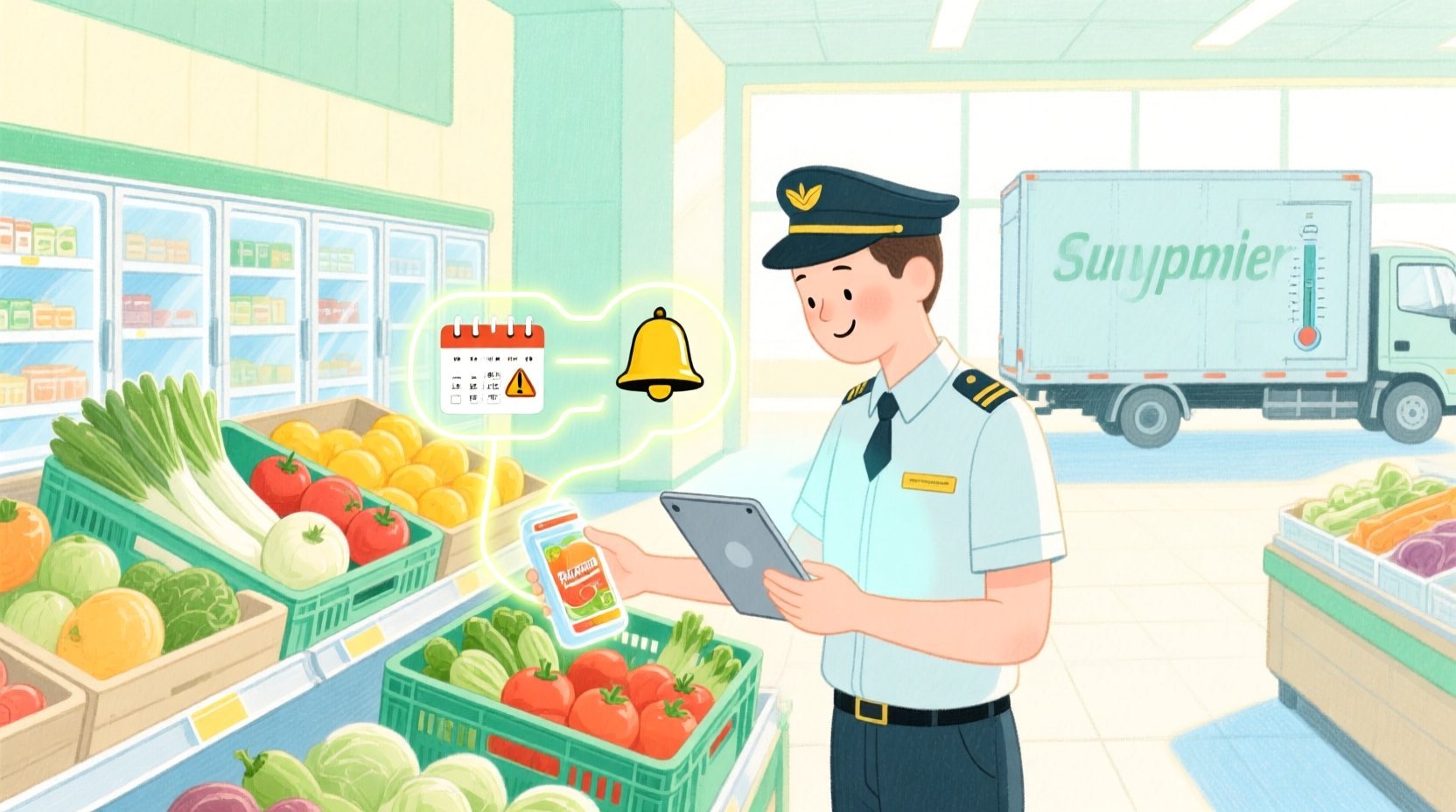
In the high-stakes environment of modern retail, particularly within the grocery sector, the margin for error regarding inventory management is virtually non-existent. Perishable goods—ranging from fresh produce and dairy to prepared foods—represent a unique logistical challenge where time is the most critical asset. Unlike durable goods, these items possess a finite lifespan, and failure to track their journey from the supplier’s dock to the store shelf, or their eventual disposal, results in direct financial loss and potential food safety compliance issues. Retailers today are increasingly turning to digital systems that not only record stock levels but actively monitor aging inventory to prevent waste and optimize pricing strategies.
This architectural complexity requires a data model that goes beyond simple stock counts. A robust system must capture the lifecycle of individual batches, linking specific products to their expiration dates, storage conditions, and the employees responsible for their handling. By modeling these relationships, businesses can generate precise alerts for expiring stock, record the reasons for waste to identify systemic issues, and track markdown events to recover value before items are discarded. This tutorial demonstrates how to translate these complex operational requirements into a clean, scalable Entity Relationship Diagram (ERD) using PlantUML, allowing architects to visualize the data flow and integrity constraints essential for a waste-tracking system.
Understanding the Model: Purpose, Scope & Problem Framing
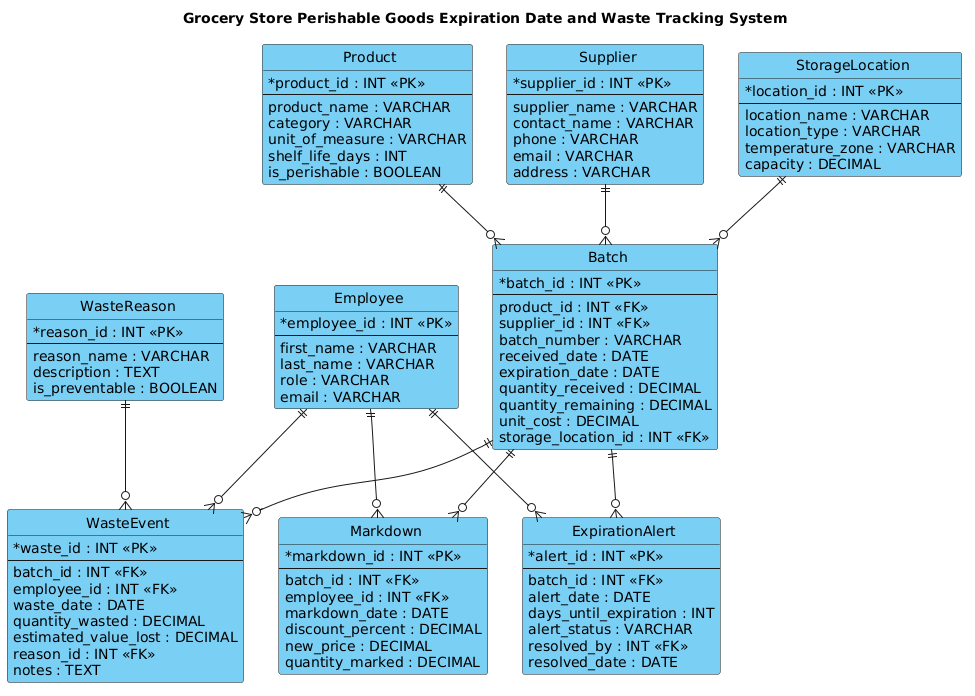
This diagram serves as the foundational data schema for a specialized retail inventory management module. Unlike a generic product catalog, this ERD is designed specifically to handle the temporal and conditional logic required for perishable goods. The core abstraction here is the Batch entity, which acts as the central hub connecting the static product definition to dynamic operational events. While a Product defines what an item is (e.g., “Organic Milk”), the Batch defines a specific instance of that item with a unique identity, a specific arrival date, and a hard deadline (expiration date).
The scope of this model extends from the initial supplier delivery through the entire in-store lifecycle. It explicitly models the relationships between suppliers, storage locations (critical for temperature-controlled zones), and employees. Furthermore, it addresses the negative outcomes of inventory management: waste and markdowns. By capturing WasteEvents and ExpirationAlerts, the model provides the data necessary for post-mortem analysis. It answers critical business questions: Which products expire most frequently? Which storage locations have the highest loss rates? Which employees are processing waste, and are the reasons preventable?
By constructing this model, you will gain insights into how to enforce data integrity in a retail environment. You will learn to separate static definitions from dynamic transactional records, ensuring that historical data remains accurate even as inventory levels fluctuate. This approach ensures that the system can support real-time decision-making, such as triggering automatic markdowns when a batch is 50% through its shelf life, or flagging a specific supplier for poor quality control based on waste patterns.
Complete Diagram & Full Source Code
Below is the complete visualization of the Grocery Store Perishable Goods Expiration Date and Waste Tracking System. This diagram illustrates the entity relationships, primary keys, foreign keys, and the cardinality of data flows between products, batches, suppliers, and waste events.
@startuml
!include https://static.visual-paradigm.com/web/resources/plantuml-stdlib/themes/vp.puml

title Grocery Store Perishable Goods Expiration Date and Waste Tracking System

/'
This ERD models a grocery store system for tracking perishable goods from delivery through sale or disposal.
It captures products, batches, expiration dates, storage locations, employees, waste events, and discard reasons.
The design helps monitor inventory aging, identify expiring stock, record waste, and analyze loss patterns.
'/

entity "Product" as product {
  * product_id : INT <<PK>>
  --
  product_name : VARCHAR
  category : VARCHAR
  unit_of_measure : VARCHAR
  shelf_life_days : INT
  is_perishable : BOOLEAN
}

entity "Batch" as batch {
  * batch_id : INT <<PK>>
  --
  product_id : INT <<FK>>
  supplier_id : INT <<FK>>
  batch_number : VARCHAR
  received_date : DATE
  expiration_date : DATE
  quantity_received : DECIMAL
  quantity_remaining : DECIMAL
  unit_cost : DECIMAL
  storage_location_id : INT <<FK>>
}

entity "Supplier" as supplier {
  * supplier_id : INT <<PK>>
  --
  supplier_name : VARCHAR
  contact_name : VARCHAR
  phone : VARCHAR
  email : VARCHAR
  address : VARCHAR
}

entity "StorageLocation" as location {
  * location_id : INT <<PK>>
  --
  location_name : VARCHAR
  location_type : VARCHAR
  temperature_zone : VARCHAR
  capacity : DECIMAL
}

entity "Employee" as employee {
  * employee_id : INT <<PK>>
  --
  first_name : VARCHAR
  last_name : VARCHAR
  role : VARCHAR
  email : VARCHAR
}

entity "WasteEvent" as waste {
  * waste_id : INT <<PK>>
  --
  batch_id : INT <<FK>>
  employee_id : INT <<FK>>
  waste_date : DATE
  quantity_wasted : DECIMAL
  estimated_value_lost : DECIMAL
  reason_id : INT <<FK>>
  notes : TEXT
}

entity "WasteReason" as reason {
  * reason_id : INT <<PK>>
  --
  reason_name : VARCHAR
  description : TEXT
  is_preventable : BOOLEAN
}

entity "ExpirationAlert" as alert {
  * alert_id : INT <<PK>>
  --
  batch_id : INT <<FK>>
  alert_date : DATE
  days_until_expiration : INT
  alert_status : VARCHAR
  resolved_by : INT <<FK>>
  resolved_date : DATE
}

entity "Markdown" as markdown {
  * markdown_id : INT <<PK>>
  --
  batch_id : INT <<FK>>
  employee_id : INT <<FK>>
  markdown_date : DATE
  discount_percent : DECIMAL
  new_price : DECIMAL
  quantity_marked : DECIMAL
}

product ||--o{ batch
supplier ||--o{ batch
location ||--o{ batch
batch ||--o{ waste
employee ||--o{ waste
reason ||--o{ waste
batch ||--o{ alert
employee ||--o{ alert
batch ||--o{ markdown
employee ||--o{ markdown

@endumlStep-by-Step Architectural Walkthrough
Building this diagram in VPasCode allows for an iterative approach to defining the data schema. We will break down the construction into four logical phases, starting with the environment setup and moving through entity definition, relationship mapping, and finally, the specific logic for retail operations.
Phase 1: Canvas Configuration & Layout Directives
The first step in any PlantUML modeling session is setting the stage. We begin by including the standard library theme to ensure the diagram adheres to a professional, consistent visual style. This is done using the !include directive, which pulls in the Visual Paradigm theme definitions. Following this, we define the diagram title to provide immediate context for anyone viewing the output. Crucially, we add a comment block using the / syntax to describe the diagram’s purpose. This documentation is embedded directly in the source code, ensuring that the model’s intent travels with the code.
!include https://static.visual-paradigm.com/web/resources/plantuml-stdlib/themes/vp.puml

title Grocery Store Perishable Goods Expiration Date and Waste Tracking System

/'
This ERD models a grocery store system for tracking perishable goods from delivery through sale or disposal.
It captures products, batches, expiration dates, storage locations, employees, waste events, and discard reasons.
The design helps monitor inventory aging, identify expiring stock, record waste, and analyze loss patterns.
'/
Phase 2: Declaring Core Entities, Actors, and Boundaries
The backbone of this system is the Batch entity. In retail, you cannot simply track “Milk”; you must track “Milk Batch #12345” because the expiration date and supplier are unique to that specific delivery. We define the core entities using the entity keyword. Each entity block defines the table name, followed by a list of attributes. We use the PK (Primary Key) and FK (Foreign Key) stereotypes to explicitly mark the relationships between tables. For instance, the Product entity defines the static attributes like shelf_life_days, while the Batch entity holds the dynamic instance data like received_date and expiration_date.
entity "Product" as product {
* product_id : INT <>
--
product_name : VARCHAR
category : VARCHAR
shelf_life_days : INT
is_perishable : BOOLEAN
}
entity "Batch" as batch {
* batch_id : INT < >
--
product_id : INT <>
expiration_date : DATE
quantity_remaining : DECIMAL
storage_location_id : INT < >
} Phase 3: Mapping Data Flows & Key Interactions
Once the entities are defined, we must establish how they interact. This is where the relational logic of the database is visualized. We use the ||--o{ syntax to represent a one-to-many relationship. For example, one Product can have many Batch records (one-to-many), but a specific Batch belongs to exactly one Product. Similarly, we map the relationships for waste events and alerts. The WasteEvent entity links back to the Batch to record what was thrown away, and to the Employee to record who performed the action. This creates a traceable audit trail for every item that leaves the inventory.
product ||--o{ batch
supplier ||--o{ batch
location ||--o{ batch
batch ||--o{ waste
employee ||--o{ waste
reason ||--o{ waste
Phase 4: Grouping, Annotations & Visual Polish
The final phase involves ensuring the diagram is readable and semantically complete. We include specific entities like WasteReason and Markdown to capture the nuances of retail operations. The Markdown entity tracks when a product is discounted to move it before it expires, linking back to the batch and the employee who authorized the price change. The ExpirationAlert entity tracks the system's proactive notifications. By defining these distinct entities, we ensure that the diagram clearly separates the act of discarding (waste) from the act of discounting (markdown), providing granular data for financial analysis.
Syntax & Keyword Deep Dive
To master PlantUML for database modeling, it is essential to understand the specific syntax used to define structure and relationships. The following keywords and conventions are critical for constructing accurate ERDs:
entity: The primary keyword used to define a database table. It is followed by the table name in quotes and an alias (e.g.,entity "Product" as product), which is used to reference the table in relationship definitions.entity ... { ... }: The block structure used to list attributes. The attributes are listed inside the curly braces, separated by newlines. The--separator is often used to visually divide the primary key from the other attributes.PKandFK: Stereotypes used to denote Primary Keys and Foreign Keys. They are applied using the double angle bracket syntax (e.g.,INT <). This helps the renderer display the keys visually and aids in code readability.> ||--o{: This is the cardinality notation for a one-to-many relationship. The||represents the "one" side (mandatory), and theo{represents the "zero or many" side (optional). This is the standard notation for linking a parent entity (like Product) to its child records (like Batch).title: A directive to set the main heading of the diagram, providing immediate context for the visual output./.../: The comment syntax for multi-line text. This allows you to embed documentation directly within the code file without affecting the rendering.
Best Practices & Pitfalls to Avoid
When modeling complex retail systems like perishable goods tracking, adhering to best practices ensures your diagram remains maintainable and accurate over time.
- Separate Static from Dynamic Data: Always distinguish between the definition of an item (Product) and the instance of that item (Batch). A common pitfall is trying to store expiration dates directly in the Product table, which is incorrect as a single product type has many expiration dates across different batches.
- Use Descriptive Aliases: While PlantUML allows you to name entities with spaces (e.g., "Waste Event"), using short, lowercase aliases (e.g.,
as waste) makes the relationship lines much cleaner and easier to read. - Document Cardinality Explicitly: Don't rely on the visual style alone; ensure your relationships reflect the business logic. For instance, a Batch must have a Supplier, but a Supplier might have zero Batches if they are new. Use
||--o{or||--|{appropriately to reflect mandatory vs. optional relationships. - Modularize Your Code: If your ERD grows large, consider splitting the code into multiple files or sections. However, for a focused system like this, keeping all entities in one file is often sufficient for clarity.
Start Building Retail ERDs Faster with VPasCode
Design professional database schemas instantly in your browser with VPasCode—no installation required, just write code and see your diagram live.