


In the rapidly evolving landscape of digital health, the integrity and clarity of data models are paramount. A patient portal is not merely a static interface; it is a complex ecosystem where sensitive clinical communications and diagnostic data converge. For software architects designing these systems, the challenge lies in mapping the intricate relationships between patients, providers, secure message threads, and structured lab results while adhering to strict compliance standards. Without a precise visual blueprint, the risk of data inconsistency, security gaps, and inefficient query performance increases significantly.
Diagramming-as-code offers a robust solution to this architectural complexity. By leveraging PlantUML, developers can define their data schemas in a text-based format that is versionable, readable, and instantly renderable. This approach transforms abstract requirements into concrete, visual Entity Relationship Diagrams (ERDs) that serve as a single source of truth for the entire engineering team. It eliminates the ambiguity of hand-drawn sketches and ensures that the database design aligns perfectly with the business logic of secure messaging and lab result retrieval.

Using VPasCode, a free web-based diagram-as-code editor, you can prototype these complex healthcare schemas in minutes without installing any local dependencies. This guide walks you through the construction of a comprehensive ERD for a Patient Portal, focusing on the core entities of secure messaging and lab result viewing. By the end of this tutorial, you will understand how to structure entities, define relationships, and apply professional styling to create a diagram that communicates the architecture of a secure, patient-centric health system.
Understanding the Model: Purpose, Scope & Problem Framing
Before diving into the syntax, it is essential to grasp the architectural abstraction this ERD represents. In the context of a healthcare patient portal, the data model must support two primary, high-stakes workflows: secure clinical communication and the delivery of diagnostic results.
Diagram Abstraction & Representation
This ERD models the static structure of the database required to support dynamic user interactions. Unlike a sequence diagram which captures the flow of messages over time, an ERD focuses on the entities (tables) and their relationships (foreign keys). It answers critical questions: How is a patient linked to a message thread? How does a single lab order decompose into multiple result components? How do we ensure that only authorized providers can participate in a specific conversation?
The diagram utilizes a standard Entity-Relationship notation where each box represents a database table, attributes represent columns, and lines represent the cardinality of the relationships (e.g., one-to-many). This abstraction allows architects to validate data integrity rules before writing a single line of SQL or application code.
Target Domain Scope & Scenario
The scope of this model is strictly bounded to the Patient Portal module. It covers:
- Identity Management: Distinct entities for
PatientandProviderto handle authentication and role-based access. - Secure Messaging: A threaded messaging system that links patients and providers, storing individual message bodies and metadata like timestamps.
- Lab Results: A hierarchical structure where a
LabOrdergenerates aLabResult, which in turn contains multipleResultComponents (specific test values).
It intentionally excludes ancillary systems like billing or appointment scheduling to maintain focus on the core clinical data flow.
Key Takeaways & Educational Insights
By constructing this diagram, you will gain insights into:
- How to model one-to-many relationships (e.g., one thread containing many messages).
- The importance of separating concerns (e.g., separating the order from the result).
- How to represent polymorphic relationships (e.g., a message sender being either a patient or a provider).
Complete Diagram & Full Source Code
Below is the final, rendered diagram representing the Patient Portal ERD. You can view the complete structure of entities, attributes, and relationships immediately.
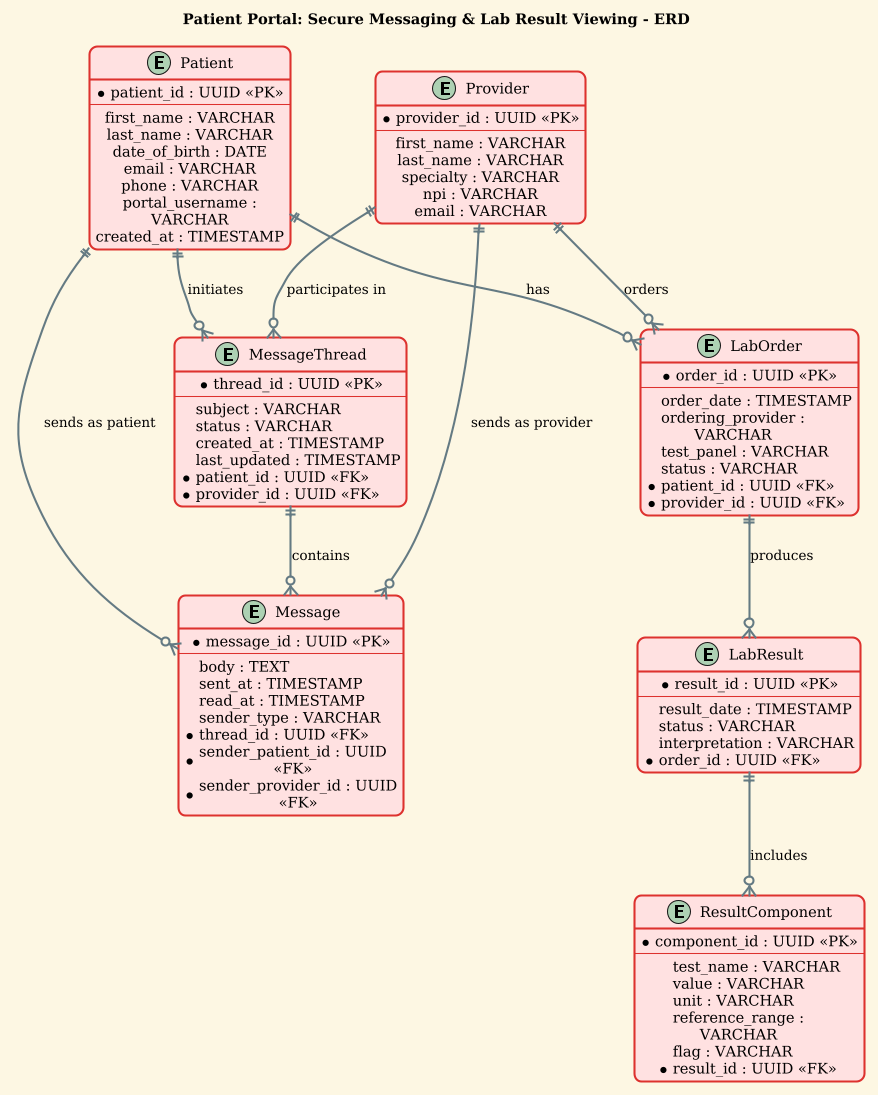
Here is the complete source code used to generate this diagram. You can copy this code directly into the VPasCode editor to see the live preview.
@startuml
!theme sunlust
title Patient Portal: Secure Messaging & Lab Result Viewing - ERD

/'
Diagram Context:
This ERD models the core data entities required to support a patient portal
that enables two key functions: (1) secure messaging between patients and
healthcare providers, and (2) viewing of laboratory test results. The diagram
captures patients, providers, message threads, individual messages, lab
orders, lab results, and result components. It illustrates how patients are
linked to their messages and lab results, how providers participate in
conversations, and how lab orders produce structured result data. This model
helps ensure secure, traceable, and patient-centric access to clinical
communications and diagnostic information.
'/

entity "Patient" as patient {
  * patient_id : UUID <<PK>>
  --
  first_name : VARCHAR
  last_name : VARCHAR
  date_of_birth : DATE
  email : VARCHAR
  phone : VARCHAR
  portal_username : VARCHAR
  created_at : TIMESTAMP
}

entity "Provider" as provider {
  * provider_id : UUID <<PK>>
  --
  first_name : VARCHAR
  last_name : VARCHAR
  specialty : VARCHAR
  npi : VARCHAR
  email : VARCHAR
}

entity "MessageThread" as thread {
  * thread_id : UUID <<PK>>
  --
  subject : VARCHAR
  status : VARCHAR
  created_at : TIMESTAMP
  last_updated : TIMESTAMP
  * patient_id : UUID <<FK>>
  * provider_id : UUID <<FK>>
}

entity "Message" as message {
  * message_id : UUID <<PK>>
  --
  body : TEXT
  sent_at : TIMESTAMP
  read_at : TIMESTAMP
  sender_type : VARCHAR
  * thread_id : UUID <<FK>>
  * sender_patient_id : UUID <<FK>>
  * sender_provider_id : UUID <<FK>>
}

entity "LabOrder" as lab_order {
  * order_id : UUID <<PK>>
  --
  order_date : TIMESTAMP
  ordering_provider : VARCHAR
  test_panel : VARCHAR
  status : VARCHAR
  * patient_id : UUID <<FK>>
  * provider_id : UUID <<FK>>
}

entity "LabResult" as lab_result {
  * result_id : UUID <<PK>>
  --
  result_date : TIMESTAMP
  status : VARCHAR
  interpretation : VARCHAR
  * order_id : UUID <<FK>>
}

entity "ResultComponent" as component {
  * component_id : UUID <<PK>>
  --
  test_name : VARCHAR
  value : VARCHAR
  unit : VARCHAR
  reference_range : VARCHAR
  flag : VARCHAR
  * result_id : UUID <<FK>>
}

patient ||--o{ thread : "initiates"
provider ||--o{ thread : "participates in"
thread ||--o{ message : "contains"
patient ||--o{ message : "sends as patient"
provider ||--o{ message : "sends as provider"
patient ||--o{ lab_order : "has"
provider ||--o{ lab_order : "orders"
lab_order ||--o{ lab_result : "produces"
lab_result ||--o{ component : "includes"

@endumlStep-by-Step Architectural Walkthrough
Now, let’s deconstruct the code to understand how each phase contributes to the final architecture. We will build this diagram chronologically, starting from the canvas setup to the final relationship mapping.
Phase 1: Canvas Configuration & Layout Directives
The foundation of any PlantUML diagram lies in its configuration. We begin by setting the theme and the diagram title. In this healthcare context, the sunlust theme provides a professional, warm color palette suitable for medical documentation.
We also include a comment block using /' and '/ to document the diagram’s context. This is crucial for team collaboration, ensuring that anyone reading the code understands the scope without needing to render it first.
@startuml
!theme sunlust
title Patient Portal: Secure Messaging & Lab Result Viewing - ERD

/'
Diagram Context:
This ERD models the core data entities...
'/
Phase 2: Declaring Core Entities, Actors, and Boundaries
Next, we define the entity blocks. Each block represents a database table. We use the entity "Name" as alias syntax to define a readable label and a shorter internal alias for use in relationship definitions later.
Inside each entity, we define attributes. We use * to denote Primary Keys (PK) and FK to denote Foreign Keys. The double dash -- separates keys from regular attributes, improving visual readability in the rendered diagram.
entity "Patient" as patient {
  * patient_id : UUID <>
  --
  first_name : VARCHAR
  last_name : VARCHAR
  date_of_birth : DATE
  email : VARCHAR
  phone : VARCHAR
  portal_username : VARCHAR
  created_at : TIMESTAMP
}
Notice the use of data types like UUID, VARCHAR, and TIMESTAMP. These are standard SQL types that help developers understand the expected data schema immediately.
Phase 3: Mapping Data Flows & Key Interactions
With entities defined, we establish the relationships using the ||--o{ syntax. This notation represents a one-to-many relationship where the “one” side is mandatory (the double pipe ||) and the “many” side is optional (the circle o).
For example, patient ||--o{ thread : "initiates" means a Patient must initiate at least one thread (in this specific model logic), or rather, a thread is linked to a patient, and a patient can have zero or many threads. The arrow direction indicates the foreign key dependency.
patient ||--o{ thread : "initiates"
provider ||--o{ thread : "participates in"
thread ||--o{ message : "contains"
patient ||--o{ message : "sends as patient"
provider ||--o{ message : "sends as provider"
We also model the complex hierarchy of lab results. A LabOrder produces one or more LabResults, and each LabResult includes multiple ResultComponents. This structure allows for flexible reporting of lab data.
lab_order ||--o{ lab_result : "produces"
lab_result ||--o{ component : "includes"
Phase 4: Grouping, Annotations & Visual Polish
While this ERD focuses on entities and relationships, PlantUML allows for additional visual polish. The title directive at the top provides a clear header. The relationship labels (e.g., "initiates", "orders") are added inline to clarify the nature of the connection, making the diagram self-documenting.
The use of sender_type : VARCHAR in the Message entity is a design choice to handle the polymorphic nature of senders (both patients and providers can send messages), which is a common pattern in healthcare messaging systems to ensure audit trails.
Syntax & Keyword Deep Dive
To master PlantUML for ERDs, you must understand the specific keywords and symbols used in this diagram. Here is a breakdown of the essential syntax elements:
entity: The keyword used to define a new table or entity. Syntax:entity "Name" as alias { ... }./* ... */or/' ... '/: Comment blocks. The/'syntax is used here to allow multi-line comments that render as a note or context description in the diagram header.||--o{: The relationship operator.||means “one and only one” (mandatory), ando{means “zero or many” (optional). This is standard Crow’s Foot notation.*: Used as a prefix to an attribute to denote a Primary Key (PK). It is rendered as a key icon in the diagram.<<PK>>and<<FK>>: Stereotypes used to explicitly label attributes as Primary Keys or Foreign Keys in the text representation.--: A separator line within an entity block to visually group keys separately from other attributes.: "Label": Used after a relationship line to add a human-readable label describing the relationship (e.g., “orders”, “contains”).
Best Practices & Pitfalls to Avoid
When designing ERDs for complex systems like healthcare portals, adhering to best practices ensures the diagram remains maintainable and clear.
- Use Meaningful Aliases: Always define an alias (e.g.,
as patient) for your entities. This makes the relationship lines much cleaner and easier to read than using full entity names repeatedly. - Separate Keys from Attributes: Use the
--separator to visually distinguish Primary Keys and Foreign Keys from standard data fields. This helps database architects quickly identify the schema structure. - Avoid Over-Normalization in Diagrams: While your database might be highly normalized, the diagram should focus on the logical relationships relevant to the application domain. Don’t feel compelled to show every single audit log table unless it is critical to the specific use case.
- Consistent Naming Conventions: Stick to a consistent naming convention (e.g., snake_case for attributes, PascalCase for entity names) to maintain readability across the codebase.
Start Building Healthcare ERDs Faster with VPasCode
Design secure and compliant database schemas instantly in your browser with VPasCode, the free PlantUML editor that brings your healthcare diagrams to life.