


In the highly regulated and data-intensive world of finance and insurance, visualizing system architecture is not merely a documentation exercise—it is a critical engineering necessity. An Insurance Claim System represents a complex ecosystem of actors, policies, financial transactions, and compliance checks. For software architects and developers, translating these business requirements into a coherent technical model is essential to ensure data integrity, transactional accuracy, and system scalability.

Traditional drag-and-drop diagramming tools often suffer from version drift, lack of reproducibility, and difficulty in maintaining consistency across large teams. Diagramming-as-code with PlantUML offers a superior alternative. By defining your architecture in plain text, you gain the ability to version your diagrams, automate their generation, and maintain a single source of truth. Using VPasCode, a free web-based diagram-as-code editor, you can instantly render, test, and refine these models without installing local dependencies or configuring complex build environments.
In this masterclass, we will construct a comprehensive class diagram for an Insurance Claim System. We will model the relationships between Policy Holders, Policies, Claims, Adjusters, and Fraud Detection mechanisms, demonstrating how to create a professional-grade blueprint that serves as both a design document and a communication tool.
Understanding the Model: Purpose, Scope & Problem Framing
Before writing a single line of code, it is crucial to understand the abstraction we are creating. This diagram is a Class Diagram, which focuses on the static structure of the system rather than its dynamic behavior (which would be a Sequence or Activity diagram).
Diagram Abstraction & Representation
A class diagram maps the “nouns” of your system. It defines the entities that exist within the database or application memory and how they relate to one another. In the context of insurance, this includes:
- Entities: Core objects like
Policy,Claim, andPolicyHolder. - Attributes: The data properties of these entities (e.g.,
premiumAmount,claimDate). - Methods: The behaviors or operations available on these entities (e.g.,
calculateSettlement,approveClaim). - Relationships: The cardinality and direction of data flow between entities (e.g., one Policy Holder holds many Policies).
Target Domain Scope & Scenario
This model focuses specifically on the core operational domain of an insurance carrier. It intentionally excludes peripheral systems like external payment gateways (Stripe/PayPal) or third-party claim verification APIs, focusing instead on the internal logical model. The scope covers the lifecycle from policy issuance to claim settlement, including the critical fraud detection and adjuster assignment workflows.
Key Takeaways & Educational Insights
By building this model, you will gain insight into:
- How to model one-to-many relationships (e.g., a Holder to multiple Policies).
- How to encapsulate business logic within class methods.
- How to represent complex financial entities like Claims and Settlements.
- How to use VPasCode to instantly visualize and iterate on these structures.
Complete Diagram & Full Source Code
Below is the finished blueprint for the Insurance Claim System. This diagram encapsulates the core entities, their attributes, methods, and the complex web of relationships that define the system’s data integrity.
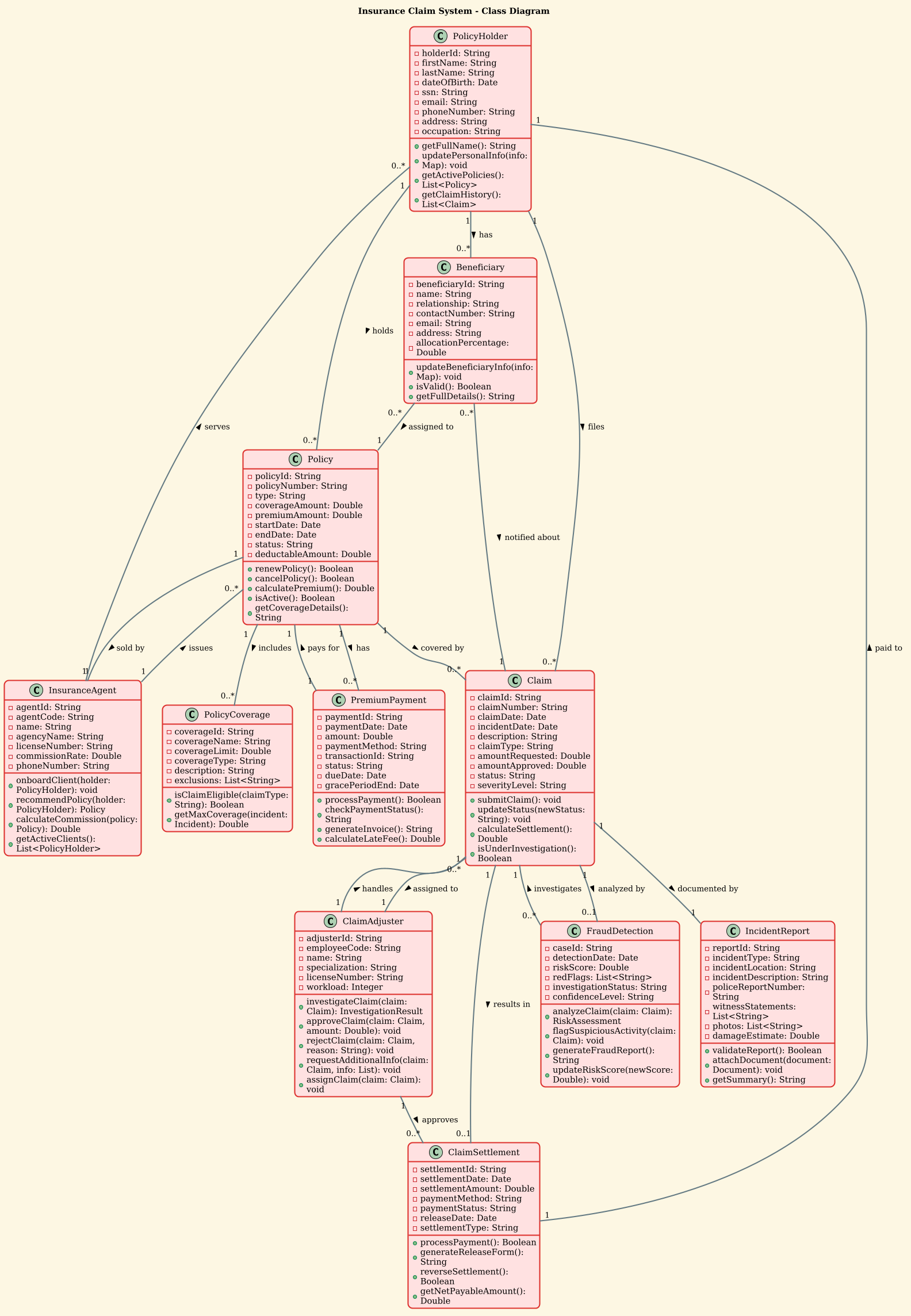
Copy the complete source code below to replicate this diagram in VPasCode:
@startuml
!theme sunlust
title Insurance Claim System - Class Diagram

' Policy Holder and Policy classes
class PolicyHolder {
  - holderId: String
  - firstName: String
  - lastName: String
  - dateOfBirth: Date
  - ssn: String
  - email: String
  - phoneNumber: String
  - address: String
  - occupation: String
  + getFullName(): String
  + updatePersonalInfo(info: Map): void
  + getActivePolicies(): List<Policy>
  + getClaimHistory(): List<Claim>
}

class Policy {
  - policyId: String
  - policyNumber: String
  - type: String
  - coverageAmount: Double
  - premiumAmount: Double
  - startDate: Date
  - endDate: Date
  - status: String
  - deductableAmount: Double
  + renewPolicy(): Boolean
  + cancelPolicy(): Boolean
  + calculatePremium(): Double
  + isActive(): Boolean
  + getCoverageDetails(): String
}

class PolicyCoverage {
  - coverageId: String
  - coverageName: String
  - coverageLimit: Double
  - coverageType: String
  - description: String
  - exclusions: List<String>
  + isClaimEligible(claimType: String): Boolean
  + getMaxCoverage(incident: Incident): Double
}

' Claim related classes
class Claim {
  - claimId: String
  - claimNumber: String
  - claimDate: Date
  - incidentDate: Date
  - description: String
  - claimType: String
  - amountRequested: Double
  - amountApproved: Double
  - status: String
  - severityLevel: String
  + submitClaim(): void
  + updateStatus(newStatus: String): void
  + calculateSettlement(): Double
  + isUnderInvestigation(): Boolean
}

class IncidentReport {
  - reportId: String
  - incidentType: String
  - incidentLocation: String
  - incidentDescription: String
  - policeReportNumber: String
  - witnessStatements: List<String>
  - photos: List<String>
  - damageEstimate: Double
  + validateReport(): Boolean
  + attachDocument(document: Document): void
  + getSummary(): String
}

class ClaimAdjuster {
  - adjusterId: String
  - employeeCode: String
  - name: String
  - specialization: String
  - licenseNumber: String
  - workload: Integer
  + investigateClaim(claim: Claim): InvestigationResult
  + approveClaim(claim: Claim, amount: Double): void
  + rejectClaim(claim: Claim, reason: String): void
  + requestAdditionalInfo(claim: Claim, info: List): void
  + assignClaim(claim: Claim): void
}

class ClaimSettlement {
  - settlementId: String
  - settlementDate: Date
  - settlementAmount: Double
  - paymentMethod: String
  - paymentStatus: String
  - releaseDate: Date
  - settlementType: String
  + processPayment(): Boolean
  + generateReleaseForm(): String
  + reverseSettlement(): Boolean
  + getNetPayableAmount(): Double
}

class FraudDetection {
  - caseId: String
  - detectionDate: Date
  - riskScore: Double
  - redFlags: List<String>
  - investigationStatus: String
  - confidenceLevel: String
  + analyzeClaim(claim: Claim): RiskAssessment
  + flagSuspiciousActivity(claim: Claim): void
  + generateFraudReport(): String
  + updateRiskScore(newScore: Double): void
}

class PremiumPayment {
  - paymentId: String
  - paymentDate: Date
  - amount: Double
  - paymentMethod: String
  - transactionId: String
  - status: String
  - dueDate: Date
  - gracePeriodEnd: Date
  + processPayment(): Boolean
  + checkPaymentStatus(): String
  + generateInvoice(): String
  + calculateLateFee(): Double
}

class Beneficiary {
  - beneficiaryId: String
  - name: String
  - relationship: String
  - contactNumber: String
  - email: String
  - address: String
  - allocationPercentage: Double
  + updateBeneficiaryInfo(info: Map): void
  + isValid(): Boolean
  + getFullDetails(): String
}

class InsuranceAgent {
  - agentId: String
  - agentCode: String
  - name: String
  - agencyName: String
  - licenseNumber: String
  - commissionRate: Double
  - phoneNumber: String
  + onboardClient(holder: PolicyHolder): void
  + recommendPolicy(holder: PolicyHolder): Policy
  + calculateCommission(policy: Policy): Double
  + getActiveClients(): List<PolicyHolder>
}

' Relationships
PolicyHolder "1" -- "0..*" Policy : holds >
PolicyHolder "1" -- "0..*" Claim : files >
PolicyHolder "1" -- "0..*" Beneficiary : has >

Policy "1" -- "0..*" PolicyCoverage : includes >
Policy "1" -- "0..*" PremiumPayment : has >
Policy "1" -- "1" InsuranceAgent : sold by >
Policy "1" -- "0..*" Claim : covered by >

Claim "1" -- "1" IncidentReport : documented by >
Claim "1" -- "1" ClaimAdjuster : assigned to >
Claim "1" -- "0..1" ClaimSettlement : results in >
Claim "1" -- "0..1" FraudDetection : analyzed by >

ClaimAdjuster "1" -- "0..*" Claim : handles >
ClaimAdjuster "1" -- "0..*" ClaimSettlement : approves >

ClaimSettlement "1" -- "1" PolicyHolder : paid to >

FraudDetection "0..*" -- "1" Claim : investigates >

InsuranceAgent "1" -- "0..*" PolicyHolder : serves >
InsuranceAgent "1" -- "0..*" Policy : issues >

Beneficiary "0..*" -- "1" Policy : assigned to >
Beneficiary "0..*" -- "1" Claim : notified about >

PremiumPayment "1" -- "1" Policy : pays for >

@endumlStep-by-Step Architectural Walkthrough
Building a complex diagram requires a phased approach. We will construct this Insurance Claim System model in four distinct phases, moving from global configuration to specific entity details, then relationships, and finally operational logic.
Phase 1: Canvas Configuration & Layout Directives
Every PlantUML diagram begins with directives that set the stage. We start by declaring the start of the diagram and selecting a visual theme.
@startuml
!theme sunlust
title Insurance Claim System - Class Diagram
The @startuml tag is mandatory to begin the code block. The !theme sunlust directive applies a professional color palette (orange and dark blue) that is ideal for financial documentation, ensuring high contrast and readability. The title directive adds a clear header to the rendered output.
Phase 2: Declaring Core Entities, Actors, and Boundaries
Next, we define the core classes. In PlantUML, a class is defined using the class keyword followed by the class name and a block containing its attributes and methods.
class PolicyHolder {
  - holderId: String
  - firstName: String
  - lastName: String
  + getFullName(): String
}
Key syntax elements here include:
- Attributes: Defined with a minus sign
-(private visibility) followed by the name, colon, and data type (e.g.,holderId: String). - Methods: Defined with a plus sign
+(public visibility) followed by the method name, parentheses for arguments, and return type (e.g.,getFullName(): String).
We repeat this pattern for other core entities like Policy, Claim, and Beneficiary, ensuring all financial fields (like premiumAmount and coverageAmount) use the Double type for precision.
Phase 3: Mapping Data Flows & Key Interactions
Once entities are defined, we must establish how they interact. This is done using relationship lines. The syntax uses double dashes -- to connect two class names, with cardinality notation (e.g., "1", "0..*") to define constraints.
PolicyHolder "1" -- "0..*" Policy : holds >
Claim "1" -- "1" IncidentReport : documented by >
This specific syntax defines:
- Cardinality:
"1"means exactly one, while"0..*"means zero or many. For example, one Policy Holder can hold zero or many Policies. - Label: The text after the colon (e.g.,
holds) describes the nature of the relationship. - Direction: The arrow
>indicates the direction of the relationship, pointing from the source to the target.
Phase 4: Grouping, Annotations & Visual Polish
The final phase involves ensuring the diagram is readable and logically grouped. While this specific diagram relies on explicit lines, we can use packages or notes to group related classes if the diagram grows larger. Here, we focus on the FraudDetection and ClaimAdjuster classes, which represent critical operational roles.
class FraudDetection {
  - riskScore: Double
  + analyzeClaim(claim: Claim): RiskAssessment
}
By defining methods like analyzeClaim, we signal to developers that this class contains business logic for risk assessment, distinguishing it from passive data containers. This level of detail transforms the diagram from a simple schema into a functional specification.
Syntax & Keyword Deep Dive
Understanding the specific PlantUML syntax is key to mastering diagram-as-code. Here is a breakdown of the critical keywords used in this Insurance Claim System diagram:
class: The keyword used to declare a new class entity. It must be followed by the class name.-(Minus Sign): Denotes private attributes or methods. Only accessible within the class itself.+(Plus Sign): Denotes public attributes or methods. Accessible by other classes.--(Double Dash): The connector used to draw a relationship line between two classes."0..*"(Cardinality): Represents “Zero or Many”. Common for one-to-many relationships like a Holder having many Policies."1"(Cardinality): Represents “Exactly One”. Used when a relationship is mandatory, like a Claim being assigned to exactly one Adjuster.!(Exclamation Mark): Used for directives like!themeor@startumlto control the diagram engine.
Best Practices & Pitfalls to Avoid
When modeling financial systems with PlantUML in VPasCode, follow these best practices to ensure your diagrams remain maintainable and accurate:
- Keep Cardinalities Accurate: In finance, data integrity is paramount. Ensure your cardinalities (e.g.,
"1"vs"0..1") reflect real business rules. For instance, a Settlement must be paid to exactly one Policy Holder, not many. - Use Meaningful Attribute Names: Avoid generic names like
field1. Use domain-specific terms likeclaimDateordeductableAmountto make the diagram self-documenting. - Group Related Classes: If your diagram becomes too large, consider using
packagedirectives to groupClaim,IncidentReport, andFraudDetectiontogether logically. - Iterate Visually: Don’t just write code and hope it works. Use VPasCode to render the preview immediately. This allows you to spot layout issues or missing relationships before you commit to the design.
Try It Yourself with VPasCode
Start Building PlantUML Class Diagrams Faster with VPasCode
Design complex financial architectures instantly in your browser with VPasCode. No installation required, just write code and see the result.