


In the high-stakes environment of financial technology, clarity is currency. When designing billing systems, understanding the exact flow of a subscription renewal is not just good practice; it is a compliance necessity. A subscription renewal process involves multiple actors, sensitive financial transactions, and critical decision points that must be flawlessly executed to prevent revenue leakage or customer churn.

Traditional diagramming tools often require heavy installations or complex licensing. However, diagramming-as-code with PlantUML offers a lightweight, version-agnostic approach to visualizing these workflows. By using VPasCode, our free web-based diagram-as-code editor, software architects and finance engineers can prototype, test, and document these complex processes instantly in the browser without any local setup.
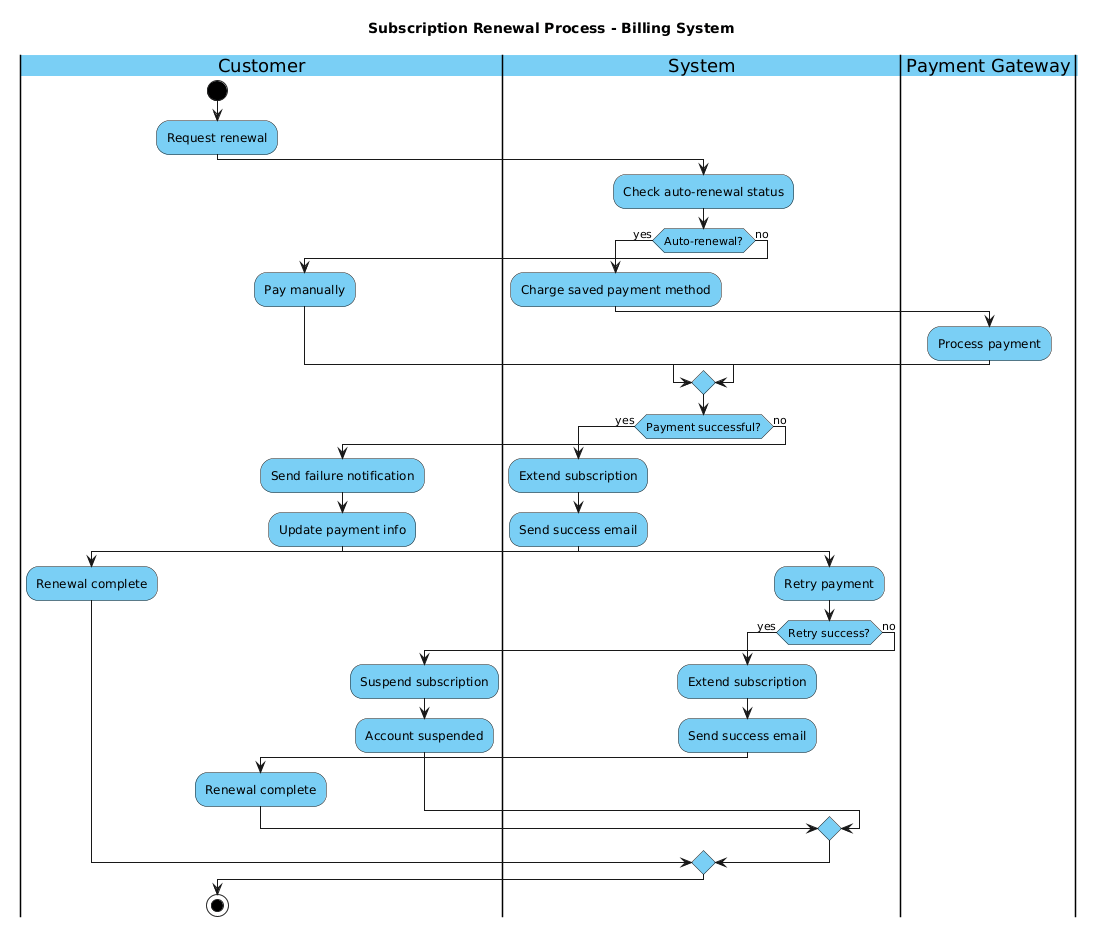
This guide serves as a masterclass in modeling the Subscription Renewal Process. We will construct a professional activity diagram that handles auto-renewal checks, manual payments, payment gateway interactions, and robust error handling for failed transactions. This visual model ensures that all stakeholders—from developers to product managers—share a unified understanding of the billing lifecycle.
Understanding the Model: Purpose, Scope & Problem Framing
Diagram Abstraction & Representation
An Activity Diagram in PlantUML is the ideal tool for modeling this scenario because it focuses on control flow rather than static structure. Unlike class diagrams that define data objects, activity diagrams map the sequence of operations and the logical decisions that drive the system forward. In this context, the diagram represents the lifecycle of a subscription renewal, highlighting where the system waits for user input, where it processes data automatically, and where it interacts with external financial services.
Target Domain Scope & Scenario
The scope of this model is strictly limited to the renewal workflow. It covers the moment a customer requests a renewal or the system triggers an auto-renewal, through the payment processing phase, and concludes with either successful extension or suspension. It explicitly defines the boundaries between the Customer, the internal Billing System, and the external Payment Gateway. This separation of concerns is critical in finance to ensure data privacy and correct transaction routing.
Key Takeaways & Educational Insights
By building this diagram, you will gain insights into:
- Swimlane Architecture: How to assign responsibilities clearly to different actors.
- Conditional Logic: Implementing nested
ifstatements for payment success/failure scenarios. - Parallelism: Visualizing where the system waits for external responses (Payment Gateway) versus internal processing.
- Error Handling: Designing retry mechanisms and suspension protocols for failed payments.
Complete Diagram & Full Source Code
Below is the finished blueprint for the Subscription Renewal Process. This diagram utilizes the VPasCode theme for a modern look and swimlanes to separate duties. You can copy this code directly into the VPasCode editor to see it render instantly.
@startuml
!include https://static.visual-paradigm.com/web/resources/plantuml-stdlib/themes/vp.puml

title Subscription Renewal Process - Billing System

|Customer|
|System|
|Payment Gateway|

|Customer|
start
:Request renewal;

|System|
:Check auto-renewal status;

if (Auto-renewal?) then (yes)
  :Charge saved payment method;
  |Payment Gateway|
  :Process payment;
  |System|
else (no)
  |Customer|
  :Pay manually;
  |System|
endif

if (Payment successful?) then (yes)
  :Extend subscription;
  :Send success email;
  |Customer|
  :Renewal complete;
else (no)
  :Send failure notification;
  |Customer|
  :Update payment info;
  |System|
  :Retry payment;
  if (Retry success?) then (yes)
    :Extend subscription;
    :Send success email;
    |Customer|
    :Renewal complete;
  else (no)
    :Suspend subscription;
    |Customer|
    :Account suspended;
  endif
endif

stop
@endumlStep-by-Step Architectural Walkthrough
Now that you have the complete code, let’s deconstruct how to build this diagram logically. We will approach this in four distinct phases to ensure structural integrity and readability.
Phase 1: Canvas Configuration & Layout Directives
Every professional PlantUML diagram starts with configuration. We begin by including the visual theme to ensure the diagram looks modern and consistent with the VPasCode branding standards. We also define the title immediately to provide context for the viewer.
In the code below, we see the inclusion of the theme and the title declaration:
!include https://static.visual-paradigm.com/web/resources/plantuml-stdlib/themes/vp.puml
title Subscription Renewal Process - Billing System
Using the title directive ensures that the diagram has a clear header when rendered, which is essential for documentation.
Phase 2: Declaring Core Entities, Actors, and Boundaries
Before drawing the flow, we must define the Swimlanes. Swimlanes are the horizontal or vertical sections that represent different actors or components. In this finance scenario, we have three distinct entities:
- Customer: The user initiating the action.
- System: The internal billing logic.
- Payment Gateway: The external service handling money.
We declare these using the pipe syntax |Name|. This sets the context for every action that follows.
|Customer|
|System|
|Payment Gateway|
Note that we declare them at the top, but we can switch context within the flow by re-declaring the swimlane before an action.
Phase 3: Mapping Data Flows & Key Interactions
This is the core logic of the diagram. We start with the start node and move through the primary decision tree. The most critical decision point is the Auto-Renewal Check.
Using the if keyword, we branch the flow. If the customer has auto-renewal enabled, the system charges the saved method. This requires interacting with the Payment Gateway swimlane. If not, the customer must pay manually.
if (Auto-renewal?) then (yes)
  :Charge saved payment method;
  |Payment Gateway|
  :Process payment;
  |System|
else (no)
  |Customer|
  :Pay manually;
  |System|
endif
This structure ensures that the flow is clear: if condition A is met, path B is taken; otherwise, path C is taken. The endif statement is mandatory to close the logic block.
Phase 4: Grouping, Annotations & Visual Polish
The final phase involves handling the outcome of the payment. We nest another decision block to check if the payment was successful. If successful, we extend the subscription and notify the customer. If not, we enter an error handling routine.
This nested logic demonstrates how PlantUML handles complexity. We check for Payment successful?. If no, we send a notification, allow the customer to update info, and retry. This nested if structure for the retry logic is crucial for robust billing systems.
if (Retry success?) then (yes)
  :Extend subscription;
  :Send success email;
  |Customer|
  :Renewal complete;
else (no)
  :Suspend subscription;
  |Customer|
  :Account suspended;
endif
Finally, we end the process with the stop node to signify the termination of the workflow.
Syntax & Keyword Deep Dive
To master PlantUML activity diagrams, you must understand the specific keywords that control the flow. Here is a breakdown of the syntax used in this tutorial:
start: Marks the beginning of the activity flow. It is the entry point for the diagram.stop: Marks the termination of the activity. Every valid activity diagram should have a clear end point.|Lane|: Defines a swimlane. This is critical for separating responsibilities between different actors in the system.:Action;: Represents an activity or process step. The colon indicates a process, and the semicolon ends the statement.if (Condition) then (yes) else (no) endif: The standard conditional structure. It allows you to branch logic based on boolean outcomes. Thethenandelselabels help clarify the path taken.title: A directive to add a header to the diagram, improving readability in documentation.
Best Practices & Pitfalls to Avoid
When creating activity diagrams for finance systems, precision is key. Follow these best practices to ensure your diagrams remain maintainable and clear.
- Keep Swimlanes Logical: Do not overcrowd a swimlane with unrelated actions. If the Payment Gateway swimlane only processes payments, keep it focused there. Moving too much logic into one lane creates visual noise.
- Use Meaningful Labels: Avoid generic labels like
:Check. Instead, use:Check auto-renewal status. The label should describe the outcome or the specific action taken. - Limit Nested Depth: While PlantUML supports deep nesting, try to keep decision trees to two levels deep. If your logic becomes too complex, consider splitting it into sub-activities or separate diagrams.
- Consistent Naming: Always use the same naming convention for actors. If you call it System in one place, do not switch to Backend in another.
Try It Yourself with VPasCode
Start Building Activity Diagrams Faster with VPasCode
Test your finance workflow logic instantly with zero local installation. Write code, preview diagrams, and customize themes directly in your browser.