


In the high-stakes world of retail, particularly in the toy industry, the ability to rapidly identify and notify customers about product safety issues is not just a customer service feature—it is a critical legal and ethical obligation. When a safety defect is discovered in a batch of toys, the manufacturer and retailer must act with precision to trace which specific customers purchased the affected items and ensure they receive timely warnings. A well-structured database schema is the backbone of this operation, enabling the swift cross-referencing of product batches, customer registrations, and recall notices.
Building this data model from scratch using traditional drag-and-drop tools can often lead to fragmented documentation and versioning headaches. By adopting a diagram-as-code approach with PlantUML, architects can define the entire data structure in a text-based format that is versionable, reproducible, and instantly visualized. This method ensures that the logical relationships between entities like Manufacturer, Toy, and Customer are explicitly defined, creating a “living document” that evolves alongside the software requirements.
This tutorial leverages VPasCode, a free, browser-based diagram-as-code editor, to guide you through creating a comprehensive Entity Relationship Diagram (ERD). We will construct a schema designed to manage the lifecycle of a safety recall, from the initial registration of a product by a customer to the generation and tracking of notification messages. By the end of this guide, you will understand how to model one-to-many relationships, define primary and foreign keys, and annotate your schema with clear business context.
Understanding the Model: Purpose, Scope & Problem Framing
Before writing a single line of code, it is essential to understand the architectural abstraction we are building. This ERD represents the relational backbone of a Toy Store Safety Recall System. Unlike a simple inventory list, this model must capture the temporal and causal links between a product, its owner, and a safety incident.
Diagram Abstraction & Representation
In this context, the diagram uses standard Entity-Relationship notation to map out data entities. The Entity represents a real-world object (e.g., a Customer or a Toy). The Attributes (like email or batch_number) are the specific data points stored for that object. The Relationships (lines connecting entities) define how these objects interact. For instance, a Manufacturer produces many Toys, and a Customer registers many Toys. The diagram specifically models the “Safety Recall” workflow, ensuring that if a Recall is issued for a specific Toy, the system can instantly query which Registrations exist for that toy and subsequently generate Notifications for the corresponding Customers.
Target Domain Scope & Scenario
The scope of this diagram is strictly limited to the data required for the recall process. It does not model the entire e-commerce platform (e.g., shopping carts, payment gateways, or shipping logistics). Instead, it focuses on the post-purchase data integrity: who owns the product, what the product is, and how to contact them in an emergency. The boundaries are defined by the Manufacturer (source of truth for product data) and the Customer (source of truth for contact data), bridged by the ProductRegistration entity which links the two.
Key Takeaways & Educational Insights
By studying this model, you will gain insights into:
- How to use composite keys and foreign keys to maintain data integrity across multiple tables.
- The importance of the ProductRegistration entity as a linking table (associative entity) between customers and toys.
- How to model status tracking (e.g.,
statusin Recall and Notification) to manage the workflow state. - Best practices for naming conventions in a retail context to ensure clarity for stakeholders.
Complete Diagram & Full Source Code
Below is the finished blueprint of the Toy Store Safety Recall ERD. This diagram visualizes the flow from a manufacturer producing a toy, to a customer registering it, and finally, how the system handles a safety recall and sends notifications.
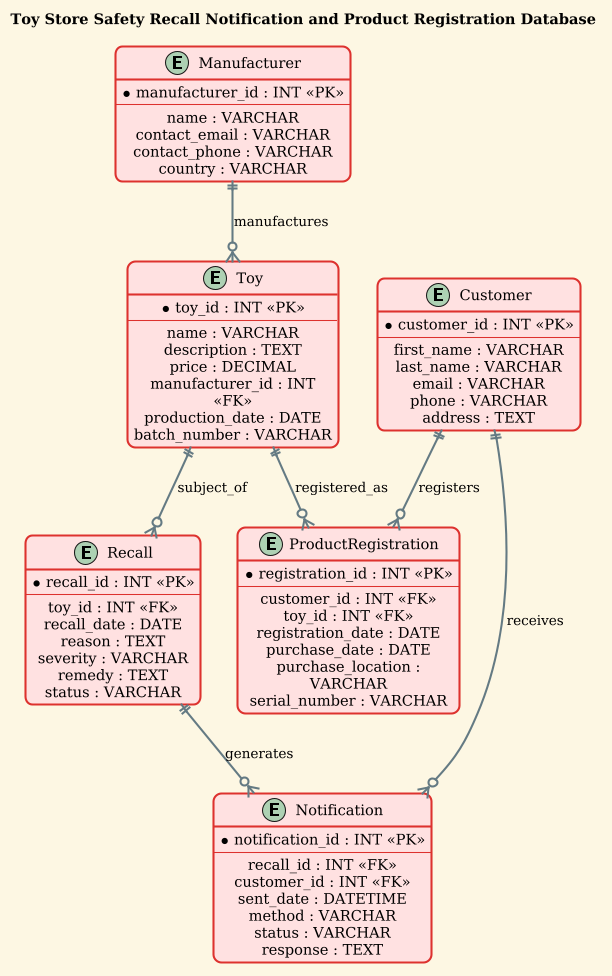
@startuml
!theme sunlust
title Toy Store Safety Recall Notification and Product Registration Database

/'
This ERD models a system for managing product safety recalls and customer product registrations
within a toy store. The database supports tracking toys, manufacturers, customers, their registered
products, safety recall notices, and notifications sent to affected customers. It enables the store
to quickly identify which customers own a recalled toy and to manage the notification process.
'/

entity "Manufacturer" as MANUFACTURER {
  *manufacturer_id : INT <<PK>>
  --
  name : VARCHAR
  contact_email : VARCHAR
  contact_phone : VARCHAR
  country : VARCHAR
}

entity "Toy" as TOY {
  *toy_id : INT <<PK>>
  --
  name : VARCHAR
  description : TEXT
  price : DECIMAL
  manufacturer_id : INT <<FK>>
  production_date : DATE
  batch_number : VARCHAR
}

entity "Customer" as CUSTOMER {
  *customer_id : INT <<PK>>
  --
  first_name : VARCHAR
  last_name : VARCHAR
  email : VARCHAR
  phone : VARCHAR
  address : TEXT
}

entity "ProductRegistration" as REGISTRATION {
  *registration_id : INT <<PK>>
  --
  customer_id : INT <<FK>>
  toy_id : INT <<FK>>
  registration_date : DATE
  purchase_date : DATE
  purchase_location : VARCHAR
  serial_number : VARCHAR
}

entity "Recall" as RECALL {
  *recall_id : INT <<PK>>
  --
  toy_id : INT <<FK>>
  recall_date : DATE
  reason : TEXT
  severity : VARCHAR
  remedy : TEXT
  status : VARCHAR
}

entity "Notification" as NOTIFICATION {
  *notification_id : INT <<PK>>
  --
  recall_id : INT <<FK>>
  customer_id : INT <<FK>>
  sent_date : DATETIME
  method : VARCHAR
  status : VARCHAR
  response : TEXT
}

MANUFACTURER ||--o{ TOY : manufactures
TOY ||--o{ REGISTRATION : registered_as
CUSTOMER ||--o{ REGISTRATION : registers
TOY ||--o{ RECALL : subject_of
RECALL ||--o{ NOTIFICATION : generates
CUSTOMER ||--o{ NOTIFICATION : receives
@endumlStep-by-Step Architectural Walkthrough
Now that you have the full picture, let’s break down the construction of this diagram into logical phases. We will walk through how to configure the canvas, define the core entities, establish the relationships, and add the necessary context.
Phase 1: Canvas Configuration & Layout Directives
Every PlantUML diagram starts with directives that control the rendering engine. In this tutorial, we begin by setting the visual theme and the diagram title.
We use the @startuml directive to mark the beginning of the code. Immediately after, we apply the !theme sunlust directive. This is a built-in PlantUML theme that provides a vibrant, professional color palette suitable for retail and modern web applications, giving the diagram a polished look without manual CSS tweaking.
Next, we define the title. This is crucial for documentation, ensuring that anyone viewing the diagram (or the rendered image) immediately understands the context of the schema.
@startuml
!theme sunlust
title Toy Store Safety Recall Notification and Product Registration Database
Phase 2: Declaring Core Entities, Actors, and Boundaries
The heart of an ERD is the entity block. Each entity represents a table in the database. We define them using the entity "Name" as ALIAS syntax. The Name is the human-readable label, and ALIAS is the unique identifier used in relationship definitions.
Inside each entity block, we list the attributes. The * symbol before an attribute (e.g., *manufacturer_id) denotes it as the Primary Key (PK). We use the < and < stereotypes to explicitly label Primary and Foreign Keys, which helps the renderer display the correct icons and aids in reading the diagram.
For example, the Manufacturer entity is the starting point for product lineage:
entity "Manufacturer" as MANUFACTURER {
  *manufacturer_id : INT <>
  --
  name : VARCHAR
  contact_email : VARCHAR
}
Notice the -- separator. This is a visual best practice in PlantUML that separates the key attributes from the regular attributes, improving readability.
Phase 3: Mapping Data Flows & Key Interactions
Once entities are defined, we must connect them using relationship lines. PlantUML uses specific arrow syntax to denote cardinality. The syntax ||--o{ is particularly important here. It represents a One-to-Many relationship where the left side (the ||) is mandatory (one) and the right side (the o{) is optional (many).
We map the core business logic as follows:
- Manufacturing: A
MANUFACTURERproduces manyTOYs. - Registration: A
TOYcan be registered by aCUSTOMER. Note that theProductRegistrationentity acts as a junction table here, linking the two. - Recall Trigger: A
TOYcan be the subject of aRECALL. - Notification Flow: A
RECALLgenerates manyNOTIFICATIONs, and aCUSTOMERreceives manyNOTIFICATIONs.
The code for these connections looks like this:
MANUFACTURER ||--o{ TOY : manufactures
TOY ||--o{ RECALL : subject_of
RECALL ||--o{ NOTIFICATION : generates
Phase 4: Grouping, Annotations & Visual Polish
The final phase involves adding context without cluttering the visual model. We use a comment block (starting with /' and ending with '/) to provide a narrative description of the diagram’s purpose. This is not visible in the rendered diagram’s layout but is often captured in the metadata or accessible via the diagram’s description properties.
We also ensure that all data types (e.g., INT, VARCHAR, DATE) are clearly defined. This acts as a contract for developers implementing the database, ensuring that the schema matches the intended data constraints.
Syntax & Keyword Deep Dive
To master PlantUML for ERD creation, it is helpful to understand the specific keywords and syntax elements used in this diagram.
entity: The fundamental building block. It defines a table or class. The syntax isentity "Label" as ID { ... }.*(Asterisk): Placed at the beginning of an attribute line, this indicates that the attribute is the Primary Key. The renderer automatically adds a key icon.<and> <: These are stereotypes. They render as bold text or specific icons (depending on the theme) to explicitly mark Primary and Foreign keys, making the schema easier to audit.> ||--o{: This is the cardinality notation.||means “One and only one” (mandatory), ando{means “Zero or more” (optional). This is standard UML notation for One-to-Many relationships.--(Double Dash): Used inside an entity block to create a horizontal separator line, visually dividing key attributes from non-key attributes.!theme: A directive to apply a specific visual style.sunlustis a popular choice for its high contrast and modern aesthetic.
Best Practices & Pitfalls to Avoid
When building database schemas with PlantUML, adhering to certain best practices ensures your diagrams remain maintainable and clear.
- Use Descriptive Aliases: While
entity "Toy" as TOYis clear, avoid overly generic aliases likeas Toras E1. Use uppercase, snake_case aliases (e.g.,TOY,MANUFACTURER) to make relationship lines readable. - Consistent Data Typing: Always specify data types (e.g.,
INT,VARCHAR). Even if the database engine infers them, explicit typing in the diagram serves as documentation for developers. - Logical Grouping: If your diagram becomes large, consider using
packageblocks to group related entities (e.g., grouping all “Customer” related entities together). While this specific ERD is small enough to remain flat, it is a good practice for larger systems. - Comment Early: Don’t forget the
/' ... '/comment block. It provides the “Why” behind the “What”, which is invaluable for future maintainers of the code.
Start Building Retail ERDs Faster with VPasCode
Experience instant live preview of your PlantUML database schemas in your browser—no local installation or complex setup required.