


Architectural Context: Visualizing Financial Workflows
In the high-stakes environment of corporate finance, clarity is currency. Treasury Management Systems (TMS) serve as the central nervous system for an organization’s liquidity, risk, and cash flow operations. However, defining the scope of such a complex system often leads to ambiguity among stakeholders. Architects and business analysts frequently struggle to bridge the gap between high-level financial strategy and the functional requirements of the software itself.

This is where diagramming-as-code becomes a strategic asset. By using PlantUML within the VPasCode editor, finance architects can rapidly prototype the functional boundaries of a Treasury Management System. Unlike static drawing tools, code-based modeling ensures precision, version readability (via text), and instant validation of system interactions.
In this masterclass, we will construct a comprehensive Use Case Diagram that maps the critical interactions between human actors (such as the Corporate Treasurer) and external systems (like ERPs and Banks). This visual blueprint is essential for ensuring that the TMS aligns with regulatory compliance requirements and operational efficiency goals before a single line of production code is written.
Understanding the Model: Purpose, Scope & Problem Framing
Before diving into the syntax, it is crucial to understand the abstraction we are building. A Use Case Diagram is not a flowchart; it is a behavioral contract. It answers the question: “Who uses the system, and what value do they get from it?”
Diagram Abstraction & Representation
In the context of Treasury Management, the diagram serves three distinct architectural purposes:
- Actor Identification: It distinguishes between Primary Actors (internal users initiating actions, like the Treasurer) and Secondary Actors (external systems or roles triggered by the primary actions, like the Bank or ERP).
- System Boundary: The rectangle encapsulates the TMS, clearly defining what functionality is handled internally versus what is delegated to external entities.
- Functional Scope: Each use case represents a high-level goal (e.g., “Manage Cash Position”) rather than a specific button click, ensuring the architecture remains stable despite UI changes.
Target Domain Scope & Scenario
This model focuses on the core liquidity management workflow. We are intentionally excluding complex investment trading modules or detailed FX hedging logic to maintain architectural clarity. The scope covers:
- Cash Visibility: Knowing where money is (Manage Cash Position).
- Liquidity Movement: Moving money where it is needed (Execute Liquidity Transfers).
- Reconciliation: Ensuring data integrity between internal ledgers and external bank statements (Reconcile Transactions).
Key Takeaways & Educational Insights
By completing this tutorial, you will gain the ability to:
- Define clear system boundaries for financial software.
- Separate human operational roles from system-to-system integrations.
- Apply consistent styling (themes) to ensure professional documentation standards.
Complete Diagram & Full Source Code
Below is the final blueprint for the Treasury Management System Use Case Diagram. You can visualize the end result immediately using the code block below, which integrates directly with the VPasCode editor for live rendering.
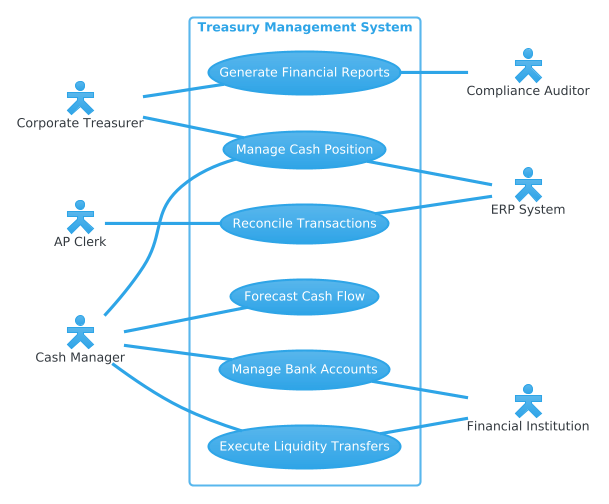
Copy the following complete source code to begin. This code utilizes the cerulean theme for a clean, professional financial aesthetic.
@startuml
!theme cerulean
left to right direction

skinparam actorStyle hollow

' Primary Actors (Left)
actor "Corporate Treasurer" as Treasurer
actor "Cash Manager" as Manager
actor "AP Clerk" as APClerk

' Secondary Actors (Right)
actor "Financial Institution" as Bank
actor "ERP System" as ERP
actor "Compliance Auditor" as Auditor

rectangle "Treasury Management System" {
    usecase "Manage Cash Position" as UC1
    usecase "Execute Liquidity Transfers" as UC2
    usecase "Forecast Cash Flow" as UC3
    usecase "Manage Bank Accounts" as UC4
    usecase "Reconcile Transactions" as UC5
    usecase "Generate Financial Reports" as UC6
}

' Primary Actor Connections (No arrow heads)
Treasurer -- UC1
Treasurer -- UC6
Manager -- UC1
Manager -- UC2
Manager -- UC3
Manager -- UC4
APClerk -- UC5

' Secondary Actor Connections (No arrow heads)
UC2 -- Bank
UC4 -- Bank
UC5 -- ERP
UC1 -- ERP
UC6 -- Auditor

@endumlStep-by-Step Architectural Walkthrough
Building a professional diagram requires a methodical approach. We will deconstruct the code into four logical phases, explaining the architectural decision behind every line.
Phase 1: Canvas Configuration & Layout Directives
The first step in any PlantUML project is setting the stage. We define the global rendering rules before declaring any objects.
We start with @startuml to signal the beginning of the diagram. Crucially, we apply !theme cerulean. This command loads a predefined color palette that is ideal for corporate documentation, providing high contrast and a modern look without manual CSS tweaking.
Next, we set the layout direction:
left to right direction
Using left to right is a best practice for Use Case diagrams where actors are typically on the left (initiators) and external systems are on the right (responders). This creates a natural reading flow from human intent to system response.
Phase 2: Declaring Core Entities, Actors, and Boundaries
Actors represent the roles interacting with the system. In finance, role separation is critical for compliance (Segregation of Duties). We define primary actors (internal users) and secondary actors (external dependencies).
We use the actor keyword. The skinparam actorStyle hollow directive gives the human icons a distinct outline style, visually separating them from system components.
actor "Corporate Treasurer" as Treasurer
actor "Cash Manager" as Manager
Notice the alias syntax (as Treasurer). This allows us to reference the actor later using a short variable name, keeping the relationship lines clean and readable.
Phase 3: Mapping Data Flows & Key Interactions
The core of the system is the rectangle block. This defines the system boundary. Anything inside is part of the Treasury Management System; anything outside is external.
Inside the rectangle, we declare the usecase elements. Each use case represents a functional goal. For example:
usecase "Execute Liquidity Transfers" as UC2
We then map the interactions. In a Use Case diagram, solid lines (associations) indicate that an actor can perform a use case. We omit arrowheads to signify that this is a capability relationship, not a data flow direction.
Manager -- UC2
Manager -- UC3
For secondary actors like the Bank or ERP, the connection implies that the use case interacts with them. For instance, Execute Liquidity Transfers inherently requires a connection to a Financial Institution.
Phase 4: Grouping, Annotations & Visual Polish
Visual hierarchy is key to readability. We ensure that the system boundary rectangle clearly groups all use cases together. This prevents the diagram from becoming a scattered list of functions.
Finally, we close the diagram with @enduml. In VPasCode, this triggers the final rendering engine to calculate the layout, ensuring actors are evenly spaced and use cases are aligned logically.
Syntax & Keyword Deep Dive
To master PlantUML for financial architecture, you must understand the specific keywords used in this model.
!theme cerulean: Applies a global CSS theme to the diagram, ensuring consistent colors and fonts across all elements without manual styling.skinparam actorStyle hollow: Overrides the default actor appearance to use an outline style, distinguishing human roles from system processes.rectangle "Name" { ... }: Defines the system boundary. This is the architectural container that separates the TMS from external entities.usecase "Name" as Alias: Creates a functional node with a short reference name. This alias is used to draw connections between actors and functions.Actor -- UseCase: The association operator. It draws a solid line between two elements. The lack of an arrowhead indicates a bidirectional capability relationship.
Best Practices & Pitfalls to Avoid
When modeling financial systems, accuracy is paramount. Follow these guidelines to maintain high-quality diagrams:
- Keep Actors High-Level: Do not model individual employees (e.g., “John Doe”). Model roles (e.g., “Cash Manager”). This ensures the diagram remains valid even if personnel changes.
- Define Clear Boundaries: Be strict about what goes inside the
rectangle. If a function relies heavily on an external bank API, keep the function inside the TMS boundary but connect it to the Bank actor outside. - Use Meaningful Aliases: Always assign aliases (
as Treasurer) to actors and use cases. This prevents syntax errors when drawing long association lines and makes the code easier to read. - Validate with VPasCode: Use the VPasCode live preview to check layout. If lines overlap, adjust the
left to rightortop to bottomdirectives to optimize the canvas.
Start Building Treasury Management Diagrams Faster with VPasCode
Instantly render, customize, and share your Finance Use Case diagrams online with VPasCode, the free PlantUML editor that requires zero local setup.